How to Connect Slack with Caspio (With or Without an AI Agent)
Connect Slack to your Caspio database so teammates query and update production app data in-channel, with an AI agent that answers reads instantly and pauses for a human, with criteria and affected row count shown, before any bulk update or delete runs.
How do you connect Slack to Caspio?
You connect Slack to Caspio by having Slack’s On Mention trigger drive Caspio’s data actions: a teammate asks a question in the ops channel, the workflow resolves the table with List Tables and Describe Table, runs Query Table Records with the right criteria, and posts the matching rows back in the thread, so the database behind your Caspio apps answers questions where your team already works. FlowRunner is a visual AI-agent orchestration platform where automations run autonomously and pause for human judgment on the steps that carry real consequence. The same connection can run as an AI agent that translates plain language into precise criteria, answers reads on its own, and pauses for a named human, criteria and row count in hand, before Update Table Records or Delete Table Records changes production data.
The problem it solves
Caspio is the database behind applications people depend on, which means the builder who made those apps is also the human query interface for them. “How many applications are still open in the West region?” “Can you archive everything from the cancelled program?” “Mark these six vendors inactive.” Each request means dropping into Caspio, finding the table, building the filter, running it, screenshotting the answer into Slack. Reads are an interruption tax on the one person who can pay it. Writes are worse: they queue up until the builder has time to do them carefully, which is another way of saying the app’s data is always slightly behind the business.
The edges are the ones every builder already flinches at. A bulk update whose filter matched more than intended, discovered a week later through a confused end user. A delete meant for the staging table run against production. Criteria built from a colleague’s ambiguous phrasing, where “the old records” meant something different to each of you. Filter-based writes are the power tool of this pair, and power tools are exactly what you do not hand to an unattended script.
How it works: the connection
The connection listens to the ops channel and operates the database. Here is the plain version, grounded in the real connector actions.
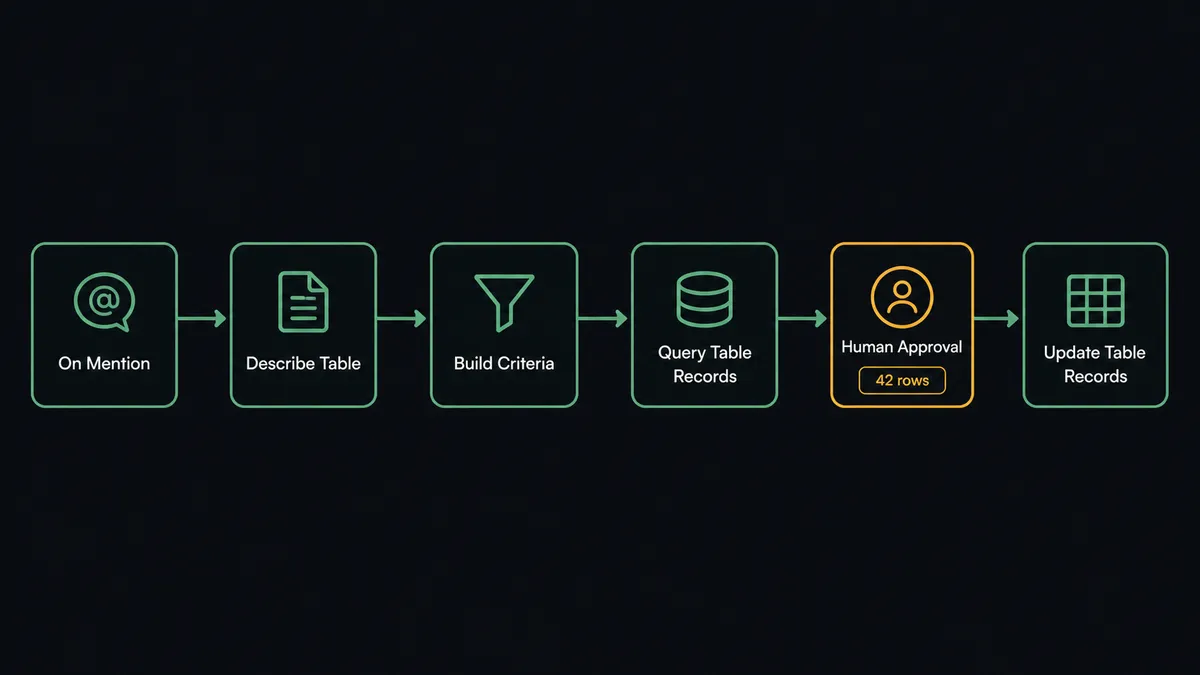
- Trigger: Slack fires On Mention when a teammate summons the workflow: “@flow how many open applications in West?”
- Resolve: The workflow calls List Tables and Describe Table to confirm the table and its fields, so criteria are built against the real schema.
- Query: It calls Query Table Records with the translated filter, or Query View Records when the answer should come through an app’s existing view.
- Answer: Send Message To Channel posts the result in-thread: the rows, or the count, formatted for the question asked.
- Write request: For “archive the cancelled program’s records”, the agent builds the criteria and first runs Query Table Records to count what would match.
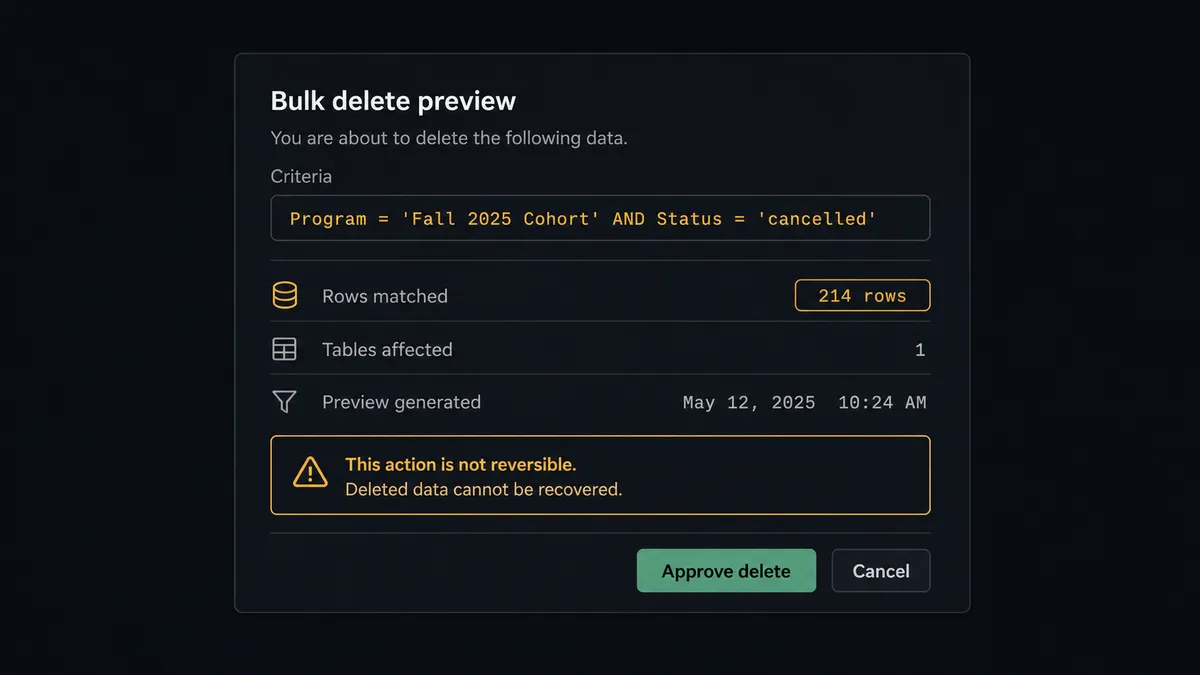
- Preview: It posts the exact criteria and the affected row count as an approval card. Nothing has executed yet.
- Execute: After the approval click, Update Table Records or Delete Table Records runs, and the workflow reports precisely how many rows changed.
That is the “just connect them” answer. Reads become self-serve, writes become previewed and confirmed, and the builder stops being a query terminal. Insert Table Record covers the intake direction: structured facts posted in Slack can become rows without anyone opening a DataPage.
Can an AI agent run it? (and why a human stays in the loop)
Yes, and the translation layer is the whole game. Colleagues do not speak in filter syntax. The agent turns “everything from the cancelled program that hasn’t been touched since spring” into explicit criteria against real fields it verified with Describe Table, states its interpretation in plain language, and shows the criteria alongside the result. When the phrasing is ambiguous, it asks in the thread rather than picking a meaning silently. Its toolbox is the real action set: List Tables, Describe Table, Query Table Records, Query View Records, Insert Table Record, Update Table Records, Delete Table Records.
The consequential step is any write that operates by filter. Update Table Records and Delete Table Records apply to every row the criteria match, which makes the criteria, not the click, the dangerous part. So the agent treats writes like migrations. It runs the read first, counts the blast radius, and invokes a human-in-loop flow it holds as a callable tool. The workflow pauses and posts: “Delete from Applications where Program = ‘Fall 2025 Cohort’ and Status = ‘cancelled’. Query Table Records matches 214 rows. This is not reversible. Approve?” A named approver, usually the builder who knows the schema’s sharp edges, confirms or corrects. Only then does the write run, and the workflow reports the actual rows changed against the predicted count, so a mismatch surfaces immediately instead of a week later.
This is the digital andon cord, the framing our own prospects gave us: like the pull cord on a Toyota line, the workflow stops the line the moment the next step mutates production data. Reads run free. Writes show their criteria, name their row count, and wait for a person.
FlowRunner vs Fivetran
If your instinct here was Fivetran, the comparison is worth making precisely because the tools point different directions. Fivetran is excellent at what it does: managed, reliable, schema-aware replication of sources into a warehouse, so analysts can query everything in one place. If the goal is Caspio tables sitting in Snowflake or BigQuery for BI, Fivetran is the mature answer.
This pair solves the operational half Fivetran does not touch. Here is the honest side-by-side.
| What matters for this pair | FlowRunner | Fivetran |
|---|---|---|
| Human-in-the-loop on bulk writes | Native. Criteria and row count previewed, named approval before execution | Not applicable; Fivetran does not write to your operational source |
| Who runs the flow | An AI agent translates requests, builds criteria, picks actions as tools | Scheduled pipelines sync source to destination |
| Direction | Two-way: reads answered in Slack, gated writes back into Caspio | One-way: source into warehouse for analytics |
| Bring your own AI keys | Yes, BYOK | Not an agent platform |
| Self-hosted option | Yes, cloud-hosted or self-hosted | Cloud service (with hybrid deployment options at higher tiers) |
| Pricing model | Transparent workflow-based tiers | Consumption-based pricing tied to monthly active rows |
If you need Caspio data replicated into a warehouse for analytics, use Fivetran; that is its job and it does it well. If you need the team asking questions and making governed changes to the live database from Slack, that is not replication, and this pairing is the better fit. Plenty of teams run both.
Before and after
| Category | Before | After |
|---|---|---|
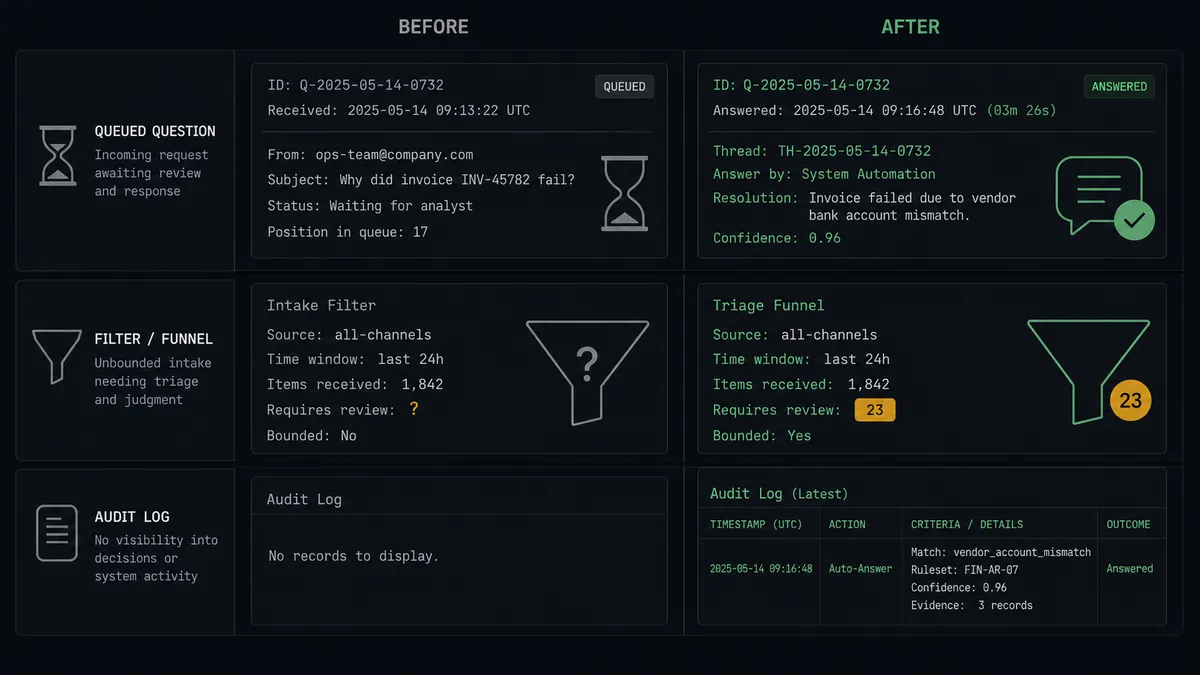
| Data questions | Queued for the builder, answered by screenshot | Query Table Records answers in-thread, seconds after the ask |
| Bulk changes | Hand-built filters run under time pressure | Criteria and affected row count previewed before every write |
| Blast radius | Discovered after the fact by confused end users | Counted before execution, verified against actual rows changed |
| Intake | Facts posted in Slack wait for manual entry into DataPages | Insert Table Record captures them as rows at mention time |
| Accountability | No record of who changed what, or why | Every write carries criteria, count, approver, and timestamp |
What you can build
Ops query desk. On Mention takes plain-language questions, Describe Table grounds the criteria, and Query Table Records answers in-thread. The builder stops being the team’s query terminal.
Governed bulk maintenance. Archive sweeps, status rollovers, and cleanup jobs run as previewed writes: criteria posted, rows counted, Update Table Records executed on approval, actuals reported back.
Chat-to-row intake. On Channel Message in an intake channel, the agent extracts structured fields from each post and files them with Insert Table Record, asking in-thread when a required field is missing, so the app’s data grows without DataPage detours.
View-backed reporting. On a schedule, Query View Records pulls the same filtered lens your Caspio apps show end users, and the agent posts a morning summary with movers highlighted, so the team reads the app’s truth without opening it.
Schema lookup on demand. On Mention, “what fields does the Vendors table have?” runs List Tables and Describe Table and posts the field list with types, which keeps criteria conversations precise and saves the builder another interruption.
Getting started
Start on the free plan: 100 executions a month, every integration included, no credit card required, plus 14 days of Professional for new accounts. Both connectors are available on every tier, and every tier includes unlimited users and unlimited workflows.
Explore the integration details:
- Slack integration (8 triggers and 16 actions covering messages, channels, members, and interactive approvals)
- Caspio integration (8 actions covering tables, views, queries, and record writes)
Start building free at flowrunner.ai or book a demo to see a live Slack to Caspio workflow, row-count approval and all.
Frequently asked questions
Is it free to connect Slack and Caspio on FlowRunner?
You can build and run the connection on FlowRunner's free plan, which includes 100 executions a month and every integration with no credit card required, and new accounts also get 14 days of Professional. Both connectors are available on every FlowRunner tier, and every tier includes unlimited users and unlimited workflows.
Can I self-host the Slack to Caspio workflow?
Yes. FlowRunner offers a cloud-hosted option and a self-hosted option, so the connection can run inside your own environment.
Does the AI agent need my own OpenAI or Claude key?
FlowRunner uses a bring-your-own-keys model, so you connect the AI provider key you already have. You are not locked to one model.
What happens when the agent is unsure how to translate a request into query criteria?
It shows its work before anything runs. The agent posts the criteria it built and, for writes, runs Query Table Records first to report how many rows would be affected. If the count looks wrong to the requester, nothing has been touched yet; the write only executes after a named approval.
Which Slack triggers and Caspio actions does this connection use?
Slack's On Mention and On Channel Message triggers start the flow, and On Block Action captures approvals. On the Caspio side the workflow uses List Tables, Describe Table, Query Table Records, Query View Records, Insert Table Record, Update Table Records, and Delete Table Records.
Can the workflow read Caspio views as well as tables?
Yes. List Views and Query View Records cover the views your Caspio apps already define, so answers can come from the same filtered lens your DataPages use rather than raw tables.