How to Connect Outlook with Amazon Redshift (With or Without an AI Agent)
Turn Amazon Redshift queries into Outlook email reports on a schedule, optionally as an AI agent that drafts the digest, flags anomalies in the numbers, and pauses for a human before Send Draft Email delivers it.
How do you connect Outlook to Amazon Redshift?
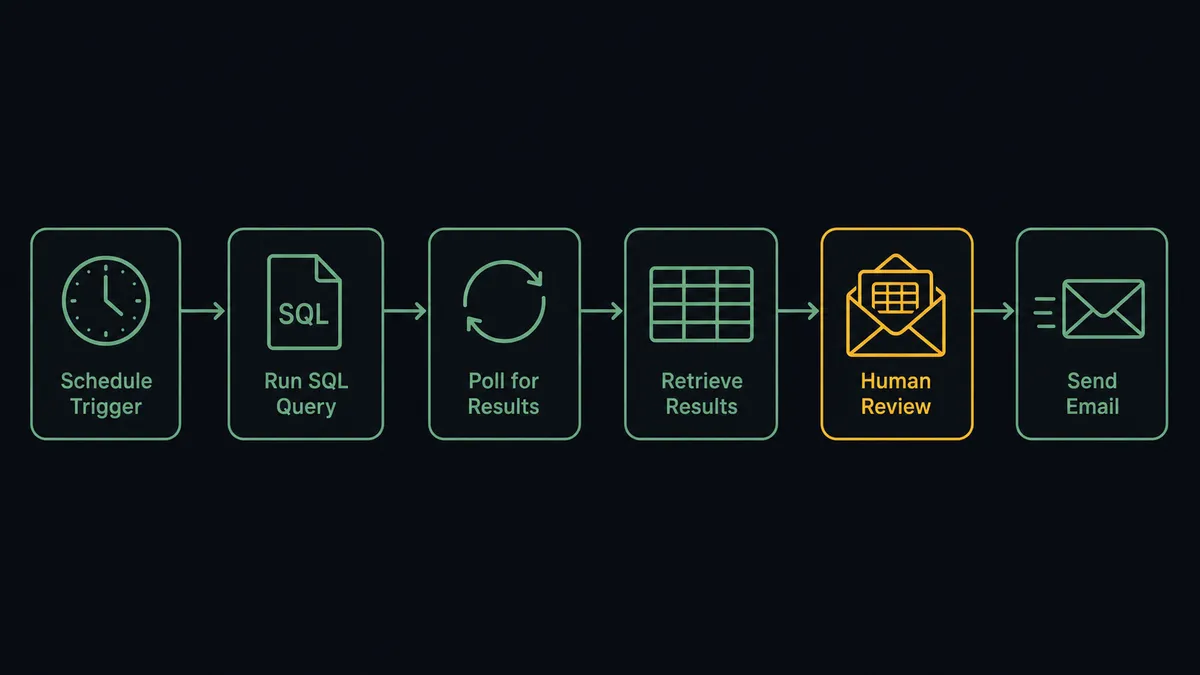
You connect Outlook to Amazon Redshift with a scheduled workflow that submits your reporting SQL through Execute Statement, polls Describe Statement until the query reports FINISHED, fetches the rows with Get Statement Result, and turns them into an email with Create Draft Email and Send Draft Email. Neither service has a trigger in FlowRunner, so a schedule starts each run, and the Redshift Data API means there is no persistent database connection to manage. FlowRunner is a visual AI-agent orchestration platform where automations run autonomously and pause for human judgment on the steps that carry real consequence. Run as an AI agent, the same connection drafts the digest on its own, reads the numbers before anyone else does, and holds the send for a named reviewer when a metric swings hard enough to be either news or a data bug.
The problem it solves
The warehouse has the answers and the inbox has the audience, and today a person carries the numbers between them. An analyst runs the same queries every morning, pastes results into an email, formats the table so it survives Outlook, and sends it to the distribution list. It is twenty minutes of copy work before their real job starts, and it silently caps how often leadership sees fresh numbers at “whenever someone has twenty minutes.”
The edges are worse than the toil. The analyst is out, so the Tuesday digest just does not go out, and three people reply-all asking where it is. Or the upstream load failed overnight, the query returns half a day of data, and the digest ships anyway, so the leadership list spends the morning reacting to a drop that never happened. A dashboard would catch none of this either; dashboards do not notice their own numbers are wrong, and most of the audience stopped opening the dashboard link months ago.
How it works: the connection
The connection reads from Amazon Redshift on a schedule and writes to Outlook. Here is the plain version, grounded in the real connector actions.
- Trigger: On a schedule, the workflow starts the reporting run.
- Submit: It calls Execute Statement with the reporting SQL against your provisioned cluster or serverless workgroup, authenticated through Secrets Manager or temporary credentials.
- Poll: It calls Describe Statement with the returned statement ID until the status is FINISHED, catching FAILED or ABORTED with the error text attached.
- Fetch: It calls Get Statement Result to pull the typed rows and column metadata, paging with the next token when the result set is large.
- Compose: It calls Create Draft Email in Outlook, formatting the results into the body and stamping the reporting period into the subject.
- Send: It calls Send Draft Email to deliver the digest to the distribution list, or Send Email directly for routine runs.
- Route replies: Follow-up questions on the thread get handled with Reply to Email or forwarded to the data team with Forward Email.
That is the “just connect them” answer. The morning numbers arrive in the inbox where people already live, on time, every time, and the analyst gets their twenty minutes back.
Can an AI agent run it? (and why a human stays in the loop)
Yes, and the agent changes what the report is. A script mails whatever the query returns. The agent reads the results first. It holds the connector actions as tools: Execute Statement, Describe Statement, Get Statement Result, Create Draft Email, Send Draft Email, Reply to Email, and it reasons about the rows before composing a word. It writes the summary line a human would write: which metrics moved, which are flat, what deserves a look. Recipients get an email that leads with meaning, not a raw table.
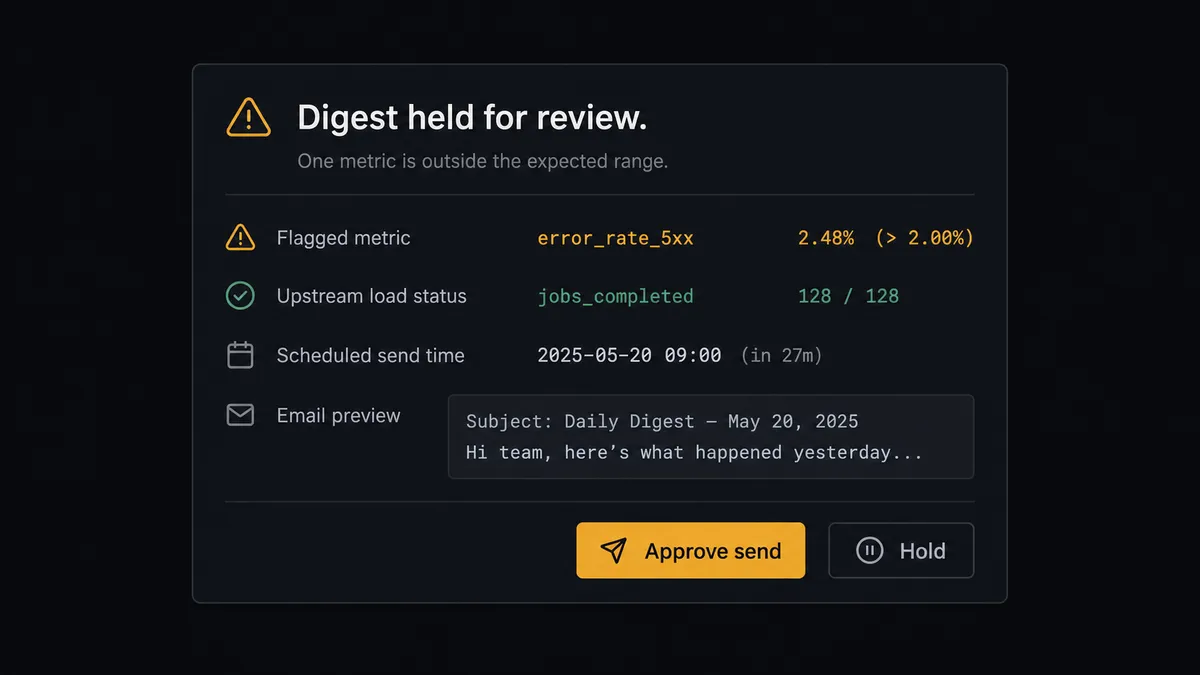
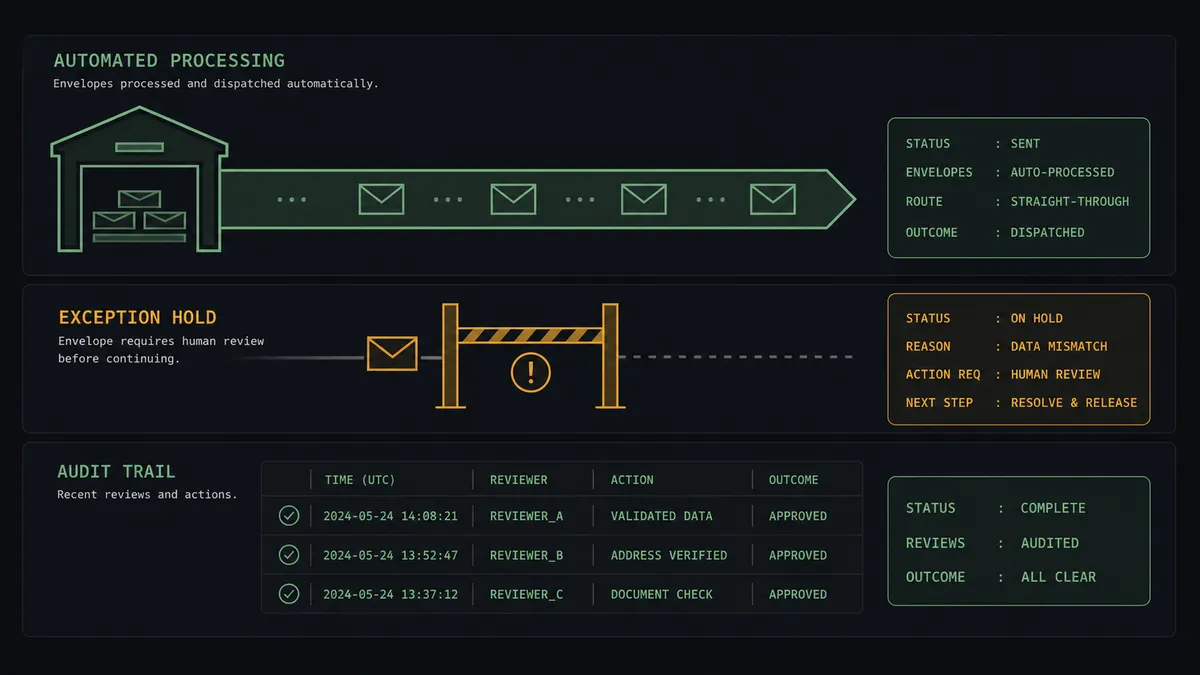
The consequential step is the send itself, because a wrong report broadcast to a leadership list creates decisions before anyone can retract it. When the numbers land inside the normal range, the agent sends. When a metric swings hard against recent runs, or Describe Statement reports the query touched suspiciously few rows, the agent leaves the digest as a draft and invokes a human-in-loop flow it holds as a callable tool. The workflow pauses and posts to the data channel: “Digest drafted but held. [Metric] moved sharply versus recent runs. Upstream load status unverified. Review the draft before it goes to the list?” A named reviewer opens the draft, checks the pipeline, and approves or kills the send. Only on approval does Send Draft Email run, and the flagged metric, the decision, and the timestamp land in the audit trail.
That is the digital andon cord for reporting: like Toyota’s andon cord, the workflow stops the line the moment it hits uncertainty. The list gets every clean digest on schedule, and it never gets the broken one.
FlowRunner vs Fivetran
Fivetran is the name teams know in the Redshift ecosystem, and for the job it does, it earns the reputation: managed connectors that move data from hundreds of sources into the warehouse with minimal maintenance. If your problem is ingestion at scale, Fivetran is a credible answer.
But Fivetran ends where this pair begins. It fills the warehouse; it does not get the numbers out of the warehouse and in front of the people who act on them. This connection is the last mile, and the last mile is where judgment lives.
| What matters for this pair | FlowRunner | Fivetran |
|---|---|---|
| Human-in-the-loop before the send | Native. The agent holds Send Draft Email and waits for a named reviewer on anomalous runs | Not applicable; Fivetran does not deliver reports |
| Who runs the flow | An AI agent runs the SQL, reads the results, and picks actions as tools | Managed pipelines moving data into the warehouse |
| Users included | Unlimited users on every tier | Seat and usage model varies by plan |
| Bring your own AI keys | Yes, BYOK. Connect the AI provider key you already have | Not an agent platform |
| Self-hosted option | Yes, cloud-hosted or self-hosted | Cloud service |
| Pricing model | Transparent workflow-based tiers | Consumption pricing tied to monthly active rows |
If you need to land dozens of SaaS sources into Redshift, use Fivetran for that and be glad it exists. If the warehouse is already full and the problem is getting verified numbers into inboxes with a human check on the digests that look wrong, that is where FlowRunner is the better fit.
Before and after
| Category | Before | After |
|---|---|---|
| The morning digest | An analyst runs queries and pastes results into Outlook by hand | The schedule runs the SQL and the draft is built before anyone logs in |
| Coverage | The report skips days when its owner is out or busy | Every scheduled run executes, polls to FINISHED, and delivers |
| Bad-data sends | A broken upstream load ships to the whole list as fact | Anomalous digests hold at a draft until a named reviewer clears them |
| The narrative | Recipients get a raw table and draw their own conclusions | The agent leads with which metrics moved and what deserves attention |
| Accountability | Nobody can say who checked the numbers before a send | Held digests carry the flagged metric, the reviewer, and a timestamp |
What you can build
The morning metrics digest. Execute Statement runs the overnight SQL, Get Statement Result pulls the rows, and Create Draft Email formats them with the agent’s summary on top. Clean runs go out with Send Draft Email before the first standup.
An anomaly-gated exec report. The agent compares each run to recent history. In-range digests send automatically; a hard swing holds at the human gate with the flagged metric attached, so the leadership list never reacts to a pipeline failure dressed as news.
Long-running query babysitter. For heavy month-end SQL, the agent submits with Execute Statement, polls Describe Statement on its own clock, and uses Cancel Statement to kill a runaway query instead of letting it burn the cluster, emailing the data team what happened.
Reply-driven drill-downs. When a recipient replies asking for a breakdown, the agent reads the request, runs a scoped follow-up query with Execute Statement, and answers on the same thread with Reply to Email, copying the data team when the ask needs a person.
Batch close-week reporting. Batch Execute Statement runs the close-week statements in order inside one transaction, Get Statement Result verifies each sub-statement, and one consolidated email goes to finance with every number sourced from the same consistent snapshot.
Getting started
Start on the free plan: 100 executions a month, every integration included, no credit card required, plus 14 days of Professional for new accounts. Both connectors are available on every tier, and every tier includes unlimited users and unlimited workflows.
Explore the integration details:
- Outlook integration (21 actions covering email, calendar, and contacts)
- Amazon Redshift integration (10 actions covering SQL execution, results, and schema exploration)
Start building free at flowrunner.ai or book a demo to see a live Outlook to Amazon Redshift workflow, held-digest review and all.
Frequently asked questions
Is it free to connect Outlook and Amazon Redshift on FlowRunner?
You can build and run the connection on FlowRunner's free plan, which includes 100 executions a month and every integration with no credit card required, and new accounts also get 14 days of Professional. Both connectors are available on every FlowRunner tier, and every tier includes unlimited users and unlimited workflows.
Can I self-host the Outlook to Amazon Redshift workflow?
Yes. FlowRunner offers a cloud-hosted option and a self-hosted option, so the connection can run inside your own environment, next to your warehouse.
Does the AI agent need my own OpenAI or Claude key?
FlowRunner uses a bring-your-own-keys model, so you connect the AI provider key you already have. You are not locked to one model.
What happens when the numbers in a digest look wrong?
The agent holds the send. It compares the run's results against recent runs, and when a metric swings hard it leaves the report as a draft, posts the flagged numbers to a reviewer, and waits. Send Draft Email only runs after a person approves, so a broken upstream load never gets mailed to the whole distribution list as fact.
Neither Outlook nor Amazon Redshift has a trigger in FlowRunner, so what starts the workflow?
A schedule. Each run submits the reporting SQL with Execute Statement, polls Describe Statement until the status is FINISHED, fetches rows with Get Statement Result, and builds the email with Create Draft Email. You choose the cadence: every morning, every Monday, or every close.
Which actions actually build and send the email?
Create Draft Email builds the message with the query results formatted in the body, and Send Draft Email delivers it after review. For routine runs the agent uses Send Email directly, and Forward Email and Reply to Email let it route follow-up questions back to the data team.