How to Connect Typeform with Caspio (With or Without an AI Agent)
Move Typeform submissions into Caspio tables as validated records, with an AI agent that deduplicates against existing rows and pauses for a person before merging records or purging source responses with Delete Responses.
How do you connect Typeform to Caspio?
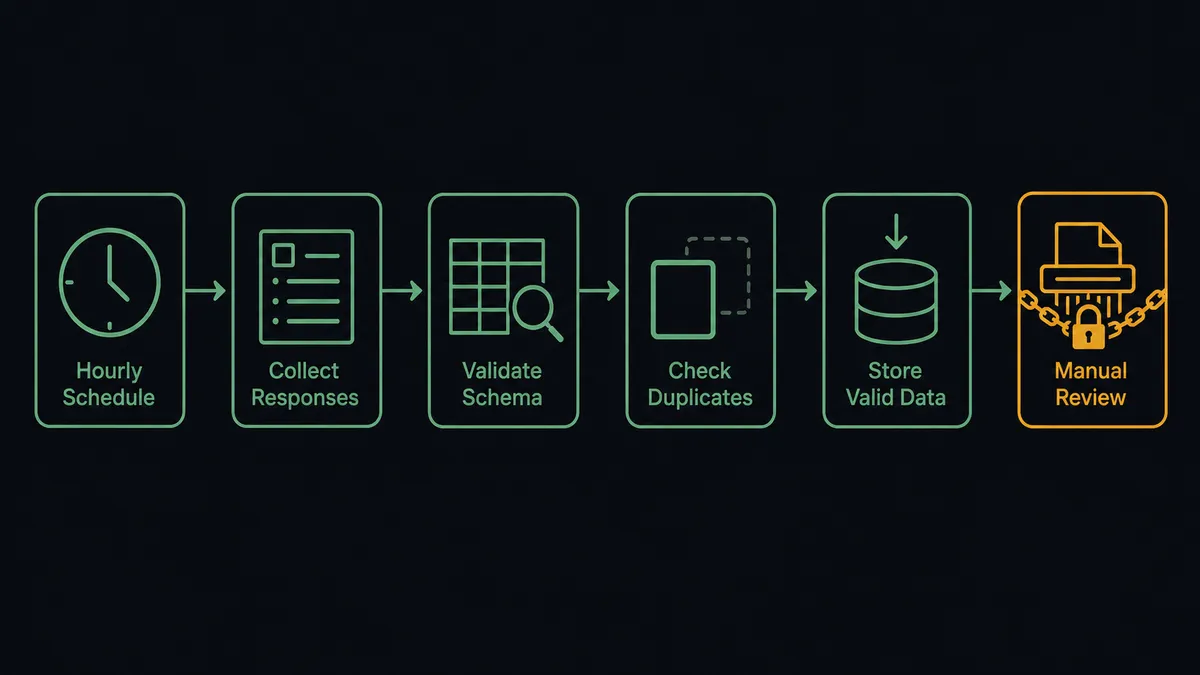
Neither service exposes a trigger, so you connect Typeform to Caspio with a scheduled workflow: Get Form Responses pulls new submissions every hour, each one is validated against the live schema from Describe Table, checked for duplicates with Query Table Records, and written into the table with Insert Table Record. FlowRunner is a visual AI-agent orchestration platform where automations run autonomously and pause for human judgment on the steps that carry real consequence. Run as an AI agent, the same connection reasons about each response before it becomes a row, and pauses for a named owner before the two irreversible operations this pair invites: merging records with Update Table Records and purging source responses with Delete Responses.
The problem it solves
Typeform is where your best data capture happens, and Caspio is where your application actually runs. Between them sits an export. Responses pile up in Typeform until someone downloads the CSV, massages the columns to match the table, and imports the batch. The Caspio app runs days behind the forms feeding it, and every import is a manual schema-matching exercise that breaks the month someone adds a question to the form or a field to the table.
Duplicates are the slow poison. The same person applies twice, registers on two forms, or resubmits after a typo, and each submission becomes its own row. The table accumulates split histories: two records for one applicant, each holding half the story, and every report counts them twice. Meanwhile the responses sit in Typeform indefinitely, a second copy of personal data your retention policy says should not exist after processing, but which nobody deletes because deleting is irreversible. Both are judgment problems, which is exactly why the batch import never solves them.
How it works: the connection
The connection reads from Typeform and writes to Caspio. Here is the plain version, grounded in the real connector actions.
- Trigger: On a schedule, Get Form Responses runs hourly and retrieves submissions received since the last run.
- Validate: The workflow checks each response against the live schema from Describe Table, so typed fields get typed values and required fields are present before anything is written.
- Check for duplicates: It calls Query Table Records for the respondent’s identity and reference fields, so a resubmission never silently becomes a second record.
- Write: Clean new entries go in with Insert Table Record, with the Typeform response ID stored on the record so every row traces back to its source.
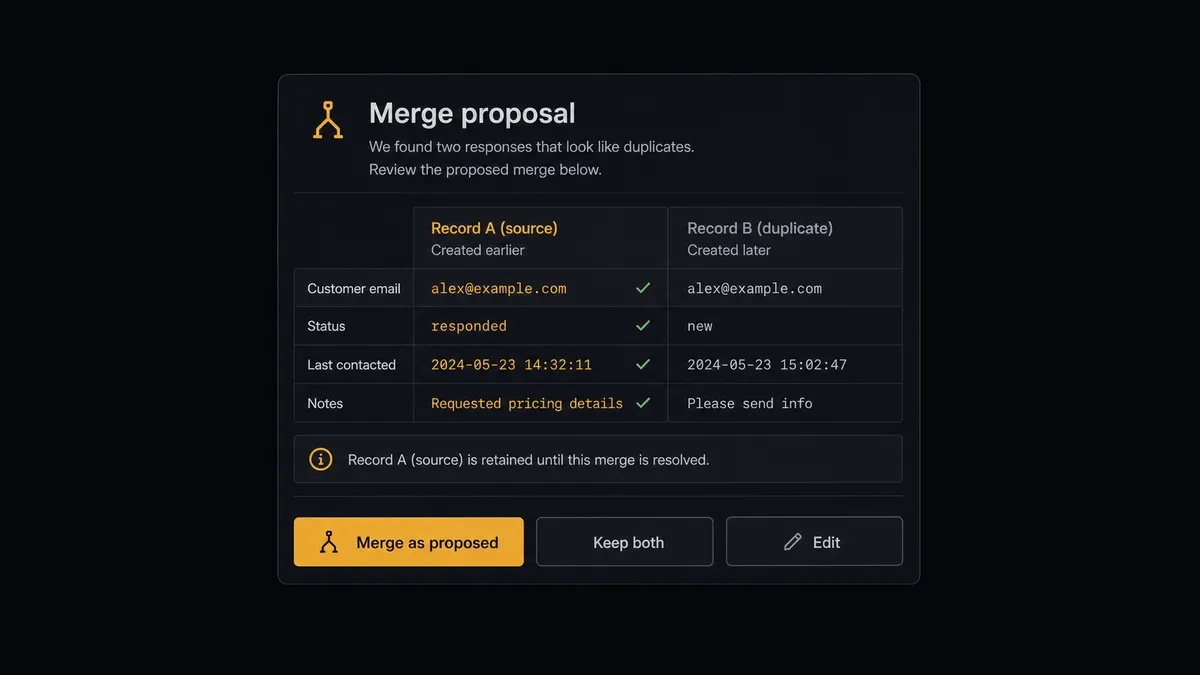
- Stage merges: Suspected duplicates are laid side by side, existing record against new submission, with a proposed set of kept values.
- Manage the source: Once records are confirmed in the table, response batches beyond the retention window are staged for purge via Delete Responses.
- Log: The run summary posts inserts, staged merges, and staged purges, so the pipeline’s behavior is on the record.
That is the “just connect them” answer. Submissions become validated rows within the hour, duplicates surface instead of accumulating, and the source data follows an actual retention policy.
Can an AI agent run it? (and why a human stays in the loop)
Yes, and the two judgment problems the batch import never solved are exactly what the agent is for. It holds the real actions as tools: Get Form Responses, Get Form, Get Form Insights, Delete Responses on the form side; List Tables, Describe Table, Query Table Records, Query View Records, Insert Table Record, Update Table Records, Delete Table Records on the database side. On duplicates, it reasons the way a careful clerk would: a resubmission minutes after a typo is not the same case as two applications a month apart. It scores the match, proposes which values survive, and shows its reasoning.
Both consequential operations here are irreversible, which is why neither runs unattended. A merge via Update Table Records overwrites one record’s values with another’s; done wrong, it destroys half of someone’s history. A purge via Delete Responses erases the source data permanently; done early, it deletes the only evidence of what the respondent actually said. Before either, the agent invokes a human-in-loop flow it holds as a callable tool. For a merge, the workflow pauses and posts: “Suspected duplicate for [reference]. Existing record and new submission side by side, proposed kept values marked. Merge as proposed, keep both, or edit?” For a purge: “Response batch past the retention window. All records confirmed present in the table via Query Table Records. Approve purge?” The owner decides, and the affected records, the decision, and the approver’s name land in the audit trail.
Everything reversible flows unattended, because holding it back would just rebuild the backlog the connection exists to remove. Prospects call the split a digital andon cord: like Toyota’s quality control pull cord, the workflow stops the line the moment a step cannot be undone, and your team pulls it back into motion.
FlowRunner vs Fivetran
A builder designing this pipeline will weigh Fivetran, and for a large class of problems it is the correct answer. Managed ELT with hundreds of connectors, automated schema drift handling, and pipelines that land application data in a warehouse with near-zero upkeep: for analytics ingestion, it sets the standard.
This pair asks for something Fivetran does not aim at. The destination is a live operational table serving a Caspio app, not a warehouse, and the hard parts, duplicate judgment and source-data retention, are decisions, not replication. FlowRunner is built around native human-in-the-loop and AI-agent orchestration, where an agent makes the routine calls and a person makes the irreversible ones. Here is the honest side-by-side.
| What matters for this pair | FlowRunner | Fivetran |
|---|---|---|
| Human-in-the-loop on merges and source purges | Native. The agent invokes an approval flow as a callable tool and pauses before Update Table Records merges or Delete Responses purges | Not in scope: replication has no review step, and destinations are analytical, not operational |
| Who runs the flow | An AI agent validates, deduplicates, reasons about retention, and picks actions as tools | Managed connectors replicating sources to a destination on a sync schedule |
| Users included | Unlimited users on every tier | Seat and usage terms set by plan |
| Bring your own AI keys | Yes, BYOK | No agent layer, so no model keys to bring |
| Self-hosted option | Yes, cloud-hosted or self-hosted | Delivered as a managed cloud service |
| Pricing model | Transparent workflow-based tiers with clear execution limits | Consumption pricing on monthly active rows, which moves with your data |
If your goal is Typeform or Caspio data in a warehouse for BI dashboards, Fivetran is the right tool for that pipeline. If the goal is a governed intake into the operational table your app runs on, with a named owner on every irreversible step, that is where FlowRunner is the better fit.
Before and after
The shift is qualitative: the pipeline gains the judgment the import never had.
| Category | Before | After |
|---|---|---|
| Freshness | The Caspio app runs days behind the forms feeding it | Get Form Responses lands validated rows within the hour, every hour |
| Schema drift | A new form question or table field breaks the next import | Describe Table reads the live schema each run and surfaces mapping decisions |
| Duplicates | Resubmissions become second records with split histories | Query Table Records catches matches, and merges run only as approved proposals |
| Traceability | Nobody can say which submission produced which row | Every record stores its Typeform response ID, and every merge is in the audit trail |
| Retention | Source responses accumulate indefinitely because deletion is scary | Delete Responses runs on policy, after confirmation, with a named approver |
What you can build
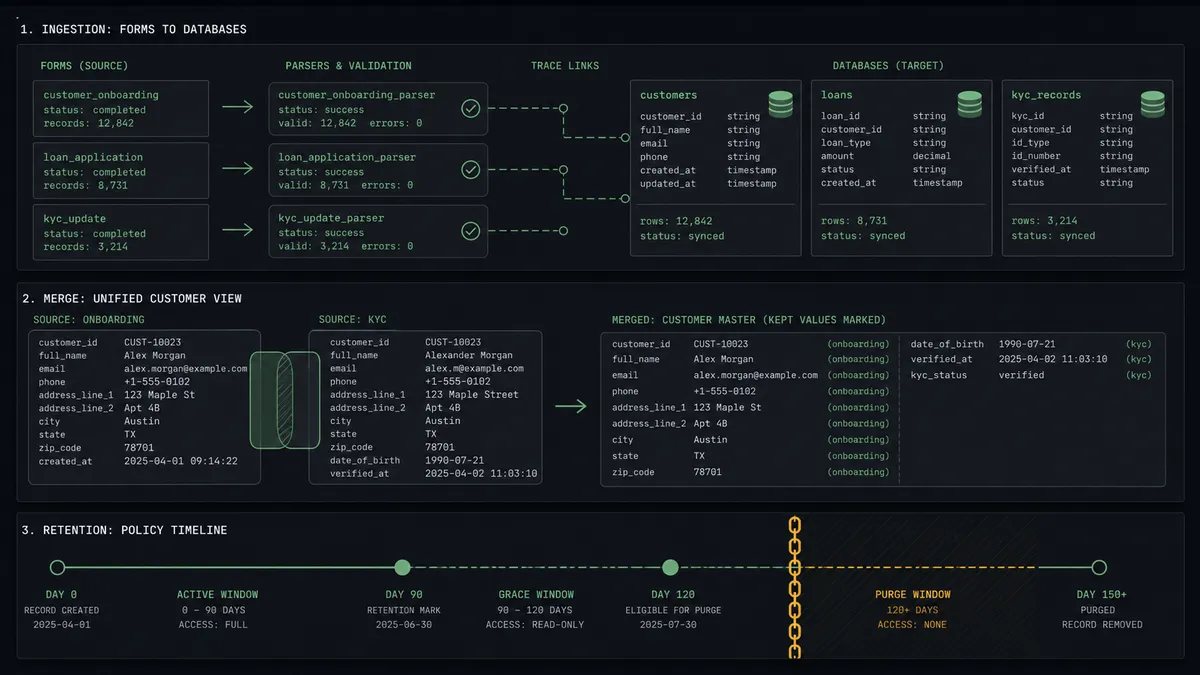
The governed intake pipeline. Get Form Responses pulls submissions hourly, Describe Table validates the mapping, Query Table Records screens for duplicates, and Insert Table Record writes clean rows with the response ID attached. The app’s table grows validated, deduplicated, and traceable.
The merge queue. Suspected duplicates accumulate as side-by-side proposals with kept-value plans. The data owner works the queue in minutes a week, Update Table Records applies exactly what was approved, and split histories stop accumulating in the table your reports count.
The retention enforcer. On policy schedule, the agent confirms each response batch is fully represented in Caspio via Query Table Records, stages the purge, and runs Delete Responses only after sign-off, so personal data stops living in two systems longer than policy allows.
The multi-form consolidator. Several Typeforms, an application, a renewal, an update form, feed one table. The agent maps each form’s answers onto the shared schema from Describe Table, routes each response to insert or proposed update by what Query Table Records finds, and keeps one record per person across every capture point.
The intake quality monitor. Weekly, the agent compares Get Form Insights drop-off data against validation failures and duplicate rates, and posts a short report on which questions produce bad rows, so the builder fixes the form instead of forever cleaning the table.
Getting started
Start on the free plan: 100 executions a month, every integration included, no credit card required, plus 14 days of Professional for new accounts. Both connectors are available on every tier, and every tier includes unlimited users and unlimited workflows, so the builder, the data owner, and the approvers all work the same pipeline.
Explore the integration details:
- Typeform integration (36 actions covering forms, responses, insights, themes, and workspaces)
- Caspio integration (8 actions covering tables, views, queries, and bulk record operations)
Start building free at flowrunner.ai or book a demo to see a live Typeform to Caspio workflow, merge approval and all.
Frequently asked questions
Is it free to connect Typeform and Caspio on FlowRunner?
You can build and run the connection on FlowRunner's free plan, which includes 100 executions a month and every integration with no credit card required, and new accounts also get 14 days of Professional. Both connectors are available on every FlowRunner tier, and every tier includes unlimited users and unlimited workflows.
Can I self-host the Typeform to Caspio workflow?
Yes. FlowRunner offers a cloud-hosted option and a self-hosted option, so the connection can run inside your own environment.
Does the AI agent need my own OpenAI or Claude key?
FlowRunner uses a bring-your-own-keys model, so you connect the AI provider key you already have. You are not locked to one model.
What happens when a submission looks like a duplicate of an existing record?
The agent does not pick a survivor on its own. It finds the match with Query Table Records, lays the existing record and the new submission side by side, and proposes which values to keep. Update Table Records only merges what the owner approves, and both versions stay reconstructable from the audit trail.
Neither Typeform nor Caspio has a trigger, so what starts the workflow?
A schedule. The workflow calls Get Form Responses hourly for submissions received since the last run, validates each one against the schema from Describe Table, checks for duplicates with Query Table Records, and writes clean entries with Insert Table Record.
Why is deleting Typeform responses a gated step?
Because Delete Responses is irreversible and it destroys the evidence trail. Purging source responses after they land in Caspio is a legitimate retention practice, but the agent only runs it after confirming the records exist in the table and a named owner approves the purge window.