How to Connect Salesforce Pro with Amazon Redshift (With or Without an AI Agent)
Extract Salesforce records into Amazon Redshift with SOQL-driven queries on a nightly schedule, and let an agent write warehouse-computed scores back to the CRM, pausing for an admin before any mass Update Record batch touches Salesforce.
How do you connect Salesforce Pro to Amazon Redshift?
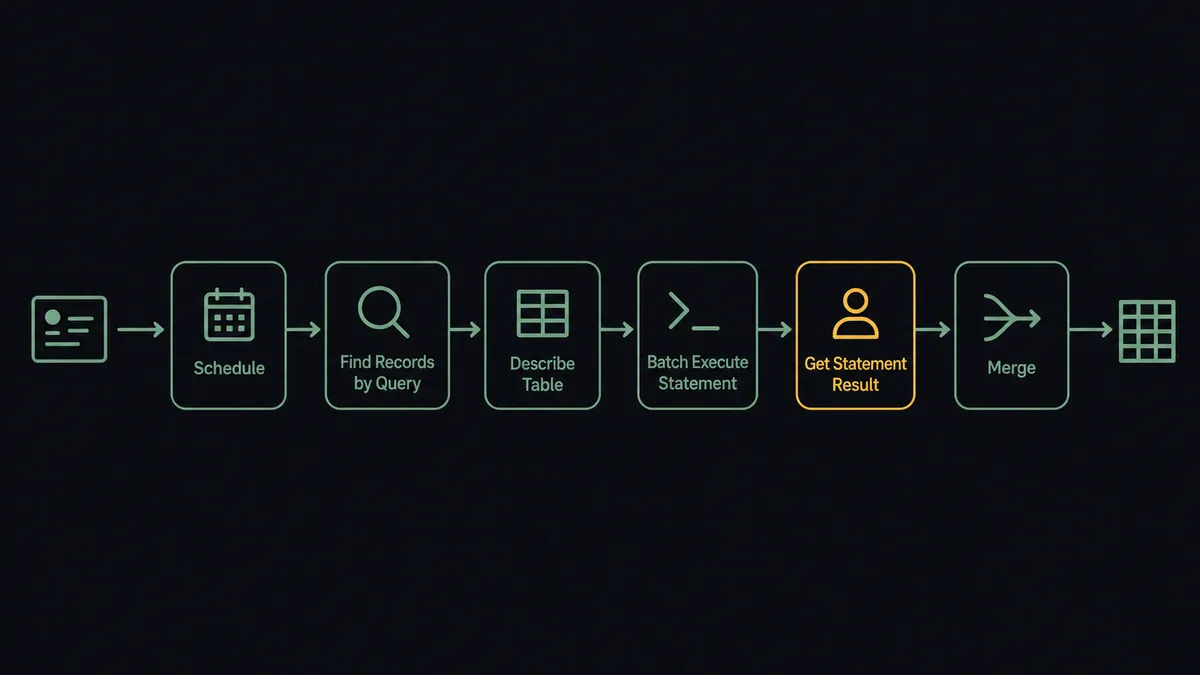
You connect Salesforce Pro to Amazon Redshift with a scheduled FlowRunner workflow: Find Records by Query runs SOQL against leads, contacts, and opportunities changed since the last run, and Batch Execute Statement upserts the rows into your warehouse through the Redshift Data API, with Describe Statement and Get Statement Result confirming every batch before a merge promotes staging to the reporting tables. Neither connector exposes a trigger, so the nightly schedule is the honest starting point. FlowRunner is a visual AI-agent orchestration platform where automations run autonomously and pause for human judgment on the steps that carry real consequence. Run as an agent, the connection also closes the loop: warehouse-computed scores flow back to the CRM, but only after an admin approves the batch that Update Record is about to write.
The problem it solves
The forward path is a familiar grind. Revenue analytics needs Salesforce data in Redshift, so a builder writes an extraction job: SOQL queries, pagination, token refresh, retries, and a load step, all glued together and scheduled. It runs until Salesforce adds a field, an API version shifts, or the job dies quietly on a Sunday, and the pipeline becomes a recurring maintenance tax on whoever wrote it. Every hour spent nursing the extraction is an hour not spent on the analysis it exists to serve.
The return path is where most teams simply give up. The warehouse computes things Salesforce should know: churn-risk scores, product usage tiers, ideal-customer-profile fit. Getting them back onto CRM records means a mass update job against the live org, and everyone who has run one knows the risk. A join that matched on the wrong key, a stale cohort, one mis-mapped column, and thousands of records now carry wrong data that reps act on immediately. So the scores stay in dashboards, sales never sees them in their own tool, and the warehouse investment pays half its rent. The blocker is not plumbing; it is the absence of a safe way to let an automated system write to the CRM at scale.
How it works: the connection
Here is the deterministic version, grounded in the real connector actions.
- Trigger: Nightly at 1 AM, the workflow starts the sync run.
- Extract: It calls Find Records by Query with SOQL scoped to records modified since the last run, and Find Child Records for related line items.
- Verify schema: It calls Describe Table in Redshift to confirm target columns match the incoming fields.
- Load: It calls Batch Execute Statement to upsert rows into staging tables, keyed on the Salesforce record ID.
- Confirm: It polls Describe Statement and reads Get Statement Result to verify each batch, retrying failures.
- Promote: A final Execute Statement merges staging into the reporting schema the dashboards query.
That is the plain answer. The warehouse mirrors the org every night, custom objects included, and the hand-rolled extraction job retires.
Can an AI agent run it? (and why a human stays in the loop)
Yes, and the agent is what makes the return path viable at all. It holds the actions as tools: Find Records by Query, Find Child Records, and Update Record on the Salesforce side; Execute Statement, Batch Execute Statement, Describe Statement, Get Statement Result, Cancel Statement, and Describe Table on the Redshift side. Forward, it behaves like a self-healing pipeline: retrying failed batches, cancelling hung statements, and escalating schema drift instead of improvising around it. Backward, it does the work teams avoid: it queries the computed tables, joins scores to Salesforce IDs, and assembles a write-back batch.
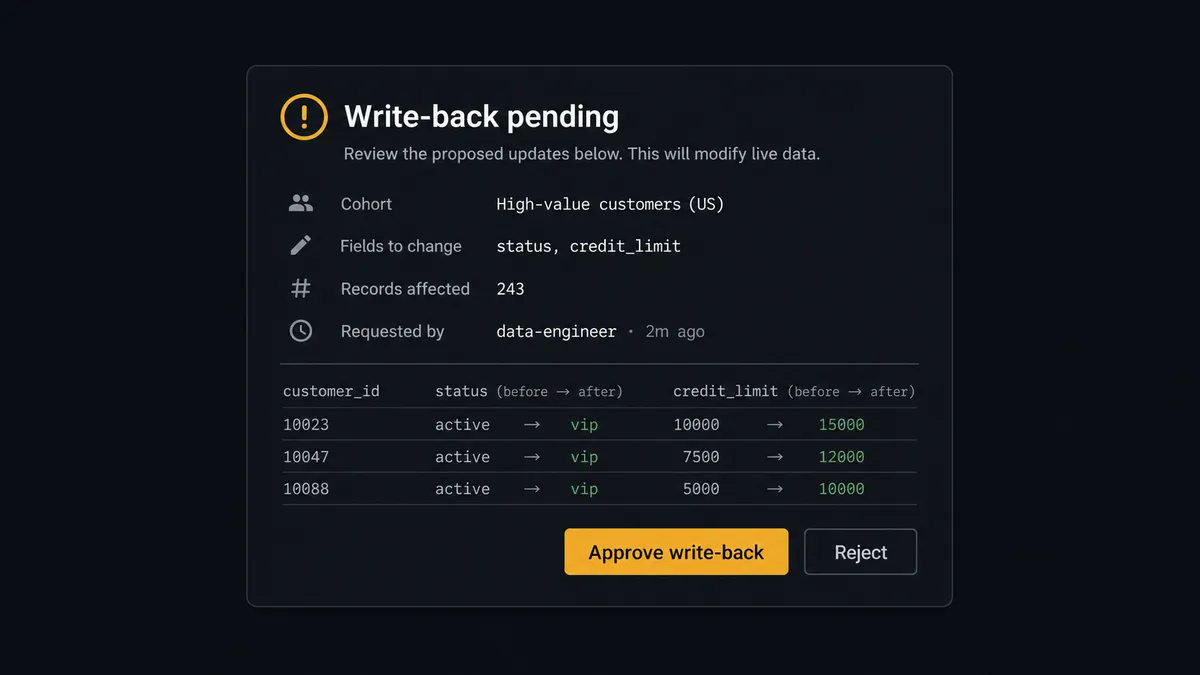
The consequential step is the mass Update Record. A write-back that touches thousands of live CRM records is costly to reverse and immediately visible to every rep whose accounts it touches. So the agent treats the batch as a proposal, never an act. It invokes a human-review flow it holds as a callable tool, and the workflow pauses: “Write-back ready: churn-risk scores for [cohort description]. Fields: risk score, risk tier. Sample: [five records with before and after values]. Source table refreshed tonight. Approve to run?” The admin inspects the sample, approves or rejects, and only then does Update Record run in batches, with the approver, timestamp, and full change set in the audit trail. Destructive warehouse SQL gets the same gate: no TRUNCATE or ALTER runs without a named approval.
This is the digital andon cord between the warehouse and the org: the moment an action would rewrite live records at scale, the line stops, and the person accountable for CRM data quality restarts it with the evidence in front of them.
FlowRunner vs Fivetran
Fivetran deserves its place on this shortlist. Its managed Salesforce connector is among the best in the industry: formula fields handled, custom objects discovered automatically, incremental syncs that survive API changes, and hundreds of other sources behind the same pane. For replicating a whole SaaS estate into Redshift with near-zero maintenance, Fivetran is the benchmark, and this page will not pretend otherwise.
The distinction is direction and judgment. Fivetran’s core motion is one-way replication into the warehouse on a schedule.
| What matters for this pair | FlowRunner | Fivetran |
|---|---|---|
| Human-in-the-loop on mass Update Record | Native. The agent pauses with cohort, fields, and samples, and an admin approves before the CRM changes | Not part of the replication model; write-back is a separate product concern |
| Who runs the flow | An AI agent reasons about run state, drift, and write-back cohorts as choices | Managed connector jobs on a sync schedule |
| Users included | Unlimited users on every tier | Consumption pricing by monthly active rows, not seats |
| Bring your own AI keys | Yes, BYOK for the agent layer | No agent layer; not applicable |
| Self-hosted option | Yes, cloud-hosted or self-hosted | Cloud-managed service, with hybrid options at enterprise tiers |
| Pricing model | Transparent workflow-based tiers | Monthly-active-rows consumption that gets harder to forecast as the org grows |
If the requirement is many sources, one warehouse, zero custom logic, choose Fivetran. If the requirement is one CRM in both directions, with an approval gate on every mass write and every destructive statement, that is exactly what this pairing does.
Before and after
| Category | Before | After |
|---|---|---|
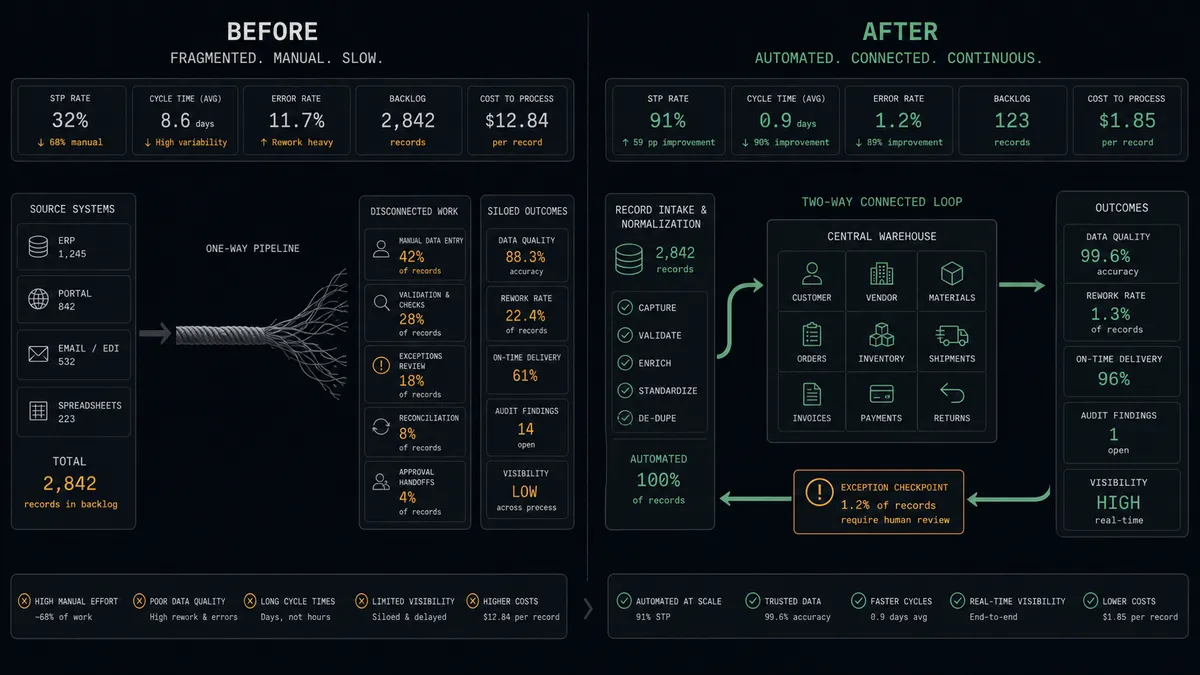
| Extraction upkeep | A hand-rolled SOQL job that breaks on API and field changes | A scheduled visual workflow with retries, drift checks, and an audit trail |
| Write-back | Scores stay trapped in dashboards because mass updates feel too risky | Computed fields reach Salesforce through approved Update Record batches |
| Blast-radius control | One bad join rewrites thousands of records before anyone notices | Every batch shows cohort, fields, and samples to an admin first |
| Failure visibility | Silent skips surface as stale numbers in Monday reporting | Failed batches retry and hung statements get cancelled, with exceptions escalated |
| Custom objects | Each new object means another round of pipeline code | A SOQL change in Find Records by Query brings the object into the warehouse |
What you can build
Nightly org mirror. Find Records by Query extracts changed leads, contacts, and opportunities, Batch Execute Statement upserts them, and the merge promotes staging before morning. Analysts query yesterday’s org without touching API limits.
Approved score write-back. The agent joins warehouse churn scores to Salesforce IDs, assembles the batch with samples, and waits. The admin approves, Update Record runs, and reps see risk tiers inside the CRM they already work in.
Pipeline velocity mart. A scheduled Execute Statement builds stage-transition history from the loaded opportunity data, so revenue operations gets cycle-time analysis by segment, owner, and lead source.
Territory data audit. The agent cross-references warehouse aggregates against live records pulled with Find Records by Query, posts the mismatches, and proposes corrections one approved batch at a time instead of a blind bulk fix.
Line-item analytics. Find Child Records carries opportunity products into the warehouse alongside their parents, enabling margin and attach-rate analysis that Salesforce reporting cannot express on its own.
Getting started
Start on the free plan: 100 executions a month, every integration included, no credit card required, plus 14 days of Professional for new accounts. Both connectors are available on every tier, and every tier includes unlimited users and unlimited workflows.
Explore the integration details:
- Salesforce Pro integration (26 actions covering leads, contacts, campaigns, notes, files, and SOQL queries)
- Amazon Redshift integration (10 actions covering SQL execution, results, and schema exploration)
Start building free at flowrunner.ai or book a demo to see a live Salesforce Pro to Amazon Redshift workflow, write-back approval and all.
Frequently asked questions
Is it free to connect Salesforce Pro and Amazon Redshift on FlowRunner?
You can build and run the connection on FlowRunner's free plan, which includes 100 executions a month and every integration with no credit card required, and new accounts also get 14 days of Professional. Both connectors are available on every FlowRunner tier, and every tier includes unlimited users and unlimited workflows.
Can I self-host the Salesforce Pro to Amazon Redshift workflow?
Yes. FlowRunner offers a cloud-hosted option and a self-hosted option, so the connection can run inside your own environment, in the same VPC neighborhood as your cluster if that is where you want it.
Does the AI agent need my own OpenAI or Claude key?
FlowRunner uses a bring-your-own-keys model, so you connect the AI provider key you already have. You are not locked to one model.
What stops the agent from overwriting Salesforce fields with bad warehouse data?
The gate. The agent assembles the write-back as a proposal: the cohort size, the fields it will change, and a sample of before-and-after values. An admin reviews and approves before any Update Record runs, and a wrong-looking sample is a one-click rejection instead of a week of data repair.
Which triggers and actions does this pair use?
Neither connector exposes a trigger, so the workflow runs on a schedule. It calls Find Records by Query and Update Record in Salesforce, and Batch Execute Statement, Execute Statement, Describe Statement, Get Statement Result, and Describe Table in Amazon Redshift.
Can it handle Salesforce custom objects?
Yes. Find Records by Query takes a SOQL query, so any object you can query, standard or custom, can be extracted and loaded, and Find Child Records brings related line items along with their parents.