How to Connect HubSpot with Amazon Redshift (With or Without an AI Agent)
Load HubSpot contacts, companies, and deals into Amazon Redshift on a schedule, with an agent that handles schema drift and pauses for an engineer before any destructive SQL like a TRUNCATE or table rebuild runs.
How do you connect HubSpot to Amazon Redshift?
You connect HubSpot to Amazon Redshift with a scheduled FlowRunner workflow: Get All Contacts, Get All Companies, and Get All Deals page through the records changed since the last run, and Batch Execute Statement upserts them into your warehouse tables through the Redshift Data API, with Describe Statement and Get Statement Result confirming each batch landed. Neither connector exposes a trigger, so a nightly schedule is the honest starting point. FlowRunner is a visual AI-agent orchestration platform where automations run autonomously and pause for human judgment on the steps that carry real consequence. Run as an agent, the connection also watches for schema drift with Describe Table, and it pauses for an engineer before Execute Statement runs anything destructive.
The problem it solves
Every analytics team eventually needs CRM data in the warehouse, and the first version is always a script. Someone writes a Python job that pulls HubSpot records and inserts them into Redshift, schedules it with cron, and moves on. It works until it does not. HubSpot pagination changes, a token expires, the job silently skips a night, and the revenue dashboard quietly shows last Tuesday’s pipeline. The person who wrote the script has since changed teams, and the runbook is a Slack thread.
Schema drift is the sharper edge. Marketing adds a custom property in HubSpot, the script does not know the column, and either the load fails at 2 AM or the property silently never reaches the warehouse. The traditional fix is worse than the break: a rebuild script that drops the table and reloads from scratch, running unattended, where one bad night turns into an empty table under a live dashboard. Destructive SQL with nobody watching is how warehouses lose mornings. What this pipeline needs is not more automation of the same kind; it needs judgment about when the destructive path is actually warranted.
How it works: the connection
Here is the deterministic version, grounded in the real connector actions.
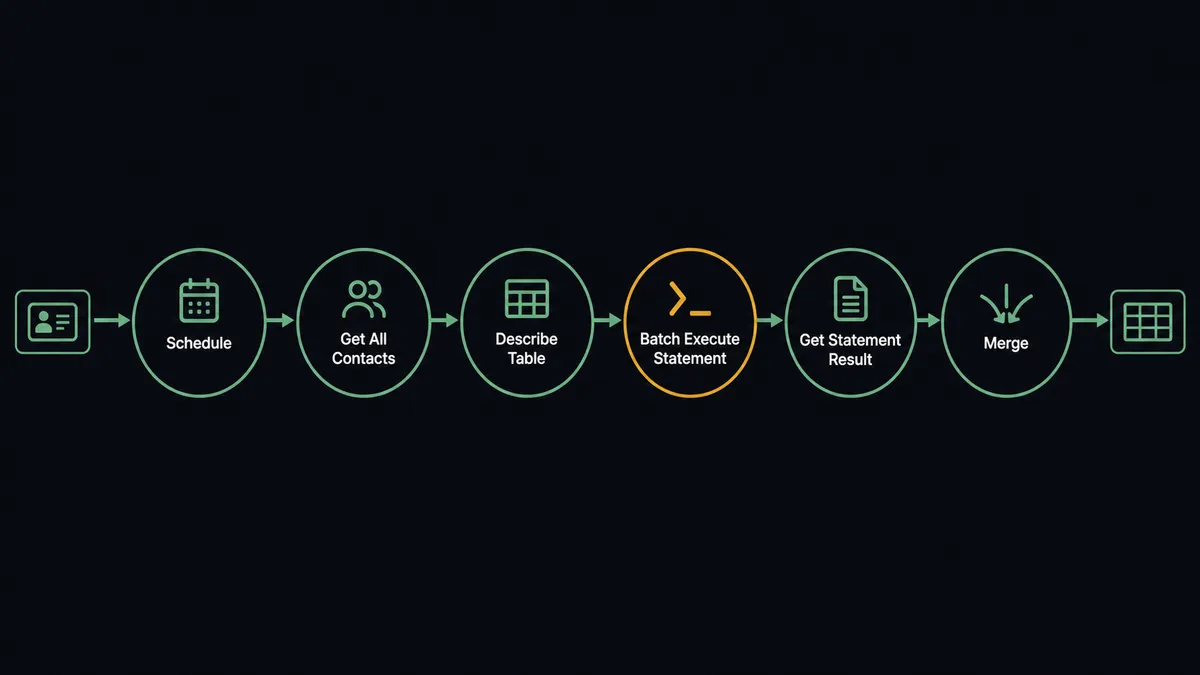
- Trigger: Nightly at 2 AM, the workflow starts the sync run.
- Extract: It calls Get All Contacts, Get All Companies, and Get All Deals in HubSpot, paging through records changed since the last run.
- Verify schema: It calls Describe Table in Redshift to confirm the target columns still match the incoming properties.
- Load: It calls Batch Execute Statement to upsert the rows into staging tables, using the HubSpot record ID as the merge key.
- Confirm: It polls Describe Statement and fetches Get Statement Result to verify every batch completed, retrying the ones that did not.
- Promote: A final Execute Statement merges staging into the reporting tables the dashboards read.
That is the plain answer. The warehouse has yesterday’s CRM truth before anyone opens a dashboard, and the cron script retires.
Can an AI agent run it? (and why a human stays in the loop)
Yes, and the agent changes what happens on the bad nights, which is the only part that matters. It holds the actions as tools: Get All Contacts, Get All Companies, Get All Deals, and Update Contact on the HubSpot side; Execute Statement, Batch Execute Statement, Describe Statement, Get Statement Result, Cancel Statement, List Tables, and Describe Table on the Redshift side. On a clean night it extracts, loads, confirms, and merges. On a messy night it reasons: a batch that failed gets retried; a statement hung past its window gets stopped with Cancel Statement; a new HubSpot property gets noticed via Describe Table before the load, not after the failure.
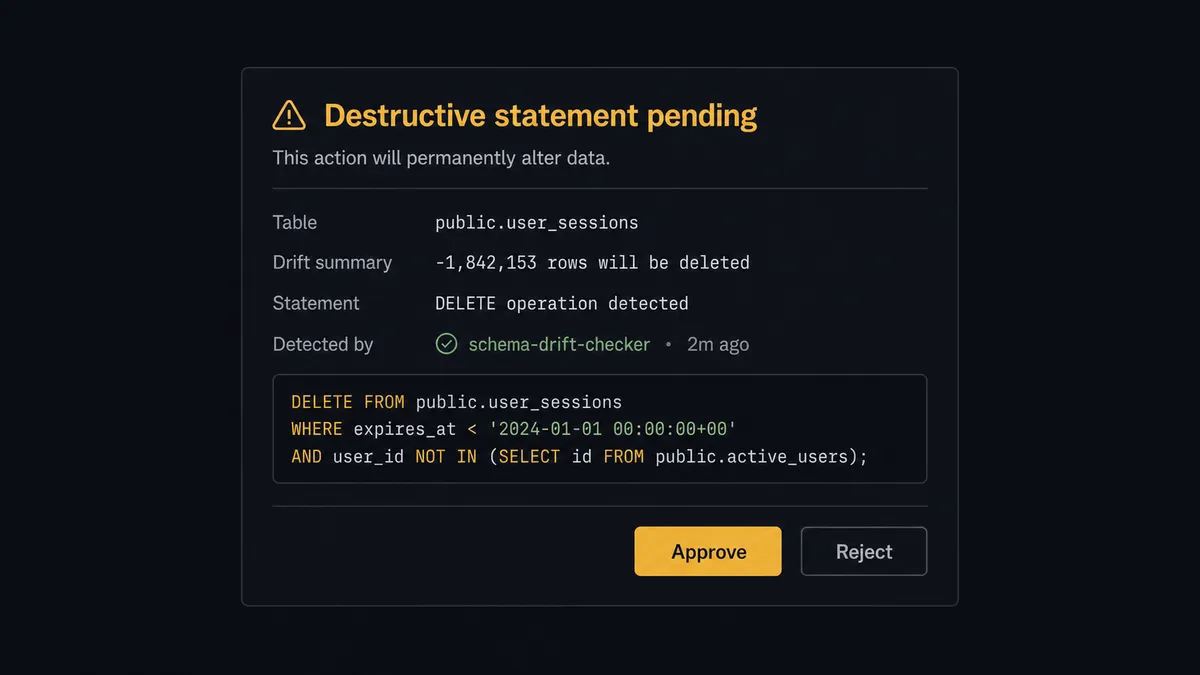
The consequential step is destructive SQL. When drift is real, the honest fixes are an ALTER, a TRUNCATE and reload, or a table rebuild, and all of them can destroy data if the diagnosis is wrong. So the agent never runs them on its own authority. It invokes a human-review flow it holds as a callable tool, and the workflow pauses: “Schema drift on [table]: HubSpot now sends [new properties]. Proposed: ALTER to add columns, then TRUNCATE staging and reload. Statements attached. Tables affected: [list]. Approve?” The engineer reads the actual SQL, approves or edits, and only then does Execute Statement run it, with the approver, timestamp, and statement text in the audit trail. Loads for unaffected tables continue while the decision waits, so one drifted table does not stall the whole warehouse.
This is the digital andon cord for data engineering: the pipeline stops the line the moment the next statement is irreversible, and the person who owns the warehouse restarts it with the SQL in front of them.
FlowRunner vs Fivetran
If your team is evaluating this pipeline, Fivetran is on the shortlist, and it belongs there. Fivetran’s managed HubSpot connector is genuinely excellent: hundreds of sources, automated schema handling, incremental syncs that just run, and a decade of hardening behind them. If you need a dozen SaaS sources replicated into Redshift with zero pipeline maintenance, Fivetran is the strongest answer on the market.
The difference is what kind of system you are buying. Fivetran replicates; it does not reason, and it has no concept of asking your team before acting.
| What matters for this pair | FlowRunner | Fivetran |
|---|---|---|
| Human-in-the-loop on destructive SQL | Native. The agent pauses before Execute Statement runs a TRUNCATE or ALTER, and an engineer approves the exact statement | Not part of the model; schema changes are applied by the connector’s own policy |
| Who runs the flow | An AI agent reads run state, retries, cancels, and escalates as a reasoned choice | Managed connector jobs on a sync schedule |
| Users included | Unlimited users on every tier | Consumption pricing by monthly active rows, not seats |
| Bring your own AI keys | Yes, BYOK for the agent layer | No agent layer; not applicable |
| Self-hosted option | Yes, cloud-hosted or self-hosted | Cloud-managed service, with hybrid options at enterprise tiers |
| Pricing model | Transparent workflow-based tiers | Monthly-active-rows consumption that is hard to forecast as CRM volume grows |
If you need broad, many-source replication with no custom logic, buy Fivetran and do not look back. If you need one CRM feed with judgment in the loop, write-back to HubSpot, and an engineer’s approval on every destructive statement, that is what this pairing is for.
Before and after
| Category | Before | After |
|---|---|---|
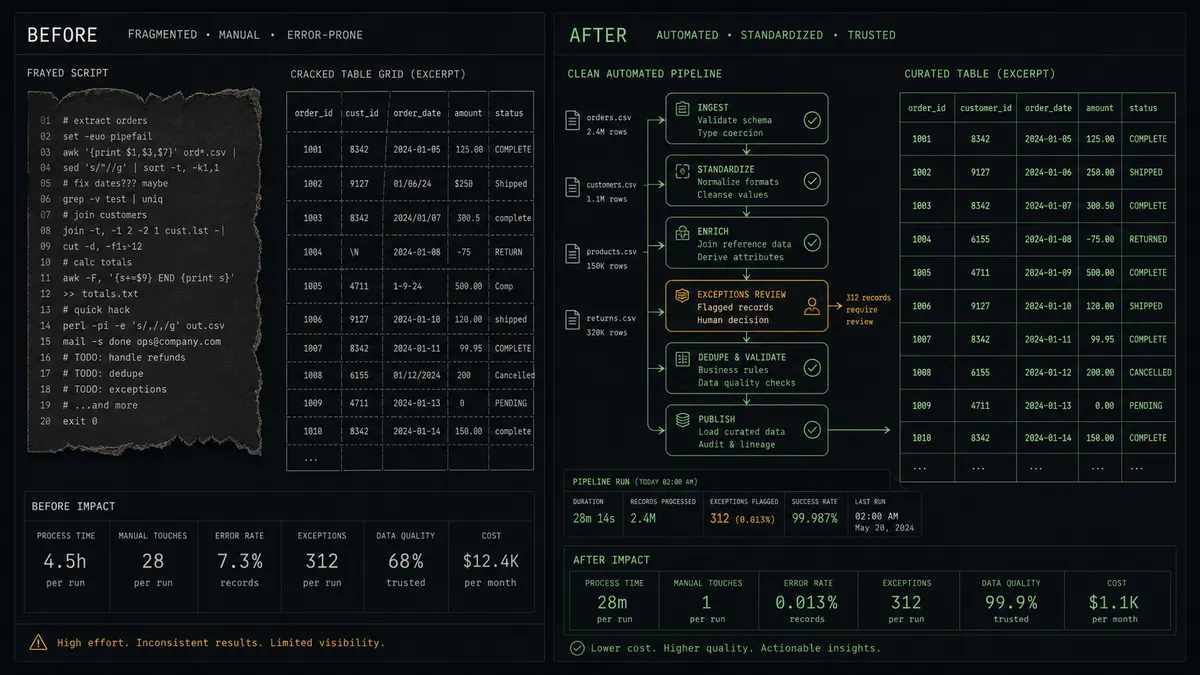
| Pipeline ownership | A cron script one former teammate understands | A visual workflow the whole team can read, with run state in the audit trail |
| Schema drift | Loads fail at 2 AM or new properties silently vanish | Describe Table catches drift before the load and routes it to an engineer |
| Destructive changes | Rebuild scripts drop tables unattended | Every TRUNCATE, DROP, or ALTER waits for a named approval with the SQL attached |
| Failure handling | Silent skips surface as stale dashboards days later | Failed batches retry, hung statements get cancelled, and exceptions escalate |
| CRM write-back | A second script nobody got around to writing | Warehouse-computed fields flow back through Update Contact behind the same gate |
What you can build
Nightly CRM mirror. Get All Contacts, Get All Companies, and Get All Deals feed Batch Execute Statement upserts into staging, confirmed by Get Statement Result and merged before morning. Dashboards read yesterday’s truth, every day.
Gated schema migration. When marketing adds HubSpot properties, the agent drafts the ALTER and reload plan, posts the SQL, and runs it only after an engineer approves. Drift becomes a reviewed change, not a 2 AM surprise.
Deal-velocity mart. A scheduled Execute Statement builds a deal-stage transition table from the loaded history, giving analysts pipeline velocity by segment without touching HubSpot’s API limits.
Score write-back with approval. The agent queries a churn-risk table with Execute Statement, fetches rows via Get Statement Result, and proposes Update Contact calls to stamp scores onto CRM records. The batch runs after a person approves the field and the cohort.
Long-running query watchdog. The agent monitors List Statements for queries hung past their window, cancels the stuck ones with Cancel Statement, and posts what it did and why, so the cluster stays healthy without a human watching it.
Getting started
Start on the free plan: 100 executions a month, every integration included, no credit card required, plus 14 days of Professional for new accounts. Both connectors are available on every tier, and every tier includes unlimited users and unlimited workflows.
Explore the integration details:
- HubSpot integration (21 actions covering contacts, companies, deals, and associations)
- Amazon Redshift integration (10 actions covering SQL execution, results, and schema exploration)
Start building free at flowrunner.ai or book a demo to see a live HubSpot to Amazon Redshift workflow, destructive-SQL gate and all.
Frequently asked questions
Is it free to connect HubSpot and Amazon Redshift on FlowRunner?
You can build and run the connection on FlowRunner's free plan, which includes 100 executions a month and every integration with no credit card required, and new accounts also get 14 days of Professional. Both connectors are available on every FlowRunner tier, and every tier includes unlimited users and unlimited workflows.
Can I self-host the HubSpot to Amazon Redshift workflow?
Yes. FlowRunner offers a cloud-hosted option and a self-hosted option, so the connection can run inside your own environment, next to your warehouse if you want it there.
Does the AI agent need my own OpenAI or Claude key?
FlowRunner uses a bring-your-own-keys model, so you connect the AI provider key you already have. You are not locked to one model.
What happens when HubSpot properties change and the warehouse schema no longer matches?
The agent detects the mismatch with Describe Table before loading, and it does not improvise. It posts the drift, the affected columns, and its proposed migration SQL to your team's channel, and an engineer approves before Execute Statement changes anything. Loads of unaffected tables continue in the meantime.
Which triggers and actions does this pair use?
Neither connector exposes a trigger, so the workflow runs on a schedule. It calls Get All Contacts, Get All Companies, and Get All Deals in HubSpot, and Describe Table, Batch Execute Statement, Execute Statement, Describe Statement, and Get Statement Result in Amazon Redshift.
Can the warehouse write anything back to HubSpot?
Yes. The agent can run a query with Execute Statement, fetch the rows with Get Statement Result, and propose updates to CRM records via Update Contact or Update Company, held behind the same approval gate before any mass write touches HubSpot.