How to Connect Notion with Xata (With or Without an AI Agent)
Surface Xata serverless Postgres data in Notion on a schedule, optionally as an AI agent that applies workspace edits back to production and pauses for a human before any SQL write, replace, or delete.
How do you connect Notion to Xata?
You connect Notion to Xata by surfacing production data in the workspace: on a schedule, the workflow calls Query Table in Xata with a filter on an updated-at column, then applies each changed record to a Notion database with Find or Create Database Item and Update Database Item, keyed by the Xata record ID. Neither connector exposes an event trigger, so the schedule drives the sync. FlowRunner is a visual AI-agent orchestration platform where automations run autonomously and pause for human judgment on the steps that carry real consequence. The same connection can run as an AI agent that carries workspace edits back to production with partial Update Record calls and pauses for a named human before Run SQL, Create or Replace Record, or Delete Record touch the database your app depends on.
The problem it solves
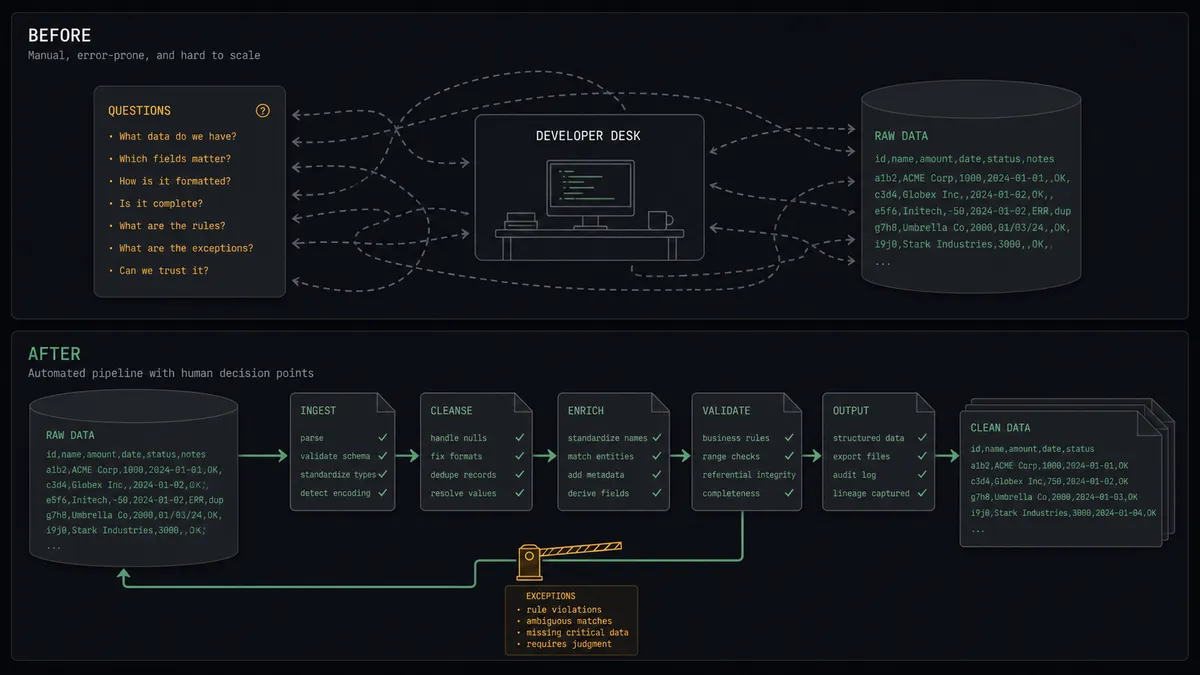
Xata holds the truth: accounts, subscriptions, feature flags, support-relevant state, all in serverless Postgres behind your product. The people who need to act on that truth, support leads, customer success, ops, do not have psql open and should not. So a developer becomes the query desk. “Can you check this account’s plan?” “Can you flag these customers for the beta?” “Can you pull everyone who signed up this month?” Each request is a context switch for the developer and a wait for the requester, and the answers get pasted into Notion where they immediately start rotting.
The reverse direction is scarier. When ops needs to change production state, someone hand-writes an UPDATE, or worse, someone builds a quick script using upsert semantics without reading the fine print. In Xata, Create or Replace Record clears every column not included in the payload. One well-intentioned write-back with a partial record and you have blanked fields on live customer rows. Delete Record is permanent. The gap between “ops needs to edit this” and “ops can safely edit this” is exactly where things break.
How it works: the connection
The connection reads from Xata and writes to Notion. Here is the plain version, grounded in the real connector actions.
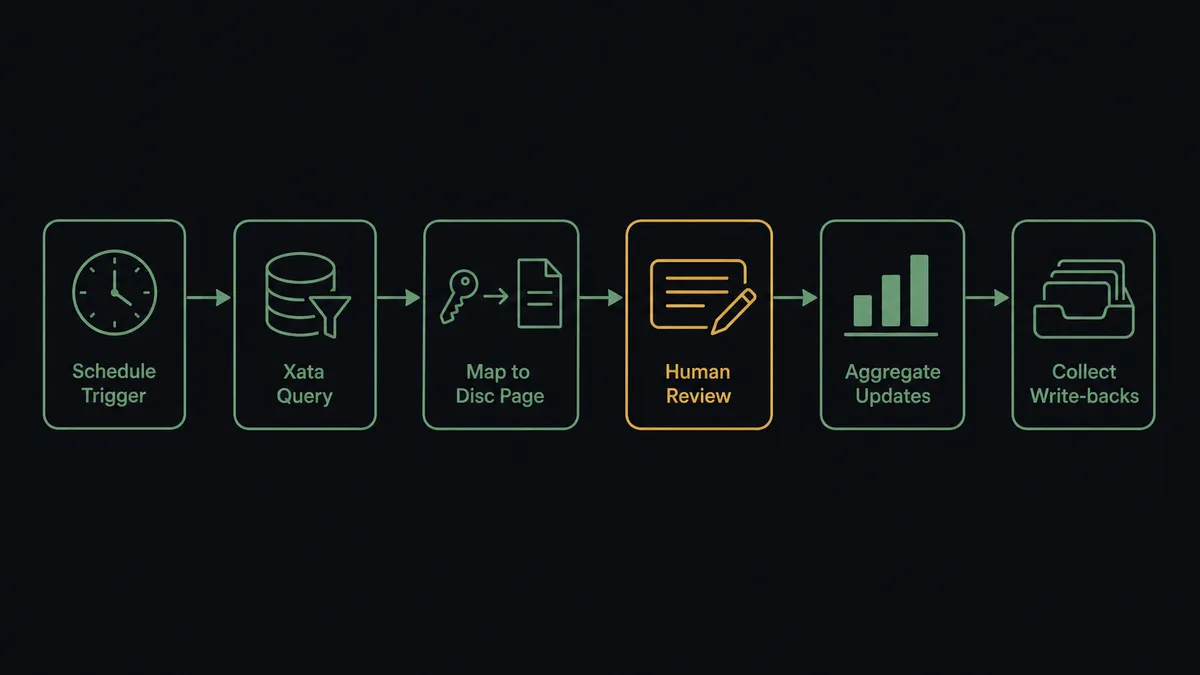
- Trigger: On a schedule, the workflow checks Xata for changes.
- Read: It calls Query Table with a filter on the updated-at column and selects only the columns the workspace needs.
- Map: For each record, it calls Find or Create Database Item in Notion, keyed by the Xata record ID stored as a property, so reruns never create duplicate rows.
- Update: It calls Update Database Item to apply changed values to the mirrored row.
- Summarize: It calls Aggregate Records for counts and sums, or Summarize Records for grouped rollups, and writes the result to a metrics page with Add Content To Page.
- Collect write-backs: It reads rows ops has flagged for change in Notion and stages them as proposed Xata updates instead of applying them blind.
That is the “just connect them” answer. Production data shows up where the team works, stays current on every run, and the developer stops being a human SELECT statement.
Can an AI agent run it? (and why a human stays in the loop)
Yes, and the agent is what makes the write-back direction safe enough to exist. It holds the real actions as tools: Query Table, Get Record, Update Record, Search Branch, Aggregate Records, Run SQL on the Xata side; Find or Create Database Item, Update Database Item, Create Comment on the Notion side. For reads it is generous: ask it a question in the workspace and it answers with Search Branch across every table or a structured Query Table, instead of the question waiting in a developer’s queue.
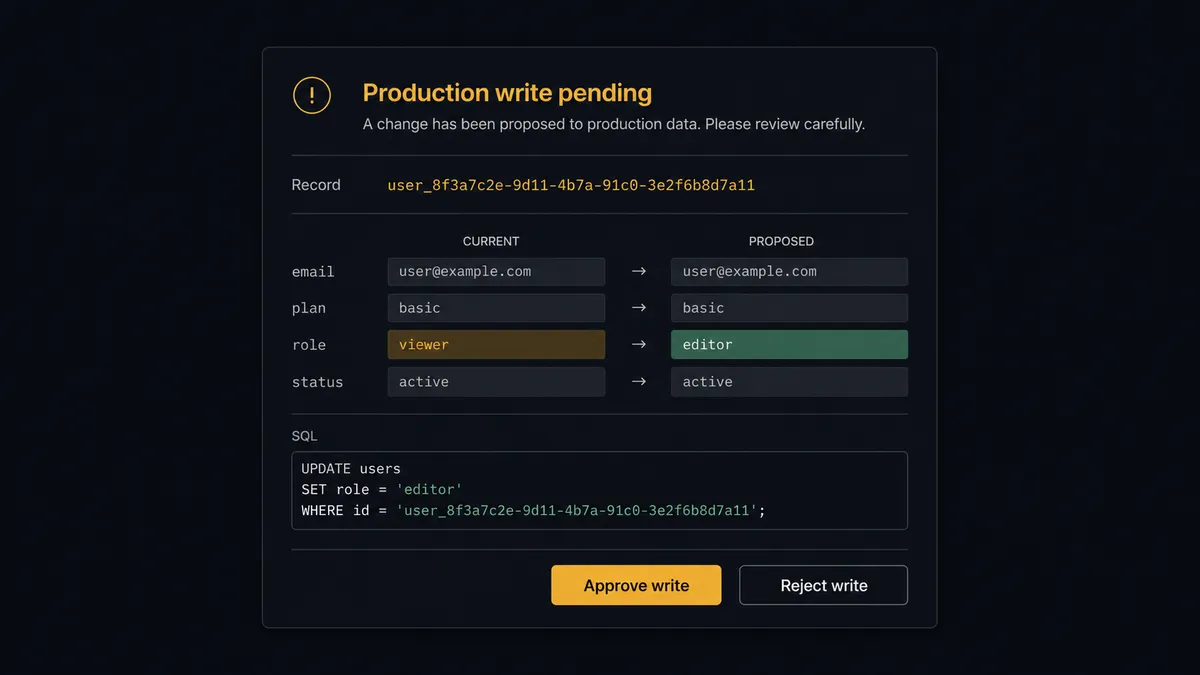
For writes it is conservative by design. The agent classifies every pending change. A single-column state change on one record is a safe partial update, applied with Update Record, which only touches the columns provided. Anything else, a Run SQL statement that mutates data, a Create or Replace Record that would clear unincluded columns, a Delete Record that cannot be undone, triggers the human-in-loop flow the agent holds as a callable tool. The workflow pauses and posts: “Proposed production write to [table]: record [ID], current values and proposed values attached. This uses [action]. Approve to apply?” For raw SQL, the full parameterized statement is in the card. Only after a named approver signs off does the write run, and the approval, the exact change, and the timestamp land in the audit trail.
This is FlowRunner’s digital andon cord: like Toyota’s production line pull cord, the workflow stops the line the moment it hits uncertainty. Routine reads and safe updates flow; anything that can blank a column or drop a row waits for a person.
FlowRunner vs Fivetran
Fivetran earned its reputation honestly: for replicating Postgres into a warehouse it is excellent, with change data capture, automated schema handling, and pipelines you set up once and rarely think about. If the question is “how do I get Xata data into Snowflake next to my other sources for BI,” Fivetran is a strong answer.
That is not this question. This job is operational: production data surfaced where ops works, and controlled writes flowing back, with judgment in the middle. Here is the honest side-by-side.
| What matters for this pair | FlowRunner | Fivetran |
|---|---|---|
| Human-in-the-loop on production writes | Native. The agent pauses before Run SQL, Create or Replace Record, or Delete Record and waits for a named approval | Not part of the model; replication has no approval concept |
| Who runs the flow | An AI agent reads, reasons, classifies each write, picks actions as tools | Managed one-way pipelines on a sync schedule |
| Destination | Notion databases the team works in, plus gated write-back to Xata | A data warehouse, read by analytics tools |
| Bring your own AI keys | Yes, BYOK | Not applicable; no agent layer |
| Self-hosted option | Yes, cloud-hosted or self-hosted | Cloud service for the core product |
| Pricing model | Transparent workflow-based tiers | Consumption-based on monthly active rows, which churny operational tables inflate |
For analytics pipelines into a warehouse, use Fivetran; that is its home turf. For Xata and Notion working as one operational loop, reads out, gated writes back, and an audit trail on every production change, this pairing is what FlowRunner is for.
Before and after
| Category | Before | After |
|---|---|---|
| Data access | Ops asks a developer to run queries against production | Query Table and Search Branch answer from the Notion mirror on every run |
| Freshness | Answers pasted into Notion rot the moment they land | The mirror updates on schedule, keyed by record ID, with no duplicates |
| Production writes | Hand-written UPDATEs and upsert scripts with replace semantics | Safe changes apply via partial Update Record; everything else is staged for approval |
| Blast radius | One bad payload clears columns across live customer rows | Create or Replace Record and Delete Record run only after a named human reviews the diff |
| Accountability | No record of who changed production state or why | Every approved write logs the approver, the exact change, and the timestamp |
What you can build
Ops mirror of production. The scheduled run calls Query Table with an updated-at filter and keeps a Notion database current through Find or Create Database Item and Update Database Item. Support and success see live account state without a database client.
Gated account changes. Ops flags rows in Notion: comp this account, extend that trial. The agent stages each as a diff against Get Record, applies the safe ones with Update Record, and routes anything replace-shaped or SQL-shaped through approval first.
Ask-the-database channel. A question posted in the workspace becomes a Search Branch full-text query across every table, or a structured Query Table, with the answer written back as a Notion comment via Create Comment. The developer queue stops being the interface to production.
Self-assembling metrics page. Aggregate Records computes counts and sums, Summarize Records groups them SQL-GROUP-BY style, and Add Content To Page rebuilds the metrics page on every run instead of someone screenshotting a dashboard.
Bulk import with a checkpoint. A cleaned list in Notion becomes a staged Bulk Insert Records call. The agent posts the row count and a sample before inserting, so a mis-mapped column is caught in review rather than discovered in production.
Getting started
Start on the free plan: 100 executions a month, every integration included, no credit card required, plus 14 days of Professional for new accounts. Both connectors are available on every tier, and every tier includes unlimited users and unlimited workflows.
Explore the integration details:
- Notion integration (23 actions covering pages, databases, and comments)
- Xata integration (13 actions covering records, queries, search, aggregations, and SQL)
Start building free at flowrunner.ai or book a demo to see a live Notion to Xata workflow, production write approval and all.
Frequently asked questions
Is it free to connect Notion and Xata on FlowRunner?
You can build and run the connection on FlowRunner's free plan, which includes 100 executions a month and every integration with no credit card required, and new accounts also get 14 days of Professional. Both connectors are available on every FlowRunner tier, and every tier includes unlimited users and unlimited workflows.
Can I self-host the Notion to Xata workflow?
Yes. FlowRunner offers a cloud-hosted option and a self-hosted option, so the connection can run inside your own environment. Self-hosting is available for teams that need the workflow to run on their own infrastructure.
Does the AI agent need my own OpenAI or Claude key?
FlowRunner uses a bring-your-own-keys model, so you connect the AI provider key you already have. You are not locked to one model, and you control which provider runs the agent.
What happens when the agent is unsure a production write is safe?
The agent stops and invokes a human-in-loop step. It posts the exact change, the record ID, the current column values, and the proposed values to your team channel, then waits for approval. For raw SQL it posts the full parameterized statement. Nothing touches production until a named person signs off.
Which triggers does this connection use if neither service has one?
Neither Notion nor Xata exposes an event trigger in the FlowRunner catalog, so the workflow runs on a schedule. Each run calls Query Table in Xata with a filter on an updated-at column and applies changes to Notion with Find or Create Database Item and Update Database Item.
Why does the agent use Update Record instead of Create or Replace Record?
Create or Replace Record clears any columns not included in the payload, which makes it easy to wipe data you did not mean to touch. The agent defaults to Update Record, which changes only the columns you provide, and any replace or delete operation is held for human approval first.