How to Connect Notion with Ninox (With or Without an AI Agent)
Mirror Ninox records into a Notion database on a schedule, optionally as an AI agent that reconciles both sides and pauses for a human before any delete or bulk overwrite touches the operational database.
How do you connect Notion to Ninox?
You connect Notion to Ninox by mirroring the operational database into the workspace: on a schedule, the workflow calls List Records in Ninox with a filter for recently changed records, then applies each one to a Notion database with Find or Create Database Item and Update Database Item, keyed by the Ninox record id stored as a Notion property. Neither connector exposes an event trigger, so the schedule drives the sync. FlowRunner is a visual AI-agent orchestration platform where automations run autonomously and pause for human judgment on the steps that carry real consequence. The same connection can run as an AI agent that reconciles both sides, writes workspace edits back with Create or Update Records, and pauses for a named human before anything destructive touches the database of record, because Delete Record in Ninox cannot be undone.
The problem it solves
You built the operations app in Ninox: customers, projects, inventory, whatever the team actually runs on. It works. The problem is everyone who is not in Ninox. Project leads, account managers, and executives live in Notion, so someone copies records into a Notion database by hand, or screenshots a Ninox view into a page, or answers the same “what’s the status of X” question in chat four times a day. The mirror is stale the moment it is made, and the person maintaining it is you.
The edges are where it turns from annoying to dangerous. Someone edits the Notion copy and assumes it changed the real record. Two people update the same customer in two systems and the versions drift apart with no record of which is right. A cleanup pass in the workspace deletes rows that still exist in Ninox, or worse, a well-meaning write-back script deletes Ninox records that only looked orphaned. Ninox’s Delete Record is permanent. A sync that handles the happy path but shrugs at conflicts and deletions is a liability wearing an automation costume.
How it works: the connection
The connection reads from Ninox and writes to Notion. Here is the plain version, grounded in the real connector actions.
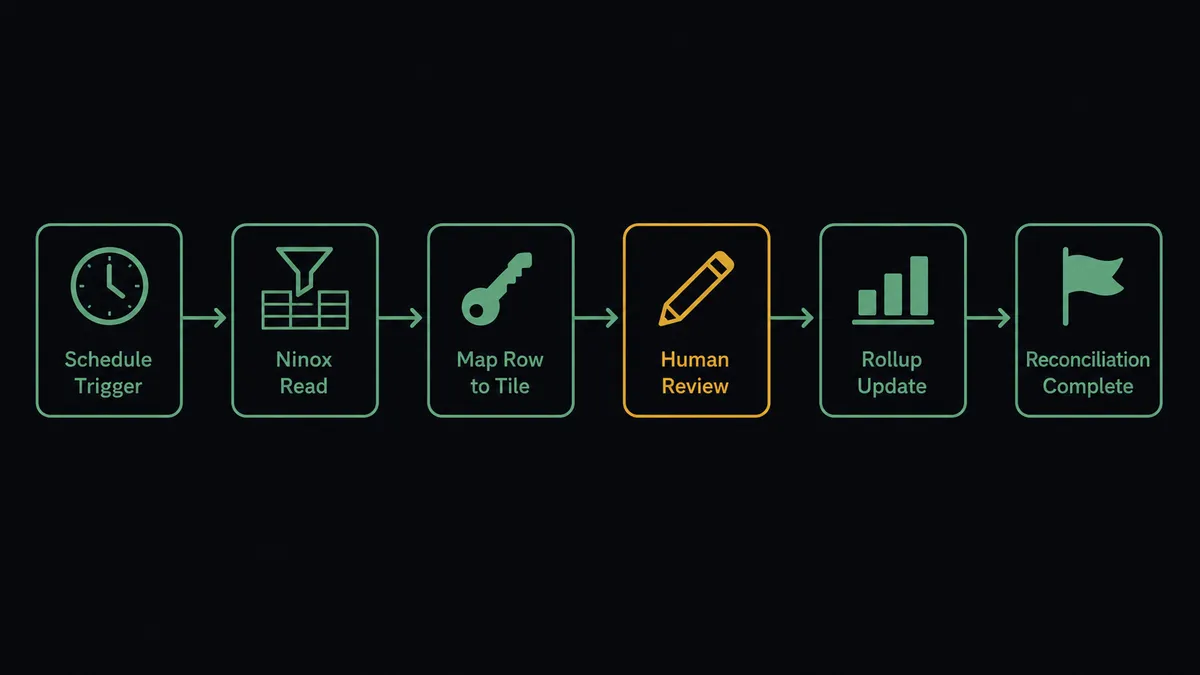
- Trigger: On a schedule, the workflow checks Ninox for changes.
- Read: It calls List Records on the source table with a JSON filter for records modified since the last run, sorted so the newest changes apply last.
- Map: For each record, it calls Find or Create Database Item in Notion, keyed by the Ninox record id property, so every record maps to exactly one row and reruns never create duplicates.
- Update: It calls Update Database Item to apply changed fields, and Update Page Properties for status and owner changes on the row’s page.
- Aggregate: It calls Run Query in Ninox to compute rollups across tables, then writes the summary into a dashboard page with Add Content To Page.
- Reconcile: It calls Find Database Item to spot Notion rows whose Ninox record no longer exists, and flags them instead of silently removing them.
That is the “just connect them” answer. The Notion mirror stays current on every run, the mapping survives reruns, and nobody maintains it by hand.
Can an AI agent run it? (and why a human stays in the loop)
Yes, and the agent earns its keep in exactly the places a dumb sync fails. It holds the real actions as tools: List Records, Get Record, Create or Update Records, Run Query on the Ninox side; Find or Create Database Item, Update Database Item, Create Comment, Delete Page on the Notion side. On a routine run it mirrors changes and moves on. When it finds a conflict, a record edited in both systems since the last run, it does not overwrite either side. It builds a field-by-field diff, posts it, and lets a person pick the winner.
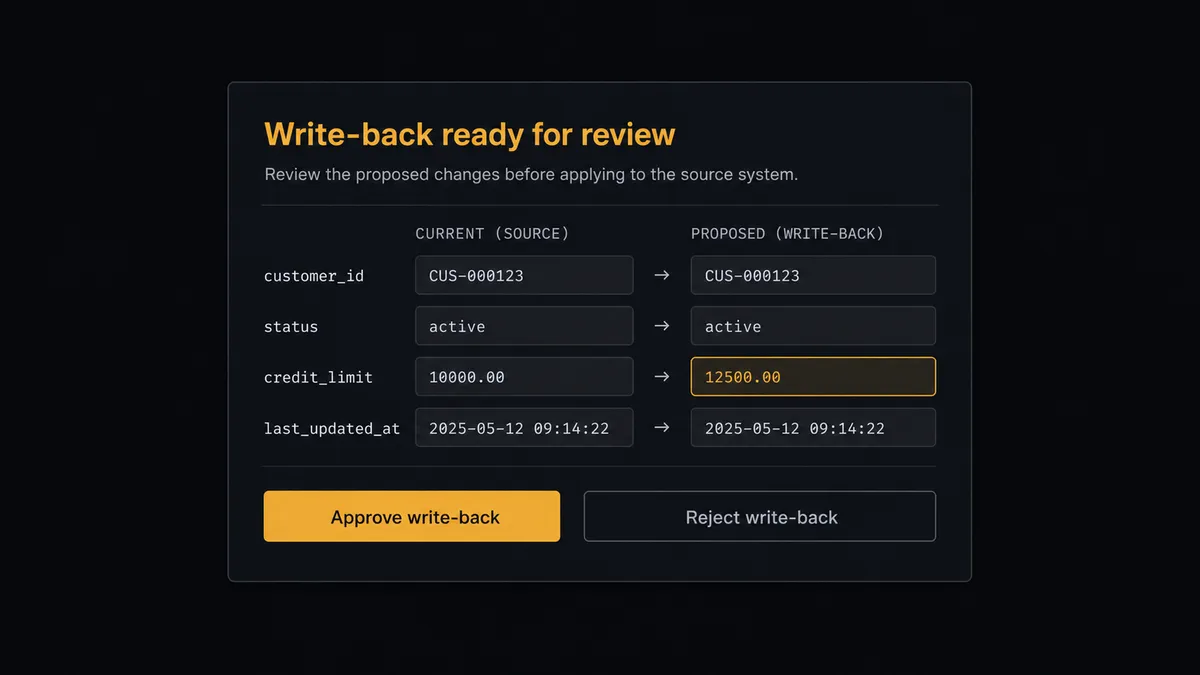
The consequential steps are the destructive ones. Delete Record in Ninox is permanent, and Create or Update Records pointed at the wrong rows rewrites operational data in bulk. Before either, the agent invokes a human-in-loop flow it holds as a callable tool. The workflow pauses and posts: “Reconciliation found [count] Ninox records with no matching Notion row and [count] Notion edits ready to write back. Diff attached. Approve the write-back? Approve the deletions?” Only after a named approver signs off does the agent call Create or Update Records or Delete Record, and the approval lands in the audit trail with the approver and timestamp.
This is the digital andon cord pattern FlowRunner is built around: like Toyota’s production line pull cord, the workflow stops the line the moment it hits uncertainty. The sync runs unattended for the ninety-something percent of records that are unambiguous, and stops for the handful where being wrong is expensive.
FlowRunner vs Fivetran
If your goal is analytics, Fivetran is genuinely good at what it does: managed ELT with hundreds of connectors, automated schema drift handling, and reliable pipelines that land source data in Snowflake, BigQuery, or another warehouse with near-zero maintenance. For feeding a BI stack, it is a strong default.
But that is a different job than this one. Fivetran moves data one way, into a warehouse, for analysts. It does not write into Notion, does not write back into Ninox, and has no concept of a human approving a destructive change. Here is the honest side-by-side.
| What matters for this pair | FlowRunner | Fivetran |
|---|---|---|
| Human-in-the-loop on deletes and bulk write-backs | Native. The agent pauses before Delete Record or Create or Update Records and waits for a named approval | Not part of the model; pipelines replicate without approval steps |
| Who runs the flow | An AI agent reads, reasons, diffs both sides, picks actions as tools | Managed connectors on a sync schedule, one direction |
| Destination | Notion databases and pages your team works in, plus write-back to Ninox | A data warehouse, for analytics tools |
| Bring your own AI keys | Yes, BYOK | Not applicable; no agent layer |
| Self-hosted option | Yes, cloud-hosted or self-hosted | Cloud service, with a separate HVR-based offering for some deployments |
| Pricing model | Transparent workflow-based tiers | Consumption-based on monthly active rows, which is hard to predict as tables churn |
If you need Ninox data in a warehouse next to twenty other sources for BI, use Fivetran. If you need Ninox and Notion operating as one system, with people editing in the workspace and a human gate on everything destructive, that is what this pairing does and Fivetran does not.
Before and after
| Category | Before | After |
|---|---|---|
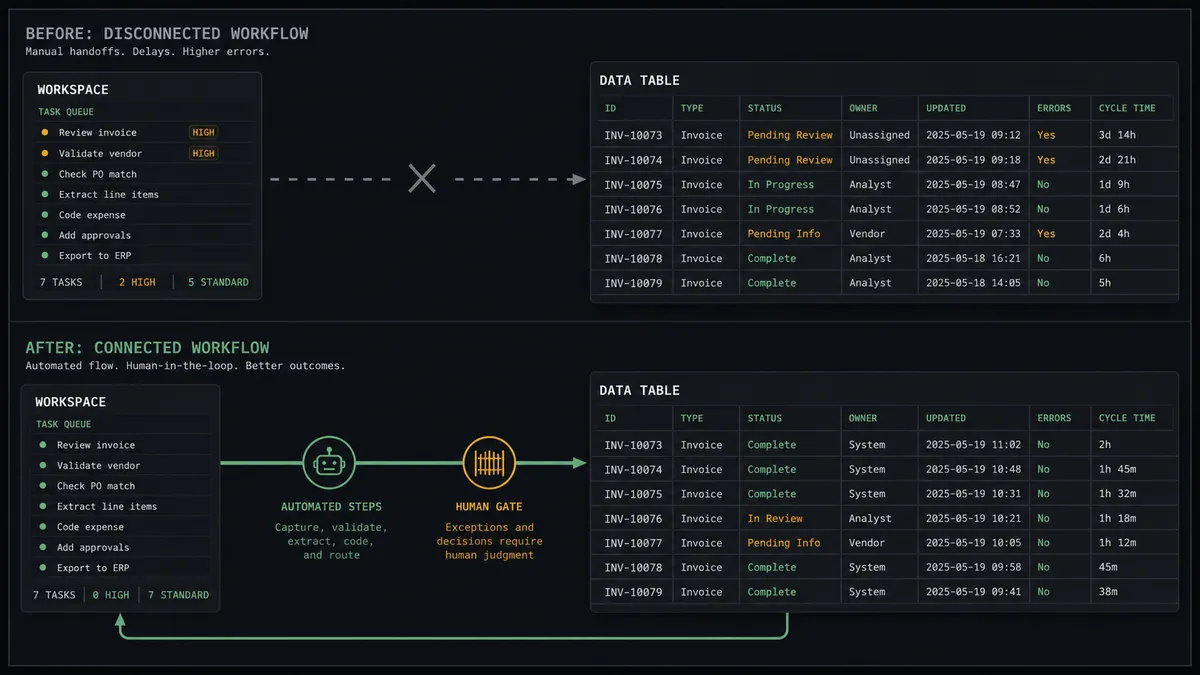
| The mirror | Someone copies Ninox records into Notion by hand, and it is stale by lunch | List Records feeds Find or Create Database Item on every run, keyed by record id |
| Status questions | ”What’s the state of X” answered in chat, repeatedly, by whoever has a Ninox seat | The Notion database answers it; Run Query rollups land on a dashboard page |
| Conflicting edits | Two versions drift apart silently until one overwrites the other | The agent posts a field-by-field diff and a person picks the winner |
| Deletions | A cleanup pass removes records with no review and no undo | Delete Record runs only after a named approval, logged in the audit trail |
| Write-backs | Ad hoc scripts push workspace edits into the database and hope | Create or Update Records runs in bulk only after the diff is approved |
What you can build
Live operational mirror. The scheduled run calls List Records with a modified-date filter and applies changes through Find or Create Database Item and Update Database Item. Everyone in Notion sees current Ninox data without a Ninox seat.
Gated write-back. People edit the Notion rows they own. The agent collects the edits, diffs them against Get Record on the Ninox side, and applies them in one Create or Update Records call after a human approves the batch.
Cross-table dashboard. Run Query executes a Ninox script that aggregates across tables, and the agent writes the result into a Notion page with Add Content To Page, so the weekly ops summary assembles itself instead of being screenshot together.
Orphan review queue. Reconciliation flags Notion rows whose Ninox record is gone and Ninox records nothing references. The agent posts the list with each record’s fields via Create Comment, and Delete Record or Delete Page runs only on the approved subset.
Schema drift alarm. List Tables returns Ninox field definitions on every run. When a field is added or renamed, the agent flags the mapping for review instead of silently dropping data on the floor.
Getting started
Start on the free plan: 100 executions a month, every integration included, no credit card required, plus 14 days of Professional for new accounts. Both connectors are available on every tier, and every tier includes unlimited users and unlimited workflows.
Explore the integration details:
- Notion integration (23 actions covering pages, databases, blocks, and comments)
- Ninox integration (8 actions covering teams, tables, records, and Ninox script queries)
Start building free at flowrunner.ai or book a demo to see a live Notion to Ninox workflow, delete approval and all.
Frequently asked questions
Is it free to connect Notion and Ninox on FlowRunner?
You can build and run the connection on FlowRunner's free plan, which includes 100 executions a month and every integration with no credit card required, and new accounts also get 14 days of Professional. Both connectors are available on every FlowRunner tier, and every tier includes unlimited users and unlimited workflows.
Can I self-host the Notion to Ninox workflow?
Yes. FlowRunner offers a cloud-hosted option and a self-hosted option, so the connection can run inside your own environment. Self-hosting is available for teams that need the workflow to run on their own infrastructure.
Does the AI agent need my own OpenAI or Claude key?
FlowRunner uses a bring-your-own-keys model, so you connect the AI provider key you already have. You are not locked to one model, and you control which provider runs the agent.
What happens when the same record changed in both Notion and Ninox?
The agent does not guess which version wins. It packages both versions field by field, posts the diff to your team channel, and waits for a person to pick a side or merge by hand before it writes anything back with Create or Update Records or Update Database Item.
Which triggers does this connection use if neither service has one?
Neither Notion nor Ninox exposes an event trigger in the FlowRunner catalog, so the workflow runs on a schedule. Each run calls List Records in Ninox with a filter for recently changed records and Find or Create Database Item in Notion to apply the changes.
Can the agent delete Ninox records on its own?
Not in this design. Delete Record in Ninox is permanent and cannot be undone, so the agent only proposes deletions. It posts the record's fields and the reason it looks orphaned, and a named human approves before Delete Record runs. The same gate covers Delete Page in Notion.