How to Connect Notion with Amazon Redshift (With or Without an AI Agent)
Sync Notion database rows into Amazon Redshift on a schedule, optionally as an AI agent that loads changed rows automatically and pauses for a human before any ALTER TABLE or destructive SQL touches the warehouse.
How do you connect Notion to Amazon Redshift?
You connect Notion to Amazon Redshift with a scheduled workflow that calls Find Database Item to pull the Notion rows that changed since the last run, then loads them into the warehouse with Batch Execute Statement, polling Describe Statement until the load reports FINISHED. Notion has no trigger in FlowRunner, so the schedule drives the sync, and the Redshift Data API means no persistent connection to manage. FlowRunner is a visual AI-agent orchestration platform where automations run autonomously and pause for human judgment on the steps that carry real consequence. Run as an AI agent, the same connection loads changed rows on its own and stops for a named engineer before any ALTER TABLE or destructive statement touches the warehouse.
The problem it solves
Teams run real operations out of Notion databases: a project tracker, a vendor register, a content calendar, a CRM-shaped table the sales team swears by. Then the analytics team needs that data in Redshift, joined against revenue and product events. Today somebody exports the Notion database to CSV, fixes the column types by hand, and runs a COPY or a one-off script. The warehouse copy is stale the moment it lands, and every dashboard built on it quietly reports last month’s truth.
The edges are where it hurts. Notion databases drift constantly: an ops manager renames a property, adds a select option, or creates a new column on a Tuesday, and the export script written in March starts dropping data or failing silently. Deleted rows in Notion linger forever in the warehouse. And when the script does break, it breaks at 2 AM in a cron log nobody reads, so the first person to notice is an executive staring at a dashboard where this week’s numbers are flat because the load never happened.
How it works: the connection
The connection reads from Notion on a schedule and writes to Amazon Redshift through the Data API. Here is the plain version, grounded in the real connector actions.
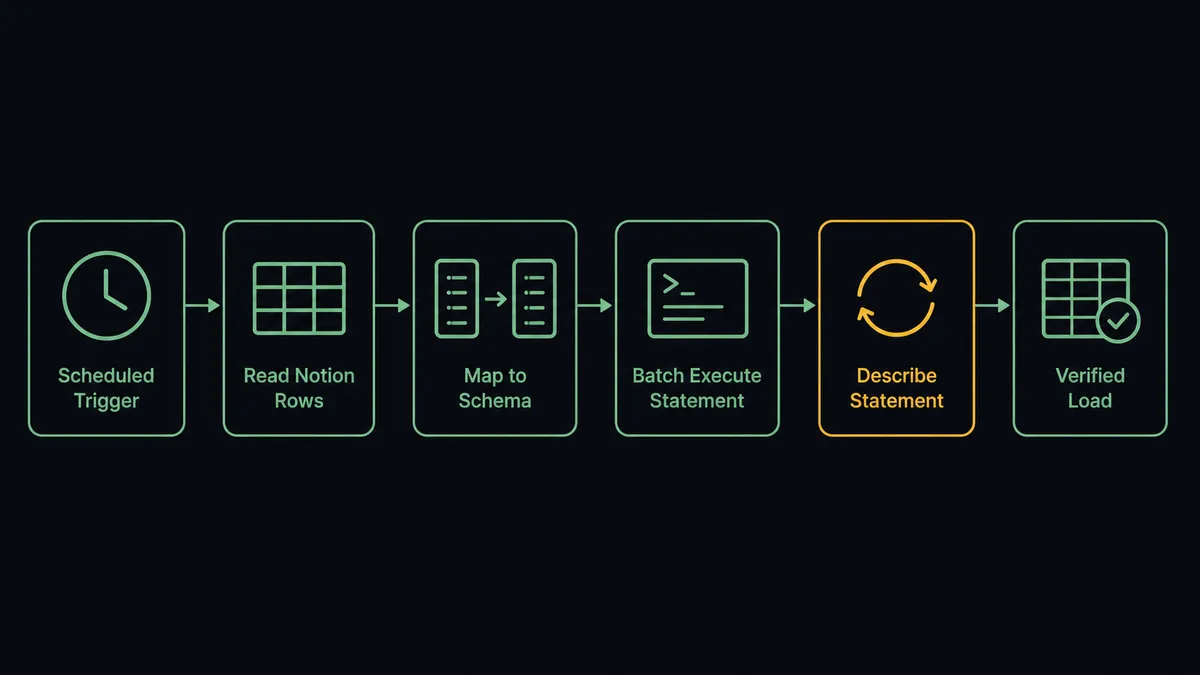
- Trigger: On a schedule, the workflow calls Find Database Item with a last-edited filter to pull only rows changed since the previous run.
- Read the schemas: It calls Get Database for the current Notion property list and Describe Table for the warehouse table’s column definitions, so the mapping is checked on every run, not assumed.
- Stage the SQL: It builds parameterized INSERT and UPDATE statements keyed on the Notion page ID, one per changed row.
- Load: It calls Batch Execute Statement so the whole batch runs in order inside a single transaction. A partial load never lands.
- Poll: It calls Describe Statement with the returned statement ID until the status is FINISHED, catching FAILED or ABORTED with the error message attached.
- Verify: It calls Get Statement Result to confirm affected row counts match the batch it sent.
- Explore when needed: List Tables and List Schemas locate the target on first run, so setup does not require console spelunking.
That is the “just connect them” answer. The Notion table your team actually maintains becomes a queryable warehouse table your analysts can join, and the sync is verified on every run instead of assumed.
Can an AI agent run it? (and why a human stays in the loop)
Yes, and the agent earns its keep at exactly the point where every hand-rolled Notion sync dies: schema drift. The agent holds the connector’s actions as tools: Get Database, Describe Table, List Tables, Batch Execute Statement, Describe Statement, Get Statement Result, Execute Statement, Cancel Statement. On each run it compares the Notion schema against the warehouse schema before loading anything. Rows that fit the existing mapping load automatically, in one transaction, verified by row count.
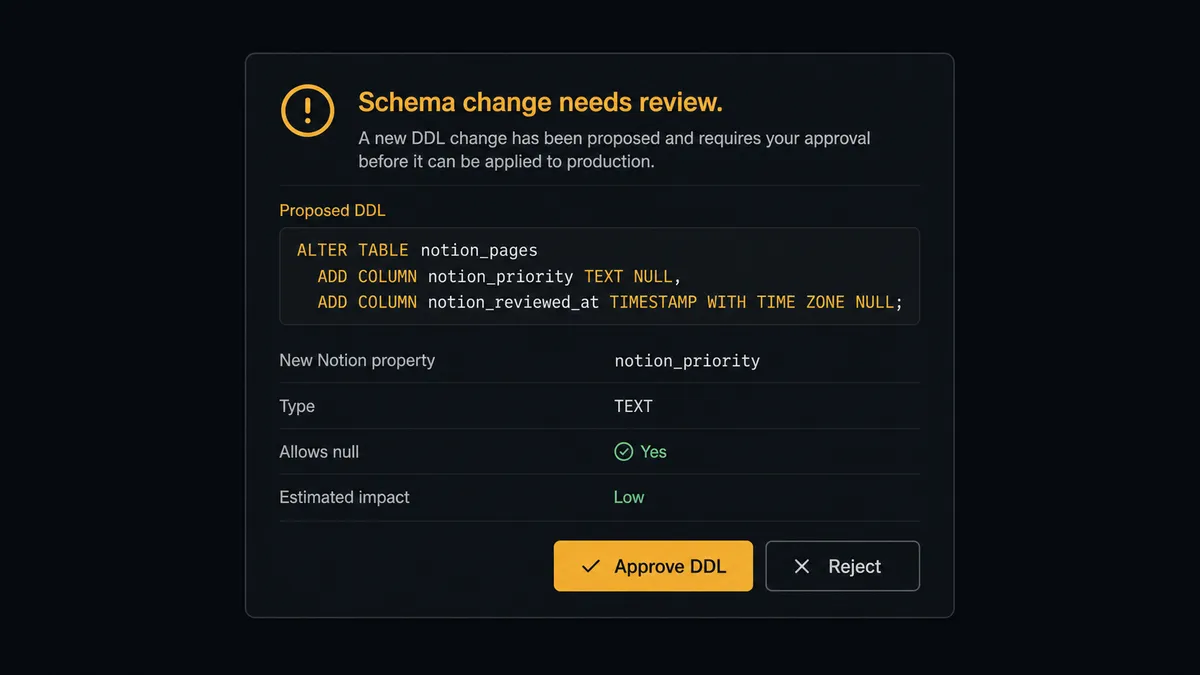
The consequential step is DDL. When someone adds a property to the Notion database, the agent does not guess a column type and silently rewrite the table, and it does not crash either. It drafts the exact statement, then invokes a human-in-loop flow it holds as a callable tool. The workflow pauses and posts to the data team’s channel: “Notion database [name] gained property [name], type select. Proposed: ALTER TABLE with a new VARCHAR column, then backfill changed rows. Approve?” A named engineer reviews the SQL as written. Only on approval does the agent run Execute Statement with that DDL, backfill the column, and record the approver and timestamp in the audit trail. The same gate guards DELETE statements when rows vanish from Notion, and Cancel Statement lets the agent kill a runaway query instead of letting it burn the cluster.
This is the digital andon cord applied to a warehouse: like Toyota’s andon cord, the workflow stops the line the moment it hits uncertainty. The sync keeps its cadence, and the schema keeps an owner.
FlowRunner vs Fivetran
If your question is “how do I get fifty SaaS sources into Redshift with zero maintenance,” Fivetran is a strong answer. Its managed connectors, automated normalization, and hands-off schema handling are genuinely good at high-volume ELT, and a data team running dozens of pipelines gets real leverage from that. Credit where it is due.
The trade is control at the moments that matter. Fivetran’s automation applies schema changes for you; nobody reviews the DDL. FlowRunner puts an agent in the loop that loads data autonomously and escalates exactly the changes an engineer would want to see.
| What matters for this pair | FlowRunner | Fivetran |
|---|---|---|
| Human-in-the-loop on ALTER TABLE and deletes | Native. The agent posts the proposed SQL and waits for a named engineer before Execute Statement runs | Schema changes applied automatically, without review |
| Who runs the flow | An AI agent reads schemas, reasons, and picks actions as tools | Managed pipeline with fixed sync behavior |
| Users included | Unlimited users on every tier | Seat and usage model varies by plan |
| Bring your own AI keys | Yes, BYOK. Connect the AI provider key you already have | Not an agent platform |
| Self-hosted option | Yes, cloud-hosted or self-hosted | Cloud service |
| Pricing model | Transparent workflow-based tiers | Consumption pricing tied to monthly active rows, which grows with your data |
If you need dozens of managed ELT pipelines and are happy to let schema changes flow through unreviewed, Fivetran fits. If this Notion database feeds decisions and you want every schema change and delete approved by a person, with the load verified on every run, that is where FlowRunner is the better fit.
Before and after
| Category | Before | After |
|---|---|---|
| Freshness | Warehouse copy updates whenever someone reruns the export script | Changed rows load on a schedule you set, verified by row count |
| Schema drift | A renamed Notion property silently breaks the load or drops data | The agent detects drift and routes the exact ALTER TABLE to an engineer |
| Failure visibility | A failed cron job surfaces days later as a flat dashboard | FAILED and ABORTED statuses from Describe Statement stop the run and page a person |
| Destructive SQL | Whoever edits the script decides what gets dropped or deleted | Every DELETE and DDL statement carries a named approver and timestamp |
| Setup | Hand-written COPY scripts and connection management | The Data API runs statements with no persistent connection to babysit |
What you can build
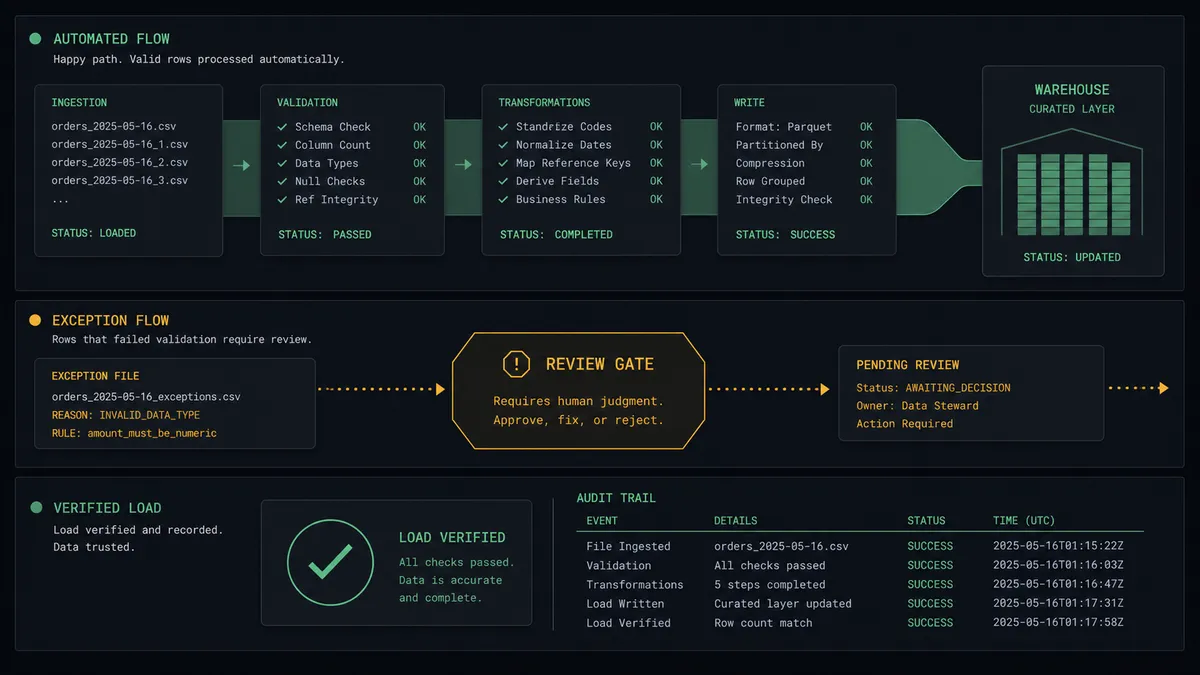
Incremental Notion sync, verified every run. Find Database Item pulls changed rows, Batch Execute Statement loads them in one transaction, Describe Statement polls to FINISHED, and Get Statement Result confirms the counts. A partial or failed load never gets marked green.
Schema drift review queue. Get Database and Describe Table run on every cycle. When they disagree, the agent drafts the ALTER TABLE, holds it at the human gate, and applies it with Execute Statement only after an engineer approves the SQL as written.
Warehouse-to-Notion status writeback. After the load verifies, the agent calls Update Database Item to stamp each synced Notion row with a synced marker, so the ops team can see from inside Notion which rows the warehouse has.
Guarded cleanup of deleted rows. When rows disappear from the Notion database, the agent stages the matching DELETE, posts the affected keys for review, and runs it only after approval. Nothing vanishes from the warehouse on an agent’s guess.
First-run discovery. On setup, the agent uses List Schemas, List Tables, and Describe Table to find or propose the target table, and List Statements gives you a full history of everything the sync has ever run against the cluster.
Getting started
Start on the free plan: 100 executions a month, every integration included, no credit card required, plus 14 days of Professional for new accounts. Both connectors are available on every tier, and every tier includes unlimited users and unlimited workflows.
Explore the integration details:
- Notion integration (23 actions covering pages, databases, and comments)
- Amazon Redshift integration (10 actions covering SQL execution, results, and schema exploration)
Start building free at flowrunner.ai or book a demo to see a live Notion to Amazon Redshift workflow, DDL approval gate and all.
Frequently asked questions
Is it free to connect Notion and Amazon Redshift on FlowRunner?
You can build and run the connection on FlowRunner's free plan, which includes 100 executions a month and every integration with no credit card required, and new accounts also get 14 days of Professional. Both connectors are available on every FlowRunner tier, and every tier includes unlimited users and unlimited workflows.
Can I self-host the Notion to Amazon Redshift workflow?
Yes. FlowRunner offers a cloud-hosted option and a self-hosted option, so the connection can run inside your own environment, next to your warehouse.
Does the AI agent need my own OpenAI or Claude key?
FlowRunner uses a bring-your-own-keys model, so you connect the AI provider key you already have. You are not locked to one model.
What happens when someone adds a new property to the Notion database?
The agent catches it. It compares the Notion schema from Get Database against the warehouse columns from Describe Table, drafts the ALTER TABLE statement, and pauses for a named engineer to approve before Execute Statement runs any DDL. Nothing rewrites your warehouse schema silently.
Notion has no trigger in FlowRunner, so what starts the sync?
A schedule. Each run calls Find Database Item with a last-edited filter to pull only the rows that changed since the previous run, then loads them with Batch Execute Statement. You choose the cadence, from every few minutes to nightly.
How does the workflow know the load actually succeeded?
It polls Describe Statement until the status is FINISHED, then calls Get Statement Result to confirm the affected row counts match what it sent. A FAILED or ABORTED status, or a count mismatch, stops the run and routes the error to a human instead of marking the sync green.