How to Connect Notion with Caspio (With or Without an AI Agent)
Mirror Caspio application records into a Notion workspace and write team decisions back, with an AI agent that previews every bulk operation and pauses for the operations owner before Update Table Records or Delete Table Records touches production data.
How do you connect Notion to Caspio?
Neither service exposes a trigger, so you connect Notion to Caspio with a scheduled workflow: Query Table Records and Query View Records pull new and changed rows from your Caspio application, Find or Create Database Item mirrors each one into a Notion database, and team edits in Notion flow back through Update Table Records. FlowRunner is a visual AI-agent orchestration platform where automations run autonomously and pause for human judgment on the steps that carry real consequence. Run as an AI agent, the same connection reads the Caspio schema at runtime with List Tables and Describe Table, diffs instead of blindly copying, and pauses for the operations owner before any bulk write touches production data.
The problem it solves
A Caspio app is a production application, and its tables hold production data: orders, casework, compliance records, customer accounts. But the team that discusses that data lives in Notion. So someone exports rows, pastes them into a Notion table, and the discussion proceeds against a snapshot that was stale before the meeting started. Decisions made in the Notion doc then have to be re-keyed into Caspio by whoever has access, whenever they get to it.
The write-back is where the real danger lives. Bulk fixes in Caspio run on a Where clause, and a Where clause is a sentence that is easy to get slightly wrong. Update Table Records and Delete Table Records act on everything the filter matches, and the person running the fix finds out afterward what that was. Meanwhile the app itself evolves: a renamed field or new table silently breaks every integration that hardcoded the old schema.
How it works: the connection
The connection reads from Caspio into Notion and writes decisions back. Here is the plain version, grounded in the real connector actions.
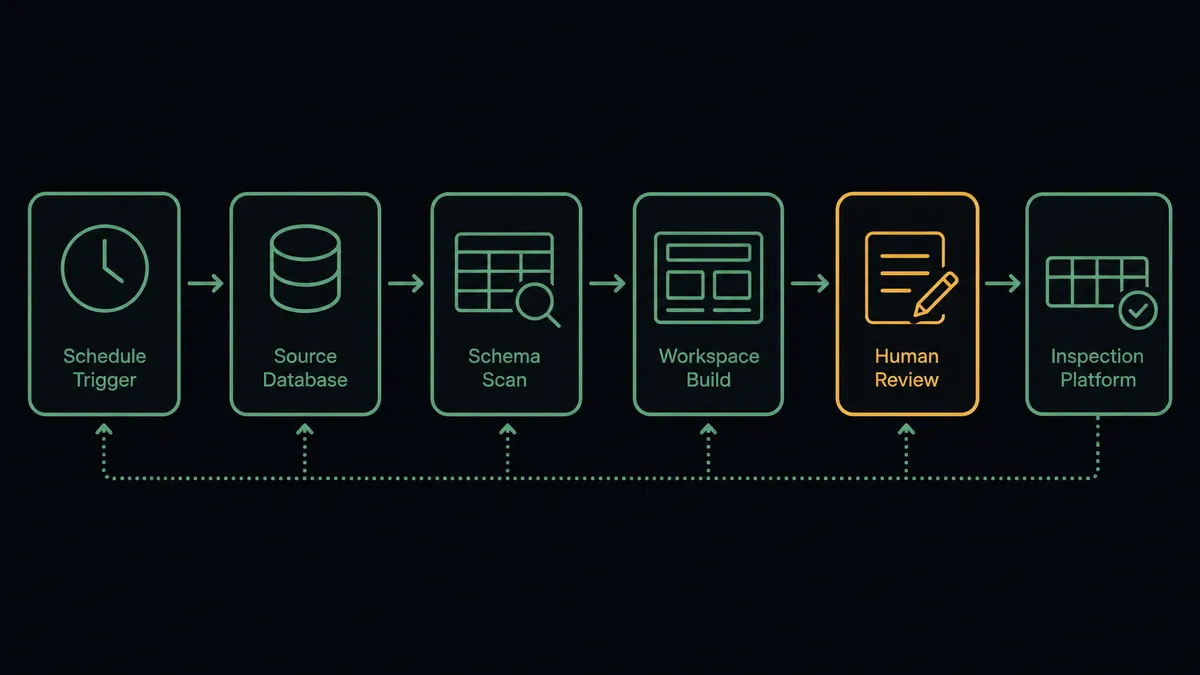
- Trigger: On a schedule, the sync run starts and calls List Tables and Describe Table to read the live schema, so the mapping reflects the app as it is today.
- Read: It calls Query Table Records for new and changed rows matching the sync filter, and Query View Records where a saved view already joins the data the team needs.
- Diff: The workflow compares the rows against the Notion mirror to find actual changes, rather than rewriting everything.
- Mirror: It calls Find or Create Database Item so each Caspio record has exactly one Notion row, then Update Database Item to refresh changed fields.
- Collect decisions: It reads the Notion database for team edits: status changes, corrections, and rows marked for action.
- Write back: Single-record changes flow through Insert Table Record or a narrowly scoped Update Table Records; bulk operations are staged as previews first.
- Log: The run summary posts what synced, what wrote back, and what is held for approval.
That is the “just connect them” answer. The workspace stops being a stale export, and decisions made in Notion reach the production tables without rekeying.
Can an AI agent run it? (and why a human stays in the loop)
Yes, and for a builder the interesting part is that the agent works schema-first. It holds the real actions as tools: List Tables, Describe Table, Query Table Records, Query View Records, Insert Table Record, Update Table Records, Delete Table Records on the Caspio side; Find or Create Database Item, Update Database Item, Create Page, Add Content To Page on the Notion side. Because it discovers the schema at runtime with Describe Table, a renamed field is a mapping decision it surfaces, not a silent break. Because it diffs before writing, a sync run touches only what changed. And because it reads the team’s edits as intent, it translates “close out everything from the Henderson batch” into a precise filter and shows its work.
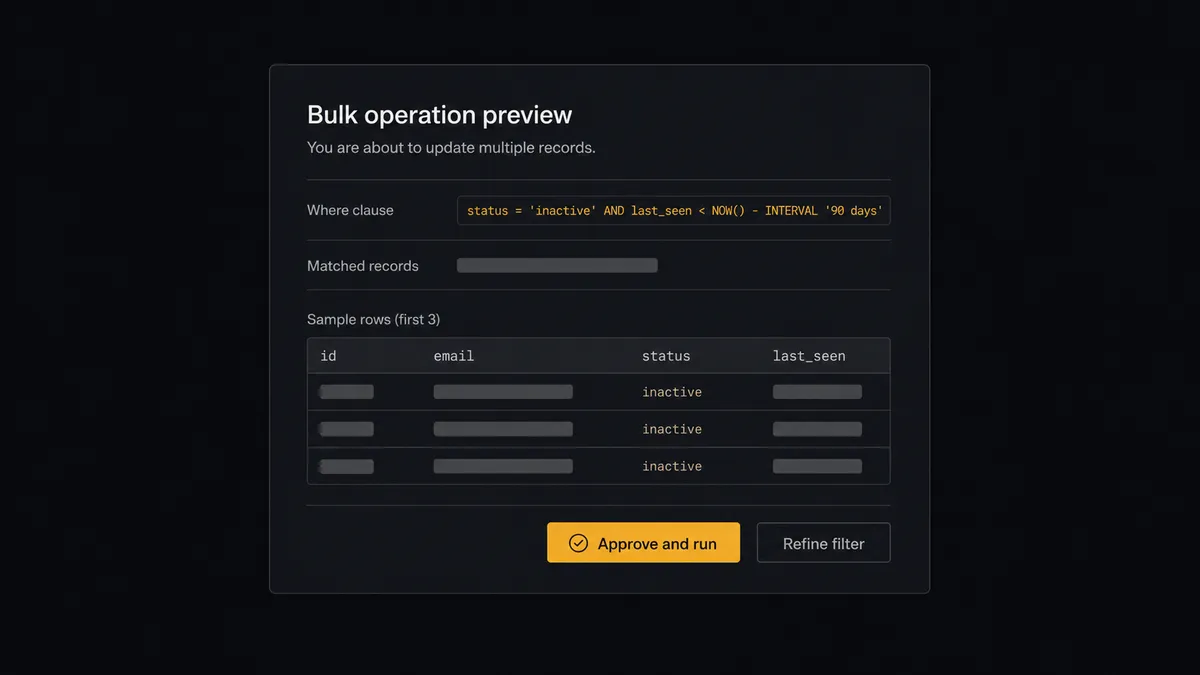
The consequential step is the bulk write. Update Table Records and Delete Table Records act on everything the Where clause matches, and a filter that is one condition too loose rewrites records nobody meant to touch. So the agent never runs a bulk operation directly from an edit. It first runs the same filter through Query Table Records, counts the matches, samples rows, and invokes a human-in-loop flow it holds as a callable tool. The workflow pauses and posts to the operations channel: “Proposed bulk update on [table]. Where clause: [clause]. Matched records: [count from the preview query], sample attached. This is the exact set that will change. Approve?” The operations owner reads the clause and the sample, and only on approval does the operation run. The clause, the count, the sample, and the approver all land in the audit trail, so every bulk change to production is reconstructable later.
Single-record inserts and narrow updates run unattended, because their blast radius is one row. Prospects call the split a digital andon cord: like Toyota’s quality control pull cord, the workflow stops the line the moment an operation’s reach is uncertain, and your team pulls it back into motion.
FlowRunner vs Fivetran
A builder surveying data-movement tools will see Fivetran near the top, deservedly. Fivetran is the standard for managed ELT: hundreds of connectors, automated schema drift handling, and pipelines that reliably land source data in a warehouse with near-zero maintenance. When the goal is analytics, getting application data into Snowflake or BigQuery for BI, it is excellent at exactly that.
This pair is a different job. Fivetran moves rows one way into a destination for analysis; it does not mirror records into a team workspace, read decisions back out, or gate a bulk write to a production table. FlowRunner is built around native human-in-the-loop and AI-agent orchestration, where the flow runs both directions and a person clears anything with blast radius. Here is the honest side-by-side.
| What matters for this pair | FlowRunner | Fivetran |
|---|---|---|
| Human-in-the-loop on bulk production writes | Native. The agent previews the Where clause and count, and pauses before Update Table Records or Delete Table Records | Not the product’s job: pipelines land data in a destination; there is no decision layer to pause |
| Who runs the flow | An AI agent reads schema, diffs records, translates decisions, and picks actions as tools | Managed connectors syncing source to destination on a schedule |
| Users included | Unlimited users on every tier | Seat and usage terms set by plan |
| Bring your own AI keys | Yes, BYOK | No agent layer, so no model keys to bring |
| Self-hosted option | Yes, cloud-hosted or self-hosted | Delivered as a managed cloud service |
| Pricing model | Transparent workflow-based tiers with clear execution limits | Consumption pricing on monthly active rows, which moves with your data |
If you need Caspio data in a warehouse for BI, use Fivetran for that pipeline; it is the right tool. If you need the operational loop, records mirrored where the team works and decisions written back to production under review, that is where FlowRunner is the better fit.
Before and after
The shift is qualitative: the workspace and the production database stop being strangers.
| Category | Before | After |
|---|---|---|
| Team visibility | Discussions run on pasted exports that were stale at paste time | Query Table Records refreshes the Notion mirror on schedule, diffs only what changed |
| Decision execution | Notion decisions get rekeyed into Caspio by whoever has access, eventually | Edits flow back through scoped writes the same day, previewed when bulk |
| Bulk operations | A Where clause runs on faith and the result is discovered afterward | Every bulk write is counted, sampled, and approved before it executes |
| Schema changes | A renamed field silently breaks the integration | List Tables and Describe Table discover the schema each run and surface mapping decisions |
| Change history | Who changed what in production lives in memory | The audit trail holds each operation’s clause, count, sample, and approver |
What you can build
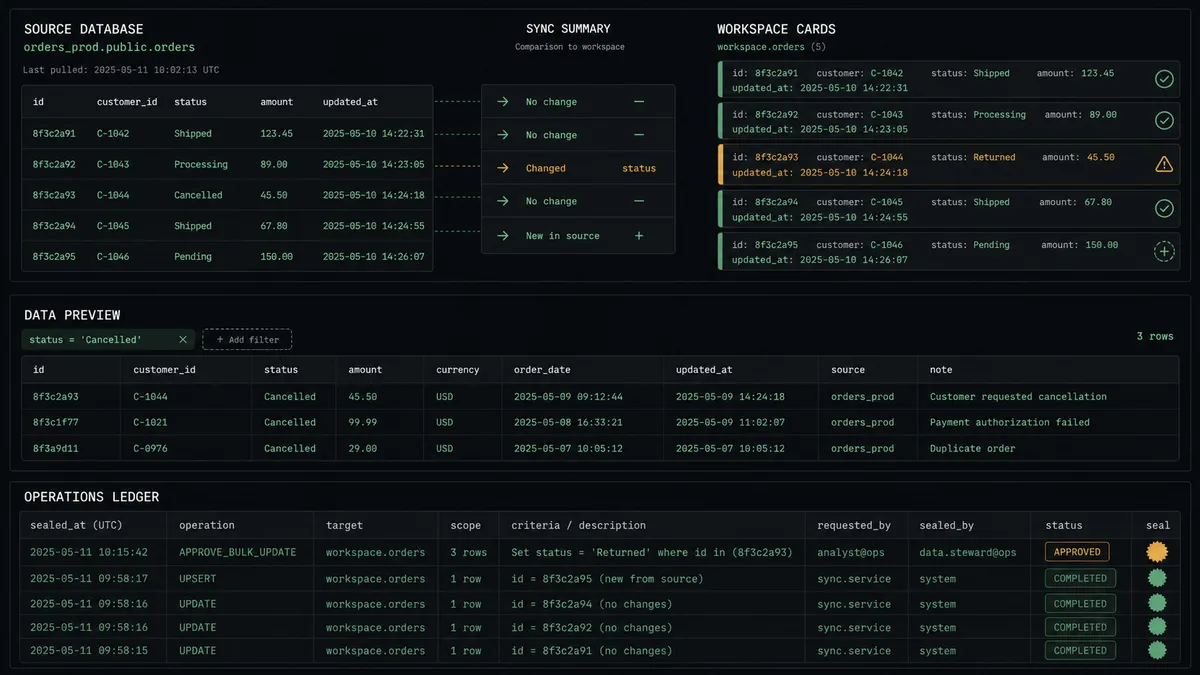
The operational mirror. Query Table Records feeds a Notion database where each production record is a row the team can discuss, comment on, and annotate. Update Database Item keeps it current on every run, so the workspace argues from live data instead of exports.
The previewed cleanup pipeline. Data-hygiene passes, deactivating stale records, purging confirmed duplicates, run as staged proposals: the agent drafts the filter, previews the count and sample with Query Table Records, and executes Update Table Records or Delete Table Records only after the owner approves.
The intake bridge. Requests and records captured in Notion, new vendors, new cases, new entries from a team template, are validated by the agent against the live schema from Describe Table and inserted with Insert Table Record, so the production app receives clean rows without anyone re-entering them.
The view-to-brief reporter. Query View Records reads the saved views that already join your tables, and the agent writes a structured summary page into Notion with Create Page and Add Content To Page, so recurring reports assemble themselves from the app’s own views.
The schema watchdog. Each run compares List Tables and Describe Table output against the last known schema and logs changes to a Notion page, so builders see the app’s evolution on the record instead of discovering it when something breaks.
Getting started
Start on the free plan: 100 executions a month, every integration included, no credit card required, plus 14 days of Professional for new accounts. Both connectors are available on every tier, and every tier includes unlimited users and unlimited workflows, so the builders who maintain the app and the team who works the records share one flow.
Explore the integration details:
- Notion integration (23 actions covering pages, databases, blocks, and comments)
- Caspio integration (8 actions covering tables, views, queries, and bulk record operations)
Start building free at flowrunner.ai or book a demo to see a live Notion to Caspio workflow, bulk-write preview and all.
Frequently asked questions
Is it free to connect Notion and Caspio on FlowRunner?
You can build and run the connection on FlowRunner's free plan, which includes 100 executions a month and every integration with no credit card required, and new accounts also get 14 days of Professional. Both connectors are available on every FlowRunner tier, and every tier includes unlimited users and unlimited workflows.
Can I self-host the Notion to Caspio workflow?
Yes. FlowRunner offers a cloud-hosted option and a self-hosted option, so the connection can run inside your own environment.
Does the AI agent need my own OpenAI or Claude key?
FlowRunner uses a bring-your-own-keys model, so you connect the AI provider key you already have. You are not locked to one model.
What happens when a bulk write would touch more records than expected?
It stops. Before any Update Table Records or Delete Table Records, the agent runs the same filter through Query Table Records, counts the matches, and samples rows. When the count diverges from what the requested change implied, the operation is held and the operations owner sees the Where clause, the count, and the sample before anything runs.
Neither Notion nor Caspio has a trigger, so what starts the workflow?
A schedule. The workflow calls Query Table Records and Query View Records on an interval to pull new and changed rows into Notion, and reads the Notion database for team edits to write back. Schema is discovered each run with List Tables and Describe Table.
Does the sync break when someone changes the Caspio app?
It adapts. The agent reads the schema at runtime with List Tables and Describe Table instead of assuming field names, so a renamed or added field is discovered on the next run and flagged if the mapping needs a decision.