How to Connect Notion with Kintone (With or Without an AI Agent)
Keep Kintone app records and a Notion database in two-way sync, with an AI agent that reconciles conflicting edits and pauses for the record owner before Delete Records or a bulk Update Records touches the system of record.
How do you connect Notion to Kintone?
You connect Notion to Kintone with a scheduled workflow that pulls changed records from Kintone with Query Records, lands them in a Notion database with Find or Create Database Item and Update Database Item, and carries Notion-side edits back with Update Record, keyed on the Kintone record number stored as a Notion property. Neither connector exposes an event trigger, so the workflow runs on a schedule, typically hourly. FlowRunner is a visual AI-agent orchestration platform where automations run autonomously and pause for human judgment on the steps that carry real consequence. Run as an agent, the connection handles the part two-way sync tools fumble: it detects when both sides edited the same record, reconciles the conflict with a person instead of a timestamp, and holds Delete Records and bulk writes for the record owner, because Kintone is the system of record.
The problem it solves
Plenty of teams run this exact split. Kintone holds the official records: the vendor register, the contract pipeline, the maintenance log, the app the back office built and audits. Notion holds the working layer: the project docs, the meeting notes, the planning database where the same records get discussed and annotated. The two describe the same reality, so someone keeps them aligned by hand: re-typing status changes from Kintone into the Notion tracker, then remembering to carry decisions from Notion back into Kintone before the weekly review.
The failure modes are predictable. The Notion tracker says the contract moved to signed; Kintone still says negotiating, and the official report goes out wrong. Someone cleans up the Notion database, and the cleanup quietly implies deleting records that Kintone is legally required to keep. Worst of all is the double edit: ops updates a record in Kintone the same afternoon a project lead edits its Notion twin, and whichever manual copy happens last erases the other person’s work without anyone noticing. Sync is easy when nothing conflicts. The whole job is what happens when it does.
How it works: the connection
The connection reads and writes both systems. Here is the plain version, grounded in the real connector actions.
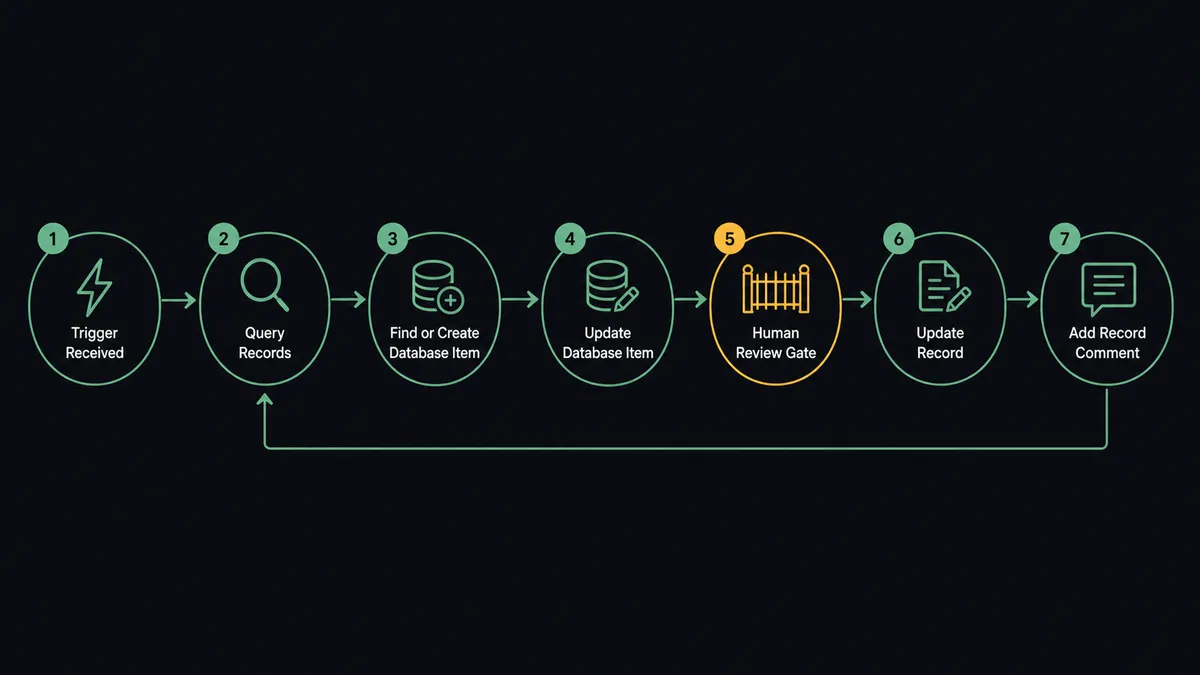
- Trigger: On a schedule, the hourly run opens the pass.
- Read Kintone: Query Records pulls records changed since the last pass, and Get Form Fields confirms the app’s schema has not shifted.
- Land in Notion: Find or Create Database Item matches each record by its stored record number, and Update Database Item applies the changed fields. New records become new items.
- Read Notion: The run compares the database’s items against the last synced state to isolate Notion-side edits.
- Write back: Clean, single-record changes flow to Kintone with Update Record, one call per record.
- Batch carefully: Genuinely new rows created in Notion are staged for Add Record, and anything bulk-shaped, many records changed the same way, is held for review rather than fired as Update Records.
- Log: Add Record Comment writes a sync note on the Kintone side so the official record shows what changed and why.
That is the “just connect them” answer. Both tools describe the same reality on a one-hour delay, and nobody re-types anything.
Can an AI agent run it? (and why a human stays in the loop)
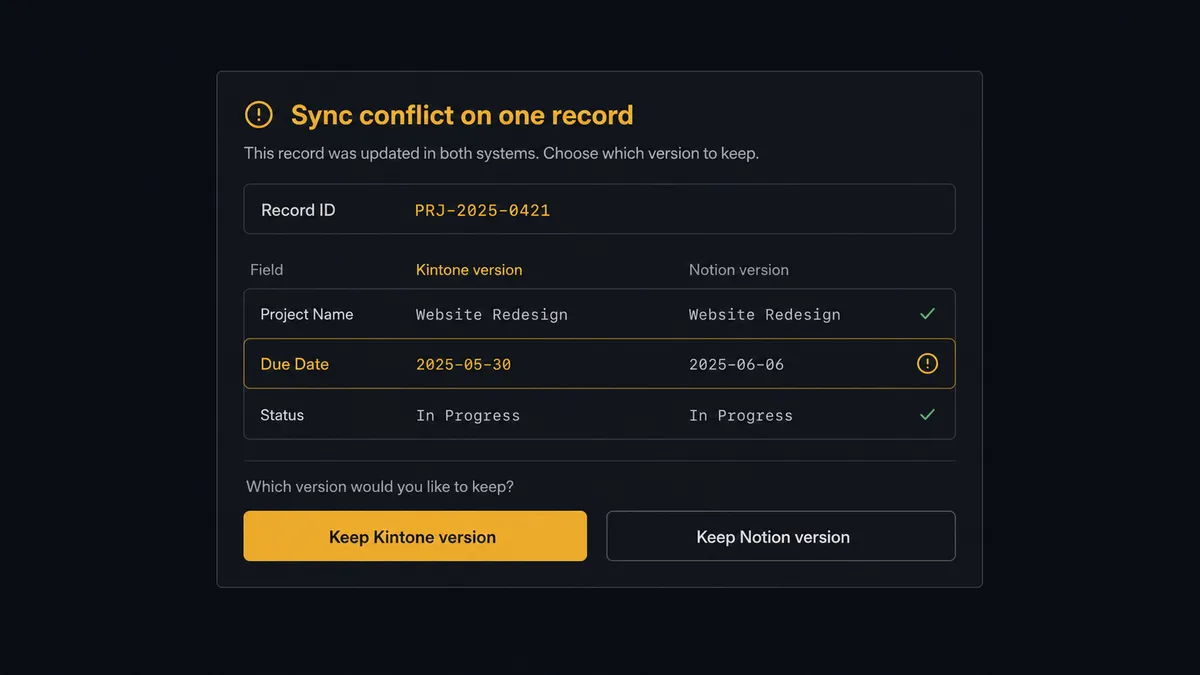
Yes, and conflict handling is the reason to want one. A naive two-way sync resolves every conflict the same way: last writer wins, which means somebody’s work loses. The agent holds Query Records, Get Record, Get Form Fields, Find or Create Database Item, Update Database Item, Update Record, Add Record, Update Records, Delete Records, and Add Record Comment as tools, and it reasons about each divergence. Both sides touched different fields of the same record? Merge them, log it. Both sides touched the same field? That is not a sync problem, that is a disagreement between two colleagues, and software should not settle it.
The consequential steps are the ones that rewrite the system of record. Delete Records removes official data; Update Records can restate hundreds of rows in one call; and a merge decision on a contested field determines which version of events the company keeps. Before any of these, the agent invokes a human-in-loop flow it holds as a callable tool. The workflow pauses and posts to the team channel: “Conflict on record [number]: Kintone shows [value] set by ops, Notion shows [value] set by the project lead, both since the last pass. Which version stands, or should they talk first?” Only after the record owner answers does the write land, and Add Record Comment stamps the decision, the approver, and the timestamp onto the record itself.
FlowRunner prospects call this the digital andon cord. Like Toyota’s line-stop cord, the sync stops the line the moment two sources of truth disagree, and the person accountable for the record, not a timestamp comparison, decides what is true.
FlowRunner vs Fivetran
Fivetran is the reference answer when the job is replicating many SaaS sources into a warehouse: hundreds of managed connectors, dependable incremental syncs, and schema handling that scales past what any team wants to hand-maintain. For analytics replication at fleet scale, it has earned the default position.
This job is not that job. Notion-to-Kintone is an operational, two-way sync between two live systems people edit all day, and Fivetran’s model is a one-way pipe into a destination: no write-back, no concept of a conflict, and no native way to pause a load for a human decision. Its consumption pricing on monthly active rows also fits analytics budgets better than operational ones.
| What matters for this pair | FlowRunner | Fivetran |
|---|---|---|
| Human-in-the-loop on deletes and bulk writes | Native. The agent pauses before Delete Records and bulk Update Records | No native human gate; syncs propagate automatically |
| Who runs the flow | An AI agent reconciles conflicts and picks actions as tools | Managed connector on a schedule, no reasoning layer |
| Direction | Two-way: Kintone to Notion and Notion back to Kintone | One-way ELT into the destination |
| Bring your own AI keys | Yes, BYOK | Not applicable; no agent layer |
| Self-hosted option | Yes, cloud-hosted or self-hosted | Cloud service; self-hosted options are limited to specific deployment models |
| Pricing model | Transparent workflow-based tiers | Consumption-based monthly active rows, moves with your data volume |
If you need Kintone data in a warehouse for BI alongside forty other sources, Fivetran is the right tool for that lane. If you need the working tool and the system of record to agree, with a person arbitrating every contested write, this pairing is the better fit.
Before and after
| Category | Before | After |
|---|---|---|
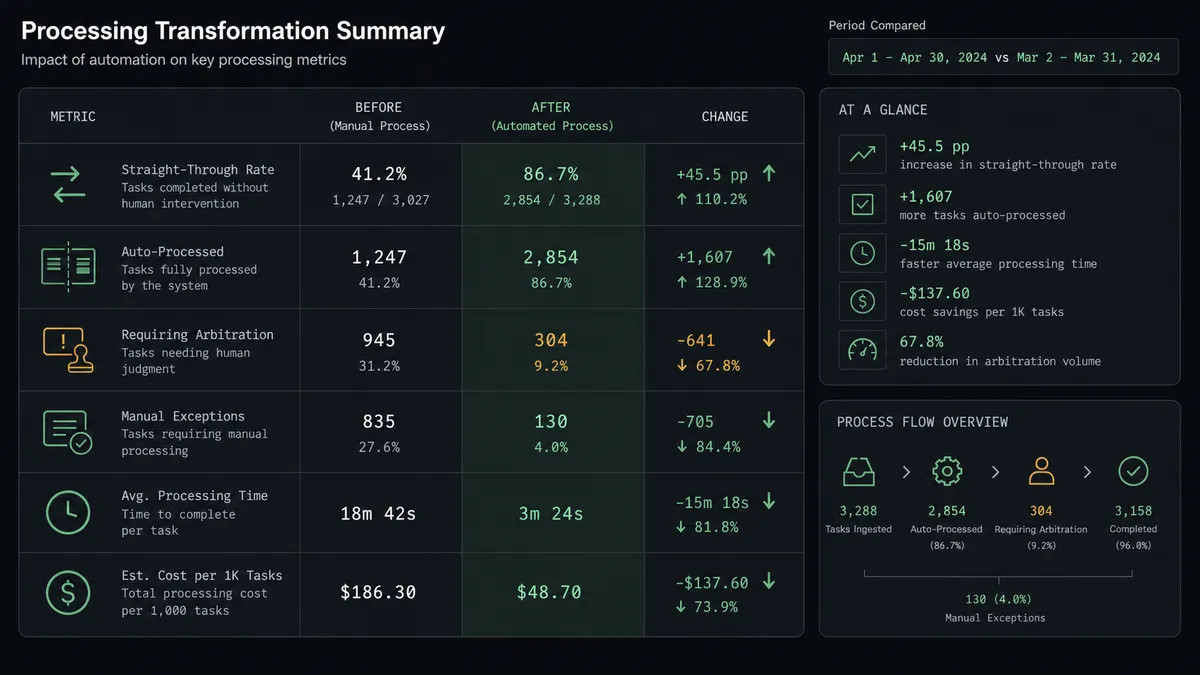
| Alignment | Someone re-types changes between Kintone and Notion before each review | Both sides converge every hour, keyed on the Kintone record number |
| Conflicting edits | The last manual copy silently erases the other person’s change | Conflicts are detected against the last synced state and arbitrated by a person |
| Deletions | A Notion cleanup can quietly imply deleting official records | Delete Records never runs without the record owner’s sign-off |
| Bulk changes | A mass edit propagates before anyone realizes its scope | Bulk-shaped writes are staged, summarized, and approved before they land |
| Traceability | Nobody can say why a Kintone field changed | Add Record Comment stamps every synced change with source and approver |
What you can build
Hourly two-way record sync. Query Records feeds Find or Create Database Item and Update Database Item; Notion edits return through Update Record. The back office keeps Kintone, the project team keeps Notion, and both stop paying the re-typing tax.
Conflict arbitration queue. Every contested field becomes an approval card with both versions side by side. The owner picks, the agent writes, Add Record Comment logs the ruling. Disagreements get resolved by people, on purpose, with a record.
Guarded intake lane. New rows drafted in the Notion database are validated against Get Form Fields, staged as Add Record proposals, and land in Kintone after review, so the official app gains a friendly front door without losing control of what enters.
Bulk-change circuit breaker. When the Notion diff shows many records changed the same way, the agent assembles one summary, holds the Update Records call, and asks whether the mass edit was intentional before the system of record absorbs it.
Schema watch on both ends. Each pass compares Get Form Fields and Get Database output against the previous run and posts a digest when either side’s fields changed, so mapping breaks are caught by the agent instead of by a failed write.
Getting started
Start on the free plan: 100 executions a month, every integration included, no credit card required, plus 14 days of Professional for new accounts. Both connectors are available on every tier, and every tier includes unlimited users and unlimited workflows.
Explore the integration details:
- Notion integration (23 actions covering pages, databases, blocks, and properties)
- Kintone integration (10 actions covering records, queries, comments, and form fields)
Start building free at flowrunner.ai or book a demo to see a live Notion to Kintone workflow, conflict arbitration and all.
Frequently asked questions
Is it free to connect Notion and Kintone on FlowRunner?
You can build and run the connection on FlowRunner's free plan, which includes 100 executions a month and every integration with no credit card required, and new accounts also get 14 days of Professional. Both connectors are available on every FlowRunner tier, and every tier includes unlimited users and unlimited workflows.
Can I self-host the Notion to Kintone workflow?
Yes. FlowRunner offers a cloud-hosted option and a self-hosted option, so the connection can run inside your own environment.
Does the AI agent need my own OpenAI or Claude key?
FlowRunner uses a bring-your-own-keys model, so you connect the AI provider key you already have. You are not locked to one model.
What happens when the same record is edited in both Notion and Kintone between runs?
Neither edit silently wins. The agent detects the conflict by comparing both sides against the last synced state, posts the two versions field by field to the team channel, and applies the merge only after a person chooses. The decision is logged on the Kintone side with Add Record Comment.
Which Notion and Kintone actions does this workflow use?
Both connectors are action-based, so the workflow runs on a schedule. It reads Kintone with Query Records, Get Record, and Get Form Fields, writes to Notion with Find or Create Database Item and Update Database Item, and writes back with Update Record, with Delete Records and bulk Update Records held behind approval.
Can the sync delete records in Kintone when items are removed from Notion?
Only with sign-off. A removal in Notion becomes a proposed Delete Records call that waits for the record owner, because Kintone is the system of record and deletion there is the one operation the sync should never take on its own.