How to Connect Notion with Keboola (With or Without an AI Agent)
Land Notion databases in Keboola Storage on a nightly schedule, with an AI agent that detects schema drift before it corrupts a table and pauses for a data owner before any destructive import or production job run.
How do you connect Notion to Keboola?
You connect Notion to Keboola with a scheduled workflow that reads each tracked Notion database’s schema with Get Database, walks its items with Get Block Children, Get Page, and Get Page Property Item, and lands the rows in Keboola Storage with Import Data to Table, then kicks the downstream transformation with Run Job. Neither connector exposes an event trigger, so the workflow runs on a schedule, typically nightly. FlowRunner is a visual AI-agent orchestration platform where automations run autonomously and pause for human judgment on the steps that carry real consequence. Run as an agent, the connection gains the thing a dumb extractor lacks: it diffs the schema on every run, notices when a Notion edit would rewrite the table underneath your transformations, and pauses for the data owner before any destructive import, table deletion, or production job run.
The problem it solves
Notion databases are where operating data actually lives in a lot of companies: the project tracker, the vendor list, the content calendar, the lightweight CRM the sales team refuses to give up. Analytics needs that data in the platform next to everything else. Today the bridge is an export. Someone downloads a CSV, fixes the column names, uploads it to Keboola, and repeats the ritual whenever the dashboard looks stale. The data in the warehouse is a photograph of Notion from whenever someone last had twenty minutes.
The deeper problem is that Notion schemas are soft. Anyone with edit access can rename Status to Stage, retype a select into multi-select, or delete a property that a transformation depends on, and Notion will not object, because flexibility is the product. A pipeline that extracts blindly carries that change straight into Storage, where it lands as a broken column mapping or a silently truncated table, and the first person to notice is whoever trusts the dashboard least. Schema drift in a tool designed for drift is not an edge case. It is the steady state.
How it works: the connection
The connection reads Notion and writes to Keboola. Here is the plain version, grounded in the real connector actions.
- Trigger: On a schedule, the nightly run opens after the day’s edits settle.
- Read the schema: Get Database pulls each tracked database’s current properties, fresh every run, never cached.
- Walk the items: Get Block Children enumerates the database’s pages, and Get Page with Get Page Property Item pulls each item’s property values, including paginated relation and people fields.
- Locate the destination: List Buckets and List Tables in Bucket find the target table, and Create Bucket provisions a destination for a newly tracked database.
- Load: Import Data to Table lands the rows incrementally, keyed on the Notion page ID.
- Transform: Run Job kicks the staging transformation, and Get Job polls until it completes.
- Verify: Preview Table Data samples the loaded table so the run’s log shows what actually landed, not what was supposed to.
That is the “just connect them” answer. The Notion workspace becomes a queryable, current input to the data platform without anyone touching a CSV.
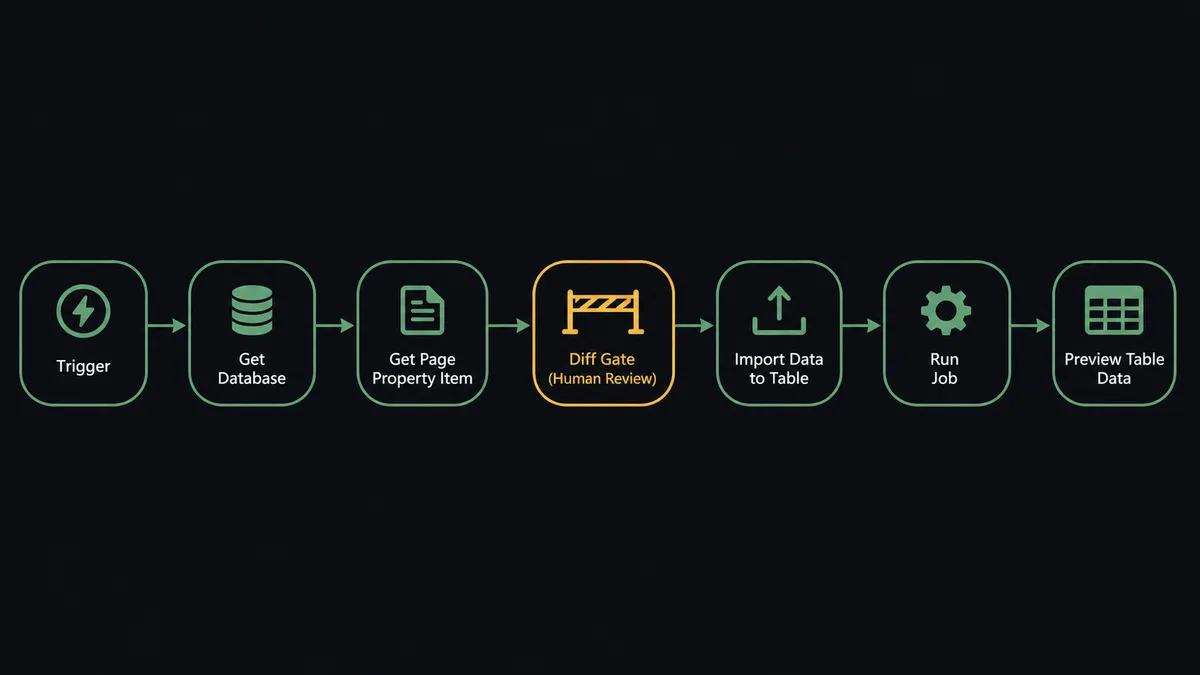
Can an AI agent run it? (and why a human stays in the loop)
Yes, and drift handling is where the agent stops being optional. A static pipeline maps columns once and breaks quietly. The agent holds Get Database, Get Block Children, Get Page, Get Page Property Item, List Buckets, Create Bucket, List Tables in Bucket, Import Data to Table, Delete Table, Run Job, Get Job, and Preview Table Data as tools, and its first job each night is comparison, not extraction. It diffs tonight’s schema against the last successful run’s. A new property is easy: extend the mapping, note it in the run log. A renamed property is a judgment call: is Stage the old Status, or something new? A deleted property that three transformations reference is a decision nobody should automate.
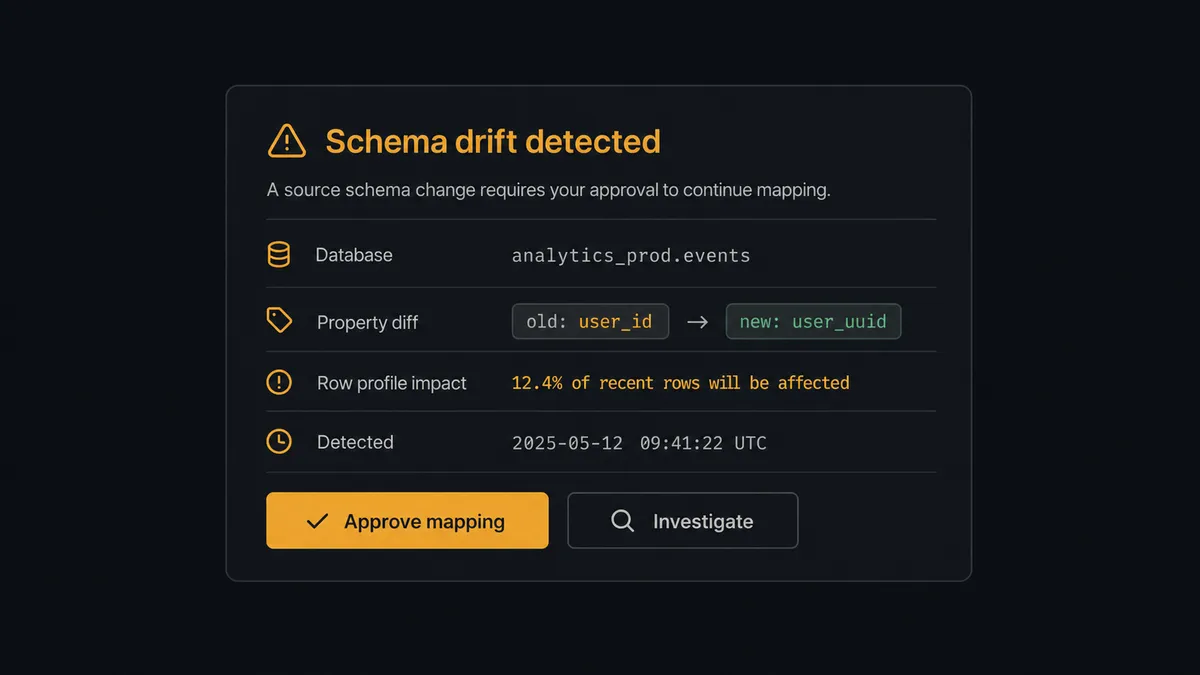
The consequential steps are the ones that rewrite state. A full-overwrite Import Data to Table replaces a table’s contents; Delete Table removes it entirely; Run Job against a production configuration pushes whatever just landed into every downstream output. Before any of these, the agent invokes a human-in-loop flow it holds as a callable tool. The workflow pauses and posts to the data channel: “Schema drift in [database]: property [old name] appears renamed to [new name], and tonight’s row count is far below the trailing profile. Proposed: map rename, hold production job. Approve mapping, or investigate first?” Only after the data owner answers does the load proceed, and the decision rides with the run in the audit trail.
FlowRunner prospects call this pattern a digital andon cord, and the metaphor is exact here. Like Toyota’s line-stop cord, the pipeline stops the line the moment the material coming down it stops matching the spec, and the person accountable for the data decides whether the line restarts.
FlowRunner vs Fivetran
If your problem is landing dozens of SaaS sources into a warehouse with managed, incremental ELT, Fivetran is the category benchmark, and it is very good at exactly that: hundreds of maintained connectors, automated schema handling at volume, and tight dbt orchestration. Data teams standardize on it for a reason.
This pair sits in Fivetran’s blind spot from two directions. Notion-shaped operational sources are the long tail where teams end up writing custom functions anyway, and Fivetran’s model is a one-way pipe with no judgment in it: whatever the source did, the sync propagates. There is no native concept of pausing a load for a human, and consumption pricing on monthly active rows makes costs move with your data instead of your plan.
| What matters for this pair | FlowRunner | Fivetran |
|---|---|---|
| Human-in-the-loop on destructive loads | Native. The agent pauses before overwrite imports, Delete Table, and production Run Job | No native human gate; syncs propagate source changes |
| Who runs the flow | An AI agent diffs schemas, reasons about drift, and picks actions as tools | Managed connector runs on schedule, no reasoning layer |
| Direction | Two-way: loads to Keboola, writes results back to Notion | One-way ELT into the destination |
| Bring your own AI keys | Yes, BYOK | Not applicable; no agent layer |
| Self-hosted option | Yes, cloud-hosted or self-hosted | Cloud service; self-hosted options are limited to specific deployment models |
| Pricing model | Transparent workflow-based tiers | Consumption-based monthly active rows, hard to predict as sources grow |
If you are syncing a large fleet of standard SaaS sources into Snowflake for BI, use Fivetran and be happy. If the job is one drift-prone operational source that needs judgment, write-back, and an approval trail, this pairing is the better fit.
Before and after
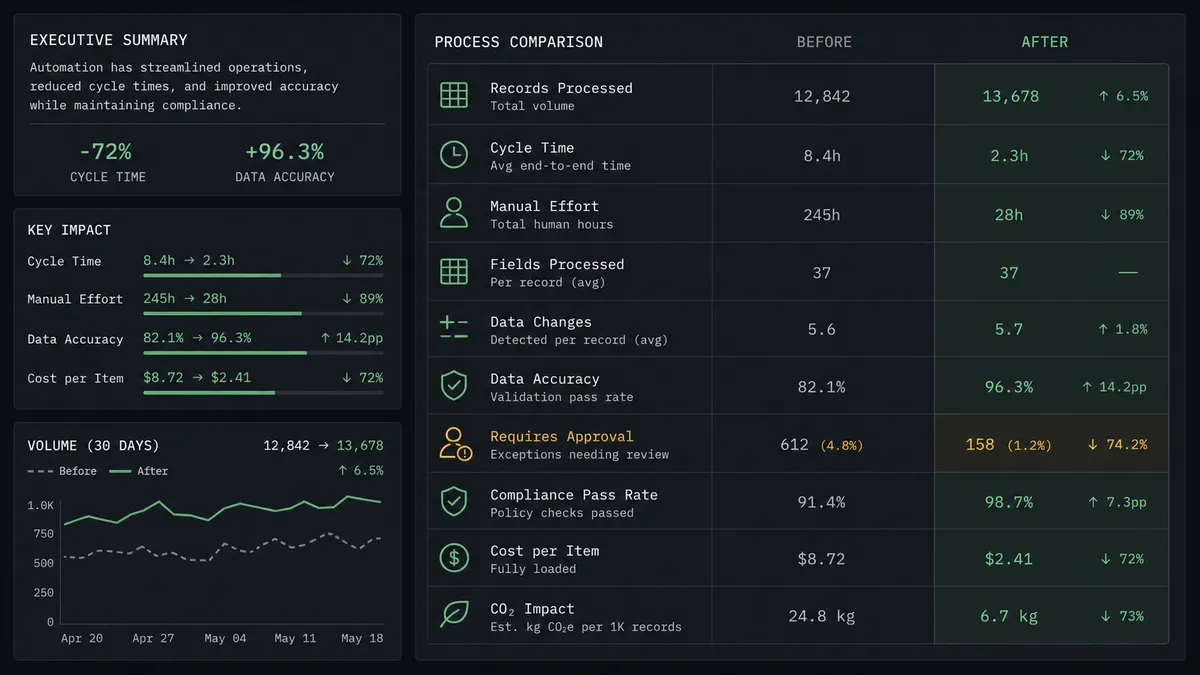
| Category | Before | After |
|---|---|---|
| Freshness | Storage holds a CSV snapshot from whenever someone last exported | The nightly run lands current rows keyed on Notion page IDs |
| Schema changes | A renamed property breaks the load or corrupts the mapping silently | Every run diffs the schema and drift becomes a reviewed decision |
| Destructive operations | An overwrite or table drop is one bad script away | Overwrites, deletions, and production jobs wait for a named approver |
| Verification | Nobody checks what actually landed until a dashboard looks wrong | Preview Table Data and Get Job put the evidence in every run log |
| Reporting back | Notion users never see warehouse-derived answers | Results write back to Notion pages the team already reads |
What you can build
Nightly workspace extract. The run walks each tracked database with Get Database and Get Page Property Item, lands rows via Import Data to Table, and kicks the staging transformation with Run Job. The workspace becomes a first-class source in Keboola without an engineer babysitting exports.
Drift sentinel. The agent’s schema diff runs even on databases you are not loading yet, posting a weekly digest of property changes across the workspace so the data team hears about breaking edits before a pipeline does.
Reverse reporting loop. After transformations finish, the agent reads results with Preview Table Data and writes summaries back into Notion with Create Page or Update Page Properties, so operators see warehouse-grade numbers inside the tool they actually open.
New-database onboarding. When a team asks to track a new database, the agent reads its schema, proposes the column mapping and destination bucket, provisions it with Create Bucket after approval, and adds it to the nightly run. Onboarding a source becomes a review, not a project.
Load-quality circuit breaker. When tonight’s row count collapses against the trailing profile, the agent completes the staging load, holds the production Run Job, and posts the comparison. Bad data stops at staging instead of reaching every downstream dashboard.
Getting started
Start on the free plan: 100 executions a month, every integration included, no credit card required, plus 14 days of Professional for new accounts. Both connectors are available on every tier, and every tier includes unlimited users and unlimited workflows.
Explore the integration details:
- Notion integration (23 actions covering pages, databases, blocks, and properties)
- Keboola integration (15 actions covering buckets, tables, imports, and jobs)
Start building free at flowrunner.ai or book a demo to see a live Notion to Keboola workflow, drift gate and all.
Frequently asked questions
Is it free to connect Notion and Keboola on FlowRunner?
You can build and run the connection on FlowRunner's free plan, which includes 100 executions a month and every integration with no credit card required, and new accounts also get 14 days of Professional. Both connectors are available on every FlowRunner tier, and every tier includes unlimited users and unlimited workflows.
Can I self-host the Notion to Keboola workflow?
Yes. FlowRunner offers a cloud-hosted option and a self-hosted option, so the connection can run inside your own environment.
Does the AI agent need my own OpenAI or Claude key?
FlowRunner uses a bring-your-own-keys model, so you connect the AI provider key you already have. You are not locked to one model.
What happens when someone changes the Notion database schema mid-sync?
The agent catches it before the import. It reads the schema with Get Database on every run, diffs it against the last known shape, and when a property was renamed, retyped, or removed it pauses and posts the diff to the data channel. The import runs only after the data owner decides how to map the change.
Which Notion and Keboola actions does this workflow use?
Both connectors are action-based, so the workflow runs on a schedule. It reads Notion with Get Database, Get Block Children, Get Page, and Get Page Property Item, and writes to Keboola with List Buckets, Create Bucket, List Tables in Bucket, Import Data to Table, and Run Job, verifying with Preview Table Data and Get Job.
Does the workflow trigger Keboola transformations after loading?
Yes, with a distinction. Run Job on a staging configuration runs automatically after a clean load, and Get Job confirms it finished. Run Job against a production pipeline configuration is approval-gated, so a questionable load never propagates downstream unreviewed.