How to Connect Notion with Lark Base (With or Without an AI Agent)
Mirror a shared tracker between Notion and Lark Base so each team works in its own suite, with an AI agent that reviews what crosses the boundary and pauses for an owner before records are shared or deleted.
How do you connect Notion to Lark Base?
You connect Notion to Lark Base with a scheduled workflow that pulls changed rows from the base with Search Records and List Records, mirrors them into a Notion database with Find or Create Database Item and Update Database Item, and carries Notion-side edits back with Update Record and Create Record, keyed on the Lark Base record ID stored as a Notion property. Neither connector exposes an event trigger, so the workflow runs on a schedule, typically hourly. FlowRunner is a visual AI-agent orchestration platform where automations run autonomously and pause for human judgment on the steps that carry real consequence. Run as an agent, the connection treats the sync as what it really is when two different teams live in two different suites: a boundary crossing, where the agent reviews what is about to become visible to the other side and holds deletions and flagged rows for a named owner.
The problem it solves
This split shows up whenever an organization spans suites. The product team at headquarters runs everything in Notion. The regional team, the manufacturing partner, or the newly acquired company runs everything in Lark, and their tracker lives in Lark Base. Both teams need the same launch tracker, vendor list, or issue log, so today someone maintains it twice: copying rows across every few days, translating field names in their head, and fielding messages about why the two versions disagree.
The edges are sharper than ordinary sync drift because the two sides are different audiences. A row tagged internal in the Notion tracker gets copied into the shared base by someone who did not check the tag, and now the partner can read it. A row deleted in one suite lingers in the other for weeks, so the teams argue about work that one side thinks was cancelled. And because the copying is manual, it happens least often exactly when the project is busiest, which is when alignment matters most. The cost is not just duplicated effort. It is that every cross-team meeting starts by reconciling two versions of the truth.
How it works: the connection
The connection reads and writes both systems. Here is the plain version, grounded in the real connector actions.
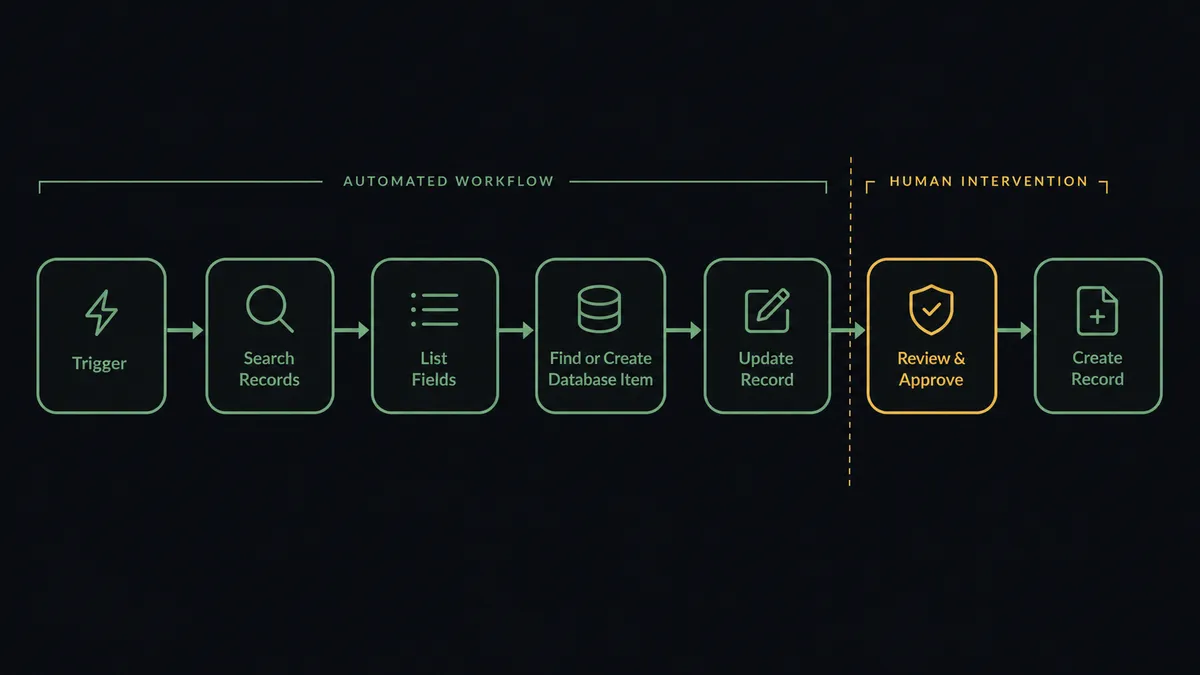
- Trigger: On a schedule, the hourly run opens the mirror pass.
- Read the base: Search Records pulls rows changed since the last pass, List Records fills gaps on the first run, and List Fields confirms the table’s schema still matches the mapping.
- Mirror to Notion: Find or Create Database Item matches each row by its stored record ID, and Update Database Item applies the changed fields. New rows become new items.
- Read Notion: The run isolates Notion-side edits by comparing items against the last mirrored state.
- Write back: Clean field updates land in the base with Update Record.
- Stage new crossings: Rows newly created in Notion stage as Create Record proposals, screened before they become visible on the Lark side.
- Handle removals: A row removed in either suite becomes a proposed Delete Record or Notion archive, held for the owner rather than executed.
That is the “just connect them” answer. Each team keeps its own suite, and the tracker they share stops forking.
Can an AI agent run it? (and why a human stays in the loop)
Yes, and the agent’s job here is border control, not just copying. A plain mirror moves every row it finds, which is exactly the behavior that turns a tagging mistake into a disclosure. The agent holds List Tables, Create Table, List Fields, List Records, Get Record, Search Records, Create Record, Update Record, Delete Record, Find or Create Database Item, Update Database Item, and Update Page Properties as tools, and it reads each row before deciding which side of the boundary it belongs on. A routine status change crosses without ceremony. A row carrying an internal tag, a never-sync field with content in it, or a note that reads like it was not written for the other audience stops at the line.
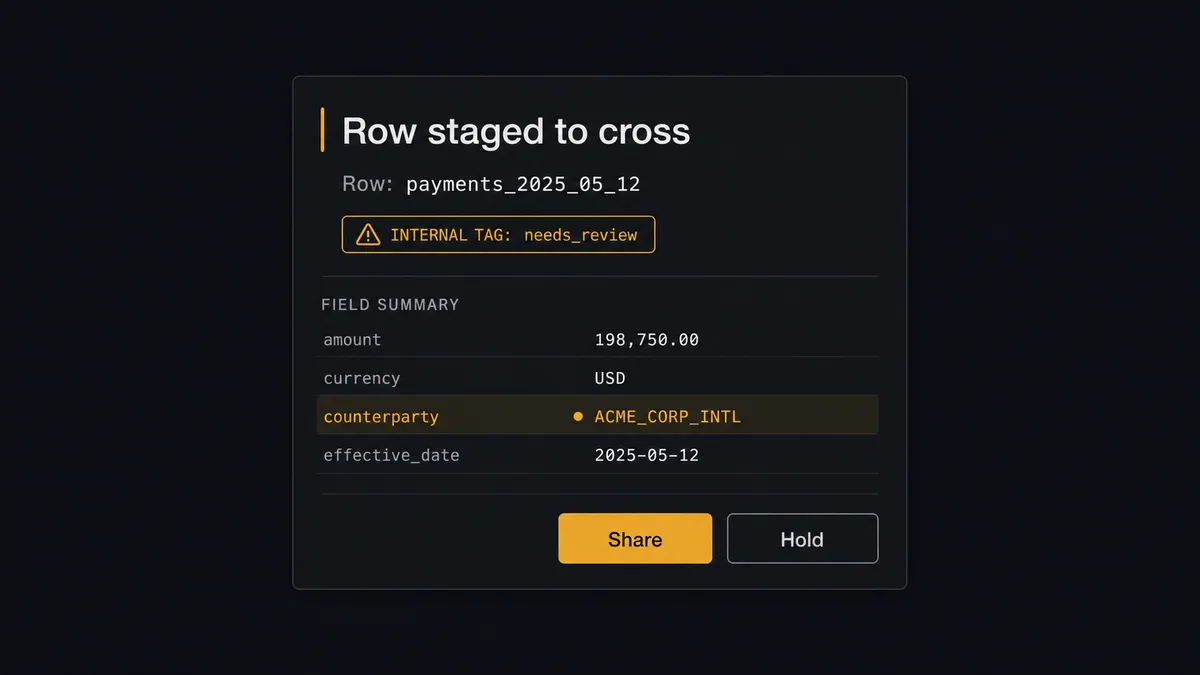
The consequential steps are sharing and deleting. Create Record into the mirrored base makes a row visible to everyone the base is shared with, and that cannot be unseen; Delete Record removes data from a table another team depends on. Before either, the agent invokes a human-in-loop flow it holds as a callable tool. The workflow pauses and posts to the owning team’s channel: “Row [name] is staged to cross into the shared base. It carries the internal tag from the Notion side. Share as is, share with the flagged fields removed, or hold?” Only after the owner answers does the row cross, and the run log records who cleared it. Deletions get the same treatment in both directions, so neither team’s cleanup quietly erases the other team’s work.
FlowRunner prospects call this pattern the digital andon cord. Like Toyota’s line-stop cord, the mirror stops the line the moment a row is about to do something irreversible, become visible or disappear, and a person makes the call.
FlowRunner vs Fivetran
For warehouse replication at scale, Fivetran is the standard for good reason: hundreds of managed connectors, reliable incremental syncs, and schema evolution handled without hand-maintenance. When the destination is Snowflake or BigQuery and the sources number in the dozens, it is the sensible default.
This workflow points the other way. It is an operational, bidirectional mirror between two collaboration suites, with a review step on what crosses. Fivetran’s model is a one-way pipe into an analytics destination: no write-back into Lark Base or Notion, no notion of a row that should not sync, and no native human gate anywhere in the path. Its monthly-active-rows pricing also tracks data churn, which an hourly operational mirror generates constantly.
| What matters for this pair | FlowRunner | Fivetran |
|---|---|---|
| Human-in-the-loop on shares and deletes | Native. The agent pauses before flagged Create Record crossings and every Delete Record | No native human gate; syncs propagate automatically |
| Who runs the flow | An AI agent screens each row and picks actions as tools | Managed connector on a schedule, no reasoning layer |
| Direction | Two-way mirror between live tools | One-way ELT into an analytics destination |
| Bring your own AI keys | Yes, BYOK | Not applicable; no agent layer |
| Self-hosted option | Yes, cloud-hosted or self-hosted | Cloud service; self-hosted options are limited to specific deployment models |
| Pricing model | Transparent workflow-based tiers | Consumption-based monthly active rows, sensitive to churn |
If the goal is analytics over Lark or Notion data alongside your other sources, Fivetran serves that lane well. If two teams in two suites need one tracker with a reviewed boundary between them, this pairing is the better fit.
Before and after
| Category | Before | After |
|---|---|---|
| Tracker upkeep | Someone copies rows between suites every few days by hand | The hourly mirror converges both sides, keyed on the record ID |
| Cross-team meetings | The first agenda item is reconciling the two versions | Both teams open the same numbers in their own tool |
| Accidental disclosure | An internal row is one careless copy away from the shared base | Flagged rows stop at the boundary until an owner clears them |
| Deletions | A cleanup on one side silently strands or erases the other | Delete Record waits for sign-off, in both directions |
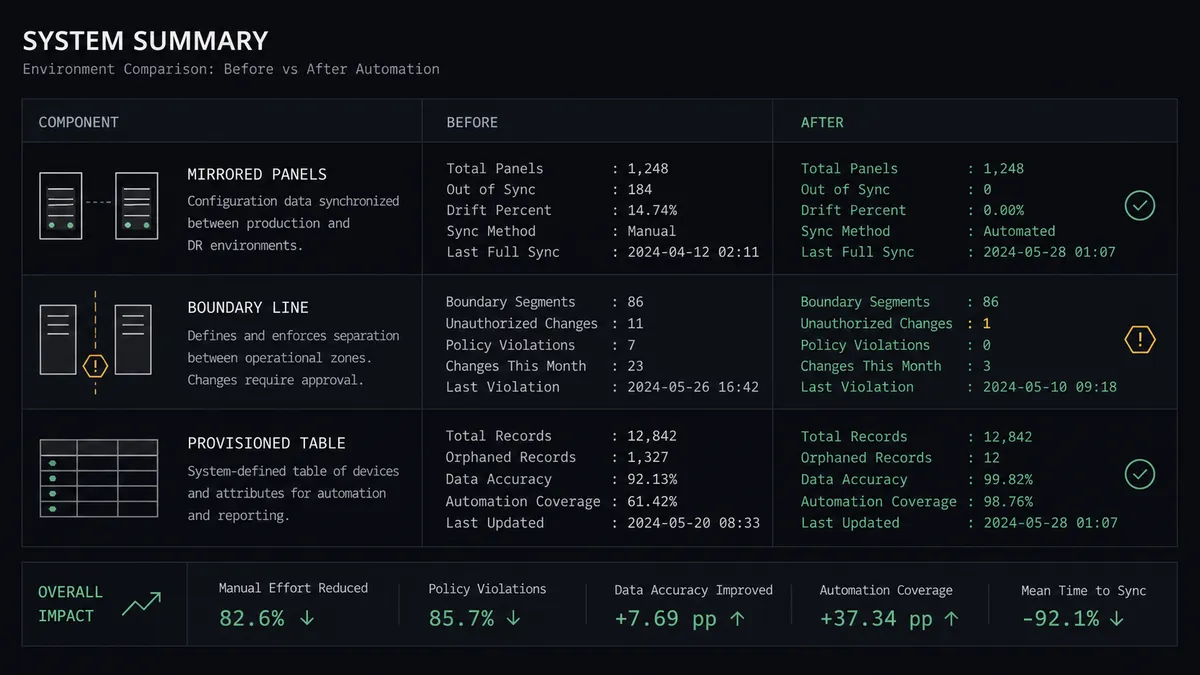
| Setup | The mirrored table is improvised and drifts from day one | Create Table provisions a reviewed structure from the approved mapping |
What you can build
Cross-suite launch tracker. The hourly pass mirrors the launch database both ways with Find or Create Database Item and Update Record, so headquarters works in Notion, the regional team works in Lark Base, and neither maintains the other’s copy.
Partner-facing subset. Only rows marked shareable cross into a base the partner can see, each screened by the agent and cleared by an owner before Create Record runs. The partner gets a live view without ever getting the internal one.
First-run provisioning. Pointed at an empty base, the agent reads the Notion schema, proposes the field layout, and builds the destination with Create Table and the approved mapping, so the mirror starts structured instead of accreting columns ad hoc.
Two-sided cleanup with consent. Rows archived in Notion become Delete Record proposals; rows deleted in the base become archive proposals in Notion. Each list is reviewed weekly, so both teams prune with a record of who agreed.
Boundary audit digest. Weekly, the agent posts everything that crossed, everything that was held, and who cleared what, drawn from the run logs, so the question “what can the other side see” always has a current answer.
Getting started
Start on the free plan: 100 executions a month, every integration included, no credit card required, plus 14 days of Professional for new accounts. Both connectors are available on every tier, and every tier includes unlimited users and unlimited workflows.
Explore the integration details:
- Notion integration (23 actions covering pages, databases, blocks, and properties)
- Lark Base integration (9 actions covering tables, fields, and records)
Start building free at flowrunner.ai or book a demo to see a live Notion to Lark Base workflow, boundary review and all.
Frequently asked questions
Is it free to connect Notion and Lark Base on FlowRunner?
You can build and run the connection on FlowRunner's free plan, which includes 100 executions a month and every integration with no credit card required, and new accounts also get 14 days of Professional. Both connectors are available on every FlowRunner tier, and every tier includes unlimited users and unlimited workflows.
Can I self-host the Notion to Lark Base workflow?
Yes. FlowRunner offers a cloud-hosted option and a self-hosted option, so the connection can run inside your own environment.
Does the AI agent need my own OpenAI or Claude key?
FlowRunner uses a bring-your-own-keys model, so you connect the AI provider key you already have. You are not locked to one model.
What happens when the agent is unsure whether a record should cross into the shared base?
It holds the record at the boundary. Anything tagged internal, containing fields that never sync, or simply ambiguous gets posted to the owning team's channel with the full row shown, and it crosses only after a person clears it. Uncertain rows wait; they are never shared by default.
Which Notion and Lark Base actions does this workflow use?
Both connectors are action-based, so the workflow runs on a schedule. It reads Lark Base with List Tables, List Fields, List Records, and Search Records, reads and writes Notion with Find or Create Database Item and Update Database Item, and writes to Lark Base with Create Record and Update Record, with Delete Record held behind approval.
Can the mirror set up the Lark Base table by itself?
Yes. On first run the agent reads the Notion database schema, proposes a field layout, and after approval provisions the table with Create Table and its columns from the mapping, so the mirror starts from a reviewed structure rather than an improvised one.