How to Connect Notion with Basecamp (With or Without an AI Agent)
Turn Notion database rows into Basecamp projects, to-do lists, and schedules automatically, with an AI agent that builds the workspace on its own and pauses for a human before Trash Project tears anything down.
How do you connect Notion to Basecamp?
You connect Notion to Basecamp with a scheduled workflow that calls Find Database Item to pull tracker rows whose status changed, then builds the corresponding Basecamp workspace: Create Project for the container, Create To-do List and Create To-do for the task plan, Create Schedule Entry for the kickoff, and Create Message for the announcement. Notion has no trigger in FlowRunner, so the schedule drives the sync, and Basecamp’s project dock resolution means the workflow only ever needs a project id. FlowRunner is a visual AI-agent orchestration platform where automations run autonomously and pause for human judgment on the steps that carry real consequence. Run as an AI agent, the same connection decides per row whether to create, update, or retire, and it never calls Trash Project without a named human sign-off, because Basecamp permanently deletes trashed projects after 30 days.
The problem it solves
Lots of teams plan in Notion and execute in Basecamp. The pipeline database in Notion holds every engagement, launch, or client project with its scope, owner, and dates, and Basecamp is where the delivery team actually works. The bridge between them is a person with two tabs open: when a row flips to ready, someone creates the Basecamp project, retypes the description, rebuilds the task list from the template doc, books the kickoff, and posts the announcement. Twenty minutes of clicking per project, done slightly differently every time.
The drift is the deeper cost. The Notion row says the project started Monday; the Basecamp project appears Thursday. One project gets the full task template, the next gets an abbreviated version because its creator was rushed. Cancelled rows are worst of all: the Notion database says dead, but the Basecamp project lives on, collecting confused to-dos, until someone dares to trash it, or nobody does, and the account fills with zombie projects that make List Projects useless as a picture of what is actually in flight.
How it works: the connection
The connection reads from Notion on a schedule and builds in Basecamp. Here is the plain version, grounded in the real connector actions.
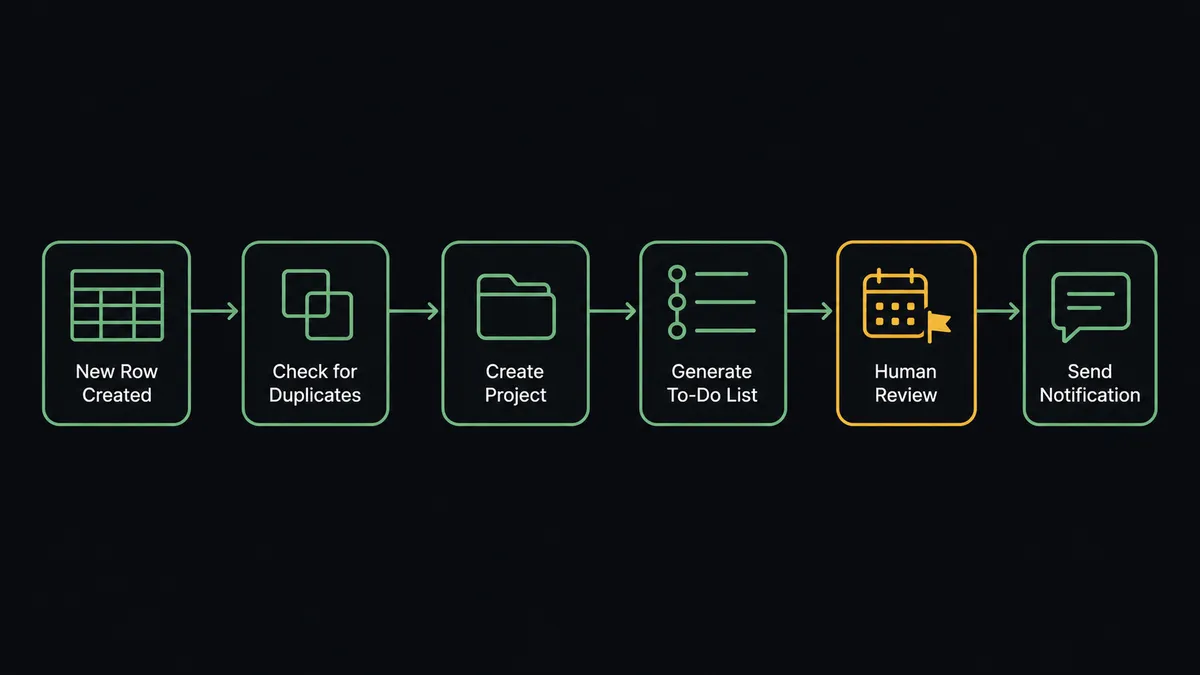
- Trigger: On a schedule, the workflow calls Find Database Item to pull rows whose status changed since the last run.
- Check for an existing project: It calls List Projects to see whether the row already has a Basecamp workspace, avoiding duplicates.
- Create the container: For a ready row with no project, it calls Create Project with the row’s name and description.
- Build the plan: It calls Create To-do List for each phase and Create To-do for each task, setting due dates from the row’s dates and assignees from List Project People.
- Book the kickoff: It calls Create Schedule Entry with the kickoff time and participants.
- Announce: It calls Create Message on the project’s message board with the scope summary, so the team reads one canonical brief.
- Write back: It calls Update Database Item to stamp the Notion row with the created project’s link and status.
That is the “just connect them” answer. A status change in the planning database becomes a fully built, consistently structured workspace in the execution tool, and the two systems agree about what exists.
Can an AI agent run it? (and why a human stays in the loop)
Yes, and the agent handles what a template cannot: the rows that do not fit the pattern. It holds the Basecamp actions as tools, List Projects, Get Project, Create Project, Create To-do List, Create To-do, Create Schedule Entry, Create Message, Update Project, Trash Project, and reads each changed Notion row as a decision. A ready row with no workspace gets a full build. A scope change on an active row becomes Update Project and new to-dos rather than a duplicate project. A row whose dates moved gets its kickoff rebooked, not re-announced.
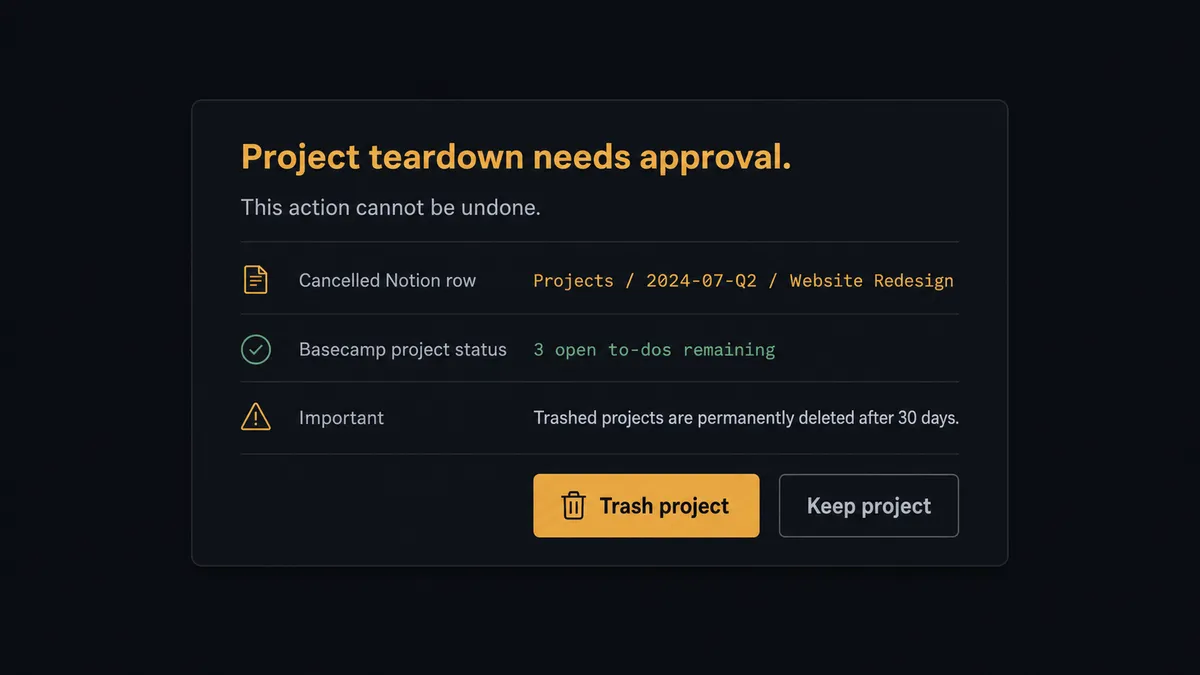
The consequential step is teardown. When a row flips to cancelled and a live Basecamp project matches it, Trash Project is not a routine cleanup: Basecamp hides trashed projects from everyone and permanently deletes them after 30 days. So the agent never trashes on its own reasoning. It invokes a human-in-loop flow it holds as a callable tool, and the workflow pauses and posts: “Notion row [name] is cancelled. Its Basecamp project has open to-dos and recent messages. Trash the project? It will be permanently deleted after 30 days.” A named approver confirms or overrides. Only then does Trash Project run, with the approver and timestamp in the audit trail and the outcome written back to the row with Update Database Item.
That is the digital andon cord for project operations: like Toyota’s andon cord, the workflow stops the line the moment a step cannot be walked back. Builds happen at machine speed; deletions get a witness.
FlowRunner vs n8n
A technical team can wire Notion to Basecamp in n8n, and the raw materials are good: n8n’s node library covers both services, its community shares workflow examples freely, and self-hosting under the fair-code license keeps starting costs low. For developers who want to own every branch of the logic, that control is a genuine draw.
The gap is who can run it and what happens at the destructive edge. In n8n, the create-versus-update decision, the duplicate check, and the teardown approval are all logic someone builds and maintains; an approval is a node placed in advance, not a tool an agent reaches for when it hits a project it should not delete. FlowRunner ships that orchestration as the product, usable by the ops person who owns the tracker.
| What matters for this pair | FlowRunner | n8n |
|---|---|---|
| Human-in-the-loop on Trash Project | Native. The agent invokes the approval flow as a callable tool before any teardown | Wait and approval nodes exist; the escalation logic is yours to build |
| Who runs the flow | An AI agent reads each row, reasons, and picks create, update, or retire as tools | Node graph a developer designs and maintains |
| Users included | Unlimited users on every tier | Cloud plans priced with limits; self-host to lift them |
| Bring your own AI keys | Yes, BYOK. Connect the AI provider key you already have | BYOK supported as well |
| Self-hosted option | Yes, cloud-hosted or self-hosted | Yes, fair-code self-hosting is its hallmark |
| Pricing model | Transparent workflow-based tiers, compliance from the $299/mo tier | Execution-based cloud pricing; full compliance features sit at Enterprise |
If your team has developers eager to own the pipeline, n8n gives them everything they need. If you want the tracker owner to run project setup and teardown safely, with the dangerous step gated and logged from day one, that is where FlowRunner is the better fit.
Before and after
| Category | Before | After |
|---|---|---|
| Project setup | Someone rebuilds each Basecamp workspace by hand from a template doc | A ready row becomes a full project, plan, kickoff, and announcement automatically |
| Consistency | Every project’s structure depends on who created it and how rushed they were | Every build follows the same structure drawn from the row’s own properties |
| Lag | The Notion status changes days before the Basecamp project appears | The next scheduled run builds the workspace, at whatever cadence you set |
| Zombie projects | Cancelled work lingers in Basecamp because trashing feels dangerous | Teardowns are proposed by the agent, approved by a person, and logged |
| Two-system truth | Notion and Basecamp quietly disagree about what is in flight | Update Database Item writes every outcome back to the tracker row |
What you can build
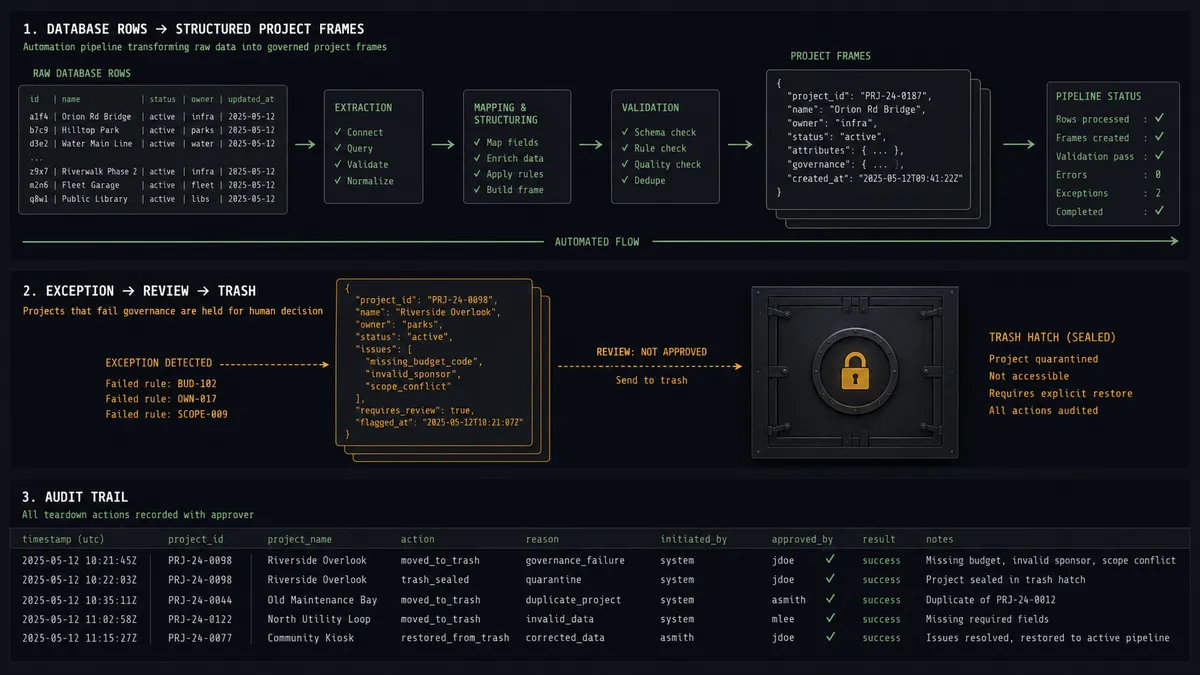
Ready-row project builder. Find Database Item catches the status flip, and the agent runs Create Project, Create To-do List, Create To-do, Create Schedule Entry, and Create Message in sequence, then stamps the row via Update Database Item with the new project’s link.
Gated teardown for cancelled work. Cancelled rows generate a teardown proposal with the project’s open to-do count attached. Trash Project runs only after a named approval, and the 30-day permanent deletion clock starts with a witness.
Scope-change propagation. When a row’s description or dates change, the agent calls Update Project and adjusts to-dos and the schedule entry instead of rebuilding, and posts a Create Message note so the team sees what moved and why.
Weekly delivery digest back to Notion. On a schedule, the agent reads each active project’s pulse with List To-dos, Get Todoset, and Get Campfire Lines, then writes a status summary into the tracker row with Update Database Item, so leadership reads delivery status without leaving Notion.
Kickoff logistics runner. For each new build, the agent pulls the right people with List Project People, books them via Create Schedule Entry with notification on, and drops a Create Campfire Line heads-up in the project chat so the kickoff never depends on someone remembering to invite the team.
Getting started
Start on the free plan: 100 executions a month, every integration included, no credit card required, plus 14 days of Professional for new accounts. Both connectors are available on every tier, and every tier includes unlimited users and unlimited workflows.
Explore the integration details:
- Notion integration (23 actions covering pages, databases, and comments)
- Basecamp integration (37 actions covering projects, to-dos, messages, and schedules)
Start building free at flowrunner.ai or book a demo to see a live Notion to Basecamp workflow, teardown approval and all.
Frequently asked questions
Is it free to connect Notion and Basecamp on FlowRunner?
You can build and run the connection on FlowRunner's free plan, which includes 100 executions a month and every integration with no credit card required, and new accounts also get 14 days of Professional. Both connectors are available on every FlowRunner tier, and every tier includes unlimited users and unlimited workflows.
Can I self-host the Notion to Basecamp workflow?
Yes. FlowRunner offers a cloud-hosted option and a self-hosted option, so the connection can run inside your own environment.
Does the AI agent need my own OpenAI or Claude key?
FlowRunner uses a bring-your-own-keys model, so you connect the AI provider key you already have. You are not locked to one model.
What happens when a Notion row is marked cancelled but the Basecamp project has activity?
The agent does not touch it alone. Because Basecamp permanently deletes trashed projects after 30 days, the agent posts the project name, its open to-do count, and the cancelled row to your channel and waits. Trash Project runs only after a named approver confirms, and the decision is written back to the Notion row.
Notion has no trigger in FlowRunner, so what starts the sync?
A schedule. Each run calls Find Database Item to pull rows whose status changed since the last check, then the agent decides per row whether to create, update, or propose a teardown in Basecamp.
Which Basecamp actions build the workspace from a Notion row?
Create Project stands up the workspace, Create To-do List and Create To-do build the task plan with assignees from List Project People, Create Schedule Entry books the kickoff, and Create Message posts the announcement. Get Project resolves the project's own tool ids automatically, so only the project id is needed.