How to Connect Notion with Aha! (With or Without an AI Agent)
Sync customer feedback from a Notion database into Aha! as ideas automatically, with an AI agent that dedupes and files on its own and pauses for a product lead before anything is promoted to a roadmap feature.
How do you connect Notion to Aha!?
You connect Notion to Aha! by polling your feedback database on a schedule with Find Database Item, reading each new row with Get Page, and filing it into Aha! with Create Idea after checking List Ideas for duplicates. The workflow then writes the Aha! reference back to Notion with Update Database Item, so both systems agree on what has been captured. FlowRunner is a visual AI-agent orchestration platform where automations run autonomously and pause for human judgment on the steps that carry real consequence. Run the same connection as an AI agent and it clusters related feedback, files ideas on its own, and pauses for a product lead before Create Feature turns any of it into a roadmap commitment.
The problem it solves
Feedback lives in Notion because that is where the rest of the company already works. Sales logs objections after calls, success logs churn-risk complaints, support pastes recurring gripes. Someone on the product team is supposed to move all of it into Aha!, where roadmap decisions actually happen. In practice, that someone does a batch sweep every few weeks: reading rows, judging what is new versus a repeat, retyping entries into Aha!, and losing an afternoon. Between sweeps, the two systems disagree, and the roadmap conversation runs on whatever feedback happens to be in Aha! at the time.
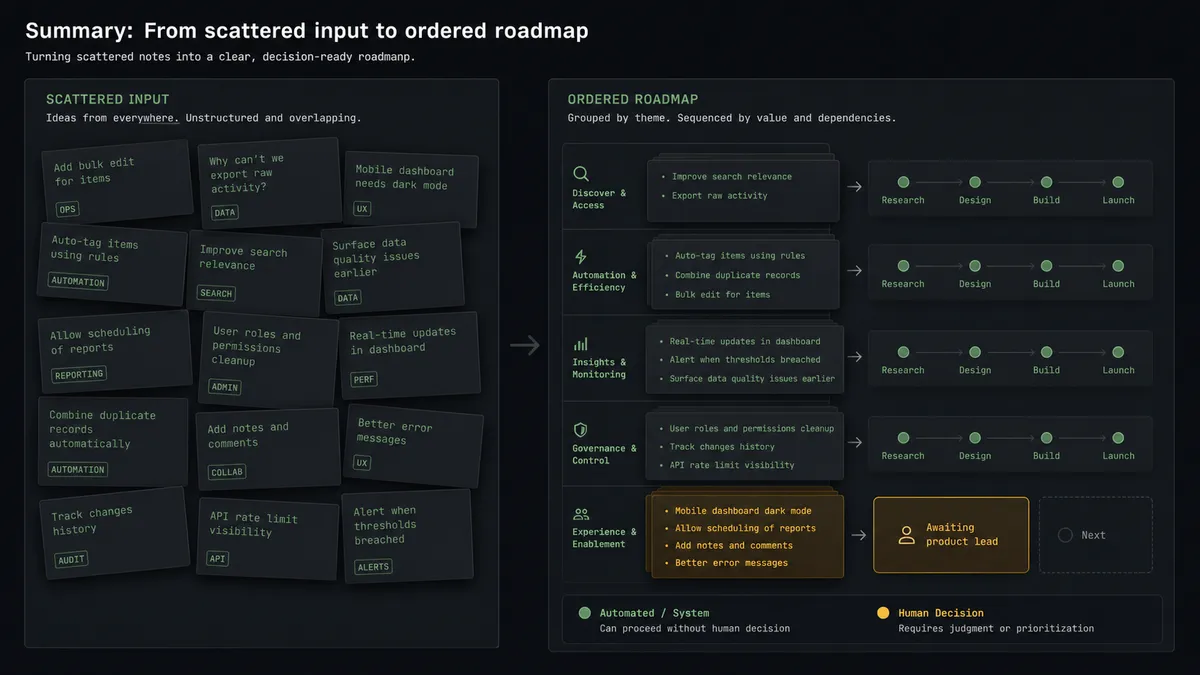
The deeper failure is signal loss. Fifteen Notion rows from eight accounts describing the same missing capability arrive as fifteen separately worded entries. Copied over one by one, they become fifteen weak ideas instead of one strong pattern. Meanwhile a single loud request from one account reads as urgent because it arrived three times in a week from the same champion. The roadmap ends up shaped by transcription order and volume, not by evidence, and the accounts whose feedback quietly repeated across segments never get counted as the trend they were.
How it works: the connection
The connection reads Notion and writes Aha!. Here is the plain version, grounded in the real connector actions.
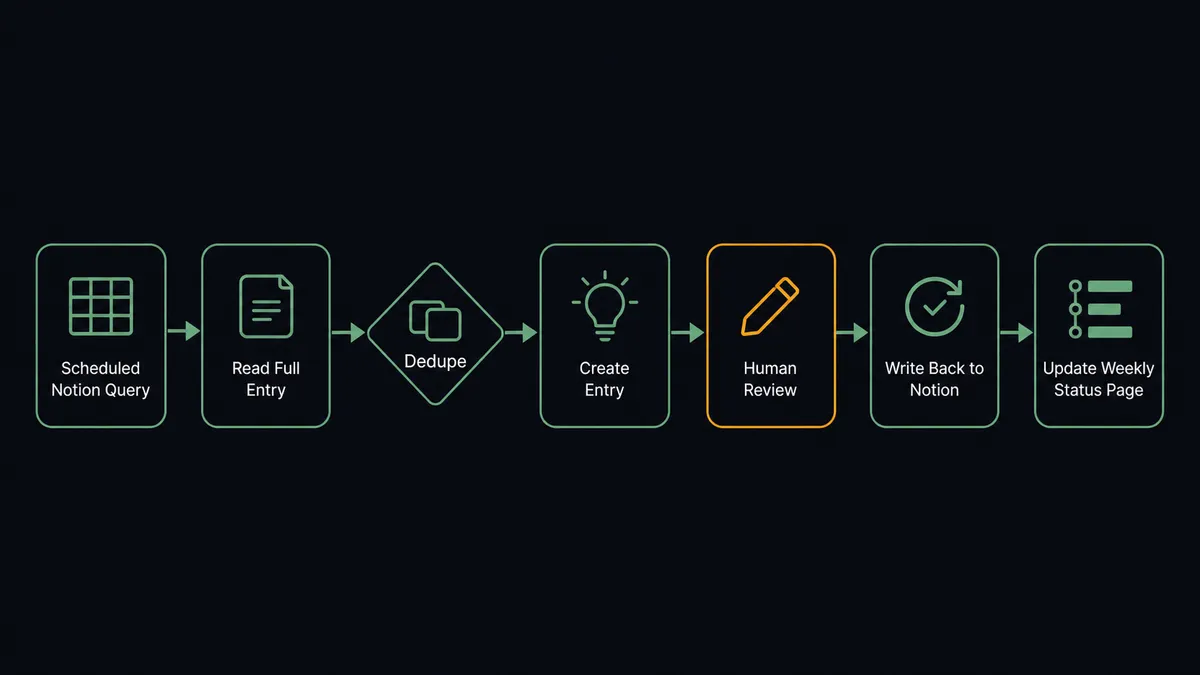
- Trigger: On a schedule, the workflow queries the feedback database with Find Database Item for rows not yet synced.
- Read: Get Page pulls the full entry: the feedback text, the account, the severity, and the theme tag.
- Resolve the product: List Products maps the theme to the right Aha! product line.
- Dedupe: List Ideas checks whether this request already exists in Aha! before anything is created.
- Write the idea: Create Idea files genuinely new feedback with the account attached as the source.
- Close the loop: Update Database Item marks the Notion row as synced and stores the Aha! idea reference, so nobody copies it again.
- Report back: On a weekly schedule, the workflow reads List Releases and List Initiatives and writes a roadmap status page into Notion with Create Page, so the feedback contributors see where things stand.
That is the “just connect them” answer. Feedback flows one way, roadmap status flows back the other, and the batch sweep disappears.
Can an AI agent run it? (and why a human stays in the loop)
Yes, and the agent is what turns a copying pipeline into a filtering one. A field mapping can move text from a Notion row to an Aha! idea. It cannot tell that “export to spreadsheet is broken for big accounts” and “we need bulk CSV download” are the same request in different words. The agent can. It holds the actions as tools: Find Database Item, Get Page, List Products, List Ideas, Create Idea, Update Database Item, Create Feature, Update Feature. For each new row it reasons about whether this is new signal, a repeat to merge, or part of a growing cluster, then picks the action that fits.
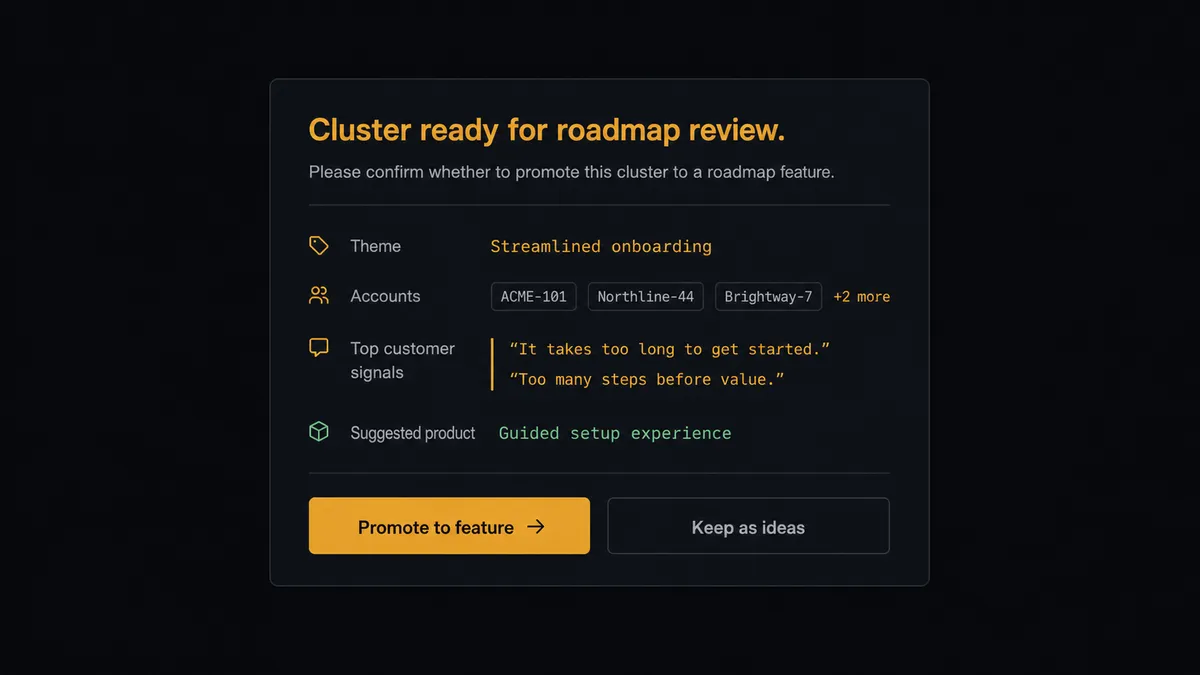
The consequential step is Create Feature. In Aha!, a feature is not a note; it is a roadmap object that engineering scopes against, that releases are planned around, and that customer-facing teams treat as a signal of intent. Promote feedback too easily and the roadmap fills with commitments nobody vetted. So when a cluster of ideas reaches real cross-account weight, the agent does not promote it. It assembles the case: the accounts involved, the individual quotes, how the requests spread over time, and which existing initiative from List Initiatives it would sit under. Then it invokes a human-in-loop flow it holds as a callable tool. The workflow pauses and posts to the product lead: “Cluster ready for roadmap review: [theme]. Accounts represented: [list]. Sample quotes attached. Suggested product line: [product]. Promote to feature?” Only after approval does the agent call Create Feature and link the source ideas.
The judgment is contextual. A cluster spanning several segments gets surfaced even if each individual entry looked minor. A high-volume request from a single account stays an idea with an honest note about its concentration. Prospects call this the digital andon cord: like Toyota’s production line pull cord, the workflow stops the line before raw feedback hardens into a commitment, and the person accountable for the roadmap makes the call.
FlowRunner vs n8n
A developer-heavy product team can absolutely wire this pair in n8n. Both services have solid nodes there, the fair-code self-hosting model is genuinely good, and the community template library gives a technical builder a running start on database-sync patterns. If your team wants to own the dedupe logic in code, n8n will not stop you.
The difference is where the intelligence lives and who guards the roadmap. FlowRunner runs the clustering and dedupe as an agent’s reasoning rather than logic you write, and the pause before Create Feature is a native capability rather than an approval system you build. Here is the honest side-by-side.
| What matters for this pair | FlowRunner | n8n |
|---|---|---|
| Human-in-the-loop on Create Feature | Native. The agent invokes an approval flow as a callable tool before feedback becomes a roadmap object | Buildable with wait nodes and webhooks; you assemble and maintain the approval logic yourself |
| Who runs the flow | An AI agent clusters, dedupes, and picks actions as tools | A node graph you design and debug, with AI available as LangChain nodes |
| Users included | Unlimited users on every tier | Cloud plans meter executions and gate collaboration features by tier |
| Bring your own AI keys | Yes, BYOK | Yes, via your own credentials in AI nodes |
| Self-hosted option | Yes, cloud-hosted or self-hosted | Yes, fair-code self-hosting is a core n8n strength |
| Pricing model | Transparent workflow-based tiers with clear execution limits | Execution-based cloud pricing; self-hosting shifts cost to your own infrastructure and upkeep |
If your product team includes engineers who want to own a custom sync in a node graph, n8n is a credible choice. If the goal is feedback that files itself and a roadmap that only changes when a named product lead says so, this pairing on FlowRunner is the better fit.
Before and after
| Category | Before | After |
|---|---|---|
| Feedback transfer | A product manager batch-copies Notion rows into Aha! every few weeks | New feedback lands in Aha! as deduplicated ideas within minutes of being logged |
| Duplicate ideas | The same request exists five times under five wordings | List Ideas is checked by meaning before anything is created |
| Signal detection | Cross-account patterns hide in scattered rows | Clusters surface with accounts and quotes attached |
| Roadmap discipline | Ideas drift into features based on who copied what when | Create Feature runs only after a named product lead approves the evidence |
| Closing the loop | Contributors never learn what happened to their feedback | A weekly status page in Notion shows where synced ideas stand against releases |
What you can build
Feedback to deduplicated idea, hands off. The schedule queries Find Database Item, the agent reads each row with Get Page, checks List Ideas for near-matches, files new signal with Create Idea, and marks the row synced with Update Database Item. The batch sweep is gone.
Roadmap promotion gate. A cluster reaches cross-account weight. The agent packages accounts, quotes, and the suggested product line, invokes the human-in-loop tool, and only calls Create Feature after the product lead approves. The decision and its evidence live in the audit trail.
Feature status writeback. When a promoted feature moves, the agent reads Get Feature and List Releases, then updates the linked Notion rows with Update Database Item so account teams see status without asking product.
Weekly roadmap digest. On a Friday schedule, the agent pulls List Initiatives and List Releases, composes a summary, and publishes it to Notion with Create Page and Append Block Children, giving the whole company one current view.
Idea hygiene pass. On a monthly schedule, the agent reviews open entries from List Ideas against fresh Notion feedback, flags stale ones with no new signal, and proposes merges for a human to confirm, keeping the idea pool honest.
Getting started
Start on the free plan: 100 executions a month, every integration included, no credit card required, plus 14 days of Professional for new accounts. Both connectors are available on every tier, and every tier includes unlimited users and unlimited workflows.
Explore the integration details:
- Notion integration (23 actions covering pages, databases, blocks, and comments)
- Aha! integration (10 actions covering products, ideas, features, releases, and initiatives)
Start building free at flowrunner.ai or book a demo to see a live Notion to Aha! workflow, roadmap promotion gate and all.
Frequently asked questions
Is it free to connect Notion and Aha! on FlowRunner?
You can build and run the connection on FlowRunner's free plan, which includes 100 executions a month and every integration with no credit card required, and new accounts also get 14 days of Professional. Both connectors are available on every FlowRunner tier, and every tier includes unlimited users and unlimited workflows.
Can I self-host the Notion to Aha! workflow?
Yes. FlowRunner offers a cloud-hosted option and a self-hosted option, so the connection can run inside your own environment.
Does the AI agent need my own OpenAI or Claude key?
FlowRunner uses a bring-your-own-keys model, so you connect the AI provider key you already have. You are not locked to one model.
What stops the agent from flooding Aha! with duplicate ideas?
Before creating anything, the agent calls List Ideas and compares the new feedback against existing entries by meaning, not exact wording. A near-match gets appended as context on the Notion side and noted against the existing idea instead of becoming a duplicate. When the agent is unsure whether two items are the same request, it asks a person rather than guessing.
Which actions move feedback from Notion into Aha!?
The workflow reads the feedback database with Get Database and Find Database Item, checks Aha! with List Products and List Ideas, writes new entries with Create Idea, and marks the Notion row as synced with Update Database Item. Promotion to the roadmap uses Create Feature, behind the approval gate.
Does promoting an idea to a feature always require approval?
Yes, by design. Create Feature is the moment feedback becomes a roadmap commitment that engineering and customers will see. The agent assembles the evidence and a named product lead makes the call. Routine idea filing never waits on a human.