How to Connect NetSuite with Files.com (With or Without an AI Agent)
Connect NetSuite to Files.com so invoices, statements, and ERP exports land in governed folders automatically, with an AI agent that stages every file and pauses for a human before a share bundle exposes financial documents outside the company.
How do you connect NetSuite to Files.com?
You connect NetSuite to Files.com by running List Invoices, List Sales Orders, or a custom Run SuiteQL Query on a schedule, then staging each extract onto your Files.com site with Create Folder and Upload File, and delivering documents externally with Create Share Bundle. FlowRunner is a visual AI-agent orchestration platform where automations run autonomously and pause for human judgment on the steps that carry real consequence. Run as an agent, the same connection sorts each record by destination, stages internal archives on its own, and pauses for a named human before any share bundle puts an external link on financial documents.
The problem it solves
Today, getting documents out of NetSuite and to the people who need them is a person exporting and emailing. Month-end statements for customers, remittance detail for vendors, transaction extracts for the auditors: someone runs the saved search, downloads the CSV, renames it to something findable, and attaches it to an email. The folder structure on the shared drive is whatever that person improvised in a hurry, and the same extract gets rebuilt from scratch every time someone new asks for it.
The edges are a governance problem, not an inconvenience. Financial documents travel as email attachments with no password, no expiration, and no record of who received what. A vendor statement goes to the wrong contact and nobody knows until the vendor mentions it. When the auditor asks “who has had access to these invoices,” the honest answer is a shrug. The ERP is locked down tight, and then its exports leak out through the least governed channel in the company.
How it works: the connection
The connection reads from NetSuite and writes to Files.com. Here is the plain version, grounded in the real connector actions.
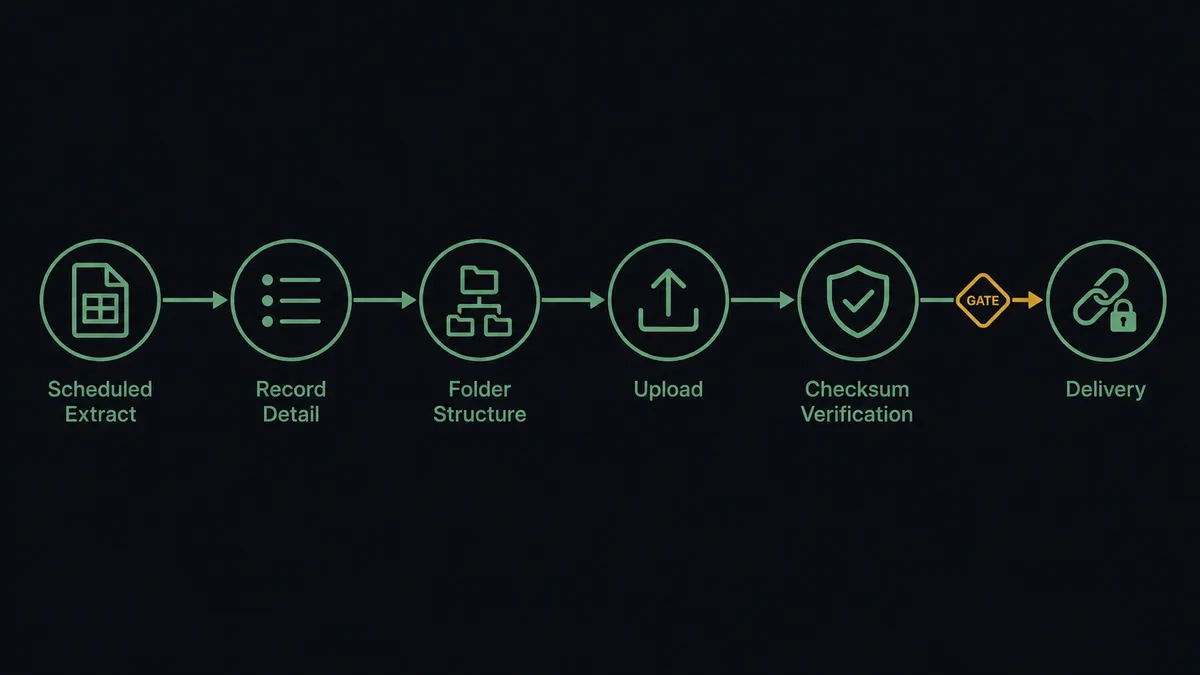
- Trigger: On a nightly schedule, the workflow runs List Invoices and List Sales Orders filtered to records created or changed since the last run. Run SuiteQL Query handles anything custom, like a transaction extract by subsidiary.
- Read: Get Invoice pulls the full detail for each record: entity, date, line items, and amount.
- Structure: Create Folder builds the destination path on the Files.com site, for example Finance/Invoices/2026-08, so every period lands in a predictable place.
- Stage: Upload File transfers each document to its path; missing parent folders are created automatically as part of the upload.
- Verify: Get Metadata confirms the uploaded file’s size and checksum, so a truncated transfer is caught the night it happens rather than the day someone opens it.
- Organize: Move File or Folder graduates verified files from a staging folder into the archive, keeping in-progress and final states separate.
- Deliver: Create Share Bundle wraps an outbound document set in a password-protected link with an expiration date, for vendors, customers, or auditors.
That is the “just connect them” answer. ERP documents flow into governed storage on a schedule, named consistently, verified on arrival, and shared through links that expire instead of attachments that live forever.
Can an AI agent run it? (and why a human stays in the loop)
Yes, and the value is in the sorting, not the copying. The agent holds the pair’s actions as tools: List Invoices, Get Invoice, List Customers, List Vendors, Run SuiteQL Query, Create Folder, Upload File, Get Metadata, Move File or Folder, Create Share Bundle. A fixed pipeline moves every record down the same path. The agent reads each one and routes it: a routine invoice archives internally, a vendor’s monthly remittance detail goes to the vendor-exchange folder, and a document that looks like it belongs to a different subsidiary’s folder tree gets flagged instead of filed wrong.
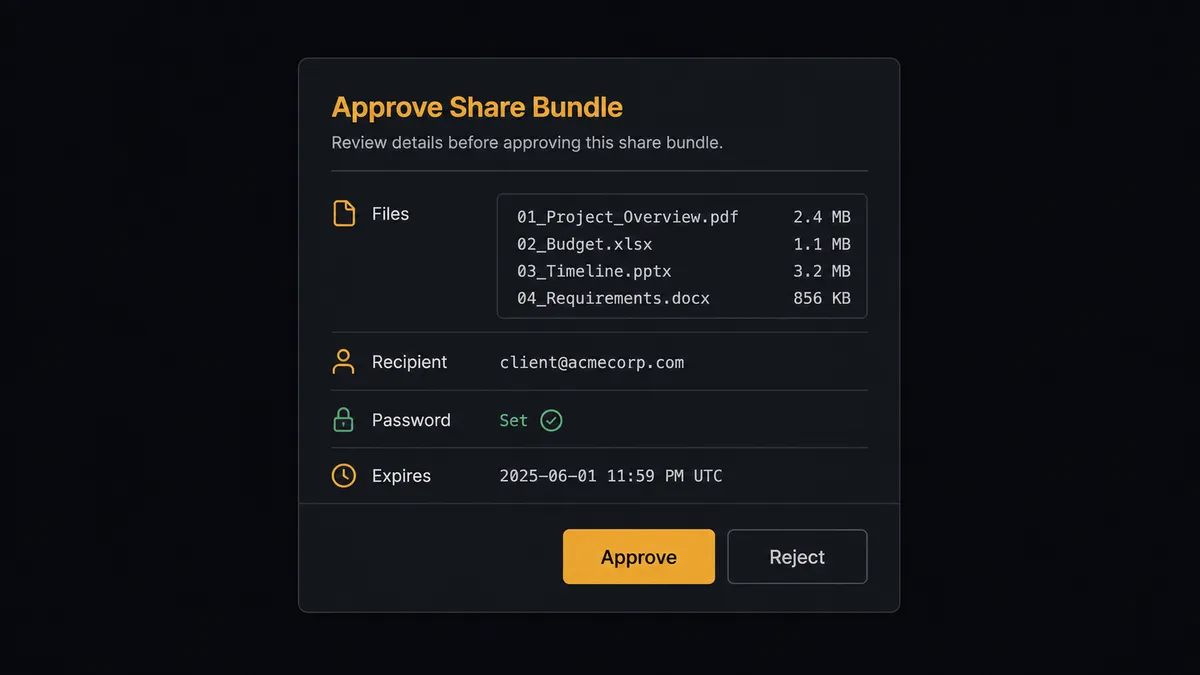
The consequential step is Create Share Bundle. An internal upload is reversible; an external link on financial documents is exposure. The wrong file in a customer-facing bundle, or the right file to the wrong recipient, is a disclosure event you get to explain later. So before any bundle is created, the agent invokes a human-in-loop flow it holds as a callable tool. The workflow pauses and posts: “Ready to share [bundle contents list] with [recipient]. Password set, expiration [date]. Approve to issue the link?” Only after a named approver signs off does Create Share Bundle run, and the audit trail records the approver, the recipient, and the expiry alongside the bundle’s code.
Deletion gets the same respect. Delete File or Folder on the Files.com site cannot be undone, so retention cleanup runs as a proposal: the agent lists what is past policy, and a person confirms before anything is removed. Prospects call this pattern a digital andon cord: the workflow stops the line the moment an action would be hard to take back, and your team pulls it back into motion.
FlowRunner vs Fivetran
If your goal is analytics, Fivetran is genuinely excellent at it: its managed NetSuite connector replicates your ERP into a warehouse reliably, handles schema drift for you, and requires near-zero maintenance. For feeding dashboards and finance analytics from NetSuite data, it is a strong, proven choice.
But Fivetran moves data one direction, into a warehouse, for analysis. This pairing is operational: documents that must reach vendors, customers, and auditors, through governed storage, with a human approving what leaves the company.
| What matters for this pair | FlowRunner | Fivetran |
|---|---|---|
| Human-in-the-loop on Create Share Bundle | Native. A named approver signs off before any external link exists | Not applicable; no concept of approval in a replication pipeline |
| Who runs the flow | An AI agent reads, reasons, picks actions as tools | Managed ELT connector on a sync schedule |
| Users included | Unlimited users on every tier | Priced by usage; seats are not the constraint, rows are |
| Bring your own AI keys | Yes, BYOK | No agent layer |
| Self-hosted option | Yes, cloud-hosted or self-hosted | Cloud service |
| Pricing model | Transparent workflow-based tiers | Consumption-based pricing tied to monthly active rows |
If you need NetSuite data in Snowflake or BigQuery for analytics, use Fivetran; that is its job and it does it well. If you need NetSuite documents staged, verified, and delivered to outside parties with approvals and an audit trail, that is an orchestration problem, and this pairing is the better fit.
Before and after
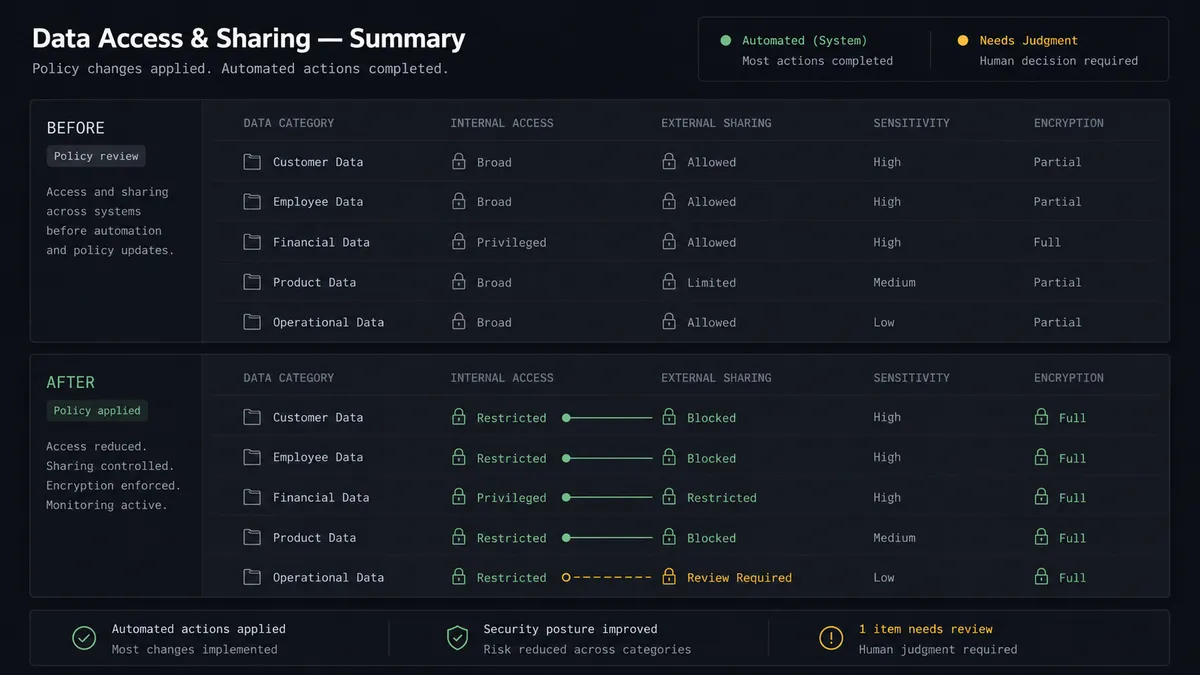
| Category | Before | After |
|---|---|---|
| Document extraction | Someone runs saved searches and downloads files by hand each month | Nightly scheduled extracts via List Invoices and Run SuiteQL Query |
| File organization | Improvised folder names on a shared drive, different every month | Create Folder builds the same period structure every time, files named from record data |
| Transfer integrity | A truncated export is discovered when someone opens it | Get Metadata verifies size and checksum the night of the upload |
| External sharing | Financial documents travel as unprotected email attachments | Create Share Bundle issues password-protected, expiring links after named approval |
| Audit answers | ”Who has had access?” is unanswerable | Every bundle records its contents, recipient, approver, and expiry |
What you can build
Nightly invoice archive. List Invoices pulls the day’s records, Get Invoice adds detail, and Upload File stages each into Finance/Invoices by period, with Get Metadata verifying every transfer. The archive builds itself and is browsable without an ERP license.
Vendor statement exchange. Each month the agent assembles per-vendor remittance detail via List Vendors and Run SuiteQL Query, stages it in the vendor’s folder, and requests approval before Create Share Bundle issues each vendor a protected, expiring link.
Audit-season document room. When the auditors send a request list, the agent runs the matching extracts, stages everything under a single engagement folder, and a controller approves one Create Share Bundle for the audit team, with expiration set to the engagement’s end.
Customer document delivery. For enterprise customers who require statements through a portal rather than email, the agent stages each customer’s documents from List Customers and List Invoices and delivers a per-customer protected link after approval.
Retention sweep with confirmation. On a quarterly schedule the agent uses List Folder and Get Metadata to find files past your retention policy, posts the removal list to the records owner, and calls Delete File or Folder only for the items a person confirms.
Getting started
Start on the free plan: 100 executions a month, every integration included, no credit card required, plus 14 days of Professional for new accounts. Both connectors are available on every tier, and every tier includes unlimited users and unlimited workflows.
Explore the integration details:
- NetSuite integration (27 actions covering customers, vendors, invoices, sales orders, payments, and SuiteQL queries)
- Files.com integration (11 actions covering uploads, downloads, folders, and share bundles)
Start building free at flowrunner.ai or book a demo to see a live NetSuite to Files.com workflow, share-bundle approval and all.
Frequently asked questions
Is it free to connect NetSuite and Files.com on FlowRunner?
You can build and run the connection on FlowRunner's free plan, which includes 100 executions a month and every integration with no credit card required, and new accounts also get 14 days of Professional. Both connectors are available on every FlowRunner tier, and every tier includes unlimited users and unlimited workflows.
Can I self-host the NetSuite to Files.com workflow?
Yes. FlowRunner offers a cloud-hosted option and a self-hosted option, so the connection can run inside your own environment.
Does the AI agent need my own OpenAI or Claude key?
FlowRunner uses a bring-your-own-keys model, so you connect the AI provider key you already have. You are not locked to one model.
What happens when the agent is unsure whether a document is safe to share externally?
It never guesses on an external link. Anything bound for Create Share Bundle is posted to a named approver with the file list, the intended recipient, and the proposed password and expiration settings. The bundle is created only after sign-off, and the decision is captured in the audit trail.
NetSuite has no trigger in the catalog. How does the workflow start?
On a schedule. The workflow runs List Invoices, List Sales Orders, or a custom Run SuiteQL Query at the interval you choose, for example nightly, then stages anything new or changed into Files.com with Upload File.
Which actions does this connection use on each side?
On the NetSuite side: List Invoices, Get Invoice, List Sales Orders, List Customers, List Vendors, and Run SuiteQL Query for custom extracts. On the Files.com side: Create Folder, Upload File, Get Metadata, Move File or Folder, and Create Share Bundle for governed external delivery.