How to Connect NetSuite with Cloudinary (With or Without an AI Agent)
Keep Cloudinary product media in step with the NetSuite item master automatically, with an AI agent that tags and transforms assets on its own and pauses for a human before Destroy Asset permanently deletes anything.
How do you connect NetSuite to Cloudinary?
You connect NetSuite to Cloudinary by reading the item master on a schedule with List Items, auditing the media library against it with Search Assets, and closing the gaps with Upload from URL, Manage Tags, and Apply Transformation, so every sellable item has correctly tagged, web-ready imagery without anyone maintaining a spreadsheet of what is missing. FlowRunner is a visual AI-agent orchestration platform where automations run autonomously and pause for human judgment on the steps that carry real consequence. Run as an AI agent, the same connection also decides what to do about discontinued items, and pauses for a named human before Destroy Asset permanently deletes anything.
The problem it solves
The item master lives in NetSuite and belongs to operations. The media library lives in Cloudinary and belongs to marketing or web. Nothing connects them, so a person does. When merchandising adds a product line, someone emails the web team a list of SKUs. The web team uploads imagery when they get to it, tags it by hand if at all, and nobody confirms coverage. The catalog goes live with placeholder images on the items that slipped, and the first person to notice is a customer.
The edges are worse. An item gets renamed in NetSuite and its imagery is now findable only by the old name. A discontinued product’s photos keep serving from the CDN for a year. And when someone finally does a cleanup, they bulk-delete a folder that a live landing page still references, and there is no undo, because deletion in Cloudinary is permanent. The library and the ledger drift until neither team trusts the other’s system.
How it works: the connection
The connection reads NetSuite on a schedule and reconciles Cloudinary against it. Here is the plain version, grounded in the real connector actions.
- Trigger: On a schedule, the workflow calls List Items, or Run SuiteQL Query for a filtered set, and diffs against the last run.
- Read: For each new or changed item, Get Item pulls the SKU, display name, category, and status.
- Audit: Search Assets checks Cloudinary for media tagged with that SKU.
- Fill gaps: Missing imagery comes in through Upload from URL from your source-imagery location, filed with Create Folder into the right path.
- Standardize: Manage Tags aligns tags to the SKU and category, and Apply Transformation builds the storefront renditions.
- Publish: Generate Delivery URL returns the CDN links for the catalog, and a coverage report posts to your team’s channel.
That is the “just connect them” answer. The item master becomes the source of truth for what media should exist, and the library converges on it every cycle instead of drifting. Discontinued items flow the other way: the workflow flags their assets as archive candidates rather than leaving them to serve forever, and Get Usage keeps an eye on storage and bandwidth so cleanup has data behind it.
Can an AI agent run it? (and why a human stays in the loop)
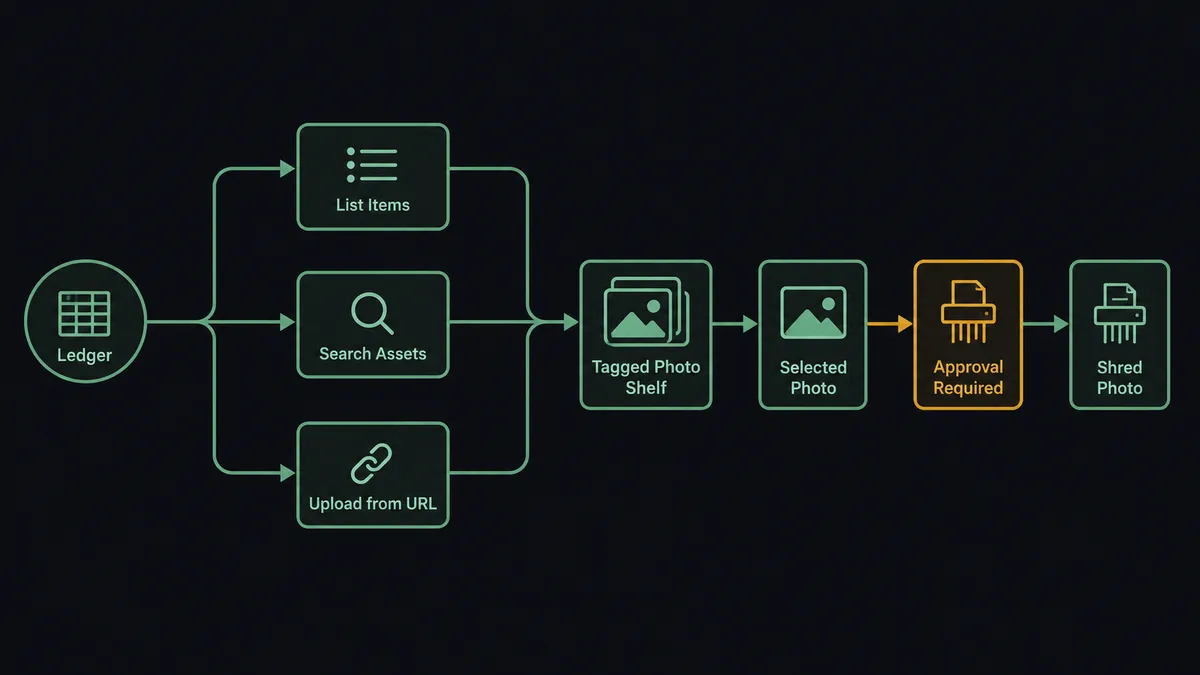
Yes, and the judgment calls are exactly where a sync script gives up. A script can detect that SKU media is missing; an AI agent decides what to do when the situation is ambiguous. Imagery exists but under a legacy tag: Rename Asset and Manage Tags fix it. Two items share one photo set after a catalog merge: the agent duplicates the association rather than deleting either. A seasonal item goes inactive: archive candidate, not deletion candidate. Its toolbox is the real action set: List Items, Get Item, Run SuiteQL Query, Search Assets, Upload from URL, Rename Asset, Manage Tags, Apply Transformation, Generate Delivery URL, Destroy Asset.
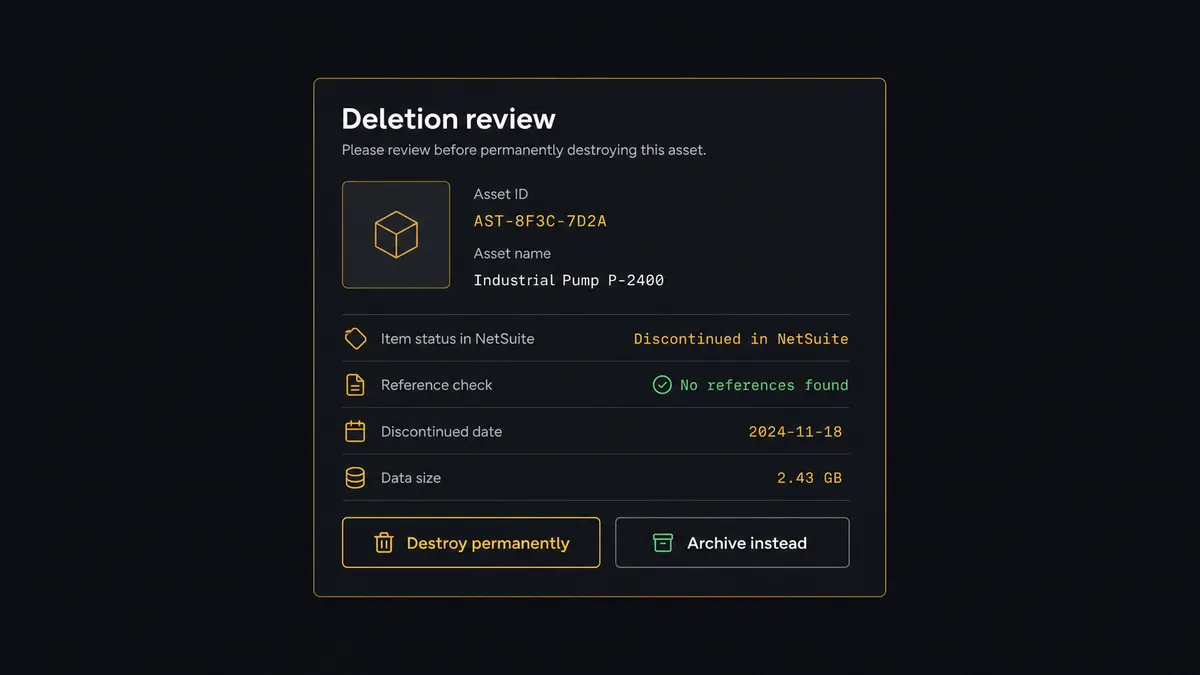
The consequential step is deletion, because Cloudinary deletion is forever. When cleanup logic reaches a Destroy Asset or Delete Assets call, the agent gathers what a human needs to decide: the asset, the item’s status in NetSuite, when the asset was last touched, and where its delivery URLs still appear. Then it invokes a human-in-loop flow it holds as a callable tool. The workflow pauses and posts: “Cleanup proposed for [SKU]: the item was discontinued in NetSuite last quarter, and its asset folder is no longer referenced in the catalog. Destroy the assets, or archive and keep?” Only after a named person approves does anything vanish, and the approver and timestamp land in the audit trail next to the asset list.
Routine work flows through untouched: uploads, tags, transformations, renditions. Escalation is reserved for the irreversible. Prospects call this a digital andon cord: the workflow stops the line the moment it hits uncertainty, and your team pulls it back into motion.
FlowRunner vs Fivetran
Data teams see NetSuite in a sentence and think Fivetran, reasonably. Fivetran’s managed NetSuite connector is excellent at what it does: reliable, schema-aware replication of ERP data into a warehouse, maintained so your analysts never babysit a pipeline. If the goal is NetSuite data in Snowflake or BigQuery for analytics, Fivetran is a strong answer.
But this pairing is not an analytics pipeline. It is an operational loop that reads the item master, writes into Cloudinary, and asks a person before destroying anything. That loop needs actions and judgment, not replication.
| What matters for this pair | FlowRunner | Fivetran |
|---|---|---|
| Human-in-the-loop on Destroy Asset | Native. The agent invokes an approval flow as a callable tool and pauses before permanent deletion | Not applicable; Fivetran replicates data, it does not take actions in Cloudinary |
| Who runs the flow | An AI agent reads, reasons, picks actions as tools | Managed ELT pipelines into a destination warehouse |
| Users included | Unlimited users on every tier | Priced by usage, not built around operational approvers |
| Bring your own AI keys | Yes, BYOK | Not an AI orchestration product |
| Self-hosted option | Yes, cloud-hosted or self-hosted | Cloud service |
| Pricing model | Transparent workflow-based tiers | Consumption-based pricing tied to rows synced |
If you need NetSuite data in a warehouse for BI, use Fivetran for that, and nothing here competes with it. If you need the item master actively enforcing order in your media library, with uploads, tags, transformations, and a human gate on deletion, that is a job for FlowRunner.
Before and after
| Category | Before | After |
|---|---|---|
| Media coverage | Nobody knows which items lack imagery until the catalog goes live | Search Assets audits every item against the master each cycle and gaps get filled |
| Tagging | Tags applied by hand, inconsistently, or not at all | Manage Tags keys every asset to the SKU and category the ERP uses |
| Renditions | Web sizes produced ad hoc on request | Apply Transformation builds the standard set the moment an asset lands |
| Cleanup | Bulk deletions done bravely and occasionally wrongly | Destroy Asset runs only after a named approver reviews status and references |
| Cross-team trust | Ops and web reconcile by email thread | One workflow, one audit trail, both teams reading the same record |
What you can build
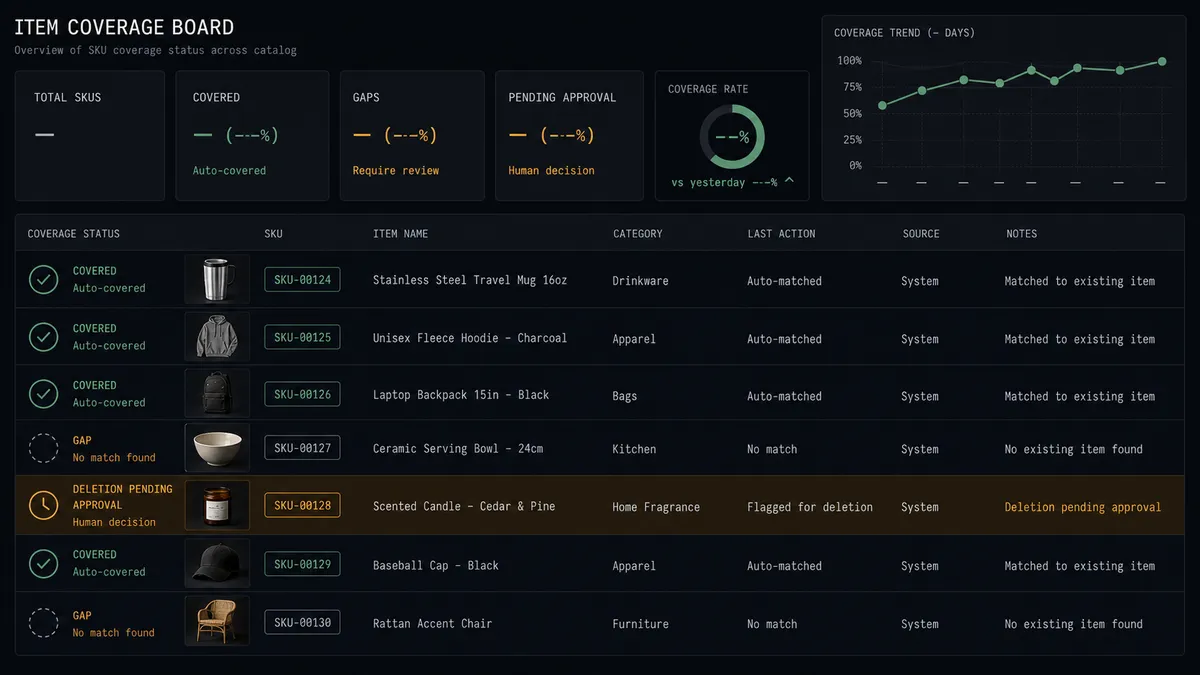
Item master to media audit. List Items reads the master, Search Assets checks coverage by SKU tag, and the agent posts a gap report with the items missing imagery, so coverage problems surface before customers find them.
New product intake. When merchandising adds a line, Upload from URL pulls the source imagery, Create Folder files it by category, Manage Tags keys it to SKUs, and Apply Transformation produces the storefront renditions, all in one pass.
Rename reconciliation. When Run SuiteQL Query surfaces renamed or merged items, the agent updates the library with Rename Asset and Manage Tags so media stays findable under the identifiers the business actually uses.
Gated end-of-life cleanup. Discontinued items produce a staged cleanup list. A person reviews each asset’s status and references on an approval card, and only approved items reach Destroy Asset, with the decision logged.
CDN link publication. Generate Delivery URL produces the delivery links for each approved rendition, and the workflow posts the link set per SKU to the team channel, so the storefront team pulls from one canonical list instead of hunting through folders.
Getting started
Start on the free plan: 100 executions a month, every integration included, no credit card required, plus 14 days of Professional for new accounts. Both connectors are available on every tier, and every tier includes unlimited users and unlimited workflows.
Explore the integration details:
- NetSuite integration (27 actions covering customers, vendors, invoices, orders, items, and SuiteQL)
- Cloudinary integration (20 actions covering uploads, transformations, tags, folders, and delivery)
Start building free at flowrunner.ai or book a demo to see a live NetSuite to Cloudinary workflow, deletion gate and all.
Frequently asked questions
Is it free to connect NetSuite and Cloudinary on FlowRunner?
You can build and run the connection on FlowRunner's free plan, which includes 100 executions a month and every integration with no credit card required, and new accounts also get 14 days of Professional. Both connectors are available on every FlowRunner tier, and every tier includes unlimited users and unlimited workflows.
Can I self-host the NetSuite to Cloudinary workflow?
Yes. FlowRunner offers a cloud-hosted option and a self-hosted option, so the connection can run inside your own environment.
Does the AI agent need my own OpenAI or Claude key?
FlowRunner uses a bring-your-own-keys model, so you connect the AI provider key you already have. You are not locked to one model.
What happens when the agent is unsure whether an asset is safe to delete?
It never guesses. Any Destroy Asset or Delete Assets call is staged, not executed. The agent packages the asset details, the item's status in NetSuite, and where the asset is still referenced, then waits for a named person to approve. Deletion in Cloudinary is permanent, so the gate is absolute.
Which actions drive the sync if NetSuite has no triggers here?
The NetSuite connector is action-based, so the workflow runs on a schedule. Each run calls List Items or Run SuiteQL Query to detect new, changed, and discontinued items, then reconciles Cloudinary with Search Assets, Upload from URL, and Manage Tags.
Can the workflow prepare web-ready renditions automatically?
Yes. When a new asset lands, Apply Transformation produces the standard renditions your storefront and catalog need, and Generate Delivery URL returns the CDN links, which the workflow posts per SKU to your team's channel so the storefront pulls from one canonical list.