How to Connect NetSuite with Egnyte (With or Without an AI Agent)
File NetSuite invoices, orders, and vendor records into a governed Egnyte folder structure automatically, with an AI agent that keeps the filing consistent and pauses for a human before Create Shared Link exposes a financial document outside the company.
How do you connect NetSuite to Egnyte?
You connect NetSuite to Egnyte by scanning for closed records with List Invoices, List Sales Orders, and List Vendors on a schedule, building the destination with Create Folder where needed, and filing each record’s document into the governed tree with Upload File, so the archive assembles itself in the structure your auditors expect. FlowRunner is a visual AI-agent orchestration platform where automations run autonomously and pause for human judgment on the steps that carry real consequence. Run as an AI agent, the same connection also handles link requests and retention cleanup, and pauses for a named human before Create Shared Link sends a financial document outside the company or Delete File or Folder removes anything.
The problem it solves
Every finance team has a filing convention and nobody follows it. Invoices close in NetSuite, and the supporting documents scatter: some in an accountant’s downloads folder, some attached to emails, some uploaded to Egnyte under whatever name made sense at 6pm on close day. The convention says customer, then year, then record number. Reality says “invoice_final_v2.” At quarter end someone rebuilds the archive by hand, and at audit time the team plays document scavenger hunt against a deadline.
The edges are the ones that show up in audit findings. A vendor asks for a copy of their statement and someone shares a link to the whole folder, exposing every other vendor’s terms. A well-meant cleanup deletes a year the retention policy required keeping. External links multiply with no record of who created them or who they reach. Egnyte was bought for governance; the way documents get into it and out of it is where the governance leaks.
How it works: the connection
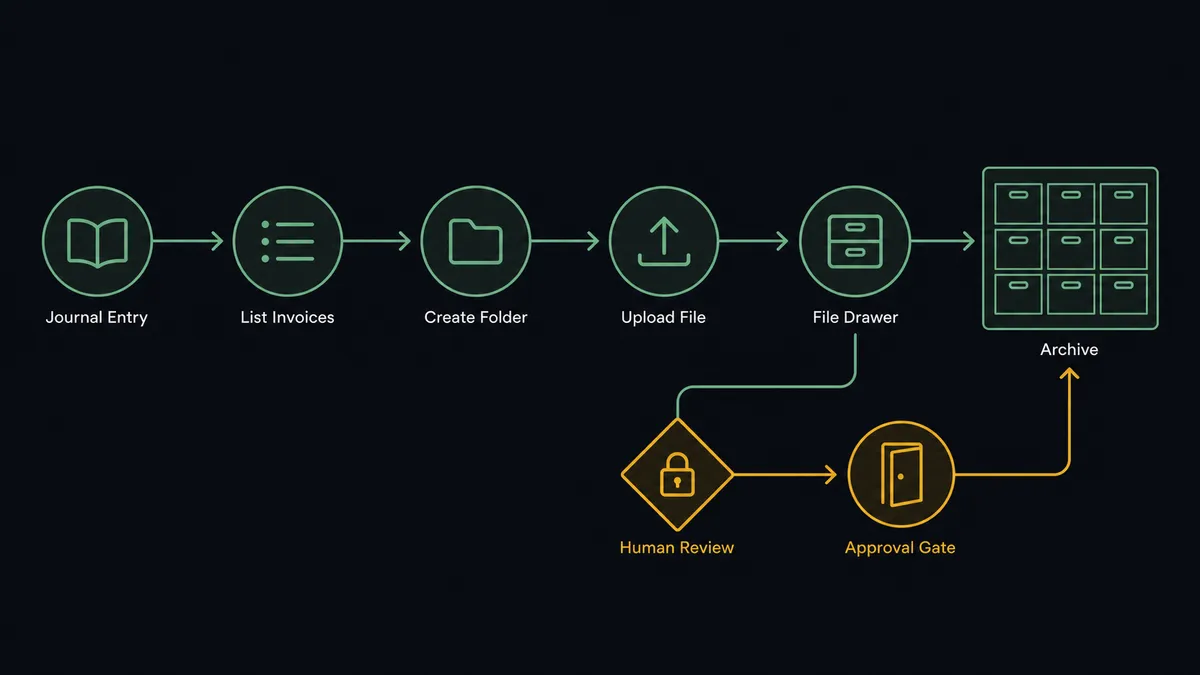
The connection reads NetSuite on a schedule and files into Egnyte. Here is the plain version, grounded in the real connector actions.
- Trigger: On a schedule, the workflow calls List Invoices, List Sales Orders, and List Vendors, or Run SuiteQL Query for a filtered set, and collects records that closed since the last run.
- Read: Get Invoice, Get Sales Order, or Get Vendor pulls the record detail, and the workflow formats it into the document package for filing.
- Verify: Get Metadata checks the destination path against the filing convention.
- Build: Create Folder adds any missing entity or period folder, so the tree grows by rule, not by habit.
- File: Upload File writes the document under the standard name convention.
- Reconcile: List Folder confirms the filing each cycle, and misplaced legacy documents get corrected with Move File or Folder.
That is the “just connect them” answer. The archive stops depending on anyone’s discipline: every closed record produces a correctly named document in the correct drawer, and the convention finally matches reality. Audit prep becomes a walk through a tree that was never allowed to rot.
Can an AI agent run it? (and why a human stays in the loop)
Yes, and the agent’s value is judgment about the perimeter. Filing is mechanical; deciding what leaves the vault is not. An AI agent handles the ambiguity a script cannot: a record whose entity name almost matches two folders, a legacy document filed under an obsolete convention, a link request whose audience is broader than its stated purpose. Its toolbox is the real action set: List Invoices, Get Invoice, List Vendors, Get Vendor, Run SuiteQL Query, List Folder, Get Metadata, Create Folder, Upload File, Move File or Folder, Create Shared Link, List Shared Links, Delete Shared Link, Delete File or Folder.
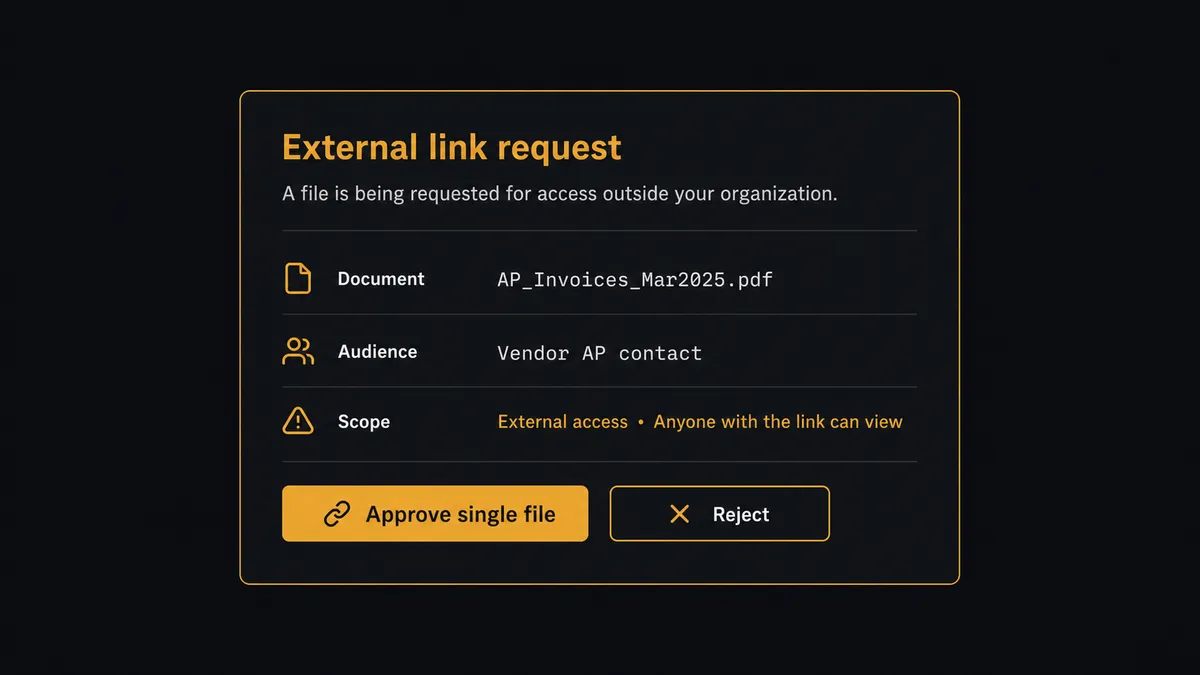
Two steps cross a line that deserves a person. The first is Create Shared Link, because a financial document leaving the company is an exposure decision, not a convenience. The agent stages the link and invokes a human-in-loop flow it holds as a callable tool. The workflow pauses and posts: “Link requested for [vendor]‘s statement folder, audience: the vendor’s AP contact. The folder also contains prior-year pricing terms. Share the single statement file instead?” A named person decides, and the link, its scope, the approver, and the timestamp all land in the audit trail. The second is Delete File or Folder: retention candidates are staged as a reviewed list, and anything ambiguous is moved to quarantine with Move File or Folder rather than destroyed.
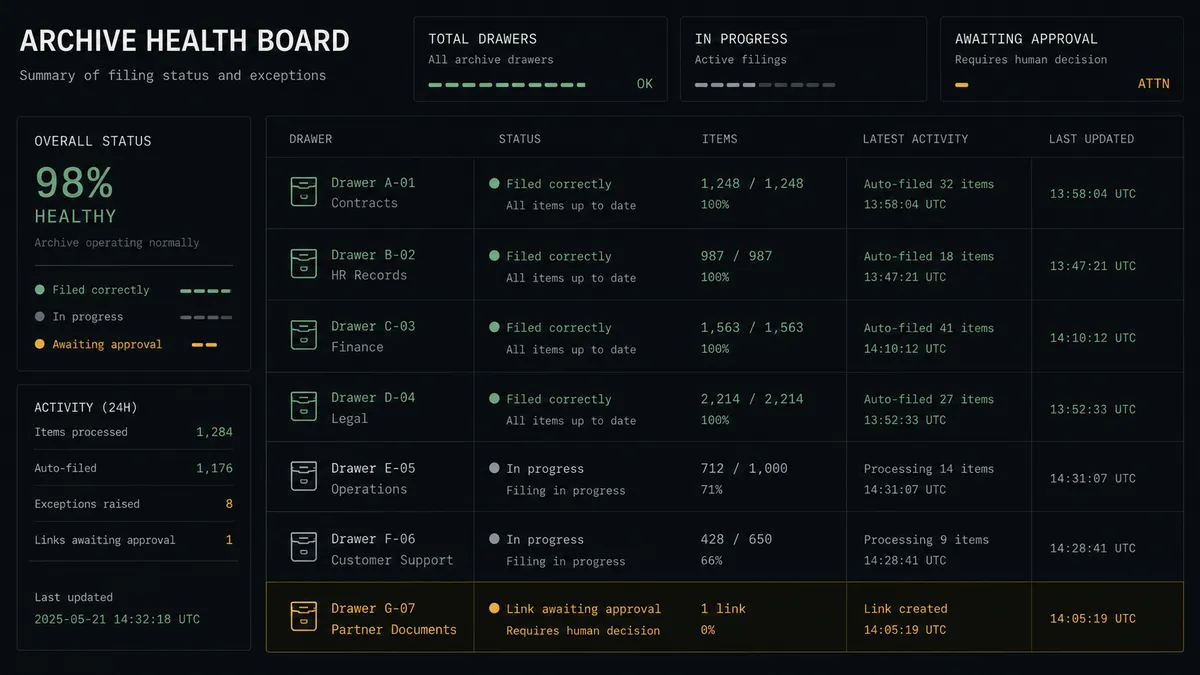
Link hygiene runs continuously in the background: List Shared Links surfaces every live external link for review, and expired ones are retired with Delete Shared Link, behind the same approval. Prospects call this a digital andon cord: the workflow stops the line the moment it hits uncertainty, and your team pulls it back into motion.
FlowRunner vs Fivetran
If the word NetSuite makes you think Fivetran, that instinct is fair. Fivetran’s managed connector moves NetSuite data into a warehouse with a reliability that is genuinely hard to match, and for analytics that is exactly what you want: schemas maintained, history preserved, dashboards fed without pipeline babysitting.
But a document archive is not a warehouse table. This pairing writes files into a governed tree, issues links with judgment, and asks a person before anything is exposed or destroyed. Replication has no opinion about any of that.
| What matters for this pair | FlowRunner | Fivetran |
|---|---|---|
| Human-in-the-loop on Create Shared Link and deletion | Native. The agent invokes an approval flow as a callable tool and pauses at the perimeter | Not applicable; Fivetran replicates data to warehouses, it does not manage documents |
| Who runs the flow | An AI agent reads, reasons, picks actions as tools | Managed ELT pipelines into a destination warehouse |
| Users included | Unlimited users on every tier | Priced by usage, not built around operational approvers |
| Bring your own AI keys | Yes, BYOK | Not an AI orchestration product |
| Self-hosted option | Yes, cloud-hosted or self-hosted | Cloud service |
| Pricing model | Transparent workflow-based tiers | Consumption-based pricing tied to rows synced |
Use Fivetran when the destination is a warehouse and the consumer is an analyst; nothing here replaces it. Use FlowRunner when the destination is a governed document tree and the consumers are auditors, vendors, and the person accountable for what crosses the perimeter.
Before and after
| Category | Before | After |
|---|---|---|
| Filing | Documents scatter across downloads folders, email, and ad hoc uploads | Every closed record files itself into the governed tree via Create Folder and Upload File |
| Naming | ”invoice_final_v2” and friends | One convention, enforced by the workflow, findable by ERP identifiers |
| External sharing | Whole-folder links shared in a hurry, unrecorded | Create Shared Link waits for a named approver, scoped to the single document |
| Link sprawl | Nobody knows which external links are still live | List Shared Links feeds a standing review, and stale links are retired with approval |
| Retention cleanup | Brave bulk deletions, occasionally of the wrong year | Staged candidate lists, human sign-off, quarantine via Move File or Folder for anything unclear |
What you can build
Self-assembling audit archive. List Invoices and List Sales Orders find each period’s closed records, and Create Folder plus Upload File file them under the convention, so audit season starts with a complete tree instead of a scavenger hunt.
Scoped vendor sharing. When a vendor needs their statement, the agent stages a single-file Create Shared Link with the audience named, a person approves, and the link is logged, so sharing never means exposing a folder full of other vendors’ terms.
Link perimeter review. A weekly flow pulls List Shared Links, matches each live link to its original approval, and stages orphans for Delete Shared Link, keeping the external surface as small as the business actually requires.
Governed retention. Run SuiteQL Query establishes which periods are past retention, List Folder and Get Metadata build the candidate list, and Delete File or Folder runs only on approved entries, with the ambiguous moved to quarantine instead.
Legacy cleanup. The agent walks old folders with List Folder, identifies documents filed outside the convention, and refiles them with Move File or Folder, converging years of accumulated habit onto one structure without a manual migration project.
Getting started
Start on the free plan: 100 executions a month, every integration included, no credit card required, plus 14 days of Professional for new accounts. Both connectors are available on every tier, and every tier includes unlimited users and unlimited workflows.
Explore the integration details:
- NetSuite integration (27 actions covering customers, vendors, invoices, orders, items, and SuiteQL)
- Egnyte integration (12 actions covering folders, files, shared links, and users)
Start building free at flowrunner.ai or book a demo to see a live NetSuite to Egnyte workflow, sharing gate and all.
Frequently asked questions
Is it free to connect NetSuite and Egnyte on FlowRunner?
You can build and run the connection on FlowRunner's free plan, which includes 100 executions a month and every integration with no credit card required, and new accounts also get 14 days of Professional. Both connectors are available on every FlowRunner tier, and every tier includes unlimited users and unlimited workflows.
Can I self-host the NetSuite to Egnyte workflow?
Yes. FlowRunner offers a cloud-hosted option and a self-hosted option, so the connection can run inside your own environment.
Does the AI agent need my own OpenAI or Claude key?
FlowRunner uses a bring-your-own-keys model, so you connect the AI provider key you already have. You are not locked to one model.
What happens when someone requests an external link to a financial document?
The link is staged, not created. The agent packages the document, the requester, and the audience, then invokes a human-in-loop step. Create Shared Link runs only after a named person approves, and the link, approver, and timestamp are logged together.
Which actions drive the workflow if NetSuite has no triggers here?
The NetSuite connector is action-based, so the workflow runs on a schedule. Each run calls List Invoices, List Sales Orders, and List Vendors, or Run SuiteQL Query for a filtered set, and files anything newly closed into Egnyte with Create Folder and Upload File.
How does retention cleanup work without risking the archive?
The agent identifies candidates past your retention window with List Folder and Get Metadata, then stages the list for review. Delete File or Folder runs only on the entries a named person approves; anything ambiguous is moved with Move File or Folder to a quarantine folder instead of destroyed.