How to Connect DocuSign with Cloudinary (With or Without an AI Agent)
Connect DocuSign completed envelopes to Cloudinary asset storage, optionally as an AI agent that archives and tags every executed contract automatically and pauses for a human before any signed document is deleted.

How do you connect DocuSign to Cloudinary?
You connect DocuSign to Cloudinary by having DocuSign’s On Envelope Completed trigger drive Cloudinary’s storage actions: the workflow calls List Envelope Documents and Download Document to pull every executed file, then Upload Asset files each one into a folder structure built with Create Folder, Manage Tags labels it by counterparty and contract type, and Generate Delivery URL produces a controlled link for the people who need it. FlowRunner is a visual AI-agent orchestration platform where automations run autonomously and pause for human judgment on the steps that carry real consequence. Run as an agent, the same connection verifies each envelope before filing it and pauses for a named approver before Delete Assets removes any signed document from the archive.
The problem it solves
Ask an operations team where a specific executed contract lives and watch what happens. The signed PDF is in DocuSign, and also in the email of whoever sent the envelope, and sometimes in a shared drive folder named “Contracts final FINAL.” Filing is manual, so it happens when someone remembers, with whatever name they invent that day. When a renewal negotiation, an audit, or a dispute needs the executed copy of one agreement from two years ago, the search spans three systems and ends with someone asking around in chat.
The quieter failure is the other direction. Storage accumulates without governance: drafts sit next to executed copies, voided envelopes look identical to completed ones, and when someone finally cleans up, they do it by hand with delete rights and good intentions. That is how an executed agreement gets removed because its filename resembled a draft’s. An archive you cannot search is an annoyance; an archive where deletions are unreviewed is a liability.
How it works: the connection
The connection listens to DocuSign and writes to Cloudinary. Here is the plain version, grounded in the real connector actions.
- Trigger: DocuSign fires On Envelope Completed the moment the final signer finishes.
- Read: The workflow calls Get Envelope Status and Get Envelope Recipients to capture the completion time and the full signer set.
- Collect: It calls List Envelope Documents, then Download Document for each executed file in the envelope.
- File: It calls Upload Asset to store each document in the right folder, with the structure maintained through Create Folder by year and contract type.
- Label: It calls Manage Tags to apply counterparty, contract type, and signing year, so Search Assets can find the document by any of them.
- Share: It calls Generate Delivery URL to produce the access link that goes back to the deal owner or into the system of record.
- Record the exceptions: On Envelope Voided and On Envelope Declined file their outcomes too, so the archive shows what never became a contract, not just what did.
That is the “just connect them” answer. Every executed envelope becomes a tagged, searchable asset in a structure nobody has to remember to maintain, and finding a contract becomes a query instead of an archaeology project.
Can an AI agent run it? (and why a human stays in the loop)
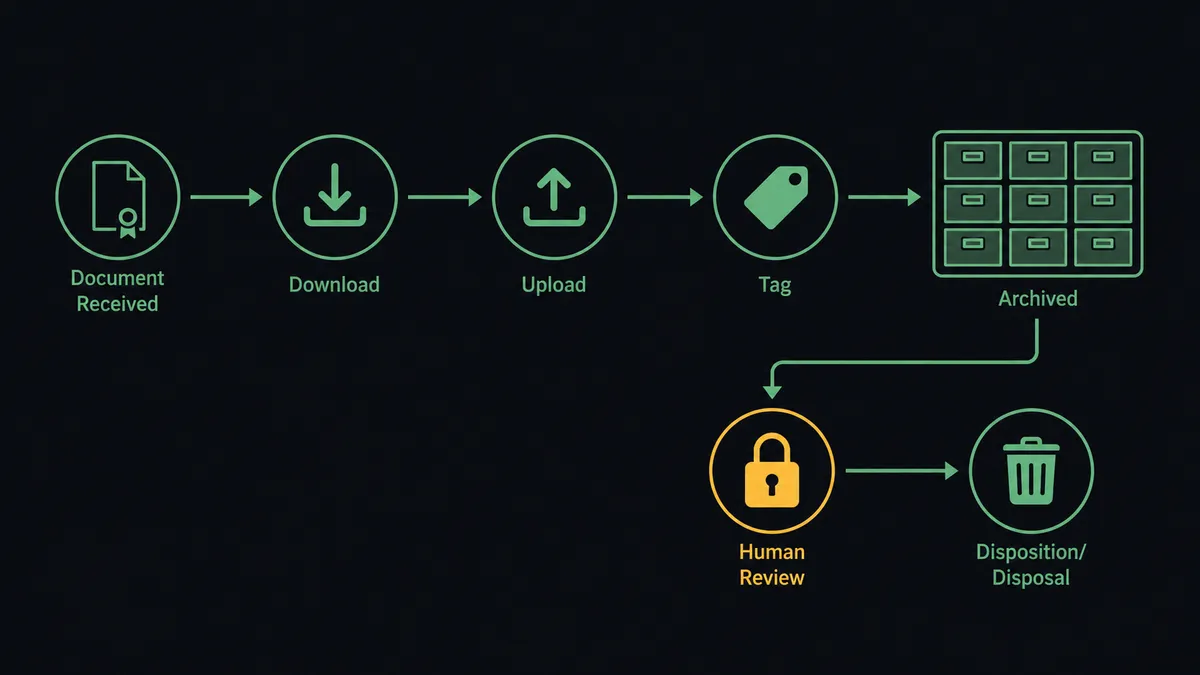
Yes, and the agent turns a filing pipe into a governed archive. It holds the real actions as tools: Download Document, Get Envelope Recipients, Upload Asset, Manage Tags, Search Assets, Update Asset, Delete Assets. Before filing, it verifies the envelope is what it claims to be: the document count from List Envelope Documents matches what was sent, the signer set from Get Envelope Recipients matches the parties on the agreement. An envelope where a signer was swapped mid-flight or a document was removed does not get silently filed as executed; it gets escalated.
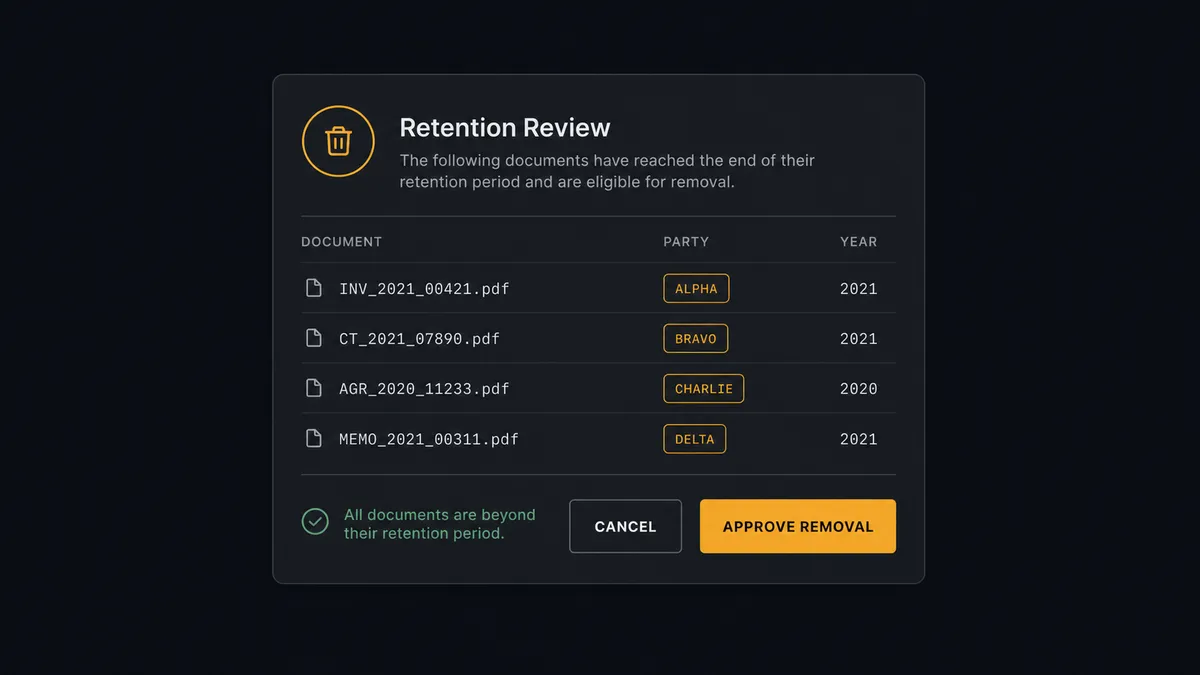
The consequential step is deletion. Retention policies eventually require removing documents, and Delete Assets is irreversible in a way that matters when the assets are signed agreements. So the retention sweep never ends in an unattended delete. The agent runs Search Assets for documents tagged past their retention date, assembles the candidate list with each document’s counterparty and signing year, and invokes a human-in-loop flow it holds as a callable tool. The workflow pauses and posts: “Retention sweep found contracts past their retention date, list attached with counterparty and signing year for each. Approve removal, or hold any that are under legal hold or active renewal?” Only after a named approver signs off does Delete Assets run, and the approver, the timestamp, and the exact list removed all land in the audit trail.
This is the digital andon cord, FlowRunner’s core thesis: like Toyota’s andon cord, the workflow stops the line the moment it reaches an action that cannot be undone. Filing runs at machine speed; destruction waits for a human.
FlowRunner vs Fivetran
If the goal were analytics, Fivetran would be the obvious reach. It is the standard for managed ELT: hundreds of maintained connectors that replicate application data into a warehouse reliably, with schema changes handled automatically and near-zero pipeline maintenance. For getting DocuSign envelope metadata into Snowflake or BigQuery so analysts can report on cycle times, Fivetran does that job extremely well.
But that is a different job. Fivetran moves copies of data into a warehouse for analysis. It does not download executed documents into an asset store, does not tag and file them for retrieval, does not act on envelopes, and has no concept of pausing for an approver before something is deleted. This pair is an operational workflow, not a data pipeline.
| What matters for this pair | FlowRunner | Fivetran |
|---|---|---|
| Human-in-the-loop before Delete Assets | Native. The agent invokes an approval flow as a callable tool and waits for a named approver | Not applicable; it replicates data, it does not take business actions |
| Who runs the flow | An AI agent reads, reasons, picks DocuSign and Cloudinary actions as tools | Managed sync jobs on a schedule |
| Users included | Unlimited users on every tier | Priced by consumption, not built around business approvers |
| Bring your own AI keys | Yes, BYOK | Not an agent platform |
| Self-hosted option | Yes, cloud-hosted or self-hosted | Cloud-first managed service |
| Pricing model | Transparent workflow-based tiers | Consumption-based pricing that scales with rows moved |
If you need DocuSign data in a warehouse for reporting, use Fivetran for that; it is genuinely the better fit there. If you need executed contracts filed, findable, governed, and never deleted without a named human’s sign-off, this pairing on FlowRunner is.
Before and after
| Category | Before | After |
|---|---|---|
| Filing | Signed PDFs live in DocuSign, inboxes, and a shared drive, filed when someone remembers | Every completed envelope is downloaded, filed, and tagged the moment the last signature lands |
| Finding a contract | A cross-system search that ends with asking around in chat | One Search Assets query by counterparty, type, or year |
| Integrity | Nobody checks that the filed copy matches what was sent for signature | The agent verifies document count and signer set before filing, and escalates mismatches |
| Deletion | Cleanup done by hand with delete rights and good intentions | Delete Assets runs only after a named approver reviews the retention list |
| The envelopes that failed | Declined and voided envelopes vanish from the record | On Envelope Declined and On Envelope Voided file their outcomes alongside the executed archive |
What you can build
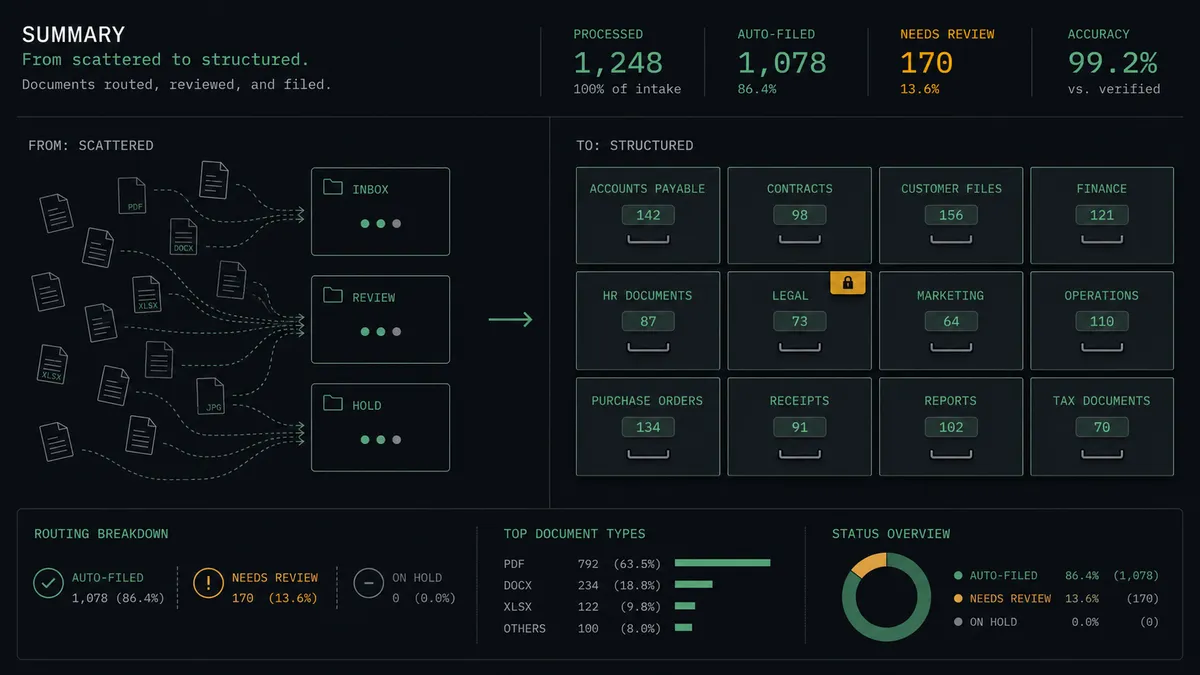
Executed-contract archive. On Envelope Completed fires, the agent pulls every file with List Envelope Documents and Download Document, files it with Upload Asset, tags it with Manage Tags, and returns a Generate Delivery URL link to the deal owner.
Retention sweep with a named approver. On a schedule, the agent runs Search Assets for documents past their retention date, packages the list with counterparty and year, and holds at the human-in-loop step until an approver releases Delete Assets.
Mismatch escalation. When the signer set from Get Envelope Recipients or the document count differs from what was sent, the agent files nothing, posts the discrepancy, and waits for a person to resolve it, with Resend Envelope available if the envelope needs another pass.
Voided-envelope ledger. On Envelope Voided fires and the agent records the void with its reason alongside the archive, so the difference between “never signed” and “signed then removed” is always answerable.
Deal-room delivery links. For active renewals, the agent uses Search Assets to gather every executed agreement with one counterparty and returns a set of Generate Delivery URL links, so the renewal owner gets the full history without touching the archive itself.
Getting started
Start on the free plan: 100 executions a month, every integration included, no credit card required, plus 14 days of Professional for new accounts. Both connectors are available on every tier, and every tier includes unlimited users and unlimited workflows.
Explore the integration details:
- DocuSign integration (4 triggers and 9 actions covering envelopes, documents, and recipients)
- Cloudinary integration (20 actions covering upload, folders, tags, search, and delivery)
Start building free at flowrunner.ai or book a demo to see a live DocuSign to Cloudinary workflow, retention approval gate and all.
Frequently asked questions
Is it free to connect DocuSign and Cloudinary on FlowRunner?
You can build and run the connection on FlowRunner's free plan, which includes 100 executions a month and every integration with no credit card required, and new accounts also get 14 days of Professional. Both connectors are available on every FlowRunner tier, and every tier includes unlimited users and unlimited workflows.
Can I self-host the DocuSign to Cloudinary workflow?
Yes. FlowRunner offers a cloud-hosted option and a self-hosted option, so the connection can run inside your own environment.
Does the AI agent need my own OpenAI or Claude key?
FlowRunner uses a bring-your-own-keys model, so you connect the AI provider key you already have. You are not locked to one model.
What happens when the agent finds an envelope that does not match what was sent?
The agent stops and invokes a human-in-loop step. If the document count from List Envelope Documents or the signer set from Get Envelope Recipients differs from what the envelope should contain, it posts the discrepancy and waits for a decision before anything is filed as executed.
Which DocuSign events can start the Cloudinary workflow?
DocuSign offers four triggers: On Envelope Completed, On Envelope Sent, On Envelope Declined, and On Envelope Voided. On Envelope Completed drives the archive path, while On Envelope Declined and On Envelope Voided let the workflow record the envelopes that never became contracts.
Can a signed contract be deleted automatically once its retention period ends?
Not without a person. The agent's retention sweep uses Search Assets to flag documents past their retention date, but Delete Assets only runs after a named approver reviews the list and signs off. The approval is captured in the audit trail.