How to Connect NetSuite with Canva (With or Without an AI Agent)
Connect NetSuite records to Canva brand templates so price lists, customer one-pagers, and sales reports render themselves, with an AI agent that pauses for a human before a document carrying live pricing is exported for customers.
How do you connect NetSuite to Canva?
You connect NetSuite to Canva by running a scheduled workflow that pulls live records with List Items, List Customers, or Run SuiteQL Query, loads a brand template’s fillable fields with Get Brand Template Dataset, renders the data into the layout with Autofill Design and Wait, and produces the finished file with Export Design and Wait. FlowRunner is a visual AI-agent orchestration platform where automations run autonomously and pause for human judgment on the steps that carry real consequence. Run as an AI agent, the connection checks the data before it renders, and stops for a named reviewer before any document carrying live pricing is exported for a customer.
The problem it solves
Every operations team has a set of documents that are really just ERP data wearing brand clothes. The weekly price list the sales team sends distributors. The quarterly account one-pager with a customer’s order history and open balance. The monthly revenue summary leadership wants as a clean slide, not a saved search. Today those get made by hand: someone exports from NetSuite, pastes into a template, nudges text boxes, exports a PDF, and repeats next cycle. The design is the same every time. Only the numbers change, and the numbers are the part humans get wrong.
The failure mode is not ugly documents, it is stale and wrong ones. A price list built from last Tuesday’s export goes out after Wednesday’s price update, and a distributor holds you to the old number. A one-pager shows an open balance that was paid a week ago, and the account review starts with an apology. When marketing owns the template and finance owns the data, each version becomes an email thread, and the version that ships is whichever attachment was newest. Branded documents built by copy-paste are pricing commitments assembled without controls.
How it works: the connection
Neither NetSuite nor Canva exposes event triggers, so the workflow opens on a schedule. Here is the plain version, grounded in the real connector actions.
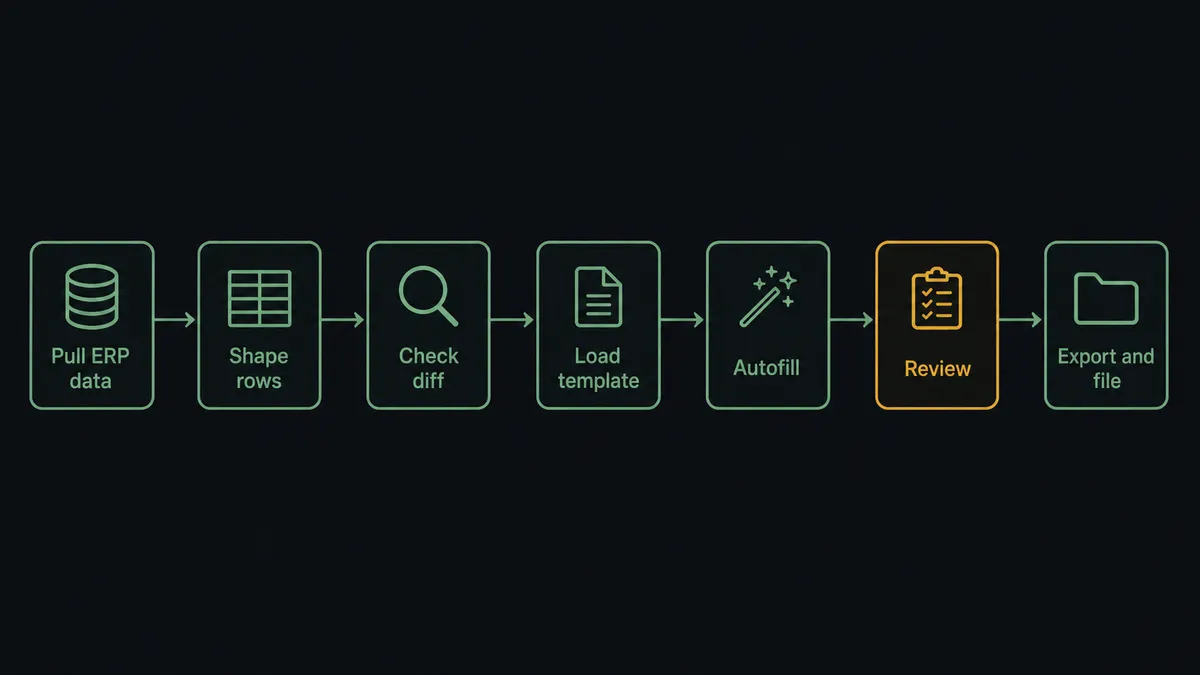
- Trigger: On a schedule, every Monday at 7 AM for a weekly price list, the workflow starts its pull.
- Read: List Items retrieves active items and current pricing; Run SuiteQL Query shapes the exact rows the document needs, such as items by category with quantity breaks.
- Enrich: For customer-specific documents, Get Customer and List Invoices add the account’s details, order history, and balances.
- Load the template: List Brand Templates finds the design, and Get Brand Template Dataset enumerates its fillable data fields.
- Render: Autofill Design and Wait fills those fields with the pulled data, producing a new design in the brand layout.
- Export: Export Design and Wait renders the finished PDF or image.
- File it: Create Folder and Move Folder Item place the output in the right release folder, so sales always grabs the current version.
That is the “just connect them” answer. The document that took an afternoon of pasting now assembles itself from live data, in the exact layout your designers built.
Can an AI agent run it? (and why a human stays in the loop)
Yes, and the agent’s job is to be the skeptical analyst between the ERP and the artwork. A dumb pipeline renders whatever the query returns. The agent holds List Items, Run SuiteQL Query, Get Customer, Autofill Design and Wait, and Export Design and Wait as tools, and it reasons about the data before committing it to a layout: it diffs this week’s prices against last week’s, notices an item that vanished from the list, catches a query that returned zero rows, and refuses to render a beautiful document around broken data.
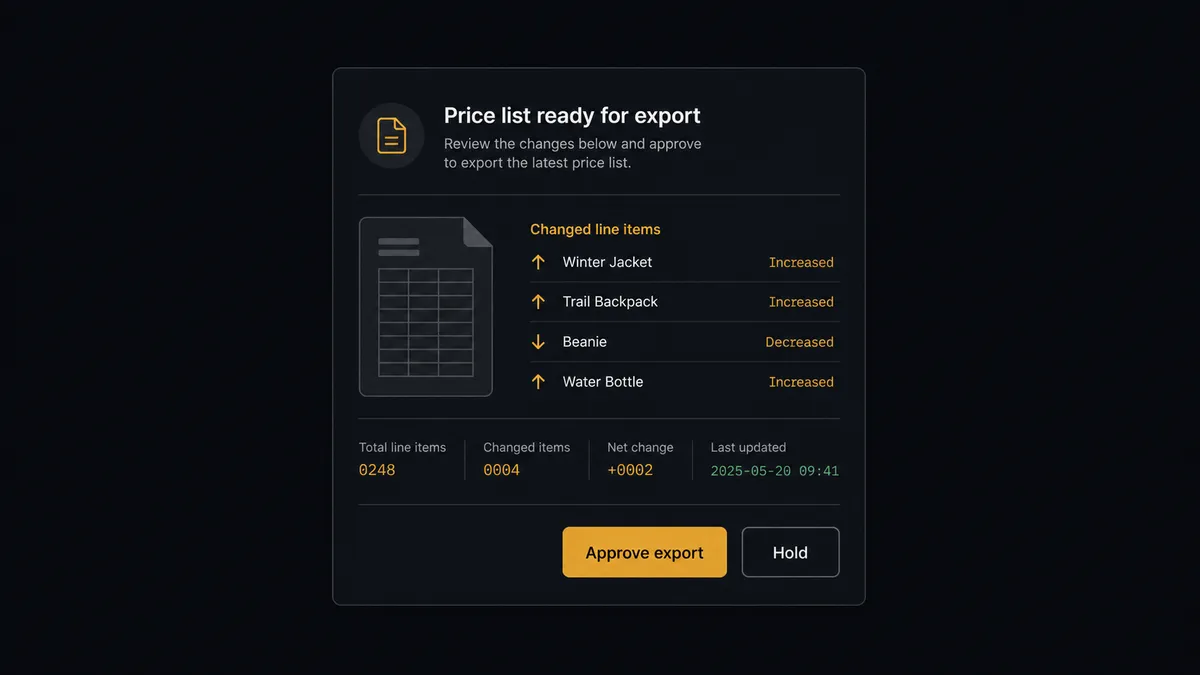
The consequential step is Export Design and Wait on a customer-facing document. An exported price list is not a draft, it is the file a distributor forwards, prints, and quotes from. So before exporting anything that carries pricing or account terms, the agent invokes a human-in-loop flow it holds as a callable tool. The workflow pauses and posts to the revenue ops channel: “Weekly distributor price list is filled and ready. Notable changes since last week: [item and price movements]. Preview attached. Approve export?” A named reviewer clicks once. Only then does Export Design and Wait run and the file move to the release folder, with the approver and timestamp in the audit trail.
Routine documents flow through untouched. An internal revenue summary exports on its own; a price list with a sharp movement on a high-volume item stops the line. Prospects call this a digital andon cord: like Toyota’s quality control pull cord, the workflow stops the line the moment it hits uncertainty, and your team pulls it back into motion.
FlowRunner vs Celigo
If you run NetSuite, you have almost certainly evaluated Celigo. That reputation is earned: Celigo grew up in the NetSuite ecosystem, its integrator.io platform is deeply fluent in NetSuite’s data model, and its prebuilt integration apps for pairings like NetSuite to Salesforce or NetSuite to Shopify are mature, well-supported products. For classic record-to-record ERP sync at enterprise scale, Celigo is a serious platform.
This pairing is not classic record sync. There is no Celigo integration app for “turn my item master into a branded price list a reviewer signs off on,” and building it means custom flows on a platform priced and designed for integration teams. FlowRunner treats the document run as what it is: an agent-driven workflow with a judgment step in the middle.
| What matters for this pair | FlowRunner | Celigo |
|---|---|---|
| Human-in-the-loop on Export Design | Native. The agent pauses and routes the preview and data diff to a named reviewer | Approval checkpoints are not a native flow primitive; exception review focuses on sync errors |
| Who runs the flow | An AI agent reads the data, reasons about anomalies, picks actions as tools | Prebuilt integration apps plus custom flows built by integration specialists |
| Users included | Unlimited users on every tier | Priced per endpoint and edition, oriented to integration teams |
| Bring your own AI keys | Yes, BYOK | AI features are Celigo’s own platform capabilities |
| Self-hosted option | Yes, cloud-hosted or self-hosted | Cloud iPaaS |
| Pricing model | Transparent workflow-based tiers | Enterprise iPaaS pricing, quoted by edition and endpoints |
If your need is high-volume ERP record synchronization across many endpoints with an integration team to run it, Celigo is a genuine fit. If the job is turning NetSuite data into reviewed, customer-facing branded documents without an integration project, this pairing on FlowRunner is the better fit.
Before and after
| Category | Before | After |
|---|---|---|
| Price list production | Someone exports items, pastes into a template, and fixes text boxes every week | Autofill Design and Wait renders current List Items data into the brand template on schedule |
| Data freshness | Documents reflect whenever the last export happened | Every run pulls live NetSuite data minutes before rendering |
| Error catching | A wrong price is discovered by the distributor quoting it | The agent diffs each pull and holds anomalies before anything renders |
| Release control | The current version is whichever attachment is newest in the thread | Approved exports land in one release folder via Move Folder Item |
| Design integrity | Each manual edit drifts the document further off brand | Designers own the template; the workflow only fills its data fields |
What you can build
Weekly distributor price list. Run SuiteQL Query shapes the item and pricing rows, Autofill Design and Wait renders them into the price list template, a reviewer approves the diff, and Export Design and Wait files the PDF for sales.
Account review one-pagers. Before each QBR, the agent pulls the account with Get Customer, its history with List Invoices and List Sales Orders, fills the one-pager template per account, and batches the set for a single approval.
Monthly revenue snapshot. A SuiteQL pull summarizes the month, Autofill Design and Wait renders the leadership slide, and because it is internal, the agent exports without escalation and files it with Move Folder Item.
New item launch cards. When the scheduled pull finds items added since the last run in List Items, the agent fills a launch card template per item, uploads product imagery with Upload Asset and Wait, and holds the set for brand review before export.
Collections-safe statements. For overdue accounts found via List Invoices, the agent fills a branded statement template, but because these documents touch customer relationships, every export waits for the AR manager’s approval first.
Getting started
Start on the free plan: 100 executions a month, every integration included, no credit card required, plus 14 days of Professional for new accounts. Both connectors are available on every tier, and every tier includes unlimited users and unlimited workflows.
Explore the integration details:
- NetSuite integration (27 actions covering customers, invoices, orders, and SuiteQL)
- Canva integration (26 actions covering designs, brand templates, autofill, and exports)
Start building free at flowrunner.ai or book a demo to see a live NetSuite to Canva workflow, export approval and all.
Frequently asked questions
Is it free to connect NetSuite and Canva on FlowRunner?
You can build and run the connection on FlowRunner's free plan, which includes 100 executions a month and every integration with no credit card required, and new accounts also get 14 days of Professional. Both connectors are available on every FlowRunner tier, and every tier includes unlimited users and unlimited workflows.
Can I self-host the NetSuite to Canva workflow?
Yes. FlowRunner offers a cloud-hosted option and a self-hosted option, so the connection can run inside your own environment.
Does the AI agent need my own OpenAI or Claude key?
FlowRunner uses a bring-your-own-keys model, so you connect the AI provider key you already have. You are not locked to one model.
What happens when the agent finds a price anomaly while filling a template?
It stops before anything renders for customers. If an item price pulled with List Items differs sharply from the last run, or a SuiteQL query returns unexpected rows, the agent holds the document and sends the diff to a named reviewer. Export Design only runs after approval.
Which NetSuite and Canva actions does this connection use?
Neither service exposes event triggers, so the workflow runs on a schedule. It reads NetSuite with List Items, List Customers, List Invoices, and Run SuiteQL Query, then renders documents with List Brand Templates, Get Brand Template Dataset, Autofill Design and Wait, and Export Design and Wait, filing results with Create Folder and Move Folder Item.
Do my designers lose control of the templates?
No. Designers own the brand templates in Canva. The workflow only fills the data fields defined in Get Brand Template Dataset, so layout, typography, and brand elements stay exactly as designed while the numbers stay current.