How to Connect NetSuite with Adobe Acrobat Sign (With or Without an AI Agent)
Send NetSuite sales orders out for e-signature with Adobe Acrobat Sign, run by an AI agent that stages and tracks agreements, archives the signed PDF and audit trail, and pauses for a human before a high-value or non-standard order goes out for signature.
How do you connect NetSuite to Adobe Acrobat Sign?
You connect NetSuite to Adobe Acrobat Sign by running a scheduled workflow that selects orders with List Sales Orders, pulls each order’s lines and terms with Get Sales Order, stages the order form with Upload Transient Document, and routes it for e-signature with Send Agreement, tracking progress through Get Agreement until the signed PDF and audit trail are archived. FlowRunner is a visual AI-agent orchestration platform where automations run autonomously and pause for human judgment on the steps that carry real consequence. The same connection can run as an AI agent that sends routine agreements on its own and pauses for a named human before a high-value or non-standard order goes in front of a customer’s signers.
The problem it solves
Right now getting a sales order signed is a manual relay between two systems that both think they are the system of record. The order is approved in NetSuite. Someone exports or rebuilds it as a PDF, uploads it to Adobe Acrobat Sign, types the signer emails, sends it, and then the tracking begins: checking the dashboard, nudging the account manager, forwarding “did they sign yet?” emails. When the signature lands, someone downloads the PDF, files it wherever this quarter’s convention says, and remembers, usually, to update the order status in NetSuite so fulfillment can start.
The edges hurt in two directions. Deals stall because the agreement sat unstaged for two days or the signer’s reminder never went out, and revenue that was ready to close waits on process. Worse, agreements go out wrong: a superseded revision of the order, a signer list missing the customer’s procurement contact, a non-standard discount nobody senior ever saw. A signature request is an offer in writing. Sending the wrong one is not a clerical error, it is a commercial one.
How it works: the connection
The connection reads NetSuite on a schedule and drives Adobe Acrobat Sign. Here is the plain version, grounded in the real connector actions.
- Trigger: On a schedule, the workflow calls List Sales Orders filtered to orders approved internally and awaiting customer signature.
- Read: For each order, it calls Get Sales Order for the lines, totals, and terms, and Get Customer for the signer contacts.
- Stage the document: It assembles the order form and calls Upload Transient Document, receiving the transient document ID Adobe Acrobat Sign expects.
- Send for signature: It calls Send Agreement with the staged document and the recipient emails, each signer routed in the listed order.
- Track and chase: It calls Get Agreement on a cadence to watch status, and Send Reminder to nudge specific signers who have not acted, with participant IDs from Get Agreement Members.
- Archive the record: On SIGNED status, Download Agreement PDF saves the combined signed document and Download Audit Trail saves the certified who-did-what record.
- Close the loop: Update Sales Order marks the order in NetSuite so fulfillment and billing proceed from the system of record.
That is the “just connect them” answer. Approved orders reach signers within minutes, reminders go out without anyone watching a dashboard, and every signed agreement lands in the archive with its audit trail attached.
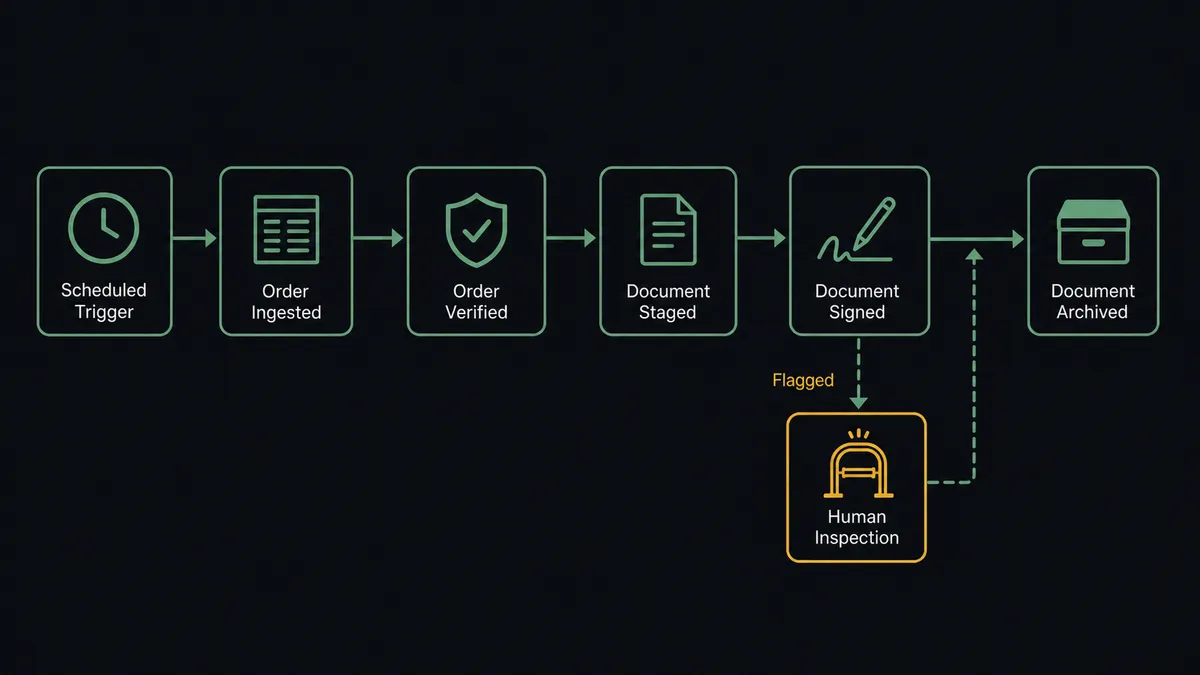
Can an AI agent run it? (and why a human stays in the loop)
Yes, and the agent’s judgment sits exactly where deals go wrong. It holds the NetSuite and Adobe Acrobat Sign actions as tools: List Sales Orders, Get Sales Order, Get Customer, Update Sales Order on one side; Upload Transient Document, Send Agreement, Get Agreement, Send Reminder, Cancel Agreement, Download Agreement PDF, Download Audit Trail on the other. Before it sends anything, it checks the order the way a careful sales ops person would. Do the totals match the customer record’s terms? Is this the current revision, or did the order change after the document was assembled? Are the signers the right people, in the right order?
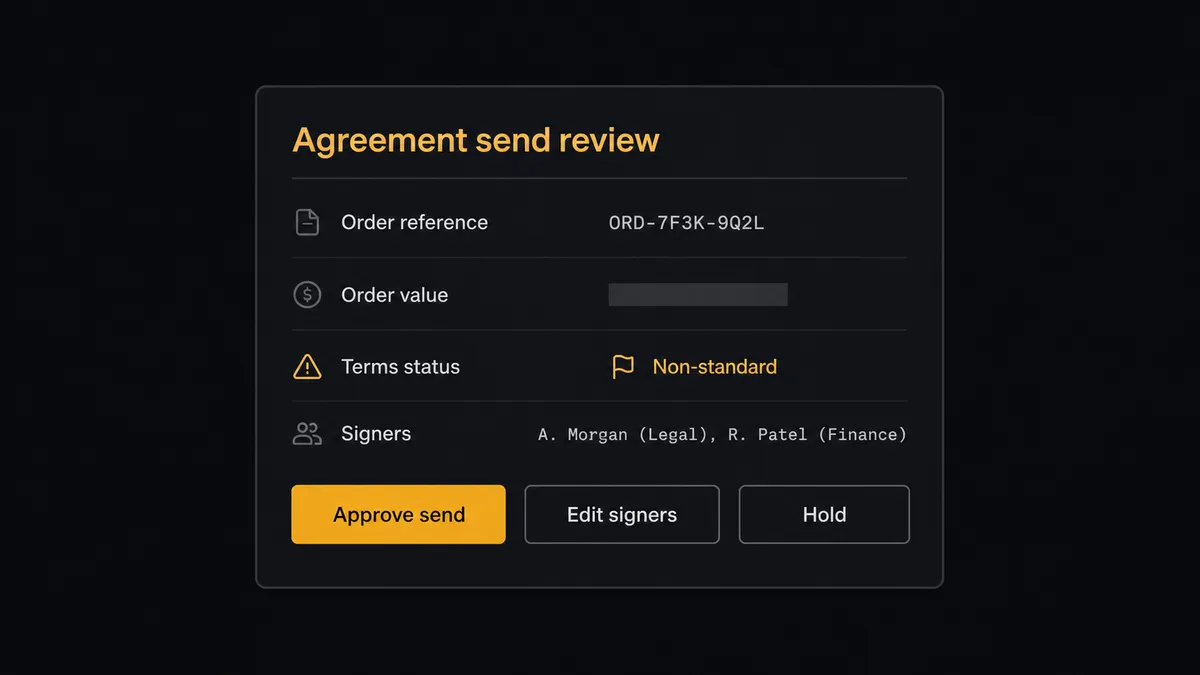
The consequential step is Send Agreement, because the moment it runs, your company has made a written offer that a customer can execute. For routine orders inside the standard playbook, the agent sends without ceremony. For an order whose value crosses your threshold, whose discount is non-standard, or whose terms were edited by hand, it stops. It invokes a human-in-loop flow it holds as a callable tool and posts to your channel: “Order staged for signature. Value and terms fall outside the standard playbook; order lines, customer history, and the staged document attached. Approve send, edit signers, or hold?” A named approver decides, and only then does Send Agreement go out. If an order changes mid-flight, the same gate governs Cancel Agreement, because pulling back an offer a customer is reading is also a decision a person should own. Every decision, approver, and timestamp lands in the audit trail, right next to the one Adobe Acrobat Sign certifies.
Prospects call this the digital andon cord: like Toyota’s production line pull cord, the workflow stops the line the moment it hits uncertainty. Routine orders close faster. The order that should never have gone out never does.
FlowRunner vs Celigo
Celigo belongs on any NetSuite team’s shortlist, and honestly. It grew up in the NetSuite ecosystem, its prebuilt integration apps encode years of NetSuite-specific field mapping and error handling, and for high-volume record synchronization between NetSuite and other enterprise systems it is a mature, managed iPaaS with real depth. If your problem is keeping tens of thousands of records flowing between NetSuite and a warehouse of endpoints, Celigo has been solving exactly that for a long time.
The difference is the shape of the problem. This workflow is not bulk record sync; it is a judgment-bearing process where one step, Send Agreement, commits your company commercially. FlowRunner is built around an AI agent running that process with a native human gate on the step that matters.
| What matters for this pair | FlowRunner | Celigo |
|---|---|---|
| Human-in-the-loop before Send Agreement reaches a customer | Native. The agent invokes an approval flow as a callable tool and waits | Flow-level controls and alerts; approval workflows are yours to construct |
| Who runs the flow | An AI agent reads the order, reasons, and picks actions as tools | Managed integration flows configured per endpoint |
| Users included | Unlimited users on every tier | Seat and role limits vary by plan |
| Bring your own AI keys | Yes, BYOK | AI features are part of the platform’s own offering |
| Self-hosted option | Yes, cloud-hosted or self-hosted | Cloud iPaaS |
| Pricing model | Transparent workflow-based tiers starting at $45/mo | Quote-based enterprise iPaaS pricing |
If you are synchronizing high-volume records across a large enterprise stack, Celigo’s NetSuite pedigree is a real asset. If the job is getting order agreements signed with judgment applied before each one goes out, and a signed-plus-approved audit record afterward, this pairing is the better fit.
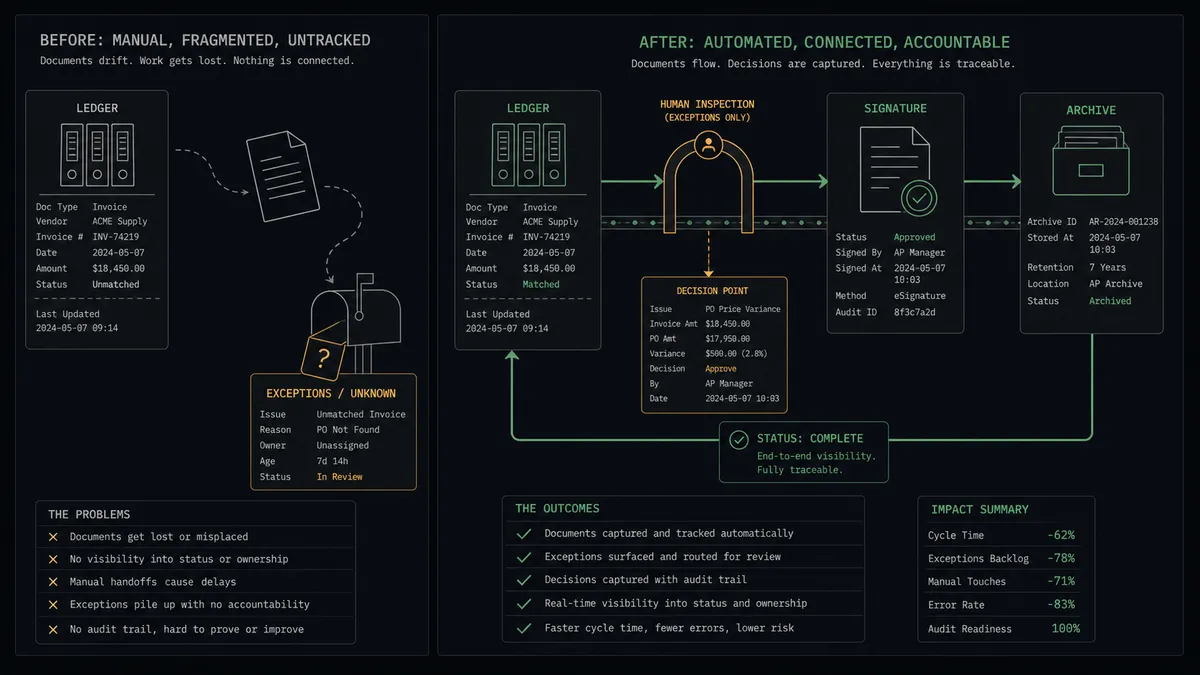
Before and after
| Category | Before | After |
|---|---|---|
| Staging | Someone rebuilds each approved order as a PDF and uploads it by hand | Upload Transient Document stages every order on schedule |
| Send discipline | Non-standard orders go out with the same click as routine ones | Flagged orders wait for a named approver before Send Agreement |
| Chasing signers | Account managers forward “did they sign yet?” emails | Get Agreement tracks status and Send Reminder nudges the specific signer |
| Archiving | Signed PDFs scatter across mailboxes and shared drives | Download Agreement PDF and Download Audit Trail file every record consistently |
| ERP status | NetSuite learns about the signature whenever someone remembers | Update Sales Order closes the loop the moment the agreement is signed |
What you can build
Order-to-signature pipeline. List Sales Orders finds approved orders, Upload Transient Document and Send Agreement put them in front of signers, Get Agreement and Send Reminder keep them moving, and Update Sales Order tells NetSuite the deal is executed.
High-value order gate. The agent applies your playbook to every order and routes the exceptions, large totals, hand-edited terms, unusual discounts, to a named approver with the staged document attached, before any customer sees an offer.
Template-driven renewals. For standard renewals, Send Agreement works from a library template via List Library Documents, with the customer’s details merged in, so recurring paperwork runs without anyone assembling documents.
Signature compliance archive. On completion, Download Agreement PDF and Download Audit Trail file the signed document and its certified event history together, and Get Agreement Events supplies the timeline when anyone asks who signed what, when.
Stalled-deal escalation. When Get Agreement shows an agreement out for signature past your threshold in days, the agent summarizes the order value and signer status to the sales channel and queues Send Reminder to the specific participant holding things up.
Getting started
Start on the free plan: 100 executions a month, every integration included, no credit card required, plus 14 days of Professional for new accounts. Both connectors are available on every tier, and every tier includes unlimited users and unlimited workflows.
Explore the integration details:
- NetSuite integration (27 actions covering customers, vendors, invoices, sales orders, and SuiteQL)
- Adobe Acrobat Sign integration (21 actions covering agreements, reminders, form data, and audit trails)
Start building free at flowrunner.ai or book a demo to see a live NetSuite to Adobe Acrobat Sign workflow, send approval and all.
Frequently asked questions
Is it free to connect NetSuite and Adobe Acrobat Sign on FlowRunner?
You can build and run the connection on FlowRunner's free plan, which includes 100 executions a month and every integration with no credit card required, and new accounts also get 14 days of Professional. Both connectors are available on every FlowRunner tier, and every tier includes unlimited users and unlimited workflows.
Can I self-host the NetSuite to Adobe Acrobat Sign workflow?
Yes. FlowRunner offers a cloud-hosted option and a self-hosted option, so the connection can run inside your own environment.
Does the AI agent need my own OpenAI or Claude key?
FlowRunner uses a bring-your-own-keys model, so you connect the AI provider key you already have. You are not locked to one model.
What happens when an order's value or terms fall outside the standard playbook?
The agent stages the document but does not send it. It packages the order's lines and totals from Get Sales Order, the customer's history, and the staged agreement, then invokes a human-in-loop step and waits for a named approver to clear, edit, or hold the order before Send Agreement runs.
Which NetSuite and Adobe Acrobat Sign actions does this workflow use?
On the NetSuite side, List Sales Orders and Get Sales Order pull the order, Get Customer supplies the signer details, and Update Sales Order records the outcome. On the Adobe Acrobat Sign side, Upload Transient Document stages the file, Send Agreement routes it for signature, Get Agreement tracks status, Send Reminder chases signers, and Download Agreement PDF and Download Audit Trail archive the signed record.
What happens after the customer signs?
Get Agreement confirms the SIGNED status, Download Agreement PDF saves the combined signed document to file storage, Download Audit Trail archives the certified record of who signed and when, and Update Sales Order marks the order in NetSuite so fulfillment and billing can proceed from the system of record.