How to Connect NetSuite with DocuSeal (With or Without an AI Agent)
Send vendor agreements and order confirmations for signature the moment NetSuite records are ready, with an AI agent that prefills every DocuSeal submission and pauses for a human before non-standard terms go out for signature.
How do you connect NetSuite to DocuSeal?
You connect NetSuite to DocuSeal by scanning for records that need paperwork with List Vendors and List Sales Orders on a schedule, selecting the right agreement with List Templates, and sending it for signature with Create Submission, prefilled from the ERP record, so a vendor approved this morning has an agreement in their inbox by lunch. FlowRunner is a visual AI-agent orchestration platform where automations run autonomously and pause for human judgment on the steps that carry real consequence. Run as an AI agent, the same connection also reads each record against your standard terms, and pauses for a named human before any non-standard document goes out for signature.
The problem it solves
Today the distance between “record approved in NetSuite” and “agreement signed” is measured in reminders. A vendor gets created, and someone in procurement has to notice, find the current version of the vendor agreement, retype the entity name and payment terms from the ERP into the document, send it, and then remember to chase it. Sales orders with signature requirements sit the same way. The ERP says the relationship exists; the signed paper that makes it real trails days behind, and the person carrying it forward is doing clerical work between real jobs.
The edges are legal, which makes them expensive. The retyped entity name does not match the ERP record, and the signed agreement binds the wrong party. An old template goes out with last year’s terms. A counterparty signs, and nobody updates NetSuite, so the record still says pending and the first PO waits on paperwork that is already done. Worst, a heavily negotiated deal goes out on the standard template because the sender did not know the terms had changed.
How it works: the connection
The connection reads NetSuite on a schedule and sends documents through DocuSeal. Here is the plain version, grounded in the real connector actions.
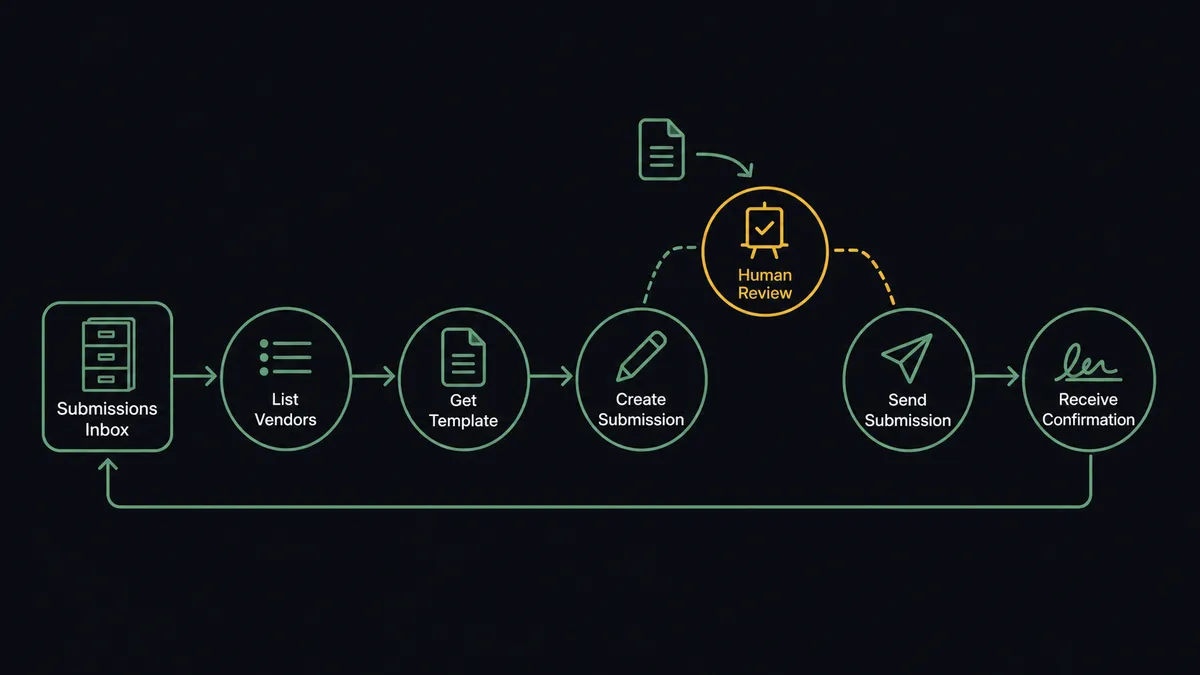
- Trigger: On a schedule, the workflow calls List Vendors and List Sales Orders, or Run SuiteQL Query for a filtered set, to find records that reached the awaiting-signature stage.
- Read: Get Vendor or Get Sales Order pulls the entity name, amounts, terms, and contacts.
- Select: List Templates and Get Template pick the current agreement for the record type, so an outdated version never ships.
- Send: Create Submission dispatches the prefilled document to the counterparty’s signer.
- Watch: Get Submission polls for completion, and Get Submitter identifies who is sitting on a stalled document.
- Write back: On completion, Update Vendor or Update Sales Order marks the NetSuite record signed, closing the loop in the ERP.
That is the “just connect them” answer. Paperwork leaves the day the record is ready, arrives prefilled from the system of record, and its completion lands back in the ERP without anyone chasing PDFs. Abandoned deals get cleaned up too: Archive Submission retires signature requests for records that fell through.
Can an AI agent run it? (and why a human stays in the loop)
Yes, and the reading matters more than the sending. A deterministic flow sends the mapped template for every record; an AI agent examines the record first. Payment terms that differ from your standard, an amount out of range for the vendor category, a legal entity name that almost matches an existing vendor, a sales order whose line items imply a different agreement type: these are the cases that turn into disputes when the wrong paper gets signed. Its toolbox is the real action set: List Vendors, Get Vendor, List Sales Orders, Get Sales Order, Run SuiteQL Query, List Templates, Get Template, Create Submission, Get Submission, Get Submitter, Archive Submission, Update Vendor, Update Sales Order.
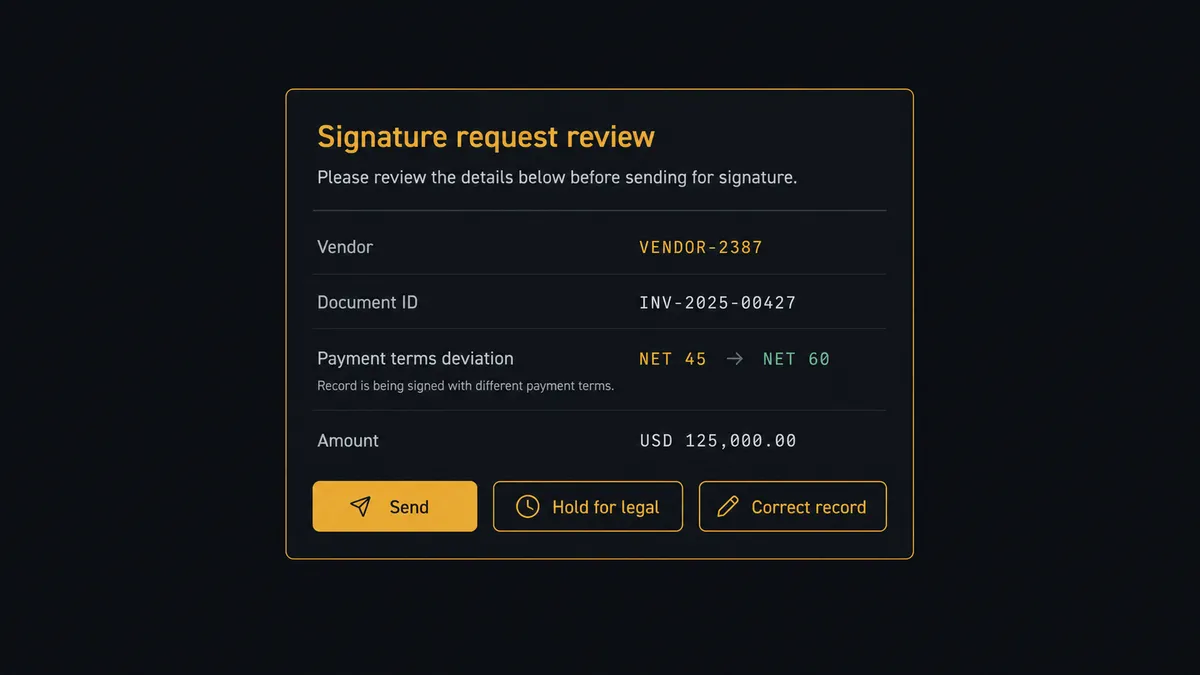
The consequential step is Create Submission, because a signature request is an offer to be bound. For clean, standard-terms records, the agent sends without ceremony. For anything else, it invokes a human-in-loop flow it holds as a callable tool. The workflow pauses and posts: “Vendor agreement staged for [vendor]. Deviation: payment terms on the record read net 60; the standard template reads net 30. Send as prefilled, hold for legal, or correct the record first?” Only after a named person decides does the document go out, and the deviation, the decision, and the approver land in the audit trail together.
The same watchfulness runs downstream: a submission stalled past its window surfaces with Get Submitter detail instead of silently expiring. Prospects call this a digital andon cord: the workflow stops the line the moment it hits uncertainty, and your team pulls it back into motion.
FlowRunner vs Celigo
Teams that live in NetSuite know Celigo, and its reputation is earned. Celigo is deeply specialized in the NetSuite ecosystem, its integration apps encode real domain knowledge, and for high-volume record synchronization between NetSuite and other enterprise systems it is a mature, credible platform. If your problem is keeping NetSuite in lockstep with a dozen other systems at scale, Celigo belongs on your shortlist.
This pairing is a different shape of problem: a judgment loop that ends in a legal act. FlowRunner runs it as an agent that reads each record, drafts the paperwork, and holds human approval as a native step in front of the signature request.
| What matters for this pair | FlowRunner | Celigo |
|---|---|---|
| Human-in-the-loop on Create Submission | Native. The agent invokes an approval flow as a callable tool and pauses on non-standard terms | Integration-centric; approval workflows are not the platform’s core primitive |
| Who runs the flow | An AI agent reads the record, reasons, picks actions as tools | Prebuilt integration apps and flows you configure |
| Users included | Unlimited users on every tier | Enterprise licensing; seats and tiers vary |
| Bring your own AI keys | Yes, BYOK | AI features are the platform’s own |
| Self-hosted option | Yes, cloud-hosted or self-hosted | Cloud iPaaS |
| Pricing model | Transparent workflow-based tiers starting at $45/mo | Enterprise pricing, quoted per deployment |
If you are synchronizing NetSuite with many systems at enterprise volume, Celigo is a genuine specialist. If the job is getting the right paper signed by the right party with a named human on every exception, at a price an operations team can start on this week, that is FlowRunner’s territory.
Before and after
| Category | Before | After |
|---|---|---|
| Sending paperwork | Someone notices the record, retypes fields into a document, and sends it days later | Create Submission dispatches a prefilled agreement the day the record is ready |
| Template control | Old versions circulate from personal downloads folders | List Templates always selects the current agreement for the record type |
| Data consistency | Retyped names and terms drift from the ERP record | Every field maps from Get Vendor or Get Sales Order, so the paper matches the ERP |
| Exceptions | Non-standard deals go out on standard paper unnoticed | Deviations pause on an approval card before any signature request leaves |
| Completion tracking | Signed PDFs sit in inboxes while NetSuite says pending | Get Submission confirms signing and Update Vendor or Update Sales Order closes the loop |
What you can build
Vendor onboarding paperwork. List Vendors finds newly approved vendors, Get Vendor pulls the entity and terms, and Create Submission sends the prefilled agreement, with Update Vendor marking the record signed when Get Submission confirms completion.
Order confirmations for signature. Sales orders above your signature threshold flow from List Sales Orders into Create Submission on the order confirmation template, and Update Sales Order records the countersignature, keeping fulfillment gated on real paper.
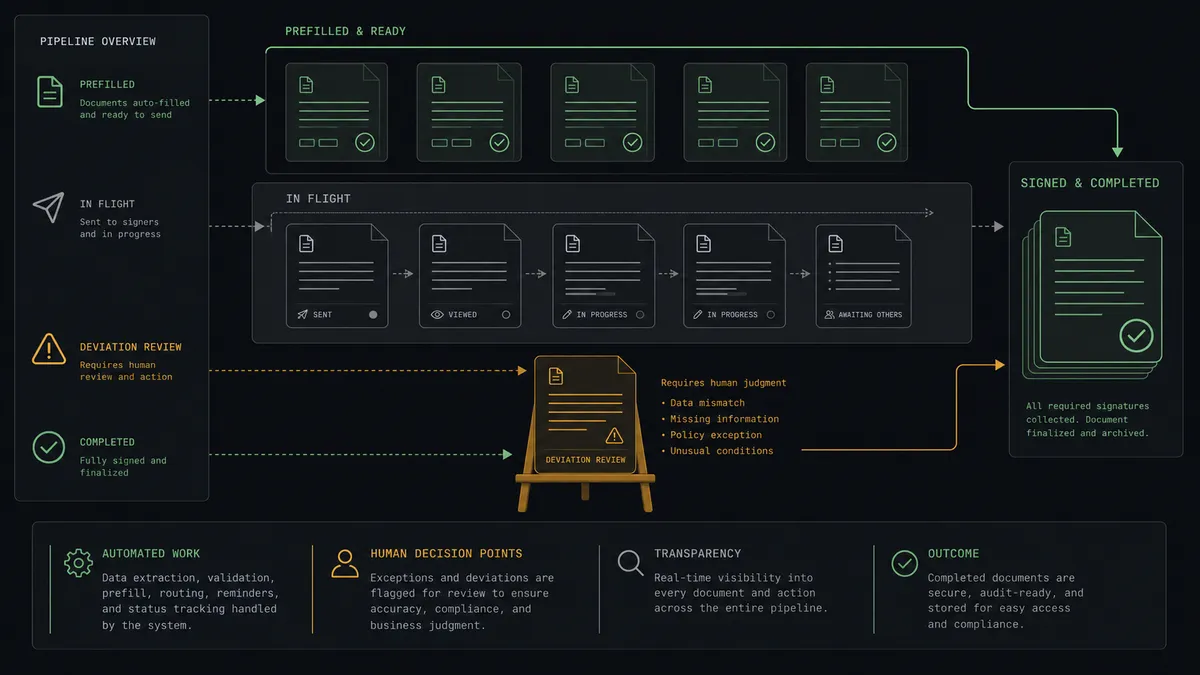
Deviation triage. Records whose terms differ from standard pause on an approval card with the exact deviation quoted, so legal reviews the five deals a week that need it instead of skimming fifty that do not.
Signature chasing. The agent watches Get Submission across all open documents, identifies stalled signers with Get Submitter, and posts a daily follow-up list to your channel, so no agreement dies of inattention.
Dead deal cleanup. When Run SuiteQL Query shows a record cancelled after paperwork went out, Archive Submission retires the pending signature request, keeping the DocuSeal workspace an honest picture of what is actually in flight.
Getting started
Start on the free plan: 100 executions a month, every integration included, no credit card required, plus 14 days of Professional for new accounts. Both connectors are available on every tier, and every tier includes unlimited users and unlimited workflows.
Explore the integration details:
- NetSuite integration (27 actions covering customers, vendors, invoices, orders, items, and SuiteQL)
- DocuSeal integration (11 actions covering templates, submissions, and submitters)
Start building free at flowrunner.ai or book a demo to see a live NetSuite to DocuSeal workflow, deviation gate and all.
Frequently asked questions
Is it free to connect NetSuite and DocuSeal on FlowRunner?
You can build and run the connection on FlowRunner's free plan, which includes 100 executions a month and every integration with no credit card required, and new accounts also get 14 days of Professional. Both connectors are available on every FlowRunner tier, and every tier includes unlimited users and unlimited workflows.
Can I self-host the NetSuite to DocuSeal workflow?
Yes. FlowRunner offers a cloud-hosted option and a self-hosted option, so the connection can run inside your own environment.
Does the AI agent need my own OpenAI or Claude key?
FlowRunner uses a bring-your-own-keys model, so you connect the AI provider key you already have. You are not locked to one model.
What happens when a record deviates from standard terms?
The signature request does not go out. The agent packages the record, the specific deviations it found, and the prefilled document, then invokes a human-in-loop step. Create Submission runs only after a named person approves, and the approval is logged with the deviations that prompted it.
Which actions drive the workflow if NetSuite has no triggers here?
The NetSuite connector is action-based, so the workflow runs on a schedule. Each run calls List Vendors, List Sales Orders, or Run SuiteQL Query to find records awaiting paperwork, then sends documents through DocuSeal with Create Submission from your templates.
How does a completed signature get back into NetSuite?
The workflow polls Get Submission until the document completes, then writes the result back: Update Vendor or Update Sales Order marks the record as signed, and stalled submissions surface to your channel with Get Submitter detail so someone can follow up.