How to Connect HubSpot with Basecamp (With or Without an AI Agent)
Connect HubSpot deals to Basecamp so closed-won deals become fully scaffolded delivery projects, with a human approving the irreversible step of trashing a project when a deal falls through.
How do you connect HubSpot to Basecamp?
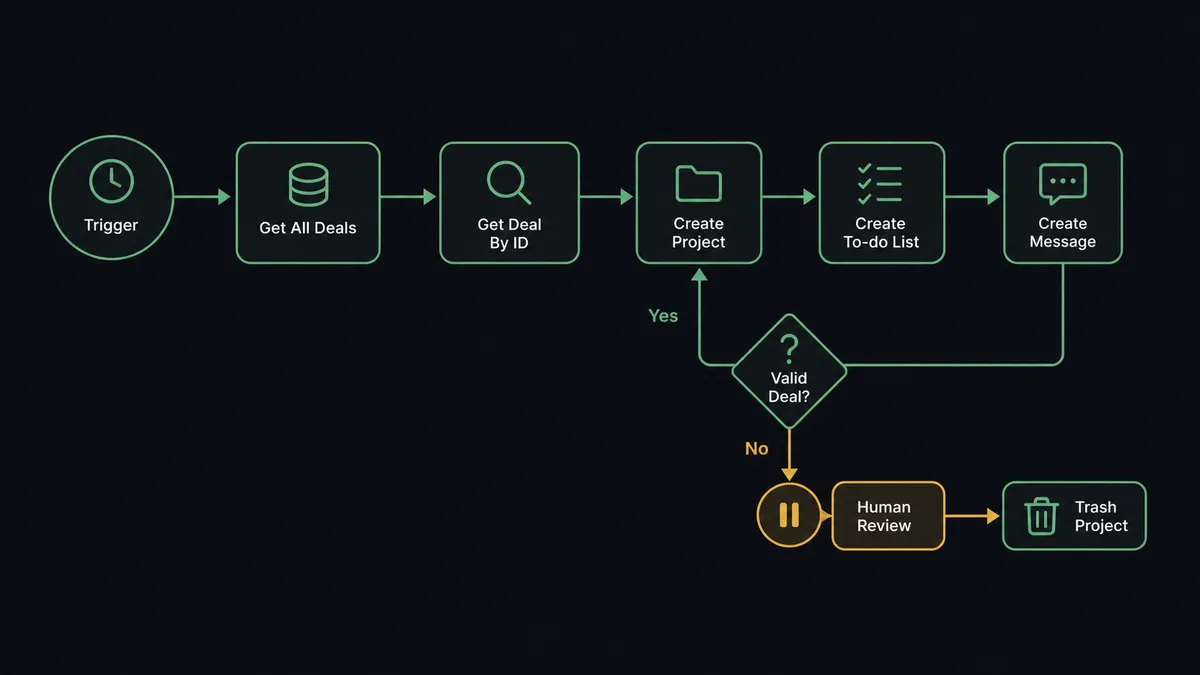
You connect HubSpot to Basecamp with a scheduled workflow: each run calls Get All Deals to catch deals that changed stage, pulls the winner’s full context with Get Deal By ID and Get Associations, and builds the delivery workspace with Create Project, Create To-do List, Create To-do, Create Message, and Create Schedule Entry. FlowRunner is a visual AI-agent orchestration platform where automations run autonomously and pause for human judgment on the steps that carry real consequence. The same connection can run as an AI agent that scaffolds each kickoff from the deal’s actual contacts and notes, and pauses for a named human before Trash Project, the one Basecamp action that permanently deletes work after 30 days, runs on anything.
The problem it solves
Today the handoff from sales to delivery is a person remembering to do it. A deal closes in HubSpot. Sometime later, an ops lead or account manager creates a Basecamp project by hand, copies the client name, rebuilds the same onboarding to-do list from the last project, writes a kickoff message from memory, and pings people to find a kickoff slot. On a good week that takes a day. On a busy week the client’s first impression of delivery is silence, because the project that should hold their onboarding does not exist yet.
The edges are where trust erodes. The kickoff message goes out missing the champion who actually signed. The onboarding checklist is a stale copy that still references last quarter’s process. And on the other end of the lifecycle, dead projects pile up: deals that fell through leave half-built workspaces cluttering Basecamp, and the one time someone bulk-cleans them, a project with real client files in it gets trashed. Basecamp permanently deletes trashed items after 30 days, so “oops” has a deadline.
How it works: the connection
The connection reads from HubSpot and builds in Basecamp. Here is the plain version, grounded in the real connector actions.
- Trigger: On a schedule, the workflow calls Get All Deals in HubSpot and compares stages against the last run to catch newly won deals.
- Read: Get Deal By ID pulls the full deal, and Get Associations walks to the contacts and company attached to it.
- Create the workspace: Create Project spins up the Basecamp project named for the client and engagement.
- Lay out the work: Create To-do List builds the onboarding checklist and Create To-do adds each task, with assignees set from List Project People.
- Announce it: Create Message posts the kickoff brief to the message board with the deal context, stakeholders, and scope summary.
- Book the kickoff: Create Schedule Entry puts the kickoff call on the project schedule with the right participants.
- Document it: Create Document drops the engagement summary into Docs & Files so delivery starts with the same facts sales closed on.
That is the “just connect them” answer. A won deal becomes a live, populated project before anyone asks for it. Since neither connector exposes an event trigger, the schedule is the heartbeat, and a few minutes of latency is invisible next to the day it used to take.
Can an AI agent run it? (and why a human stays in the loop)
Yes, and the agent version is the difference between a template stamp and a real handoff. A fixed sync creates the same project skeleton every time. An AI agent reads the deal first: the company, the associated contacts, the deal notes, the close date. It holds the real actions as tools, Get Deal By ID, Get Associations, Create Project, Create To-do List, Create To-do, Create Message, Create Schedule Entry, Create Document, and composes the kickoff that this deal needs. A two-week onboarding gets a lean checklist; a multi-phase engagement gets phased to-do lists and a longer runway to the kickoff call.
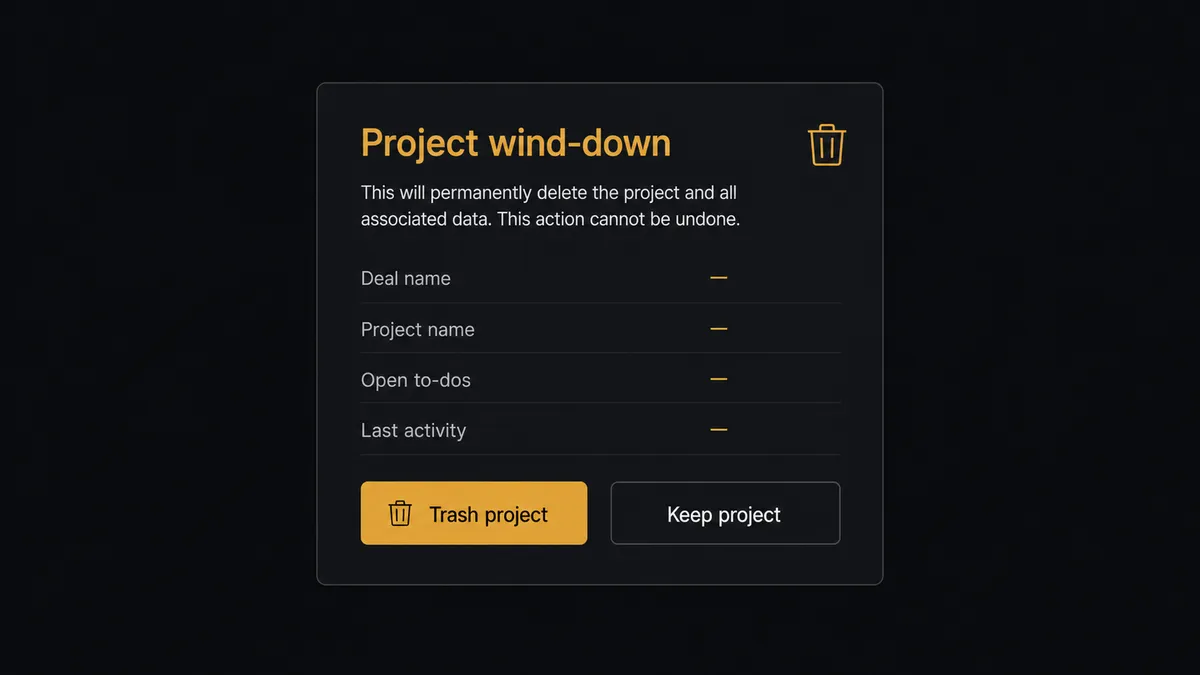
The consequential step lives at the other end of the lifecycle: Trash Project. When a deal is marked lost or a client cancels, the tidy thing is to retire the workspace. But Trash Project is not tidy, it is destructive: Basecamp permanently deletes trashed projects after 30 days. So the agent never trashes on its own. It gathers what a person needs to decide, the project’s open to-dos from List To-dos, recent activity, the deal’s story from HubSpot, and invokes a human-in-loop flow it holds as a callable tool: “Deal [name] moved to closed-lost. Basecamp project [project] has [open items] and recent activity. Trash it, or keep it?” A named approver decides, and only then does Trash Project run, with Update Deal writing the wind-down note back onto the HubSpot record.
This is the digital andon cord in practice: like Toyota’s line-stop cord, the workflow halts the moment an action cannot be cheaply undone, and a person clears it. Kickoffs run at machine speed. Deletions run at the speed of judgment.
FlowRunner vs n8n
Developer-led teams will consider n8n for this pair, and fairly. Its community edition is free to self-host, its node catalog covers both HubSpot and Basecamp-style REST work, and its community shares plenty of deal-to-project patterns a developer can adapt. If your delivery ops runs through an engineering team that wants full control of the graph, n8n can build this.
The difference is who owns the workflow and what stands between automation and an irreversible click. In n8n, the wind-down safeguard is whatever IF node and wait step a developer remembered to wire. In FlowRunner, the agent treats human approval as a native tool it must call before the destructive action. Here is the honest side-by-side.
| What matters for this pair | FlowRunner | n8n |
|---|---|---|
| Human-in-the-loop on trashing projects | Native. The agent invokes an approval flow as a callable tool and pauses before Trash Project | Wait and approval mechanisms exist, but the builder wires them per workflow; not an agent decision |
| Who runs the flow | An AI agent reads the deal, reasons, composes the kickoff from context | A node graph a developer wires and maintains; AI agent nodes exist but the graph stays fixed |
| Users included | Unlimited users on every tier | Cloud plans meter workflows and executions; self-host capacity is yours to manage |
| Bring your own AI keys | Yes, BYOK | Yes, n8n also supports your own model keys |
| Self-hosted option | Yes, cloud-hosted or self-hosted | Yes, self-hosting is a core n8n strength |
| Pricing model | Transparent workflow-based tiers | Execution-based cloud pricing; full cloud compliance features sit on custom-priced Enterprise |
If your automation team is developers who want a free self-hosted graph, n8n is a fair choice. If the people who live in this handoff are sales ops and delivery leads who need kickoffs happening without engineering tickets, and a hard stop before anything gets deleted, this pairing on FlowRunner is the better fit.
Before and after
| Category | Before | After |
|---|---|---|
| Kickoff speed | The Basecamp project appears whenever someone gets to it | The workspace exists, populated, on the next scheduled run after the deal closes |
| Checklist quality | A copy of the last project’s list, stale steps included | To-dos composed from this deal’s scope, with assignees set from List Project People |
| Stakeholder context | Delivery re-asks sales who the champion is | Get Associations pulls the contacts onto the kickoff brief automatically |
| Dead projects | Half-built workspaces linger, then get bulk-deleted in a risky cleanup | Lost deals surface a wind-down decision with full context, one project at a time |
| Accountability | Nobody knows who trashed a workspace or why | Every Trash Project carries a named approver, and the decision is noted on the deal |
What you can build
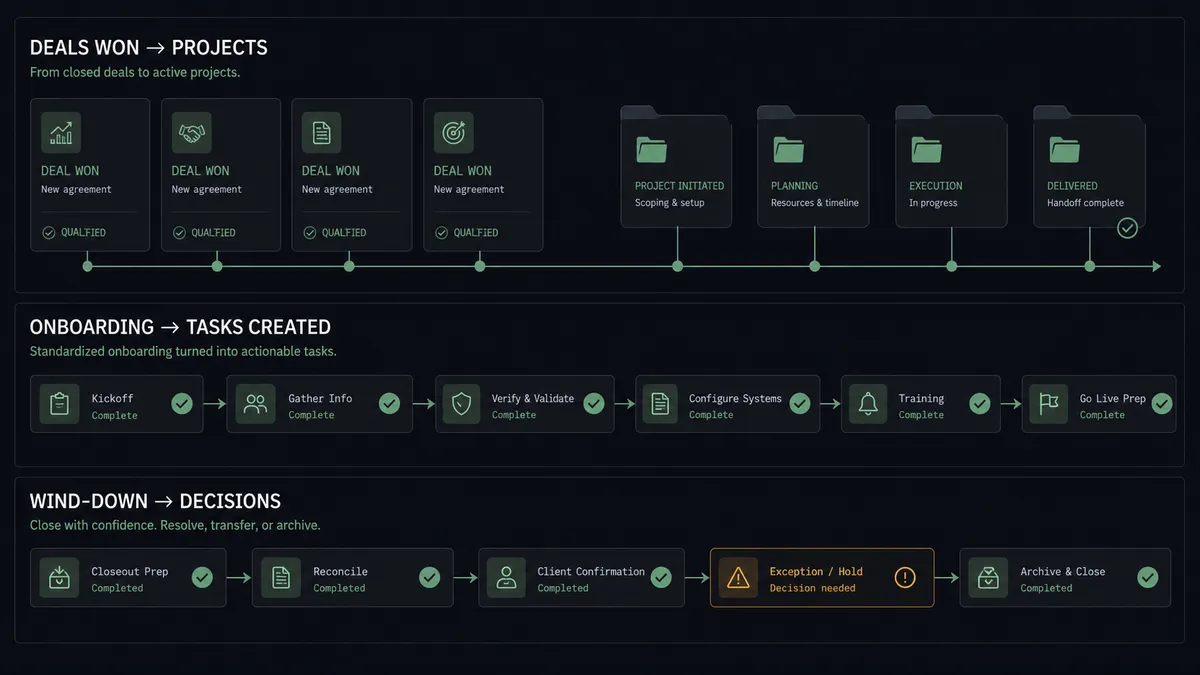
Closed-won to live workspace. Get All Deals catches the stage change, Get Deal By ID and Get Associations pull the context, and Create Project, Create To-do List, and Create To-do scaffold delivery before the client’s welcome email is even drafted.
Kickoff brief with the real stakeholders. Create Message posts a kickoff note built from the deal’s associated contacts and company, and Create Schedule Entry books the call with participants set by people ids, so delivery never starts by asking sales for a recap.
Deal-status updates where the team lives. On later stage changes, the agent posts a Create Campfire Line to the project’s chat, so renewals, expansions, and at-risk signals reach the delivery team without anyone forwarding CRM emails.
Safe wind-down of lost deals. When a deal goes closed-lost, the agent lists the project’s open work with List To-dos, asks a named approver, and only then runs Trash Project, writing the outcome back with Update Deal.
Engagement doc from day one. Create Document publishes the scope summary into the project’s Docs & Files, and Update Document keeps it current when the deal is amended in HubSpot, so the project’s source of truth never drifts from the CRM’s.
Getting started
Start on the free plan: 100 executions a month, every integration included, no credit card required, plus 14 days of Professional for new accounts. Both connectors are available on every tier, and every tier includes unlimited users and unlimited workflows, so sales ops, delivery leads, and everyone in the Basecamp project work from the same workspace from day one.
Explore the integration details:
- HubSpot integration (21 actions covering contacts, companies, deals, and associations)
- Basecamp integration (37 actions covering projects, to-dos, messages, schedules, and documents)
Start building free at flowrunner.ai or book a demo to see a live HubSpot to Basecamp workflow, wind-down approval and all.
Frequently asked questions
Is it free to connect HubSpot and Basecamp on FlowRunner?
You can build and run the connection on FlowRunner's free plan, which includes 100 executions a month and every integration with no credit card required, and new accounts also get 14 days of Professional. Both connectors are available on every FlowRunner tier, and every tier includes unlimited users and unlimited workflows.
Can I self-host the HubSpot to Basecamp workflow?
Yes. FlowRunner offers a cloud-hosted option and a self-hosted option, so the connection can run inside your own environment.
Does the AI agent need my own OpenAI or Claude key?
FlowRunner uses a bring-your-own-keys model, so you connect the AI provider key you already have. You are not locked to one model.
What happens when the agent is unsure which project belongs to a deal?
It stops and asks. The agent lists candidate matches from List Projects with the deal's company and contact context, posts them to your channel, and waits for a person to pick the right project before it posts messages, creates to-dos, or touches anything.
Which triggers does this connection use?
Neither connector exposes an event trigger, so the workflow runs on a schedule. Each run calls Get All Deals in HubSpot to catch stage changes since the last run, then works in Basecamp with actions like Create Project, Create To-do List, Create To-do, Create Message, and Create Schedule Entry.
Does creating to-dos notify my delivery team by email?
Only if you want it to. Create To-do accepts a Notify option that emails the assignees, and assignees are set by people ids from List Project People. Most teams let the agent create the scaffolding quietly, then post one Create Message kickoff so the team gets a single announcement instead of a burst of task emails.