How to Connect HubSpot with Adobe Workfront (With or Without an AI Agent)
Connect closed-won HubSpot deals to Adobe Workfront projects, optionally as an AI agent that builds the delivery plan automatically and pauses for a delivery lead before project dates become client commitments.
How do you connect HubSpot to Adobe Workfront?
You connect HubSpot to Adobe Workfront by having a scheduled workflow poll HubSpot with Get All Deals, pick up every deal that just reached closed won, and turn it into delivery work: Create Project builds the client project in Workfront, Create Task lays out the kickoff plan with assignees resolved through Search Users, and Update Deal writes the Workfront project reference back onto the HubSpot deal so sales can see delivery status without leaving the CRM. FlowRunner is a visual AI-agent orchestration platform where automations run autonomously and pause for human judgment on the steps that carry real consequence. The same connection can run as an AI agent that reads each closed deal, checks real team capacity with Search Tasks, and pauses for a named delivery lead before the project’s planned dates become commitments the account team repeats to the client.
The problem it solves
Right now the handoff between sales and delivery is a meeting, or worse, a message thread. A deal closes in HubSpot. Someone from the delivery team hears about it a day later, opens Workfront, creates the project by hand, retypes the client name, guesses at scope from a call recording, and rebuilds the kickoff checklist from memory. The account manager, meanwhile, has already told the client a start date that nobody checked against the team’s actual workload. The gap between “closed won” and “project exists” is where onboarding momentum dies.
The edges are worse than the happy path. A deal closes with a custom scope that matches no template, and the project gets built wrong. Two deals for the same company close in the same week and someone creates duplicate projects. A rush deal lands on an over-committed team, nobody flags it, and three existing clients quietly slip. The CRM says everything is fine because the CRM has no idea what delivery looks like.
How it works: the connection
The connection polls HubSpot and writes to Adobe Workfront. Here is the plain version, grounded in the real connector actions.
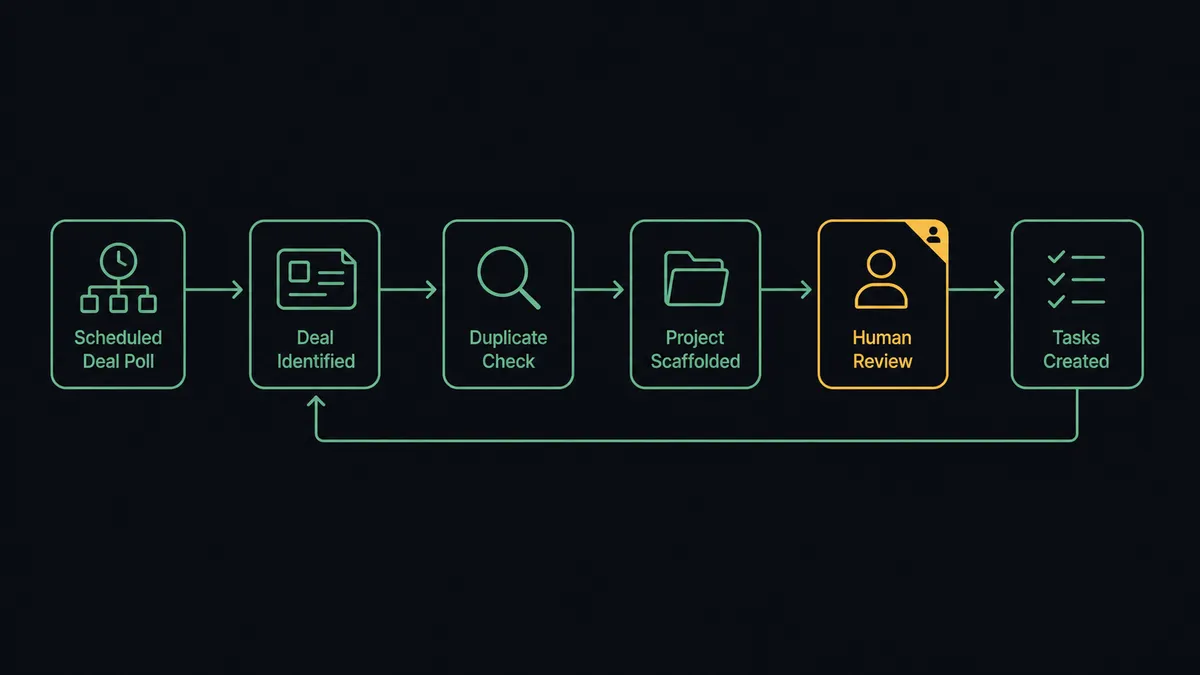
- Trigger: On a schedule, the workflow calls Get All Deals in HubSpot and filters for deals that reached closed won since the last run.
- Read: It calls Get Deal By ID for the full deal record, then Get Associations and Get Company By ID to pull the client company, and Get Contacts At Company for the stakeholders who will appear in kickoff communications.
- Check for duplicates: It calls Search Projects in Workfront, filtering by the client and deal name, to confirm the project does not already exist.
- Create the project: It calls Create Project with the deal name, a description assembled from the deal’s scope fields, and the planned start and completion dates.
- Build the plan: It calls Search Users to resolve the delivery owner and assignees, then Create Task for each item in the kickoff checklist, assigned and dated.
- Close the loop: It calls Update Deal in HubSpot to write the Workfront project ID onto the deal, so the account team can follow delivery from the record they already live in.
That is the “just connect them” answer. Closed deals become structured projects with owners and dates, the same way every time, minutes after the deal closes instead of days.
Can an AI agent run it? (and why a human stays in the loop)
Yes, and this is where the connection stops being a copy machine. A deterministic sync creates the same project skeleton for every deal. An AI agent reads the deal in front of it and reasons about what the delivery work should look like, holding the real actions as tools: Get Deal By ID, Get Associations, Search Projects, Search Tasks, Search Users, Create Project, Create Task, Update Deal. It picks which to use, in what order, based on what the deal says.
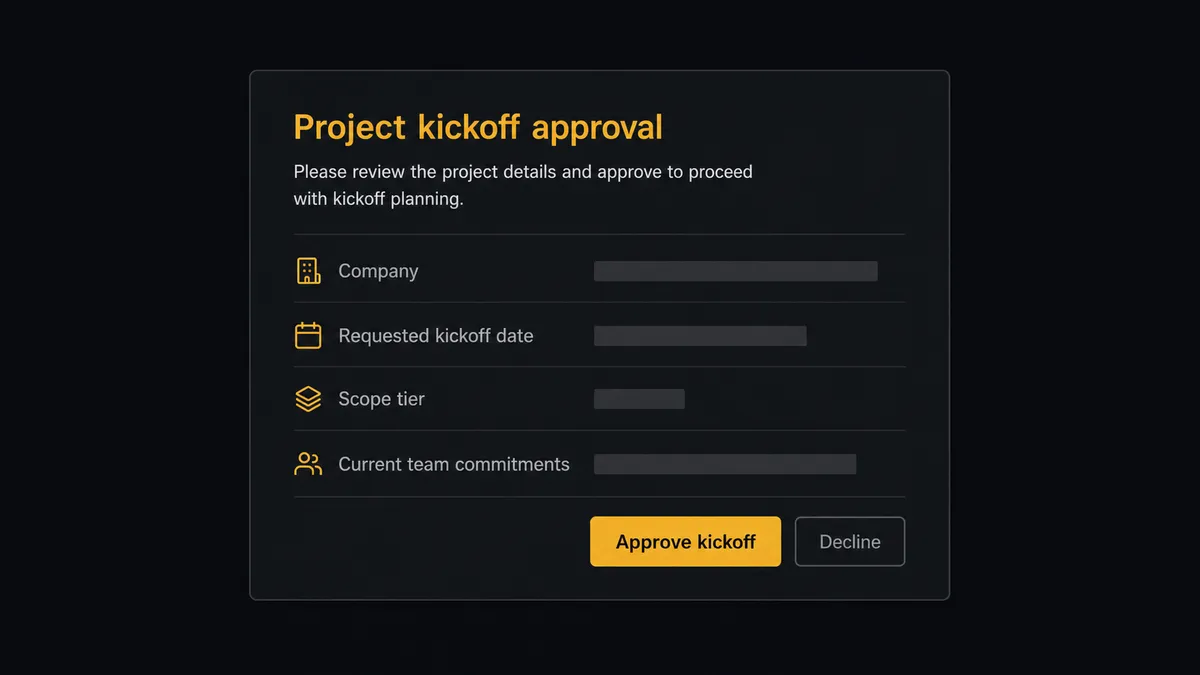
The consequential step is Create Project, because in a services business a project’s planned dates are not internal trivia. The account manager reads them to the client. So before the agent creates the project, it calls Search Tasks across the team’s active projects, looks at what is already committed in the requested window, and decides whether this kickoff is safe to schedule. When the date collides with committed work, or the deal’s scope fields are thin or contradictory, the agent does not guess. It invokes a human-in-loop flow it holds as a callable tool, and the workflow pauses. The delivery lead gets a message: “Closed-won deal for [company], requested kickoff [date], scope tier [tier]. The assigned team has [current commitments] in that window. Approve these planned dates, or adjust before I create the project?” Only then does Create Project run, and the approver’s name and timestamp land in the audit trail next to the project.
Prospects call this pattern a digital andon cord: like Toyota’s production line, the workflow stops the line the moment it hits uncertainty, and the person with judgment pulls it back into motion. Routine deals flow straight through. The ones that would have caused a quiet three-client slip get caught at the gate.
FlowRunner vs n8n
If your automation team is technical, n8n is a serious option for this pair. It is self-hostable under a fair-code license, it has a very large integration library and community template gallery, and a developer who knows its node model can wire HubSpot to Workfront with full control over every branch. The difference is who can build and run this, and what happens at the step that carries consequence. FlowRunner treats the AI agent and the human gate as native platform primitives, not as a graph you engineer.
| What matters for this pair | FlowRunner | n8n |
|---|---|---|
| Human-in-the-loop on Create Project | Native. The agent invokes an approval flow as a callable tool and pauses before planned dates become client commitments | Approval patterns exist as wait and form nodes a developer wires into the graph |
| Who runs the flow | An AI agent reads the deal, reasons about capacity, picks actions as tools | A node graph you design and maintain; AI runs inside nodes you configure |
| Users included | Unlimited users on every tier | Cloud plans meter by executions and plan level; unlimited on self-hosted |
| Bring your own AI keys | Yes, BYOK | Yes, n8n also connects your own model keys |
| Self-hosted option | Yes, cloud-hosted or self-hosted | Yes, self-hosting is a genuine n8n strength |
| Pricing model | Transparent workflow-based tiers with clear execution limits | Execution-based cloud pricing that teams find hard to predict; full cloud compliance sits in custom-priced Enterprise |
If you have engineers who want to own a node graph and tune every branch by hand, n8n will serve you well. If you want the ops team that owns the sales-to-delivery handoff to build this themselves, with a delivery lead’s approval built into the flow and an audit trail at $299/mo instead of a custom Enterprise quote, this pairing is the better fit.
Before and after
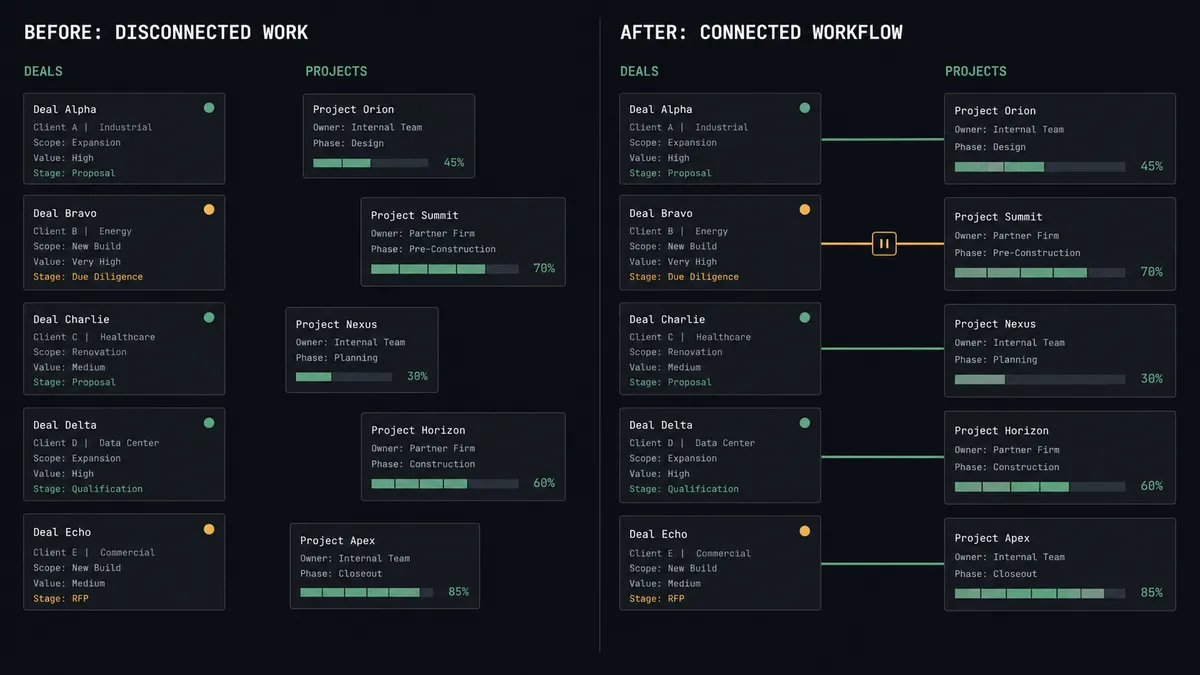
| Category | Before | After |
|---|---|---|
| Project creation | Someone in delivery hears about the closed deal, then builds the Workfront project by hand from a call recording | The project exists minutes after the deal closes, built from the deal’s own scope fields |
| Kickoff dates | The account manager promises a start date nobody checked against workload | Dates are checked against Search Tasks capacity and approved by the delivery lead before they exist |
| Task setup | The kickoff checklist is rebuilt from memory, differently each time | Create Task lays out the same assigned, dated plan for every deal of that scope |
| Sales visibility | Sales asks delivery for status in a channel and waits | Update Deal keeps the Workfront reference and status on the deal record sales already reads |
| Duplicates and misses | Duplicate projects and dropped handoffs surface weeks later | Search Projects catches duplicates up front, and no closed deal goes unprocessed |
What you can build
Closed-won to kickoff, hands off. The scheduled poll picks up a closed deal via Get All Deals, the agent pulls context with Get Deal By ID and Get Associations, confirms no duplicate with Search Projects, and builds the project and task plan with Create Project and Create Task, writing the reference back through Update Deal.
Capacity-checked scheduling. Before any project is created, the agent reads committed work with Search Tasks and Search Projects. Clean windows flow straight through; collisions pause for the delivery lead with the full capacity picture attached.
Delivery health back to sales. On a weekly schedule the agent calls Get Project on every active client project and writes a delivery-health summary onto the matching deal with Update Deal, so account managers walk into renewal calls informed.
Change-order radar. The agent scans Search Issues for new change orders on client projects, matches them to the account via Get Company By ID, and flags expansion candidates to the account owner before drafting a new Create Deal for approval.
Stalled-project escalation. The agent cross-references Search Projects results against deal size from Get Deal By ID and raises the projects that are both behind plan and high value, so operations leadership sees the risks worth attention.
Getting started
Start on the free plan: 100 executions a month, every integration included, no credit card required, plus 14 days of Professional for new accounts. Both connectors are available on every tier, and every tier includes unlimited users and unlimited workflows.
Explore the integration details:
- HubSpot integration (21 actions covering contacts, companies, deals, and associations)
- Adobe Workfront integration (10 actions covering projects, tasks, issues, users, and documents)
Start building free at flowrunner.ai or book a demo to see a live HubSpot to Adobe Workfront workflow, delivery-lead kickoff approval and all.
Frequently asked questions
Is it free to connect HubSpot and Adobe Workfront on FlowRunner?
You can build and run the connection on FlowRunner's free plan, which includes 100 executions a month and every integration with no credit card required, and new accounts also get 14 days of Professional. Both connectors are available on every FlowRunner tier, and every tier includes unlimited users and unlimited workflows.
Can I self-host the HubSpot to Adobe Workfront workflow?
Yes. FlowRunner offers a cloud-hosted option and a self-hosted option, so the connection can run inside your own environment.
Does the AI agent need my own OpenAI or Claude key?
FlowRunner uses a bring-your-own-keys model, so you connect the AI provider key you already have. You are not locked to one model.
What happens when the agent is unsure about kickoff dates or scope?
It stops and invokes a human-in-loop step. The agent posts the deal, the company, the requested dates, and the current capacity picture to your delivery lead's channel, then waits for approval before Create Project runs in Workfront.
Which events start the HubSpot to Adobe Workfront workflow?
Neither connector publishes a catalog trigger, so the workflow runs on a schedule. Every few minutes it calls Get All Deals in HubSpot, filters for deals that reached closed won since the last run, and processes each one exactly once.
Can the workflow assign Workfront tasks to the right people automatically?
Yes. The agent calls Search Users in Adobe Workfront to resolve the delivery owner and assignees by name or email, then passes those user IDs to Create Task so the kickoff plan lands assigned, not orphaned.