How to Connect Mailchimp Marketing with Mastodon (With or Without an AI Agent)
Bring your Mailchimp campaign content to the fediverse the way Mastodon expects, with an AI agent that listens before it posts and pauses for a person before Post Status or Boost Status speaks for the brand.
How do you connect Mailchimp Marketing to Mastodon?
You connect Mailchimp Marketing to Mastodon with a scheduled workflow that reads your recent sends with Search Campaign and Get Campaign Info, identifies what subscribers actually clicked with Get Clicks Report, and publishes fediverse-native versions of that content with Post Status, while Search, Get Public Timeline, and List Notifications keep the brand listening to the conversation around it. Neither connector exposes an event trigger, so the workflow runs on a schedule, typically each morning. FlowRunner is a visual AI-agent orchestration platform where automations run autonomously and pause for human judgment on the steps that carry real consequence. Run as an agent, the connection gets the order right for Mastodon specifically: it listens before it drafts, adapts rather than cross-posts, and holds every Post Status and Boost Status for a named approver, because the fediverse notices the difference between a participant and a broadcast pipe.
The problem it solves
Teams that add Mastodon to the channel list usually do it the cheap way: pipe the newsletter headline into a status and move on. On most networks that earns silence. On Mastodon it earns something worse, because federated communities are explicitly allergic to broadcast marketing, and an account that only shouts gets muted, mocked, or defederated from the conversation it came for. So the alternative becomes manual: someone on the team reads the timelines when they remember to, rewrites email content by hand in the instance’s voice, and answers mentions whenever they surface. It is nobody’s whole job, and it stops happening the first busy week.
The edges are where the brand damage lives. A mention thread about your product picks up steam for two days before anyone notices, and the community reads the silence as indifference. A well-meaning post lands tone-deaf because nobody checked what the instance was already discussing that morning. A boost fired without thought puts the brand’s name behind a post whose author’s other content nobody vetted. Mastodon rewards presence and punishes automation that behaves like automation. That is a genuinely hard combination to staff by hand.
How it works: the connection
The connection reads both systems and acts on Mastodon. Here is the plain version, grounded in the real connector actions.
- Trigger: On a schedule, the morning run opens by listening.
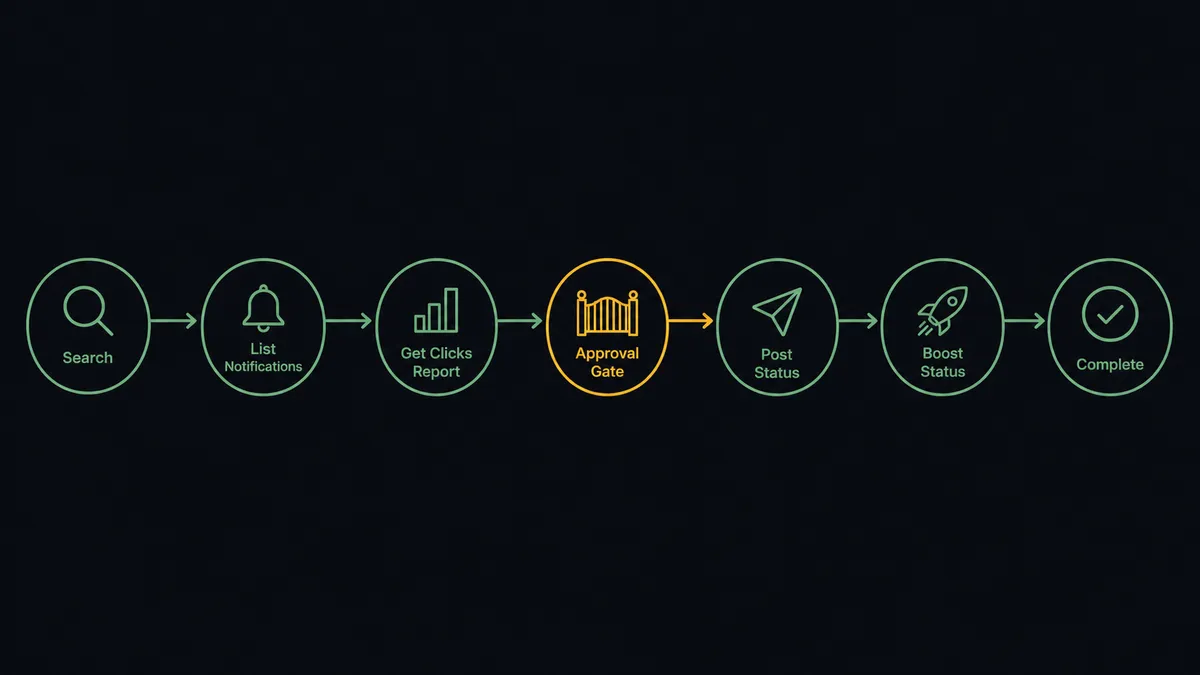
- Read the room: Search finds conversation around the brand’s topics, Get Public Timeline and Get Home Timeline show what the instance and followed accounts are discussing, and List Notifications surfaces overnight mentions and replies.
- Read the email evidence: Search Campaign and Get Campaign Info pull the latest sends, and Get Clicks Report shows which topic subscribers actually clicked.
- Draft: The winning topic becomes a Mastodon-native draft: the instance’s tone, its length norms, its content warning conventions where they apply.
- Publish: Post Status publishes the approved draft under the brand account.
- Participate: Favourite Status acknowledges positive mentions under standing policy, and Boost Status amplifies community content worth endorsing, after review.
- Verify and track: Get Status and Get Account Statuses confirm what is live, and mention threads feed the next morning’s listening pass.
That is the “just connect them” answer. The brand shows up in the fediverse informed by both what its audience clicks and what the community is saying, without a person stitching the two together by hand.
Can an AI agent run it? (and why a human stays in the loop)
Yes, and this pair is a strong argument for why the agent matters more than the pipe. A fixed cross-poster does the one thing Mastodon communities dislike most: it repeats email content verbatim on a schedule. The agent holds Search Campaign, Get Campaign Info, Get Clicks Report, Search, Get Public Timeline, Get Home Timeline, List Notifications, Post Status, Boost Status, Favourite Status, Get Status, and Get Account as tools, and it uses the reading tools before the writing ones. It notices the instance is mid-conversation about a topic adjacent to your campaign and drafts a contribution to that conversation instead of an announcement over it. It notices a mention thread turning critical and escalates it instead of favouriting it.
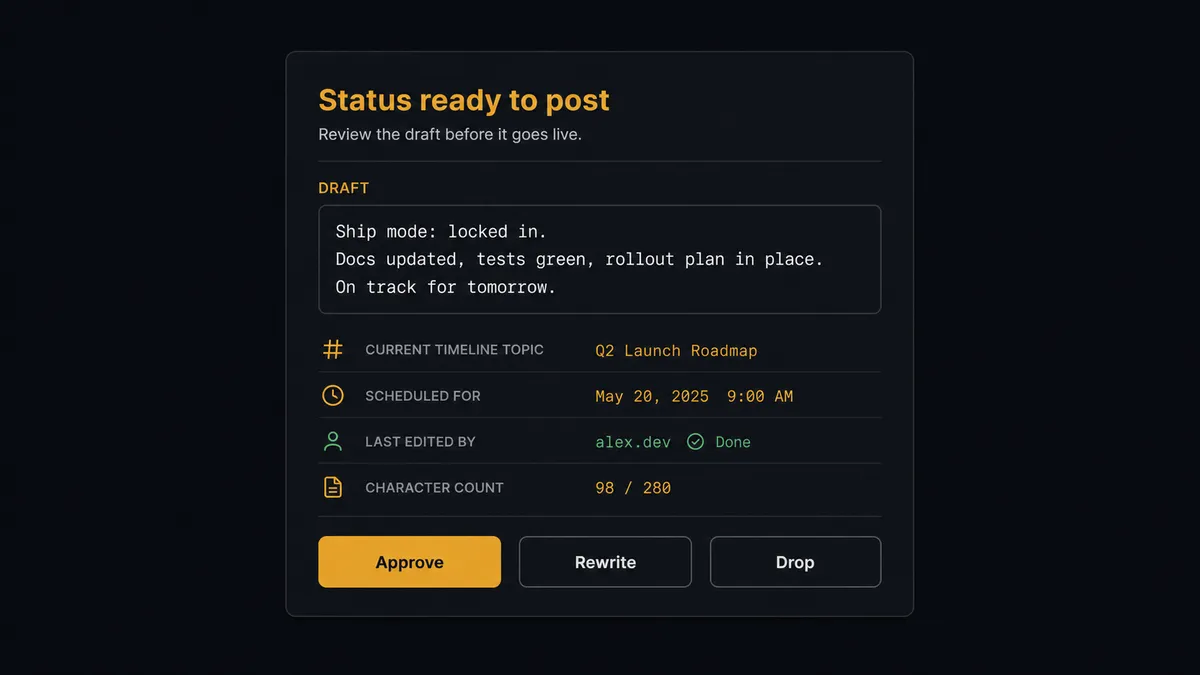
The consequential steps are the ones that speak for the brand. Post Status is the brand talking in a federated public square where posts travel to servers you do not control. Boost Status is the brand endorsing someone else’s words with the same reach. Before either, the agent invokes a human-in-loop flow it holds as a callable tool. The workflow pauses and posts to the marketing channel: “Draft for [instance]: [text]. Context: the timeline is currently discussing [topic], and this draft joins that thread. Approve, rewrite, or drop?” For boosts: “Proposed boost of [author]‘s post: [text]. Their account context attached. Endorse?” Only after a person signs off does the act run. Favourite Status stays under standing policy, because appreciating a kind mention is routine; amplifying and speaking are not.
FlowRunner prospects call this pattern the digital andon cord. Like Toyota’s line-stop cord, the workflow stops the line whenever the next action would commit the brand in public, and a person decides whether the line moves.
FlowRunner vs n8n
n8n has real credibility with exactly the audience Mastodon overlaps: technical, self-hosting, open-source-adjacent teams. Its node library is large, its community has published thousands of templates, and running your own n8n next to your own Mastodon instance is a coherent stack. For an engineer who wants to own every line of the logic, it is a solid choice.
The difference is where the judgment lives and who maintains it. This workflow’s whole value is the judgment layer: listen first, adapt, escalate what speaks for the brand. FlowRunner ships that as a native agent capability the marketing team configures visually; in n8n it is an architecture you design, build, and keep working yourself.
| What matters for this pair | FlowRunner | n8n |
|---|---|---|
| Human-in-the-loop on posts and boosts | Native. The agent pauses before Post Status and Boost Status | Wait and approval patterns exist; you assemble the escalation logic yourself |
| Who runs the flow | An AI agent listens, drafts, and picks actions as tools | Node graph you design and maintain; AI available as LangChain nodes |
| Who can build it | Marketing ops builds it visually, no code required | Developer-first; steep learning curve for non-technical users |
| Bring your own AI keys | Yes, BYOK | Yes, n8n supports your own model keys too |
| Self-hosted option | Yes, cloud-hosted or self-hosted | Yes, self-hosting is a core n8n strength |
| Compliance features | Audit trails and RBAC from the $299/mo Professional tier | Full cloud compliance suite sits at custom-priced Enterprise |
If your team is technical and wants to hand-build the listening and escalation logic, n8n will let you. If marketing should own a fediverse presence with approvals built in and an audit trail attached, this pairing is the better fit.
Before and after
| Category | Before | After |
|---|---|---|
| Presence | The brand posts when someone remembers, then goes quiet for weeks | The morning run listens and drafts daily, so presence survives busy weeks |
| Content fit | Email headlines cross-posted verbatim, ignored or resented | Winning topics redrafted to the instance’s tone, joined to live conversations |
| Mentions | Threads about the brand surface days late, if at all | List Notifications feeds every mention into the same morning’s pass |
| Endorsements | Boosts happen on impulse with no review of what the brand is signing | Every Boost Status is proposed with context and approved by name |
| Accountability | Nobody can say who decided to post what | Every published status carries its approver and timestamp in the trail |
What you can build
Listen-then-post morning loop. Search and Get Public Timeline map the conversation, Get Clicks Report names the topic subscribers proved they wanted, and the agent drafts one status that joins the two. A person approves, Post Status publishes, and the brand reads like a participant.
Mention triage desk. List Notifications feeds every overnight mention into the pass. Kind words get Favourite Status under standing policy; questions get drafted replies; anything critical or ambiguous is escalated with the full thread before the brand responds.
Curated boost queue. The agent uses Search and Get Account to find community posts genuinely worth the brand’s endorsement, assembles each with the author’s context, and stages Boost Status proposals for a weekly review instead of impulse amplification.
Campaign companion thread. When a major send goes out, the agent drafts a short thread expanding the campaign’s core idea for the fediverse audience, each status approved before Post Status runs, so the email and the timeline tell one story in two native voices.
Signal-back loop. Topics that draw replies and boosts on Mastodon feed the next email plan: the agent tags engaged themes in Mailchimp with Add Member Tag context from campaign data, so the fediverse conversation quietly informs what the newsletter covers next.
Getting started
Start on the free plan: 100 executions a month, every integration included, no credit card required, plus 14 days of Professional for new accounts. Both connectors are available on every tier, and every tier includes unlimited users and unlimited workflows.
Explore the integration details:
- Mailchimp Marketing integration (20 actions covering audiences, tags, campaigns, and click reporting)
- Mastodon integration (12 actions covering statuses, timelines, boosts, and notifications)
Start building free at flowrunner.ai or book a demo to see a live Mailchimp Marketing to Mastodon workflow, post approval and all.
Frequently asked questions
Is it free to connect Mailchimp Marketing and Mastodon on FlowRunner?
You can build and run the connection on FlowRunner's free plan, which includes 100 executions a month and every integration with no credit card required, and new accounts also get 14 days of Professional. Both connectors are available on every FlowRunner tier, and every tier includes unlimited users and unlimited workflows.
Can I self-host the Mailchimp Marketing to Mastodon workflow?
Yes. FlowRunner offers a cloud-hosted option and a self-hosted option, so the connection can run inside your own environment. Self-hosting pairs naturally with Mastodon, where many organizations already run their own instance.
Does the AI agent need my own OpenAI or Claude key?
FlowRunner uses a bring-your-own-keys model, so you connect the AI provider key you already have. You are not locked to one model.
What happens when the agent is unsure whether a draft fits the instance's culture?
It holds the draft and shows its work. The agent posts the draft alongside what it observed in the timelines, including why it reads the tone as risky, and waits for the marketing lead to approve, rewrite, or drop it. On Mastodon, not posting is often the right call, and the agent treats that as a valid outcome.
Which Mailchimp Marketing and Mastodon actions does this workflow use?
Both connectors are action-based, so the workflow runs on a schedule. It reads Mailchimp with Search Campaign, Get Campaign Info, and Get Clicks Report, listens on Mastodon with Search, Get Public Timeline, Get Home Timeline, and List Notifications, and acts with Post Status, Boost Status, and Favourite Status, the first two behind approval.
Why does boosting someone else's post need approval?
Because a boost from the brand account is a public endorsement pushed to every follower, exactly as visible as an original post. The agent proposes boosts with the original status and author shown, and Boost Status runs only after a person confirms the brand wants its name on that content.