How to Connect Mailchimp Marketing with Instagram Business (With or Without an AI Agent)
Run email and Instagram as one loop: campaign click data shapes what gets published, media insights shape the next send, and an AI agent pauses for a person before anything posts to the brand feed.
How do you connect Mailchimp Marketing to Instagram Business?
You connect Mailchimp Marketing to Instagram Business with a scheduled workflow that reads campaign performance through Get Campaign Report and Get Clicks Report, turns the content subscribers actually clicked into feed posts staged through Publish Photo or Publish Carousel, and carries feed performance back the other way with Get Media Insights so the next email send learns from the feed. Neither connector exposes an event trigger, so the workflow runs on a schedule, typically each morning. FlowRunner is a visual AI-agent orchestration platform where automations run autonomously and pause for human judgment on the steps that carry real consequence. Run as an agent, the connection stops being a one-way content pipe: the agent reasons about both channels’ evidence, proposes what to publish and what to feature, and holds every publish call for a named approver, because the feed is permanent in a way a draft never is.
The problem it solves
In most marketing teams, email and Instagram are run by different people looking at different dashboards. The email owner knows which links got clicked Tuesday. The social owner knows which post carried the week. Neither number reaches the other person in time to matter, so the feed posts about one thing while the newsletter proves the audience cares about another. Repurposing happens late or not at all: the case study that dominated email clicks never becomes a carousel, and the reel that tripled typical reach never becomes a subject line.
The edges compound it. A product email goes out with updated pricing while a still-scheduled post references the old offer. Comments pile up on a post that came from a campaign, asking questions the email already answered, and nobody bridges the two. And the monthly report stitches together screenshots from two systems because no single place knows how the channels performed together. The problem is not effort. It is that two feedback loops that should be one loop have no connection between them.
How it works: the connection
The connection reads both systems and writes to both. Here is the plain version, grounded in the real connector actions.
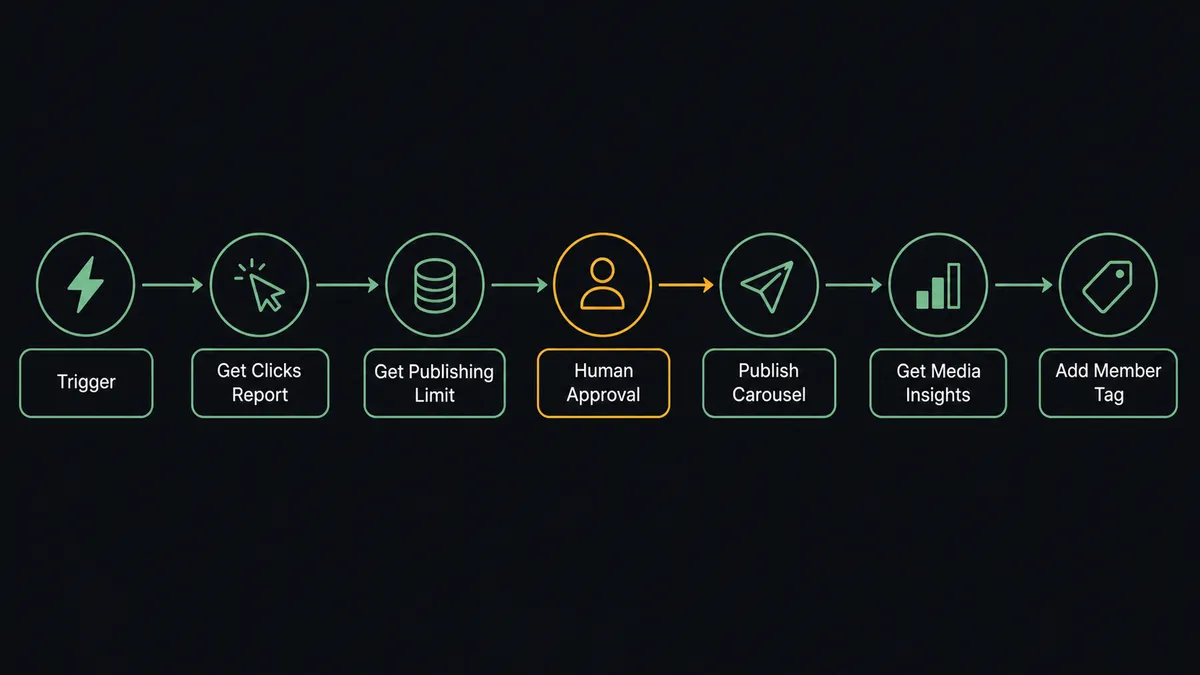
- Trigger: On a schedule, the morning run opens the loop.
- Read email: Get Campaign Report pulls yesterday’s send performance, and Get Clicks Report shows exactly which links and topics earned clicks.
- Read the feed: Get Account Insights and Get Media Insights pull reach and engagement for recent media via List Media.
- Check capacity: Get Publishing Limit confirms how much of the account’s publishing quota remains.
- Publish: The winning email topic becomes a feed post through Publish Photo or Publish Carousel, and Get Container Status confirms the media processed.
- Bridge the conversation: List Comments surfaces questions on campaign-driven posts, and Reply to Comment answers with the same information the email carried.
- Feed the next send: Feed winners are tagged into the email plan, and Add Member Tag marks engaged segments in Mailchimp for the follow-up campaign.
That is the “just connect them” answer. The channels stop guessing about each other and start trading evidence daily.
Can an AI agent run it? (and why a human stays in the loop)
Yes, and this pair is exactly the shape agents are good at: two streams of evidence and a judgment call about what deserves the feed. The agent holds Get Campaign Report, Get Clicks Report, Get Publishing Limit, Publish Photo, Publish Carousel, Publish Reel, Get Container Status, List Media, Get Media Insights, Get Account Insights, List Comments, Reply to Comment, and Hide or Unhide Comment as tools. It reads the click report, notices the case study drew the clicks, drafts a carousel concept and caption from that content, and checks the publishing quota before proposing a slot.
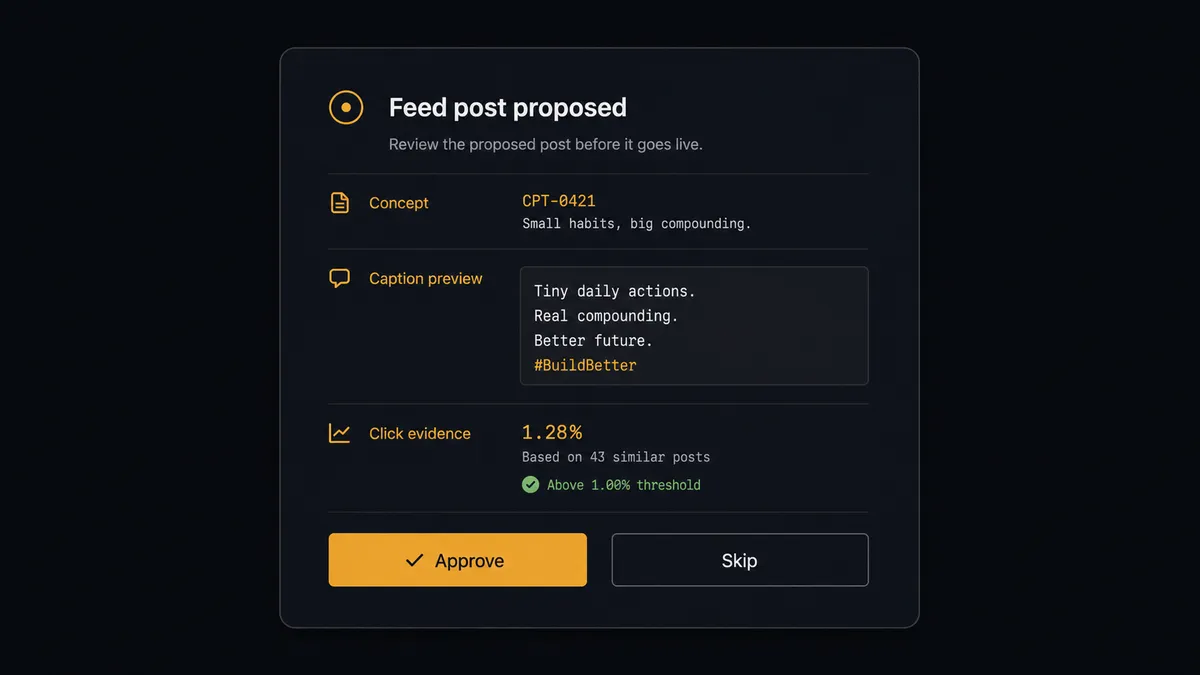
The consequential step is the publish. A feed post is the brand speaking in public, permanently, to everyone who follows. So the agent never calls Publish Photo, Publish Carousel, or Publish Reel on its own authority. It packages the concept, the caption, the media, the evidence for why this content, and the proposed timing, then invokes a human-in-loop flow it holds as a callable tool. The workflow pauses and posts to the marketing channel: “Feed post proposed from campaign [name]: [concept]. Caption draft attached. Click evidence: [summary]. Approve, edit, or skip?” Only after approval does the publish sequence run. Moderation gets the same respect: the agent drafts Reply to Comment answers for routine questions, but a Hide or Unhide Comment or Delete Comment call on anything that is not obvious spam waits for a person, because silencing a customer is a brand act too.
FlowRunner prospects describe this as a digital andon cord. Like Toyota’s line-stop cord, the workflow stops the line at the moment of consequence, the brand about to speak or to silence someone, and a person pulls it back into motion.
FlowRunner vs n8n
For a team with developers on hand, n8n is a credible way to wire this pair: a large node library, thousands of community templates, and a fair-code self-hosted deployment you control end to end. Engineers who want to own every branch of the logic get exactly that.
The difference is who operates it and where judgment lives. This workflow makes brand-facing decisions daily, and FlowRunner treats the human gate as a native agent capability the marketing team configures visually, not an escalation pattern someone codes and maintains.
| What matters for this pair | FlowRunner | n8n |
|---|---|---|
| Human-in-the-loop on publishing and moderation | Native. The agent pauses before every Publish and Hide call | Wait and approval patterns exist; you assemble the escalation logic yourself |
| Who runs the flow | An AI agent weighs both channels’ evidence and picks actions as tools | Node graph you design and maintain; AI available as LangChain nodes |
| Who can build it | Marketing ops builds it visually, no code required | Developer-first; steep learning curve for non-technical users |
| Bring your own AI keys | Yes, BYOK | Yes, n8n supports your own model keys too |
| Self-hosted option | Yes, cloud-hosted or self-hosted | Yes, self-hosting is a core n8n strength |
| Compliance features | Audit trails and RBAC from the $299/mo Professional tier | Full cloud compliance suite sits at custom-priced Enterprise |
If you have engineering capacity and want full control of the plumbing, n8n will reward it. If the marketing team should own a cross-channel loop with approvals the whole company can audit, this pairing is the better fit.
Before and after
| Category | Before | After |
|---|---|---|
| Channel learning | Email and Instagram optimize separately on separate dashboards | Click data shapes the feed and media insights shape the next send, daily |
| Repurposing speed | Winning email content reaches the feed late or never | The morning run proposes the post while the topic is still warm |
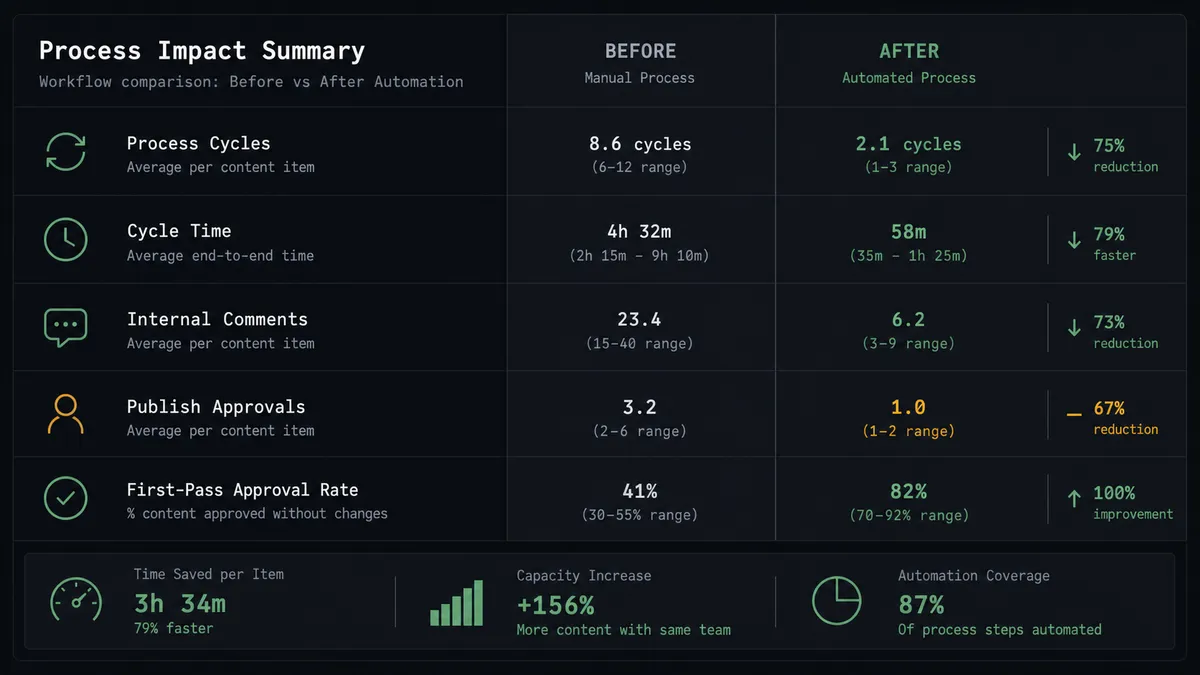
| Publish discipline | Whoever holds the login posts, with no consistent review | Every publish call waits for a named approver with evidence attached |
| Comment handling | Questions on campaign posts sit unanswered or get ad hoc replies | Routine questions get drafted replies; sensitive ones are escalated |
| Reporting | Cross-channel performance is stitched from screenshots | One loop, one record: campaign, post, insights, and approvals together |
What you can build
Click-to-carousel pipeline. The morning run reads Get Clicks Report, finds the topic that carried yesterday’s send, and drafts a carousel through Publish Carousel with a caption grounded in the email content. The draft waits for approval before it touches the feed.
Feed-to-subject-line loop. Weekly, the agent ranks recent media by Get Media Insights, identifies the theme with the strongest reach, and proposes it as the lead story for the next campaign, tagging the engaged audience with Add Member Tag.
Campaign-post Q&A bridge. After a campaign-driven post goes live, the agent watches List Comments, answers questions the email already covered with drafted Reply to Comment responses, and escalates anything sensitive to a person before replying.
Hashtag reconnaissance. Before a launch, the agent uses Search Hashtag with Get Hashtag Top Media to read what already performs in the topic space, and folds that into the post concept it proposes for the launch email’s companion post.
Story countdown with quota awareness. For a launch week, the agent stages a Publish Story sequence, checking Get Publishing Limit before each day’s post so the sequence never collides with the account’s API quota, and each story clears approval before it runs.
Getting started
Start on the free plan: 100 executions a month, every integration included, no credit card required, plus 14 days of Professional for new accounts. Both connectors are available on every tier, and every tier includes unlimited users and unlimited workflows.
Explore the integration details:
- Mailchimp Marketing integration (20 actions covering audiences, tags, campaigns, and click reporting)
- Instagram Business integration (23 actions covering publishing, comments, insights, and hashtags)
Start building free at flowrunner.ai or book a demo to see a live Mailchimp Marketing to Instagram Business workflow, publish approval and all.
Frequently asked questions
Is it free to connect Mailchimp Marketing and Instagram Business on FlowRunner?
You can build and run the connection on FlowRunner's free plan, which includes 100 executions a month and every integration with no credit card required, and new accounts also get 14 days of Professional. Both connectors are available on every FlowRunner tier, and every tier includes unlimited users and unlimited workflows.
Can I self-host the Mailchimp Marketing to Instagram Business workflow?
Yes. FlowRunner offers a cloud-hosted option and a self-hosted option, so the connection can run inside your own environment.
Does the AI agent need my own OpenAI or Claude key?
FlowRunner uses a bring-your-own-keys model, so you connect the AI provider key you already have. You are not locked to one model.
What happens when the agent is unsure whether a comment should be hidden?
It leaves the comment visible and asks. Hiding a comment is a brand act with an audience, so the agent posts the comment text, the media it sits on, and its concern to your team channel and waits for a decision. Only clear policy matches, like obvious spam patterns you have defined, are handled under standing rules.
Which Mailchimp Marketing and Instagram Business actions does this workflow use?
Both connectors are action-based, so the workflow runs on a schedule. It reads Mailchimp with Get Campaign Report and Get Clicks Report, publishes through Publish Photo, Publish Carousel, and Publish Reel after approval, reads performance with Get Media Insights and Get Account Insights, and manages conversation with List Comments and Reply to Comment.
Does the workflow respect Instagram's publishing limits?
Yes. The agent calls Get Publishing Limit before staging any post and checks container readiness with Get Container Status after publishing, so the workflow works within the account's real API quota instead of failing mid-run.