How to Connect Mailchimp Marketing with Hootsuite (With or Without an AI Agent)
Turn Mailchimp campaign results into scheduled Hootsuite posts, optionally run by an AI agent that drafts the social version of every winning email and pauses for a human before anything publishes under a brand profile.
How do you connect Mailchimp Marketing to Hootsuite?
You connect Mailchimp Marketing to Hootsuite by having a scheduled workflow read your recent campaigns with Search Campaign and Get Campaign Info, pull performance with Get Campaign Report and Get Clicks Report, and then stage social posts with Hootsuite’s Schedule Message across the profiles returned by List Social Profiles. Neither connector exposes an event trigger, so the workflow runs on a schedule, which fits how social amplification actually works: you review what the email did, then decide what deserves a second life on social. FlowRunner is a visual AI-agent orchestration platform where automations run autonomously and pause for human judgment on the steps that carry real consequence. Run as an agent, the same connection stops copying content blindly and starts choosing: it reads the click report, drafts the social version of the content subscribers actually engaged with, and holds every draft for a named approver before it enters the Hootsuite queue.
The problem it solves
Today the bridge between your email program and your social calendar is a person with two browser tabs. A campaign goes out in Mailchimp. Sometime later, someone on the marketing team opens the report, skims the click data, decides the product update deserves a social push, rewrites the copy for each network, and pastes it into Hootsuite one profile at a time. On a good week that happens the same day. On a normal week it happens Thursday, three days after the send, when the moment has cooled and the social calendar has moved on.
The edges are where it breaks. The email that quietly outperformed everything else this quarter never gets amplified because nobody read the clicks report closely. A pricing correction goes out in email, but the scheduled social post promoting the old offer is still sitting in the Hootsuite queue and fires on time. Two team members repurpose the same campaign without knowing it, and the brand posts near-duplicates two days apart. None of this is a tooling failure. It is what happens when cross-channel coordination depends on someone remembering to look.
How it works: the connection
The connection reads Mailchimp Marketing and writes to Hootsuite. Here is the plain version, grounded in the real connector actions.
- Trigger: On a schedule, the morning run opens by calling Search Campaign to find campaigns sent since the last run.
- Read: For each new send, Get Campaign Info pulls the subject, content, and audience, and Get Campaign Report pulls opens, clicks, and unsubscribes.
- Read the clicks: Get Clicks Report shows exactly which links subscribers clicked, which is the honest signal of what content earned attention.
- Map the channels: List Social Profiles returns the networks the brand posts to through Hootsuite.
- Stage the posts: Schedule Message queues one post per profile, each with its own copy and send time. Register Media Upload attaches an image when the post needs one.
- Verify the queue: List Messages confirms each post landed in the queue at the right slot, and Get Message retrieves any post that needs review.
- Clean up: When an email correction invalidates a scheduled post, Delete Message pulls it before it fires.
That is the “just connect them” answer. Every campaign send produces a social follow-up without anyone re-keying copy across profiles.
Can an AI agent run it? (and why a human stays in the loop)
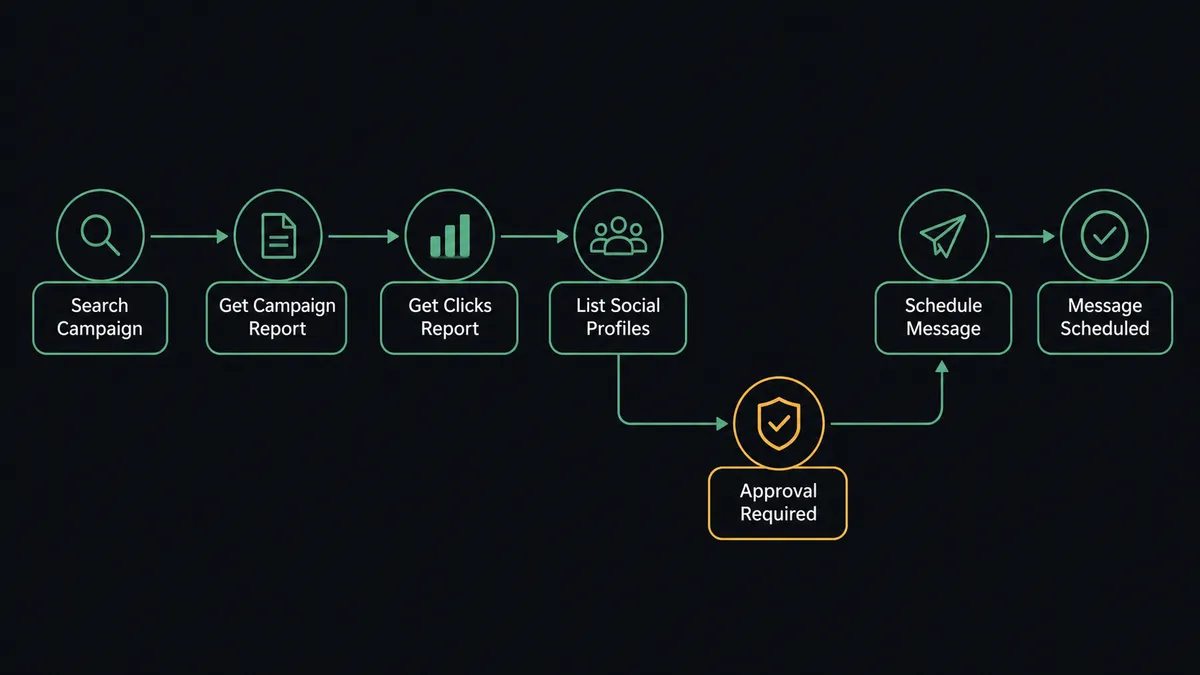
Yes, and this is where the connection stops being a copy machine. A fixed pipeline amplifies every campaign the same way, which means it amplifies the mediocre ones too. An AI agent reads the click report first. It holds Search Campaign, Get Campaign Report, Get Clicks Report, List Social Profiles, Schedule Message, List Messages, and Delete Message as tools, and it reasons about which content earned a second channel. A campaign where one link drew most of the clicks becomes a focused post about that one thing. A campaign that landed flat gets skipped, and skipping is a decision the agent is allowed to make.
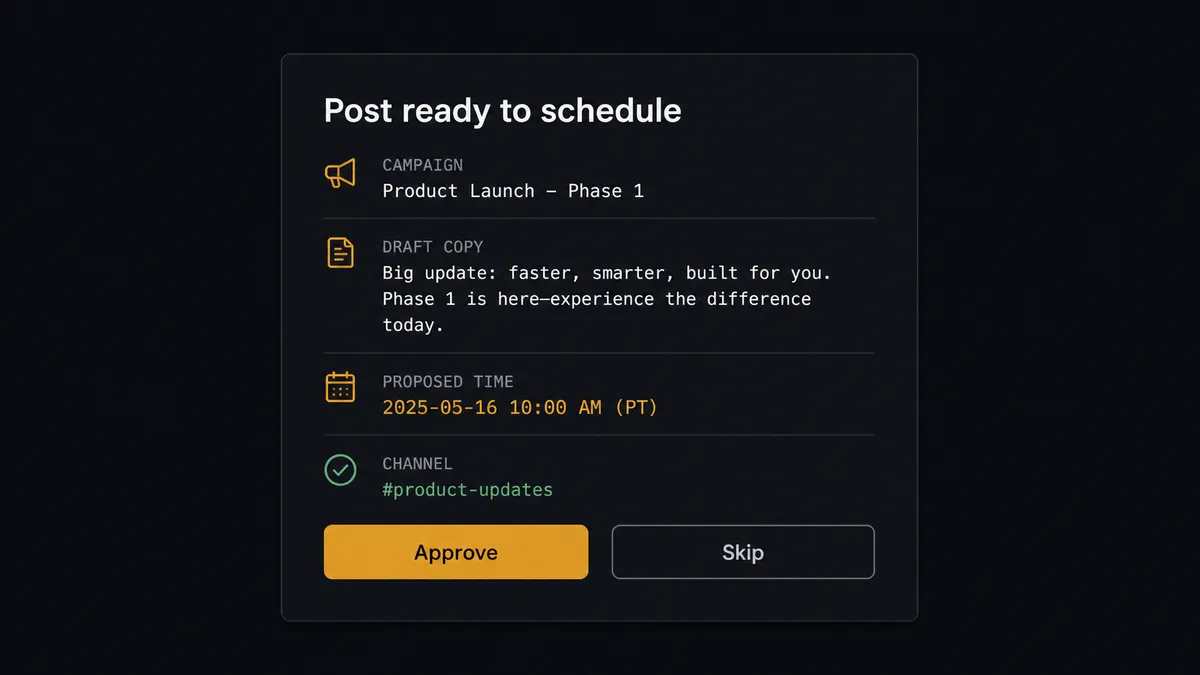
The consequential step is publication under your brand’s name. A queued Hootsuite post reaches the public feed of every follower you have, and a bad one cannot be quietly unsent. So the agent never calls Schedule Message on its own authority. It packages the campaign name, the click evidence for why this content, the drafted copy per network, and the proposed send times, then invokes a human-in-loop flow it holds as a callable tool. The workflow pauses and posts to the marketing channel: “Campaign [name] earned amplification. Draft for [profile]: [copy]. Proposed slot: [day, 11 AM]. Approve, edit, or skip?” Only after the approver signs off does Schedule Message run. The same gate covers removals: when a correction means a queued post has to go, the Delete Message request is held for the same sign-off.
Prospects call this pattern a digital andon cord. Like Toyota’s production line cord, the workflow stops the line the moment it hits uncertainty: an ambiguous draft, a sensitive topic, a post that speaks for the brand in public. A person pulls the line back into motion, and the automation keeps its speed everywhere else.
FlowRunner vs n8n
If your team has engineers who live in workflow tooling, n8n is a genuine option for this pair. Its node library is large, its community has published thousands of workflow templates, and its fair-code model means you can self-host it and inspect exactly what it does. For a developer who wants full control over a Mailchimp-to-social pipeline, n8n earns its reputation.
The difference is who can build it and what happens at the consequential step. FlowRunner is built for the operations and marketing team that owns this workflow day to day, and human-in-the-loop is a native agent capability rather than a pattern you assemble yourself.
| What matters for this pair | FlowRunner | n8n |
|---|---|---|
| Human-in-the-loop on brand publication | Native. The agent invokes an approval flow as a callable tool and pauses before Schedule Message | Wait nodes and approval patterns exist, but you wire the escalation logic yourself |
| Who runs the flow | An AI agent reads the click report, reasons, and picks actions as tools | Node graph you design and maintain; AI available as LangChain nodes |
| Who can build it | Marketing ops builds it visually, no code required | Developer-first; non-technical users find the learning curve steep |
| Bring your own AI keys | Yes, BYOK | Yes, n8n supports your own model keys too |
| Self-hosted option | Yes, cloud-hosted or self-hosted | Yes, self-hosting is a core n8n strength |
| Compliance features | Audit trails and RBAC from the $299/mo Professional tier | Full cloud compliance suite sits at custom-priced Enterprise |
If you have engineering capacity to spare and want to hand-build every branch, n8n will serve you well. If the people who own the email and social calendars should run this themselves, with an approval gate the auditors can see, this pairing is the better fit.
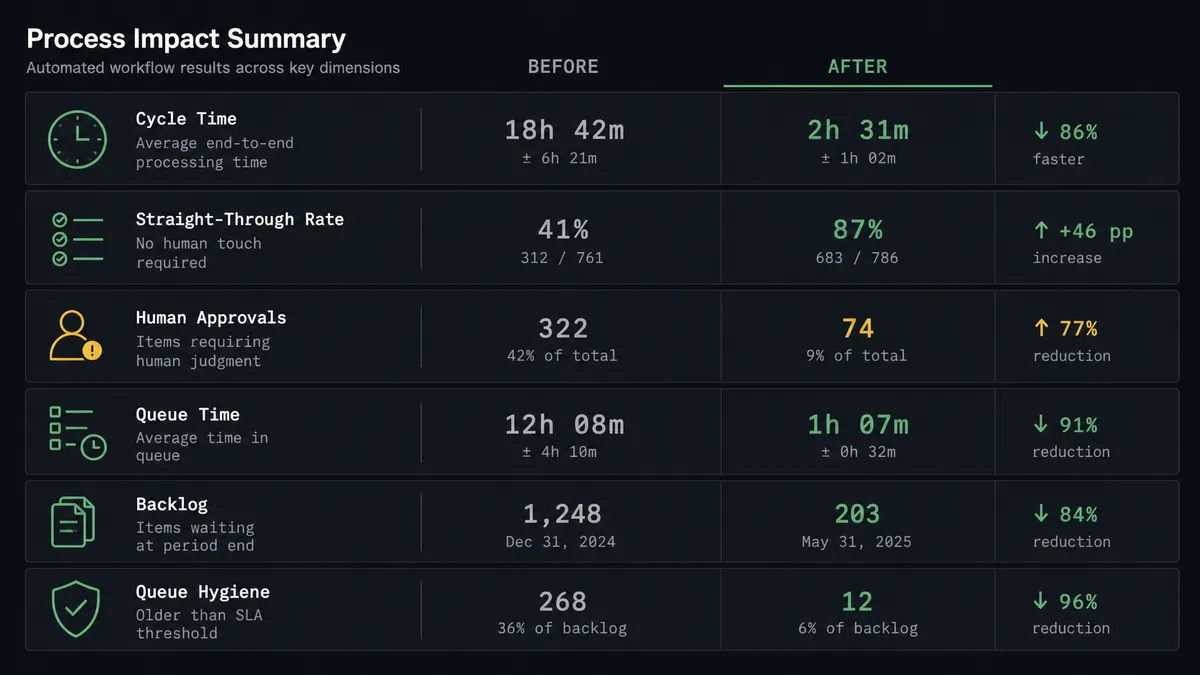
Before and after
| Category | Before | After |
|---|---|---|
| Cross-channel timing | Social follow-up happens days after the email send, when someone gets to it | Drafts are staged the morning after every send, while the content is still current |
| What gets amplified | Whichever campaign someone remembers, regardless of performance | The content subscribers actually clicked, chosen from the Get Clicks Report data |
| Rewriting per network | One person pastes and trims copy profile by profile in Hootsuite | The agent drafts per-network versions and stages each with Schedule Message |
| Brand safety | Whoever has Hootsuite access publishes, with no consistent review step | Every draft is approved by a named person before it enters the queue |
| Stale queue posts | A corrected offer stays live in the social queue until someone notices | List Messages finds the affected posts and Delete Message pulls them, with sign-off |
What you can build
Campaign echo with judgment. The morning run finds yesterday’s sends with Search Campaign, reads Get Clicks Report, and drafts a social post about the one link that dominated clicks. The draft waits for approval, then Schedule Message queues it across the profiles from List Social Profiles.
Correction sweep. When a fix goes out in email, the agent calls List Messages, finds every queued post referencing the old content, and holds Delete Message requests for each. The social queue never contradicts the inbox.
Winner’s rotation. Weekly, the agent compares Get Campaign Report data across the month’s sends, identifies the evergreen piece with the strongest engagement, and proposes a re-amplification slot. A person approves before it re-enters the queue.
List growth loop. The agent watches social-driven signups land in Mailchimp, tags them with Add Member Tag by source network, and reports which Hootsuite profiles feed the list. Budget conversations get real attribution instead of gut feel.
Send-day sequencing. For a major launch email, the agent stages a same-day social sequence: an announcement at send time and a follow-up the next morning, each staged with Schedule Message, each individually approved, so the launch lands as one coordinated push.
Getting started
Start on the free plan: 100 executions a month, every integration included, no credit card required, plus 14 days of Professional for new accounts. Both connectors are available on every tier, and every tier includes unlimited users and unlimited workflows.
Explore the integration details:
- Mailchimp Marketing integration (20 actions covering audiences, tags, campaigns, and click reporting)
- Hootsuite integration (9 actions covering profiles, scheduling, and queue management)
Start building free at flowrunner.ai or book a demo to see a live Mailchimp Marketing to Hootsuite workflow, post approval and all.
Frequently asked questions
Is it free to connect Mailchimp Marketing and Hootsuite on FlowRunner?
You can build and run the connection on FlowRunner's free plan, which includes 100 executions a month and every integration with no credit card required, and new accounts also get 14 days of Professional. Both connectors are available on every FlowRunner tier, and every tier includes unlimited users and unlimited workflows.
Can I self-host the Mailchimp Marketing to Hootsuite workflow?
Yes. FlowRunner offers a cloud-hosted option and a self-hosted option, so the connection can run inside your own environment.
Does the AI agent need my own OpenAI or Claude key?
FlowRunner uses a bring-your-own-keys model, so you connect the AI provider key you already have. You are not locked to one model.
What happens when the agent is unsure a campaign is worth amplifying?
It does not guess in public. The agent posts the campaign name, the click report summary, and its draft to your team channel and waits. A person decides whether the content goes to social, gets rewritten, or stays email-only. Skipping is always a valid outcome.
Which Mailchimp Marketing and Hootsuite actions does this workflow use?
Both connectors are action-based, so the workflow opens on a schedule rather than an event trigger. It reads Mailchimp with Search Campaign, Get Campaign Info, Get Campaign Report, and Get Clicks Report, then writes to Hootsuite with List Social Profiles, Schedule Message, List Messages, and Delete Message.
Can the workflow pull a scheduled post if the email campaign changes?
Yes. The agent calls List Messages to find the affected posts in the Hootsuite queue and holds a Delete Message request for approval, so a correction in email is reflected on social before the post goes out, and a person signs off on the removal.