How to Connect Mailchimp Marketing with LinkedIn Ads (With or Without an AI Agent)
Let Mailchimp engagement data shape your LinkedIn ad campaigns, with an AI agent that proposes campaigns and budget changes from click evidence and pauses for a named approver before any action that spends money.
How do you connect Mailchimp Marketing to LinkedIn Ads?
You connect Mailchimp Marketing to LinkedIn Ads with a scheduled workflow that reads your email engagement through Get Campaign Report and Get Clicks Report, maps your paid account with Search Ad Accounts, List Campaign Groups, and List Campaigns, and turns the strongest email signals into campaign proposals executed with Create Campaign and Update Campaign. Neither connector exposes an event trigger, so the workflow runs on a schedule, typically weekly to match ad review cadence. FlowRunner is a visual AI-agent orchestration platform where automations run autonomously and pause for human judgment on the steps that carry real consequence. Run as an agent, the connection reasons about which email wins deserve paid amplification and drafts the campaign to do it, but every action that spends money waits for a named approver, because on an ad platform the difference between a draft and a live campaign is your budget.
The problem it solves
Most B2B teams run email and LinkedIn ads as separate disciplines with separate meetings. The email owner knows the compliance-automation piece drew triple the usual clicks last Tuesday. The ads owner is still running the campaign brief written six weeks ago. By the time the insight crosses the hallway, if it ever does, the moment has passed and the ad budget spent the interval promoting the thing the audience already ignored in their inbox.
The edges are expensive. A campaign keeps spending against a message the email data has already falsified. A promising topic never gets paid support because nobody connected the click report to the media plan. Budget reallocations happen quarterly on gut feel instead of weekly on evidence. And the person who finally notices the mismatch has to reconstruct the case by hand, exporting one platform’s report to argue with the other’s. Email engagement is the cheapest, fastest read on what your audience wants. Ads are the most expensive place to act on a guess. Keeping the two disconnected means paying premium CPMs to learn what your newsletter already knew.
How it works: the connection
The connection reads Mailchimp Marketing and writes to LinkedIn Ads. Here is the plain version, grounded in the real connector actions.
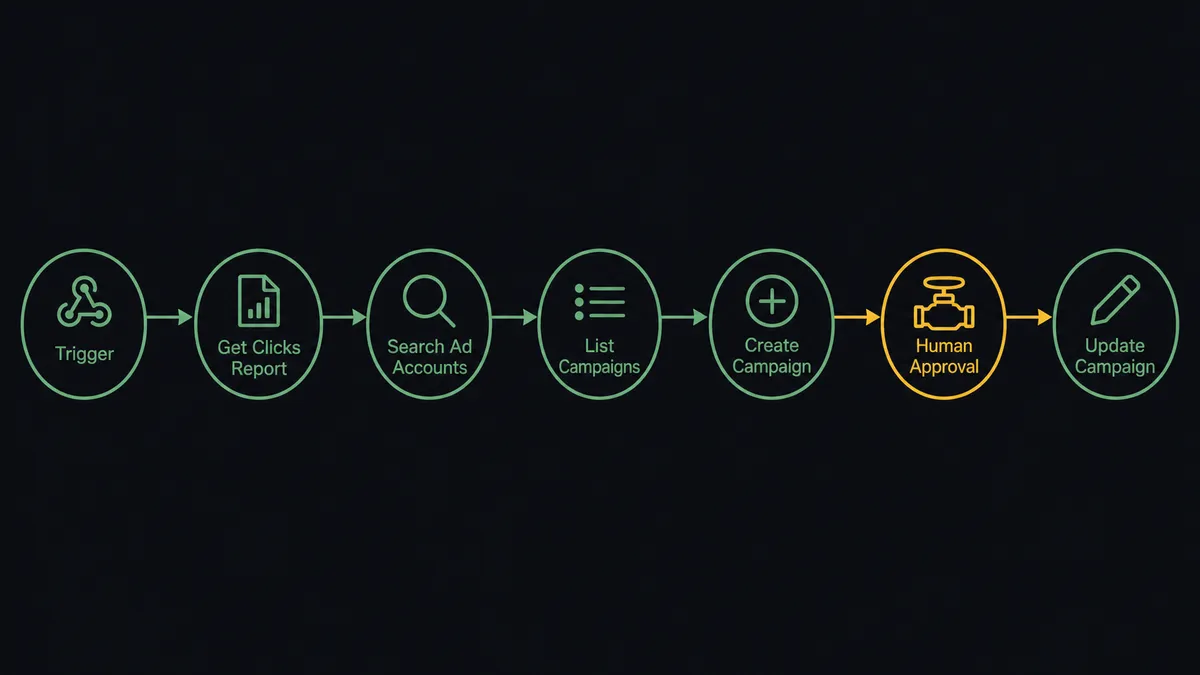
- Trigger: On a schedule, the weekly run opens the review pass.
- Read the email evidence: Get Campaign Report pulls each send’s performance, and Get Clicks Report shows which links and topics actually earned clicks. Get Lists Info adds audience size and growth context.
- Map the paid structure: Search Ad Accounts and Get Ad Account locate the account, and List Campaign Groups with List Campaigns lay out what is currently running where.
- Read the running campaigns: Get Campaign pulls each campaign’s configuration and status, and List Creatives shows the assets in play.
- Compare: The week’s email winners line up against the current paid topics, exposing gaps and mismatches.
- Propose: New-topic opportunities become Create Campaign drafts inside the right campaign group; mismatched spend becomes Update Campaign proposals.
- Execute after approval: Approved proposals run, and the run log ties each change to its email evidence.
That is the “just connect them” answer. Paid spend starts following proven engagement instead of last quarter’s brief.
Can an AI agent run it? (and why a human stays in the loop)
Yes, and the agent’s value is turning two reports into one argument. A fixed pipeline can copy numbers between platforms; it cannot notice that the topic dominating your click report has no paid campaign behind it. The agent holds Get Campaign Report, Get Clicks Report, Get Lists Info, Search Ad Accounts, Get Ad Account, List Campaign Groups, Create Campaign Group, List Campaigns, Get Campaign, List Creatives, Create Campaign, and Update Campaign as tools. Each week it builds the comparison: what the audience engaged with organically, what the account is paying to promote, and where the two disagree. Then it drafts the fix as a concrete proposal with the evidence attached.
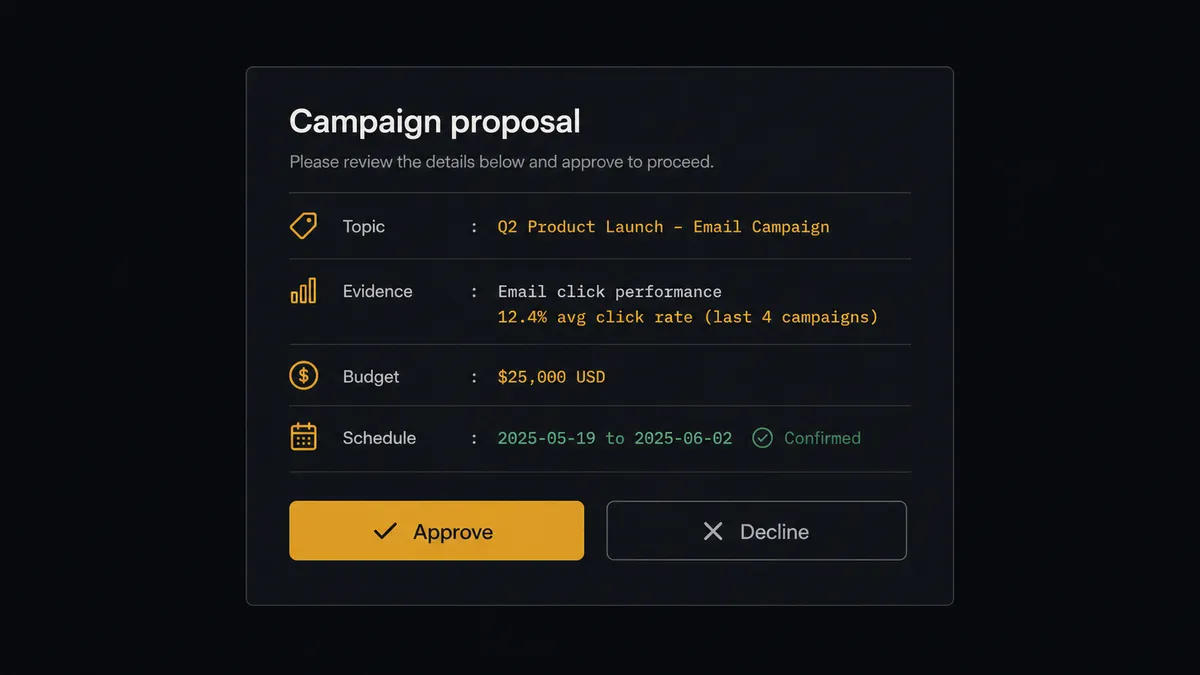
The consequential step is anything that moves money. Create Campaign starts spend the moment the campaign goes live; Update Campaign can raise a budget or redirect it. The agent never takes either action on its own authority. It invokes a human-in-loop flow it holds as a callable tool, and the workflow pauses and posts to the marketing channel: “Proposal: new campaign in group [name] on [topic]. Evidence: this topic led your last two sends’ click reports. Suggested budget: [amount], schedule: [dates]. Approve, adjust, or decline?” Only after the marketing lead signs off does Create Campaign run. Budget shifts on running campaigns follow the same path, including the urgent case: when a campaign’s message has been falsified by the email data, the agent proposes pausing it via Update Campaign and marks the request urgent, but a person still makes the call.
FlowRunner prospects call this the digital andon cord, and nowhere does the metaphor pay for itself faster than in ad spend. Like Toyota’s line-stop cord, the workflow halts the line before money moves on an unverified assumption, and the person who owns the budget pulls it back into motion.
FlowRunner vs Zapier
Zapier is the obvious first tool to glue marketing systems together, and its strengths here are genuine: the biggest connector catalog in the category, an editor non-technical marketers actually finish setting up, and a deep template gallery for moving leads and contacts between email and ad platforms. For syncing audiences or pushing new subscribers around, it is quick and proven.
This workflow asks for something structurally different: cross-platform reasoning that ends in a money decision, with the decision held for a person. FlowRunner runs that as an agent with native human-in-the-loop rather than a chain of fixed steps.
| What matters for this pair | FlowRunner | Zapier |
|---|---|---|
| Human-in-the-loop on spend | Native. The agent pauses before every Create Campaign and Update Campaign | Available via added approval steps, not a native agent decision |
| Who runs the flow | An AI agent compares both platforms’ evidence and picks actions as tools | Predefined step sequence you configure per Zap |
| Users included | Unlimited users on every tier | Priced by task volume; seats vary by plan |
| Bring your own AI keys | Yes, BYOK | AI features tied to Zapier’s own AI offering |
| Self-hosted option | Yes, cloud-hosted or self-hosted | Cloud only |
| Pricing model | Transparent workflow-based tiers | Per-task pricing; weekly multi-step analysis consumes tasks quickly |
If you need subscriber and lead data moved between platforms, Zapier handles it well. If you want email evidence steering ad spend with a named approver on every dollar-moving action, this pairing is the better fit.
Before and after
| Category | Before | After |
|---|---|---|
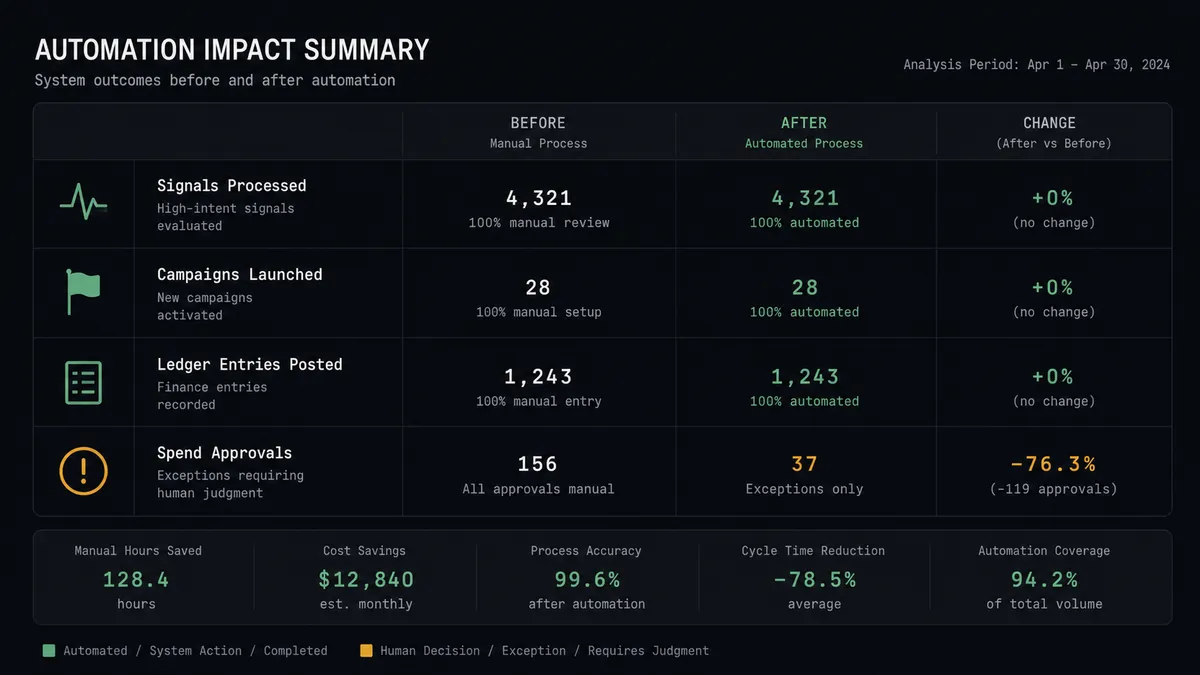
| Signal to spend | Email insights reach the ads owner weeks late, or never | The weekly run lines up click evidence against the live campaign list |
| New campaigns | Launched from quarterly briefs and instinct | Proposed from click reports, approved by a named person, then created |
| Budget shifts | Argued from memory in a monthly meeting | Proposed with evidence attached and executed the day they are approved |
| Falsified messages | A campaign keeps spending against a message email already disproved | The agent flags the mismatch and proposes the pause, marked urgent |
| Accountability | Nobody can reconstruct why a campaign was created or changed | Every Create Campaign and Update Campaign carries its evidence and approver |
What you can build
Winner-to-campaign pipeline. The weekly run reads Get Clicks Report, finds the topic that led the last two sends, and drafts a Create Campaign proposal in the right group with budget and schedule. The lead approves, the campaign goes live, and the evidence rides in the log.
Budget follow-the-signal. The agent compares Get Campaign data against email engagement by topic and proposes Update Campaign shifts, moving spend toward what the audience demonstrably reads. Every shift is a signed decision, not a silent drift.
Message-mismatch alarm. When a running campaign promotes an angle whose email version has gone quiet, the agent assembles the falsification case and proposes a pause or rewrite, so the account stops paying to push a message the audience declined.
Structure keeper. New themes get a home before they get spend: the agent proposes Create Campaign Group when a genuinely new topic earns paid support, keeping the account organized by theme instead of accreting orphan campaigns.
Friday spend digest. The agent posts a weekly summary pairing List Campaigns status with the week’s email evidence: what ran, what was proposed, what was approved and by whom, and what it recommends watching next week. The ads meeting starts from the digest instead of from screenshots.
Getting started
Start on the free plan: 100 executions a month, every integration included, no credit card required, plus 14 days of Professional for new accounts. Both connectors are available on every tier, and every tier includes unlimited users and unlimited workflows.
Explore the integration details:
- Mailchimp Marketing integration (20 actions covering audiences, tags, campaigns, and click reporting)
- LinkedIn Ads integration (9 actions covering accounts, campaign groups, campaigns, and creatives)
Start building free at flowrunner.ai or book a demo to see a live Mailchimp Marketing to LinkedIn Ads workflow, spend approval and all.
Frequently asked questions
Is it free to connect Mailchimp Marketing and LinkedIn Ads on FlowRunner?
You can build and run the connection on FlowRunner's free plan, which includes 100 executions a month and every integration with no credit card required, and new accounts also get 14 days of Professional. Both connectors are available on every FlowRunner tier, and every tier includes unlimited users and unlimited workflows.
Can I self-host the Mailchimp Marketing to LinkedIn Ads workflow?
Yes. FlowRunner offers a cloud-hosted option and a self-hosted option, so the connection can run inside your own environment.
Does the AI agent need my own OpenAI or Claude key?
FlowRunner uses a bring-your-own-keys model, so you connect the AI provider key you already have. You are not locked to one model.
What happens when the agent is unsure whether email engagement justifies a new campaign?
It presents the case and waits. The agent posts the click evidence, the proposed audience and budget, and its own uncertainty to the marketing channel. A weak or ambiguous signal produces a recommendation to wait, and no campaign is created either way until a person approves.
Which Mailchimp Marketing and LinkedIn Ads actions does this workflow use?
Both connectors are action-based, so the workflow runs on a schedule. It reads Mailchimp with Get Campaign Report, Get Clicks Report, and Get Lists Info, reads the ad account with Search Ad Accounts, List Campaign Groups, List Campaigns, Get Campaign, and List Creatives, and writes with Create Campaign and Update Campaign after approval.
Can the workflow change LinkedIn ad budgets on its own?
No. Update Campaign is exactly the action that moves money, so it is always approval-gated. The agent proposes the change with the evidence attached, a named approver signs off, and only then does the budget move. Pausing an overspending campaign follows the same path, marked urgent.