How to Connect Shopify with Mailchimp Marketing (With or Without an AI Agent)
Connect Shopify to Mailchimp Marketing so new customers and orders instantly update your audience, with an AI agent that applies tags, syncs behavior, and pauses for human approval before sending campaigns to large lists.
How do you connect Shopify to Mailchimp Marketing?
Use the Shopify On New Customer trigger to fire the Mailchimp Marketing Add Or Update List Member action the moment a buyer creates an account, and use On New Order to apply purchase tags with Add Tag after every checkout. FlowRunner is a visual AI-agent orchestration platform where automations run autonomously and pause for human judgment on the steps that carry real consequence. That same connection can run as an AI agent that reads order data, segments subscribers, and holds large campaign sends for a named marketing manager to approve before anything goes out.
The problem with manual Shopify-to-Mailchimp workflows
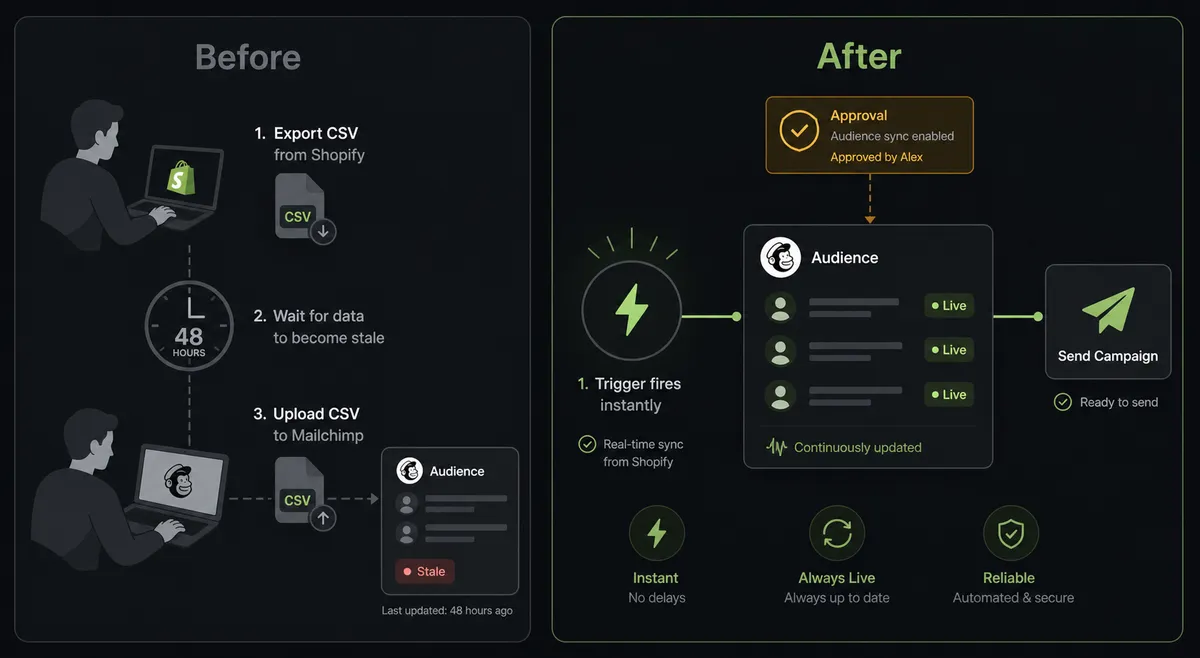
Most Shopify stores that use Mailchimp are running a version of the same manual process. Someone exports a customer segment from Shopify, imports it into Mailchimp, cleans the duplicates, and applies tags by hand. By the time the list is ready, a day or two has passed. The customer who bought yesterday morning is still in the “prospect” segment. The returning buyer who just purchased a second product is not in the post-purchase sequence yet. The marketing manager is running on stale data, and no one has the time to keep it current.
The compounding problem is segmentation. Shopify knows what each customer bought, when they bought it, and how much they spent. Mailchimp can act on that data to personalize every send, but only if the tags get applied. Without an automated bridge, behavioral tagging lives on a whiteboard. Someone intends to tag buyers of a specific product line with a specific tag so they receive the right follow-up sequence. That intention falls through the cracks the moment the team is busy with anything else.
How it works: the connection
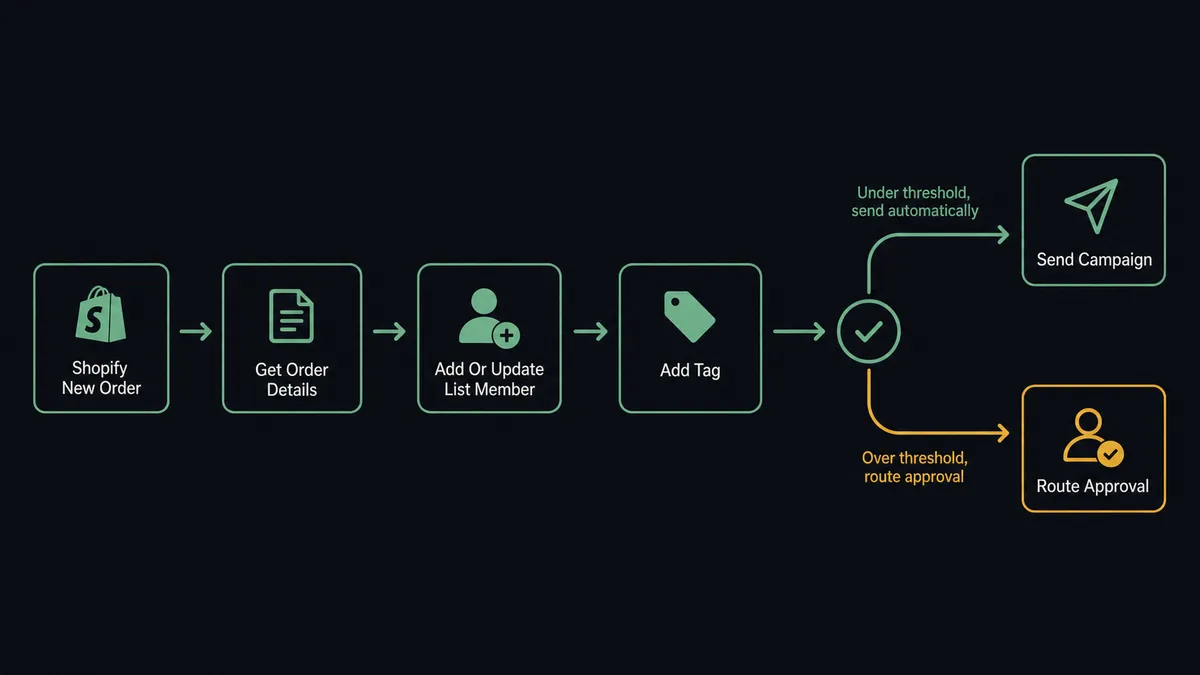
The Shopify On New Customer trigger fires the moment a buyer creates a customer record, which happens at account creation or at first checkout for guest-to-customer conversion. The agent calls Get Customer to retrieve the full record including email, name, and address. It then calls Add Or Update List Member in Mailchimp, mapping the email and contact fields to the target audience. Because Add Or Update List Member is idempotent, the same customer passing through the flow twice does not create a duplicate.
For purchase-based segmentation, On New Order fires at checkout. The agent calls Get Order to read the full line items, shipping details, and order total. It identifies the product categories purchased and calls Add Tag in Mailchimp to apply the appropriate segment tags to the subscriber. A customer who buys from the skincare line gets tagged “skincare-buyer.” A customer who hits a cumulative spend threshold gets tagged “high-value.” Those tags immediately shift which email sequences the subscriber receives in Mailchimp.
When a customer record is updated in Shopify, On Customer Updated fires and the agent syncs the change to Mailchimp. A subscriber who opts out of marketing in one channel gets processed through Unsubscribe Or Delete List Member in Mailchimp. Compliance handling flows automatically without a human having to remember to cross-reference two systems.
Can an AI agent run it? (and why a human stays in the loop)
A plain Shopify-to-Mailchimp connection runs trigger-to-action in a straight line. An AI agent running the same flow does something different: it reads the order data, reasons about it, and decides which tools to call based on what it finds. The agent is not executing a script. It is evaluating each order and making a judgment call about how to handle it.
The most consequential step in this flow is not the subscriber enrollment. It is the campaign send. When an agent creates and schedules a campaign based on a Shopify event, sending to a large audience without a checkpoint is the kind of decision that causes real problems if something is wrong. Subject line error, wrong segment, send time misconfigured. This is the moment FlowRunner’s human-in-loop capability matters.
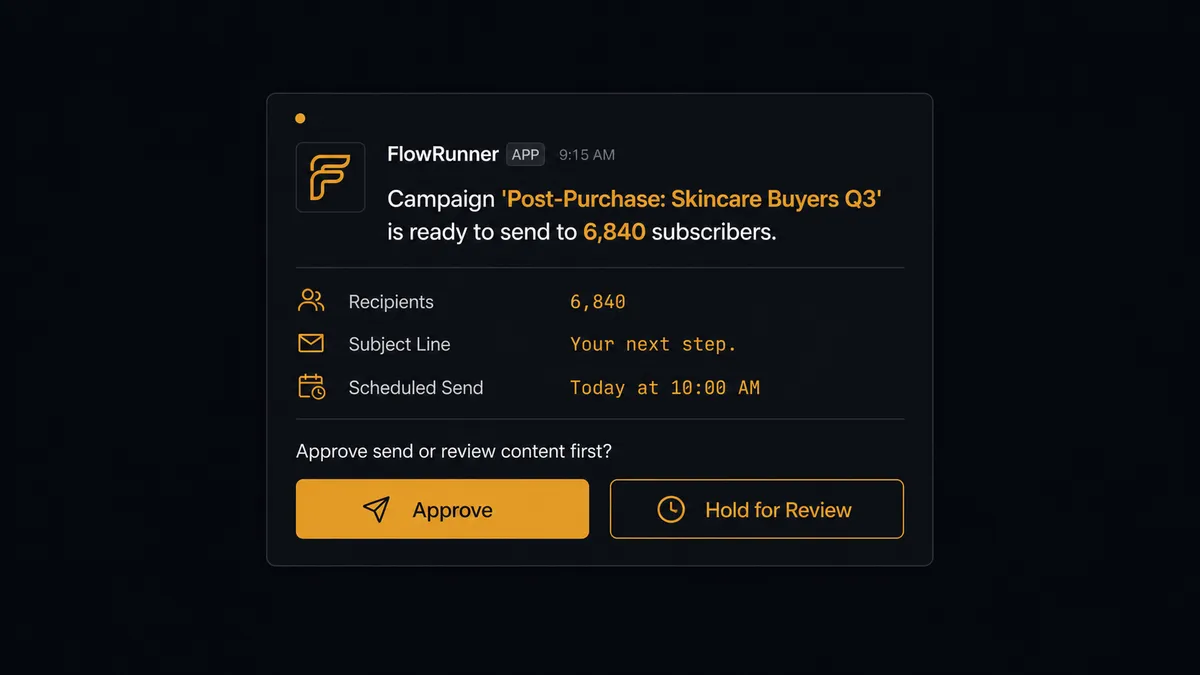
When the agent detects that the audience size for a pending send exceeds the configured threshold, it does not send. It invokes the human-in-loop subflow as a callable tool. The agent packages the campaign name, the subject line, the audience size, the scheduled send time, and any segmentation logic it applied. It routes the approval request to the marketing manager’s Slack channel: “Campaign [Name] is ready to send to [N] subscribers. Subject line: [subject]. Scheduled send: [time]. Approve send or review content first?”
The marketing manager sees the full context. They click Approve, and the agent calls Send Campaign. They click Hold for Review, and the agent pauses and logs the decision. The agent did not apply a hardcoded threshold and blindly pass or fail. It evaluated the context and made the call to escalate. This is the digital andon cord: the agent stops the line when it hits a step that carries real consequence.
FlowRunner vs Zapier: what’s actually different?
Zapier is the tool most non-technical Shopify teams reach for first, and for good reason. It has a clean setup experience, thousands of pre-built templates, and a large library of connectors. For a straight trigger-to-action connection between Shopify and Mailchimp, Zapier works.
The differences show up at the edges that matter most to an operations team.
| Feature | Zapier | FlowRunner |
|---|---|---|
| Human approval before campaign send | Not available; actions run automatically | Native human-in-loop subflow; agent pauses and routes to Slack before Send Campaign |
| AI agent with reasoning | Multi-step Zaps with conditional logic; no autonomous reasoning | AI agent reads order data, evaluates context, and decides which actions to call |
| Users per plan | Per-seat pricing on most plans | Unlimited users on every tier |
| BYOK (bring your own AI keys) | Not available | Full BYOK; connect your own OpenAI, Anthropic, or other AI provider account |
| Audit trail | Limited run history | Full audit trail with decision logs, approver identity, and timestamps |
| Self-hosted option | No | Community Edition (free) and Enterprise self-hosted |
Zapier’s strength is speed of setup for simple connections. FlowRunner’s difference is what happens at decision points: the agent reasons, escalates when it should, and leaves a record of every call it made.
Before and after
| Category | Before | After |
|---|---|---|
| Audience sync | Manual CSV export and import on a weekly or monthly cadence; list is always behind | On New Customer and On New Order keep Mailchimp updated the moment anything changes in Shopify |
| Segmentation tags | Tags applied by hand when someone remembers; most buyers go untagged | Agent applies product-category and lifecycle tags automatically on every order |
| Campaign sends | Large sends go out without a review checkpoint; errors reach the full list | Sends above the configured audience threshold hold for named-approver sign-off in Slack |
| Compliance handling | Opt-outs cross-referenced manually between Shopify and Mailchimp | Agent processes opt-outs through Unsubscribe Or Delete List Member automatically |
| Visibility | No record of who made what change to the list | Full audit trail: every enrollment, tag, and approval decision is logged with identity and timestamp |
What you can build
New-customer welcome sequence trigger. On New Customer fires in Shopify, the agent calls Add Or Update List Member to enroll the buyer, then Add Tag to apply a “new-customer” segment tag. The subscriber enters the welcome sequence in Mailchimp immediately, not when someone runs the next import.
Purchase-based segment routing. On New Order fires after checkout. The agent reads the line items with Get Order and applies product-category tags with Add Tag. Buyers of one product line enter a different post-purchase sequence than buyers of another. Segmentation runs at the order level without manual list management.
Post-dispute subscriber note. On New Dispute fires when Shopify Payments flags a chargeback. The agent retrieves the order and customer context, then calls Add Member Note in Mailchimp to log the dispute against the subscriber record. The marketing team sees the note before the next send and can make an informed decision about whether to continue that subscriber’s journey.
Weekly engagement digest. On a Monday morning schedule, the agent calls Get Campaign Report for each active campaign, formats open rate, click rate, and list growth data, and posts a performance summary to the marketing Slack channel. Leadership sees last week’s numbers before the week starts.
Large-campaign approval gate. Before any Send Campaign call above the configured threshold, the agent routes a Slack approval to the marketing manager with the campaign name, subject line, audience size, and scheduled send time. The campaign sends only after the approver clicks Approve. Every decision is captured in the audit trail.
Common questions
Is it free to connect Shopify and Mailchimp Marketing on FlowRunner? FlowRunner has a free plan with 100 executions a month, every integration included, and no credit card required, and new accounts get 14 days of Professional on top. Beyond the free plan, Growth starts at $45 per month for 12,000 executions, and all tiers include unlimited users and workflows.
Can I self-host FlowRunner instead of using the cloud? Yes. FlowRunner offers a self-hosted Community Edition at no cost for single-instance deployments. Enterprise self-hosted is available with multi-instance clustering and the full compliance suite.
Does the AI agent need my own OpenAI key? FlowRunner uses a bring-your-own-keys model. You connect your preferred AI provider account, whether that is OpenAI, Anthropic, or another supported provider, and the agent uses those credentials. FlowRunner does not charge for AI tokens.
What happens when the agent is not sure what to do? The agent invokes a human-in-loop flow as a callable tool. It assembles the full context, routes it to the right person via Slack, email, or another channel, and pauses until it receives a response. The decision, the decider, and the timestamp are all captured in the audit trail.
Does FlowRunner keep my Mailchimp audience updated in real time? Yes. Shopify triggers like On New Customer and On Customer Updated fire the moment a customer record changes. The agent calls Add Or Update List Member in Mailchimp immediately, so your audience reflects the current state of your store without manual syncing.
Can I tag Mailchimp subscribers based on what they bought in Shopify? Yes. After an order is placed or updated, the agent reads the line items and calls Add Tag in Mailchimp to apply purchase-based tags to the subscriber. Those tags feed directly into your Mailchimp audience segmentation.
Getting started
FlowRunner has a free plan with 100 executions a month, every integration included, and no credit card required, and new accounts get 14 days of Professional on top. Unlimited users and workflows are included on every tier.
To get started, connect both integrations from the FlowRunner connector library:
Start your free trial at flowrunner.ai or book a 30-minute walkthrough at calendly.com/flowrunner/intro. The team will show you a live Shopify-to-Mailchimp flow with the human-in-loop approval gate running in real time.
Frequently asked questions
Is it free to connect Shopify and Mailchimp Marketing on FlowRunner?
FlowRunner has a free plan with 100 executions a month, every integration included, and no credit card required, and new accounts get 14 days of Professional on top. Beyond the free plan, Growth starts at $45 per month for 12,000 executions, and all tiers include unlimited users and workflows.
Can I self-host FlowRunner instead of using the cloud?
Yes. FlowRunner offers a self-hosted Community Edition at no cost for single-instance deployments. Enterprise self-hosted is available with multi-instance clustering and the full compliance suite.
Does the AI agent need my own OpenAI key?
FlowRunner uses a bring-your-own-keys model. You connect your preferred AI provider account, whether that is OpenAI, Anthropic, or another supported provider, and the agent uses those credentials. FlowRunner does not charge for AI tokens.
What happens when the agent is not sure what to do?
The agent invokes a human-in-loop flow as a callable tool. It assembles the full context, routes it to the right person via Slack, email, or another channel, and pauses until it receives a response. The decision, the decider, and the timestamp are all captured in the audit trail.
Does FlowRunner keep my Mailchimp audience updated in real time?
Yes. Shopify triggers like On New Customer and On Customer Updated fire the moment a customer record changes. The agent calls Add Or Update List Member in Mailchimp immediately, so your audience reflects the current state of your store without manual syncing.
Can I tag Mailchimp subscribers based on what they bought in Shopify?
Yes. After an order is placed or updated, the agent reads the line items and calls Add Tag in Mailchimp to apply purchase-based tags to the subscriber. Those tags feed directly into your Mailchimp audience segmentation.