How to Connect Mailchimp Marketing with FirstPromoter (With or Without an AI Agent)
Connect FirstPromoter to Mailchimp Marketing so affiliates flow into a tagged, segmented audience automatically, with an AI agent that keeps promoter data in step and pauses for a human before a campaign reaches your whole partner list.
How do you connect Mailchimp Marketing to FirstPromoter?
You connect Mailchimp Marketing to FirstPromoter by polling List Promoters and List Commissions on a schedule, upserting each new or changed affiliate into your partners audience with Add Or Update List Member, and keeping their tags true to their current state with Add Member Tag and Remove Member Tag. FlowRunner is a visual AI-agent orchestration platform where automations run autonomously and pause for human judgment on the steps that carry real consequence. Run as an agent, the same connection reads each promoter’s actual referral and commission activity, maintains the segments on its own, and pauses for a named human before Send Campaign puts a message in front of every partner you have.
The problem it solves
Today your affiliate program and your affiliate communications live in different buildings. Partners sign up and change state in FirstPromoter: approved, active, earning, dormant. Your emails to them come from a Mailchimp audience that somebody exported once, months ago. Every newsletter goes to people who left the program, misses the affiliates who joined last week, and addresses your best-earning partner with the same generic copy as someone who has never referred a soul. Keeping the two in step means a CSV export and an import, done whenever someone remembers.
The edges are what make it costly. A promoter you rejected for brand-safety reasons keeps receiving insider partner announcements because nobody removed them. A top performer’s commission questions go unanswered in a generic drip. And the one message that really matters, the payout or terms-change announcement to the entire partner base, gets sent from a stale list, so the people most affected never see it and the people who should not see it do.
How it works: the connection
The connection reads from FirstPromoter and writes to Mailchimp Marketing. Here is the plain version, grounded in the real connector actions.
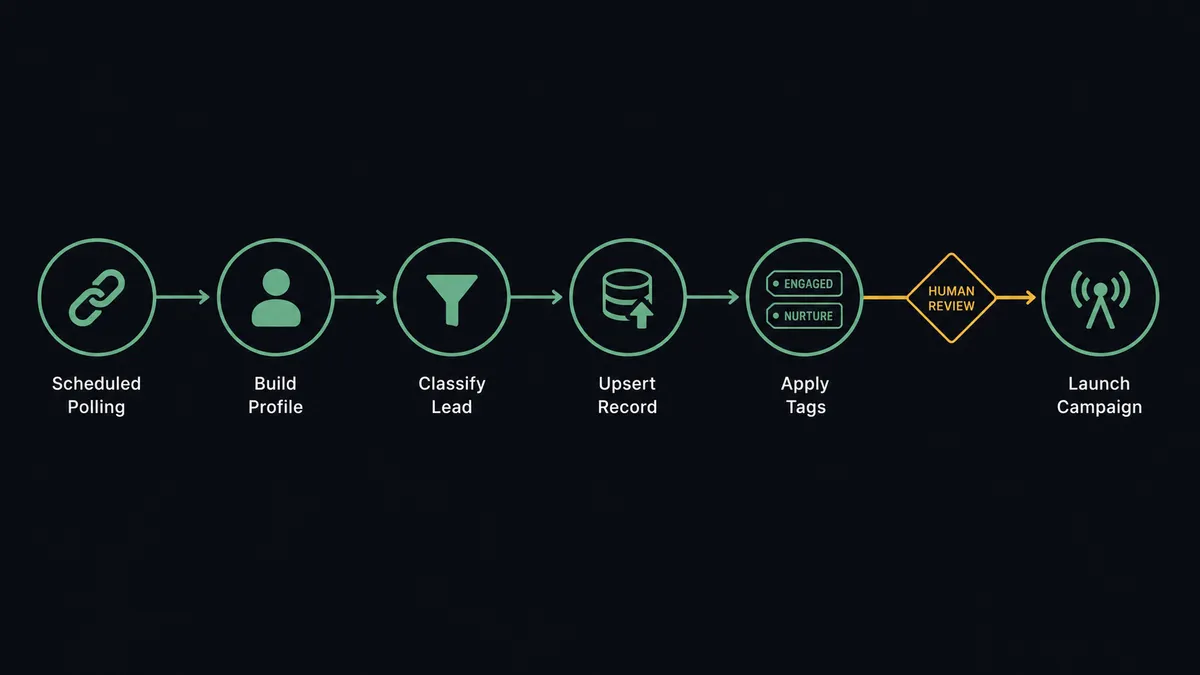
- Trigger: On a schedule, the workflow runs List Promoters filtered by state and List Commissions for fresh earnings activity since the last pass.
- Read: Get Promoter pulls each changed affiliate’s full profile: email, name, campaign, state, referral link, and aggregate earnings.
- Upsert: Add Or Update List Member writes the promoter into the partners audience, creating the member or updating the existing record in one call.
- Tag: Add Member Tag applies the promoter’s campaign and current state; Remove Member Tag clears tags that no longer apply, so segments never carry ghosts.
- Annotate: Add Member Note records earnings context on the member, so anyone opening the profile sees the affiliate relationship at a glance.
- Verify activity: List Referrals cross-checks which promoters actually drove signups, separating active partners from sign-up-and-vanish accounts.
- Report back: After any partner campaign, Get Campaign Report and Get Clicks Report pull opens and clicks, feeding the next segmentation pass.
That is the “just connect them” answer. The partner audience becomes a live mirror of the program: new affiliates enter within the hour, departed ones stop receiving insider announcements, and tags reflect what partners actually do.
Can an AI agent run it? (and why a human stays in the loop)
Yes, and segmentation is where the agent beats a sync. It holds the pair’s actions as tools: List Promoters, Get Promoter, List Referrals, List Commissions, Add Or Update List Member, Add Member Tag, Remove Member Tag, Add Member Note, Send Campaign, Get Campaign Report. A sync copies fields; the agent interprets them. A promoter with an approved state but zero referrals in List Referrals is a different partner than one with steady entries in List Commissions, and the agent tags them differently, drafts different copy for each, and notices when a previously active partner goes quiet.
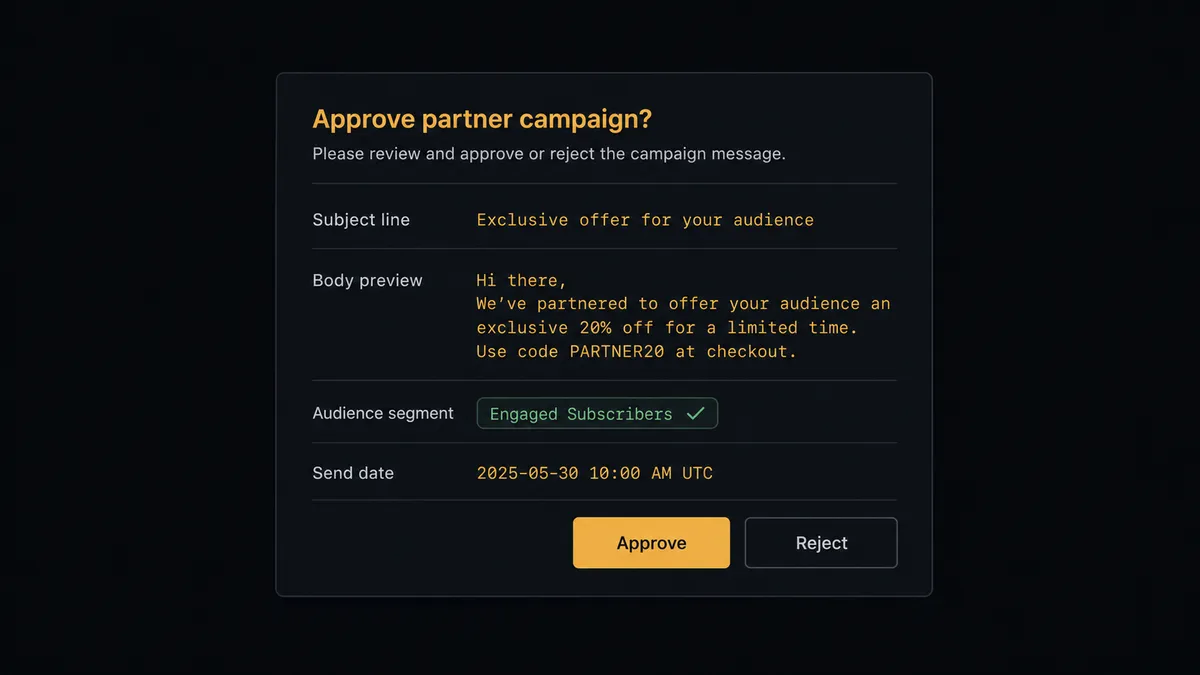
The consequential step is Send Campaign. A partner-wide send is your program speaking to every affiliate at once, including the ones negotiating better terms and the ones one bad email away from churning. A wrong payout figure or a mis-targeted segment cannot be unsent. So before the send, the agent invokes a human-in-loop flow it holds as a callable tool. The workflow pauses and posts: “Partner campaign drafted for the active-affiliates segment. Subject, body preview, and audience definition attached. Approve to send?” Only after a named approver signs off does Send Campaign fire, and the approval lands in the audit trail next to the campaign’s report.
Removals get the same gate. Unsubscribe Or Delete List Member is how a rejected or departed promoter leaves the audience, and it is exactly the kind of tidy-up an automation gets wrong quietly. The agent proposes each removal with the reason; a person confirms. Prospects call this a digital andon cord: the workflow stops the line the moment an action would be hard to take back, and your team pulls it back into motion.
FlowRunner vs Zapier
Zapier’s case here is legitimate: it connects both FirstPromoter and Mailchimp, the setup is fast, and for a single rule like “new promoter becomes a Mailchimp subscriber,” a Zap is running before your coffee cools. Its template gallery is the largest in the category, and this exact pairing likely has a starting point in it.
The difference is that an affiliate audience is not one rule; it is a living segmentation problem with a broadcast step that carries real relationship risk.
| What matters for this pair | FlowRunner | Zapier |
|---|---|---|
| Human-in-the-loop on Send Campaign to all partners | Native. The agent posts the draft and segment for approval before the send | Available via added approval steps, not a native agent decision |
| Who runs the flow | An AI agent reads referral and commission data, reasons, picks actions as tools | Predefined step sequence you configure per Zap |
| Users included | Unlimited users on every tier | Priced by task volume; seats vary by plan |
| Bring your own AI keys | Yes, BYOK | AI features tied to Zapier’s own AI offering |
| Self-hosted option | Yes, cloud-hosted or self-hosted | Cloud only |
| Pricing model | Transparent workflow-based tiers | Per-task pricing; hourly polling plus tag updates consume tasks quickly |
If all you need is new promoters appearing in an audience, Zapier handles it. If you want segments that track real partner behavior and a named human approving every list-wide send and every removal, this pairing is the better fit.
Before and after
| Category | Before | After |
|---|---|---|
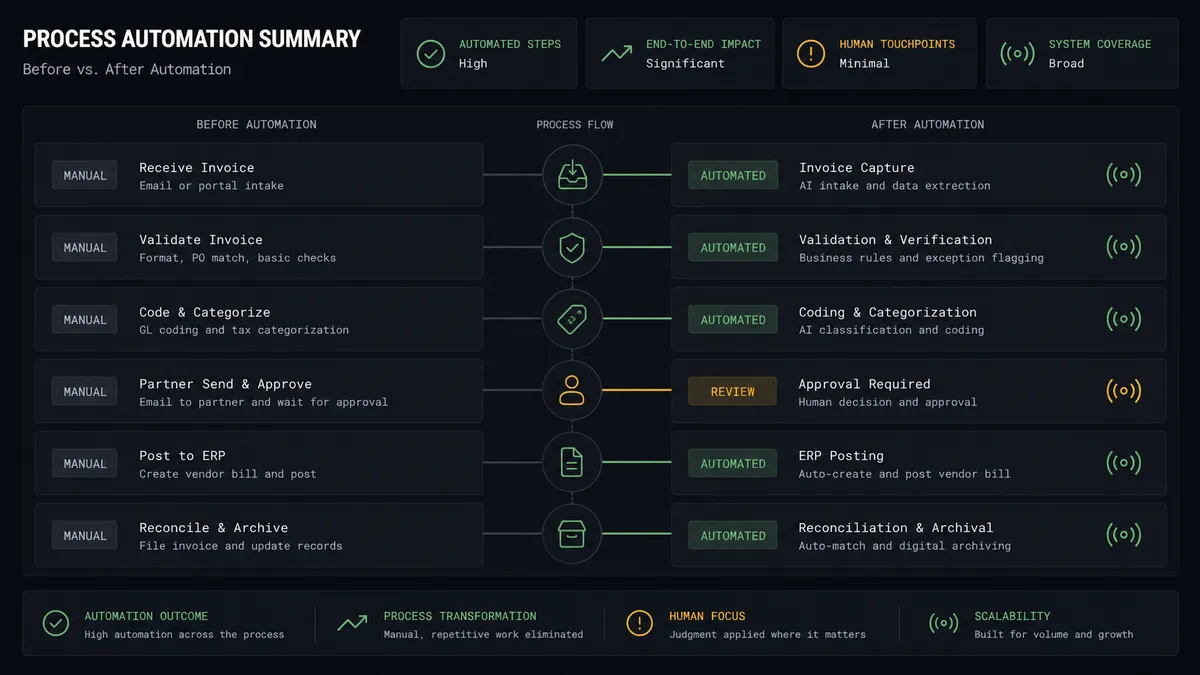
| Audience freshness | A months-old CSV export defines who counts as a partner | New and changed promoters land in the audience within the hour |
| Segmentation | Every affiliate gets the same generic newsletter | Tags track campaign, state, and actual referral activity per partner |
| Departures | Rejected and departed promoters keep receiving insider announcements | Removals are proposed with a reason and executed only after a named approval |
| Partner-wide sends | One person clicks send to the whole list and hopes | Send Campaign runs only after an approver reviews draft and segment |
| Feedback loop | Nobody checks which partners engaged | Get Campaign Report feeds opens and clicks into the next segmentation pass |
What you can build
Live partner audience, hands off. List Promoters and Get Promoter feed Add Or Update List Member on a schedule, with Add Member Tag and Remove Member Tag keeping campaign and state tags true. The audience mirrors the program without a single export.
New-affiliate welcome track. When a promoter first appears with an approved state, the agent upserts them, tags them as new, records their referral link with Add Member Note, and enrolls them in the onboarding sequence that teaches them how to actually earn.
Top-performer recognition. The agent watches List Commissions for partners crossing your earning thresholds, retags them, and drafts a personal recognition note for the program manager to approve before it sends, so your best partners hear from a human voice.
Dormancy winback with approval. Partners with an active state but no List Referrals entries in recent months get tagged dormant, and the agent drafts a re-engagement campaign for that segment which goes out only after the named approver signs off on Send Campaign.
Payout-announcement guardrail. For terms or payout changes, the agent builds the affected segment from commission states, drafts the announcement, and holds it at the human gate, so the single most sensitive email your program sends is always reviewed before it exists in anyone’s inbox.
Getting started
Start on the free plan: 100 executions a month, every integration included, no credit card required, plus 14 days of Professional for new accounts. Both connectors are available on every tier, and every tier includes unlimited users and unlimited workflows.
Explore the integration details:
- Mailchimp Marketing integration (20 actions covering audiences, tags, campaigns, and reports)
- FirstPromoter integration (8 actions covering promoters, referrals, commissions, and sale tracking)
Start building free at flowrunner.ai or book a demo to see a live FirstPromoter to Mailchimp Marketing workflow, partner-send approval and all.
Frequently asked questions
Is it free to connect Mailchimp Marketing and FirstPromoter on FlowRunner?
You can build and run the connection on FlowRunner's free plan, which includes 100 executions a month and every integration with no credit card required, and new accounts also get 14 days of Professional. Both connectors are available on every FlowRunner tier, and every tier includes unlimited users and unlimited workflows.
Can I self-host the Mailchimp Marketing to FirstPromoter workflow?
Yes. FlowRunner offers a cloud-hosted option and a self-hosted option, so the connection can run inside your own environment.
Does the AI agent need my own OpenAI or Claude key?
FlowRunner uses a bring-your-own-keys model, so you connect the AI provider key you already have. You are not locked to one model.
What happens when the agent is unsure whether a promoter should be removed from the audience?
It never removes anyone on its own. Unsubscribe Or Delete List Member is destructive, so the agent posts the promoter's email, state, and reason to a named approver and acts only on confirmation. A rejected promoter who becomes ineligible is a proposal, not an automatic deletion.
Neither connector lists a catalog trigger. How does the workflow start?
On a schedule. The workflow polls FirstPromoter with List Promoters, List Referrals, and List Commissions at the interval you choose, then upserts the deltas into Mailchimp with Add Or Update List Member and adjusts tags to match each promoter's current state.
Which actions does this connection use on each side?
On the FirstPromoter side: List Promoters, Get Promoter, List Referrals, and List Commissions. On the Mailchimp side: Add Or Update List Member, Add Member Tag, Remove Member Tag, Add Member Note, Send Campaign, and Get Campaign Report.