How to Connect Mailchimp Marketing with Bluesky (With or Without an AI Agent)
Turn Mailchimp campaign performance into Bluesky posts automatically, with an AI agent that drafts the social copy and pauses for a marketing lead before anything publishes under the brand handle.
How do you connect Mailchimp Marketing to Bluesky?
Neither service exposes a trigger, so you connect Mailchimp Marketing to Bluesky with a scheduled workflow: each morning it calls Search Campaign and Get Campaign Info to find campaigns sent since the last run, pulls performance with Get Campaign Report and Get Clicks Report, and turns the content subscribers responded to into Bluesky posts with Create Post and Create Post with Image. FlowRunner is a visual AI-agent orchestration platform where automations run autonomously and pause for human judgment on the steps that carry real consequence. Run as an AI agent, the same connection reads the click data, decides which campaign content deserves a public life on Bluesky, drafts the posts, and waits for a marketing lead’s approval before anything publishes under the brand handle.
The problem it solves
Today the bridge between your email program and your Bluesky presence is a person with two browser tabs. A campaign goes out in Mailchimp. Days later, someone remembers to check how it performed, screenshots the report, and manually rewrites the newsletter’s best section as a social post. More often, nobody does, and the content your subscribers demonstrably clicked on never reaches the audience that has not subscribed yet. The email channel and the social channel run as strangers, fed by the same calendar but never by each other’s data.
The edges are worse. A campaign link takes off and the conversation about it starts on Bluesky without you: mentions accumulate overnight, a question about your announcement sits unanswered in a thread, and the brand arrives last to a conversation its own email started. Meanwhile the person who posts for the brand had a busy week, so the account went quiet exactly when the campaign gave it something to say.
How it works: the connection
The connection reads from Mailchimp Marketing and writes to Bluesky. Here is the plain version, grounded in the real connector actions.
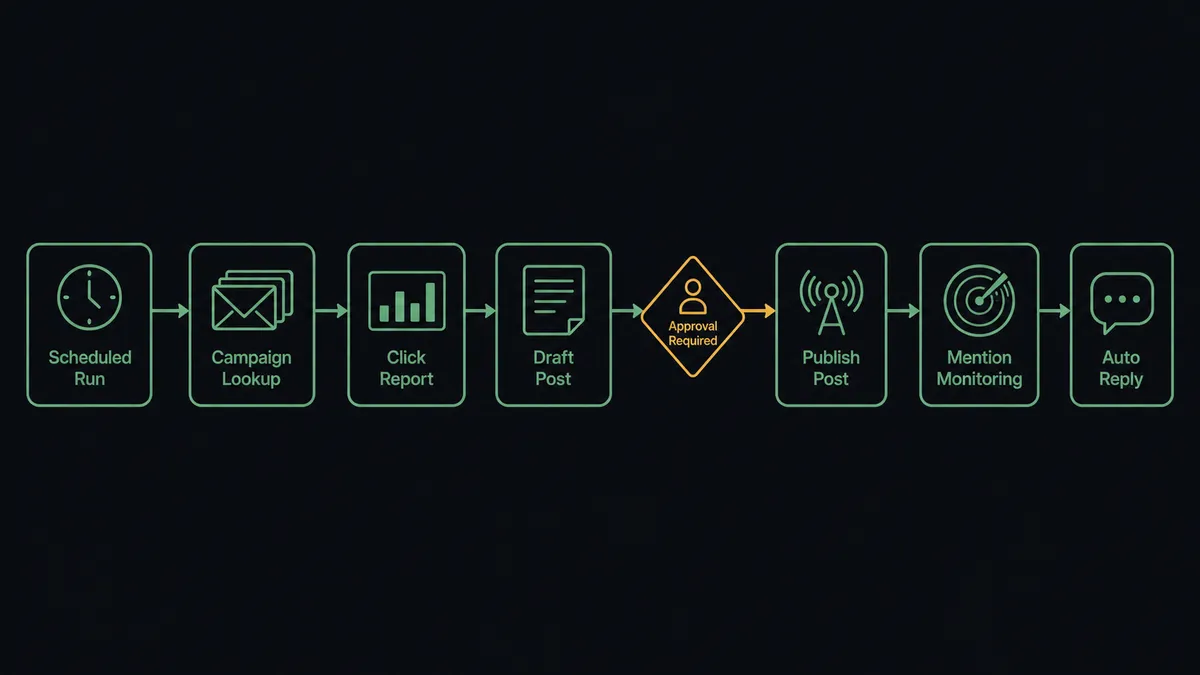
- Trigger: On a schedule, the morning run starts and checks for campaigns sent since the previous run.
- Read: The workflow calls Search Campaign and Get Campaign Info to identify what went out: subject line, send time, and audience.
- Measure: It calls Get Campaign Report for opens and clicks, then Get Clicks Report to rank which links subscribers actually clicked.
- Draft: It turns the top-performing content into Bluesky posts sized to the 300-character limit, with the campaign’s winning link rendered as a clickable facet.
- Publish: It calls Create Post for text announcements, or Create Post with Image when the campaign has a strong visual, within the platform’s 1 MB image limit.
- Listen: An hourly sweep calls Search Posts for the campaign topic and List Notifications for mentions and replies, reconstructing flagged conversations with Get Post Thread.
- Engage: Routine positives get Like Post and Repost; replies worth making are drafted with Reply to Post.
That is the “just connect them” answer. Every campaign gets a social afterlife proportional to how it actually performed, and the brand shows up in the conversations its own email starts.
Can an AI agent run it? (and why a human stays in the loop)
Yes, and this is where the connection stops being a cross-poster. Instead of a fixed script that reformats every campaign into a post on a timer, an AI agent reads the click report and reasons about it. A campaign where one link drew most of the clicks gets a post built around that link. A campaign that underperformed gets skipped rather than amplified. The agent holds the real actions as tools: Search Campaign, Get Clicks Report, Create Post, Create Post with Image, Reply to Post, Repost, Like Post. It chooses which to use based on what the data says.
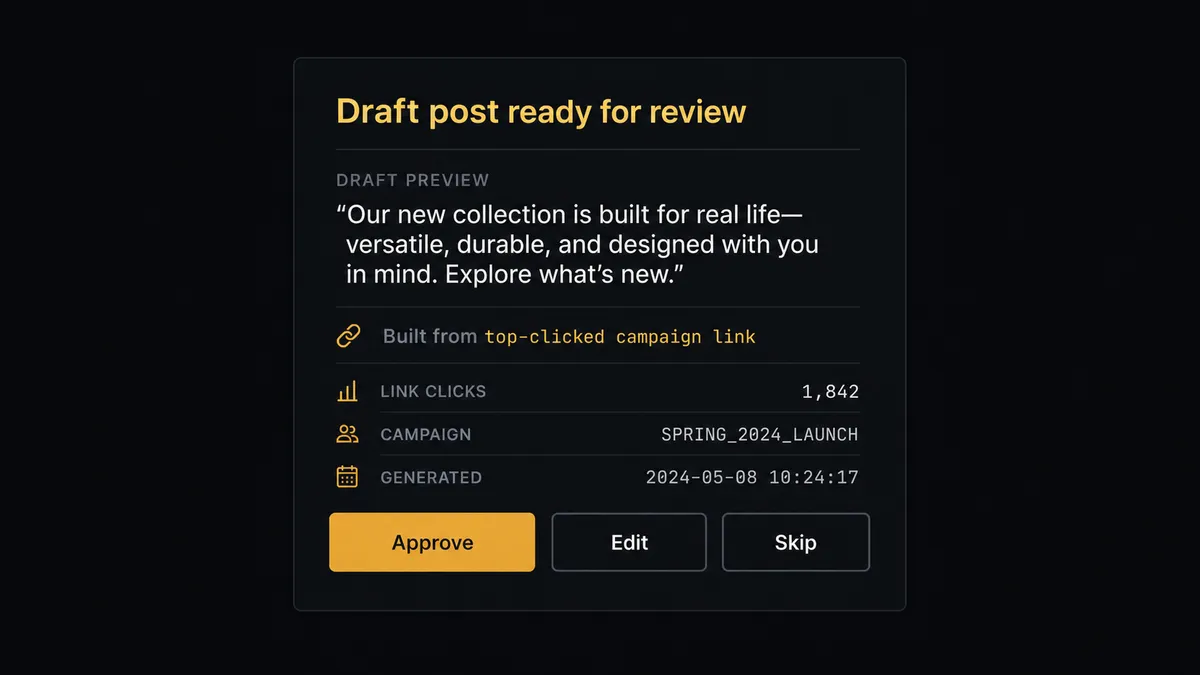
The consequential step is publishing in public. An email campaign goes to people who opted in; a Bluesky post under the brand handle speaks to everyone, is quotable by anyone, and cannot be quietly unsent. So before Create Post or Reply to Post runs, the agent invokes a human-in-loop flow it holds as a callable tool. The workflow pauses and posts to the marketing channel: “Draft post for yesterday’s campaign [subject line]. Copy: [draft]. Built around the top-clicked link. Approve, edit, or skip?” The marketing lead approves or rewrites in one step. Only then does the agent publish. The draft, the edits, the approver’s name, and the timestamp all land in the audit trail.
The same judgment applies on the listening side. Like Post and Repost on clearly positive mentions run under standing policy. But a drafted reply into a contested thread, where the agent has reconstructed the parent chain with Get Post Thread and found criticism or confusion, waits for a person every time. Prospects call this a digital andon cord: like Toyota’s quality control pull cord, the workflow stops the line the moment it hits uncertainty, and your team pulls it back into motion.
FlowRunner vs n8n
Teams with a developer on hand often reach for n8n here, and the appeal is real. n8n has a very large node library, a strong self-hosting story under its fair-code license, and an active community that has published thousands of workflow templates. If your team is comfortable wiring nodes, expressions, and credentials, n8n will move data between an email platform and a social network.
The difference shows up in who can run it and what happens at the public-facing step. FlowRunner is built around native human-in-the-loop and AI-agent orchestration, where the agent decides when a post needs a person, rather than a node graph you assemble and maintain. Here is the honest side-by-side.
| What matters for this pair | FlowRunner | n8n |
|---|---|---|
| Human-in-the-loop on publishing under the brand handle | Native. The agent invokes an approval flow as a callable tool and pauses before Create Post or Reply to Post | Wait and approval nodes exist; the pause is a step you wire in, not a decision the agent makes in context |
| Who runs the flow | An AI agent reads the click data, reasons, and picks actions as tools | A node graph you assemble; agent nodes are available for those comfortable configuring them |
| Users included | Unlimited users on every tier | Cloud plans meter by executions, with limits that vary by plan |
| Bring your own AI keys | Yes, BYOK | Yes, n8n also connects your own model keys |
| Self-hosted option | Yes, cloud-hosted or self-hosted | Yes, self-hosting is a core n8n strength |
| Pricing model | Transparent workflow-based tiers with clear execution limits | Execution-based cloud pricing, or self-hosting with infrastructure you operate |
If you have engineers who want full control of a node graph and are happy owning the wiring, n8n is a credible choice. If you want marketing to own this flow directly, with an agent doing the reasoning and a person approving everything the public sees, that is where FlowRunner is the better fit.
Before and after
The shift is qualitative: the channels stop depending on someone’s spare attention.
| Category | Before | After |
|---|---|---|
| Campaign amplification | The newsletter’s best content reaches only the list, unless someone remembers to rewrite it for social | Every sent campaign is evaluated the next morning and its strongest content drafted for Bluesky |
| What gets posted | Whatever someone had time to write, regardless of what performed | Posts built around the links subscribers actually clicked, per Get Clicks Report |
| Mention response | Threads about the brand grow overnight and get discovered by accident | Hourly sweeps surface mentions, and drafted replies wait in the approval queue with full thread context |
| Brand safety | Whoever holds the password posts directly, with no review step | Nothing publishes under the brand handle without a named approver, captured in the audit trail |
| Consistency | The account goes quiet whenever the responsible person has a busy week | The cadence holds, because drafting is automatic and approval takes one click |
What you can build
The campaign afterlife flow. Each morning the agent finds yesterday’s sends with Search Campaign, ranks content by Get Clicks Report, drafts posts around the winners, and publishes with Create Post after approval. Email performance data decides what the public sees.
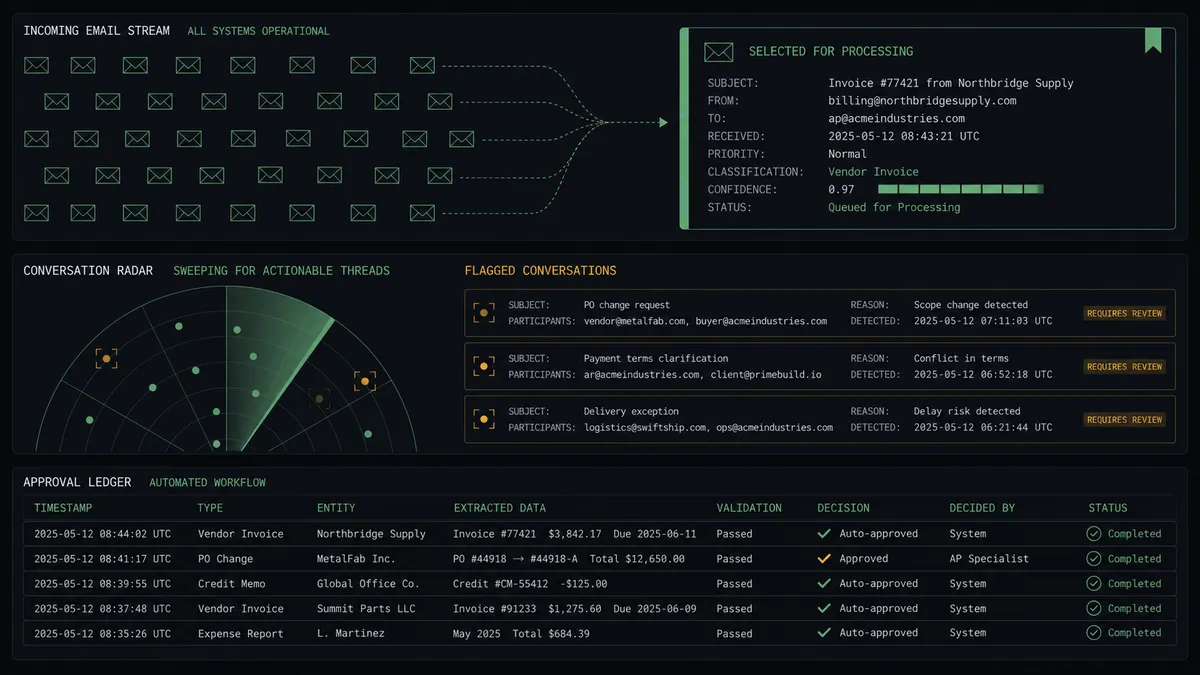
The brand listening post. Every hour, Search Posts and List Notifications sweep for the brand name and campaign topics. Get Post Thread reconstructs flagged conversations, praise gets Like Post and Repost under standing policy, and drafted replies to hard threads wait for the comms lead.
The subscriber intelligence loop. When a Bluesky conversation reveals strong interest in a topic, the agent tags the related subscribers with Search Member and Add Member Tag, so the next campaign speaks to demonstrated interest.
The launch echo. For a product announcement campaign, the agent publishes the approved launch post, then monitors the thread with Get Post Thread. Questions in the replies become drafted answers via Reply to Post, each one approved before it posts, so launch day questions get same-day responses.
The graph gardener. The agent reviews accounts that engaged with campaign-related posts using Get Followers and Search Users, follows relevant ones with Follow User under policy, and flags high-signal accounts to the team.
Getting started
Start on the free plan: 100 executions a month, every integration included, no credit card required, plus 14 days of Professional for new accounts. Both connectors are available on every tier, and every tier includes unlimited users and unlimited workflows, so the marketing lead who approves posts costs nothing extra to add.
Explore the integration details:
- Mailchimp Marketing integration (20 actions covering audiences, campaigns, tags, and performance reports)
- Bluesky integration (24 actions covering posting, threads, search, and the social graph)
Start building free at flowrunner.ai or book a demo to see a live Mailchimp Marketing to Bluesky workflow, post approval and all.
Frequently asked questions
Is it free to connect Mailchimp Marketing and Bluesky on FlowRunner?
You can build and run the connection on FlowRunner's free plan, which includes 100 executions a month and every integration with no credit card required, and new accounts also get 14 days of Professional. Both connectors are available on every FlowRunner tier, and every tier includes unlimited users and unlimited workflows.
Can I self-host the Mailchimp Marketing to Bluesky workflow?
Yes. FlowRunner offers a cloud-hosted option and a self-hosted option, so the connection can run inside your own environment.
Does the AI agent need my own OpenAI or Claude key?
FlowRunner uses a bring-your-own-keys model, so you connect the AI provider key you already have. You are not locked to one model.
What happens when the agent is unsure whether a Bluesky reply is safe to post?
It does not post. The agent routes the drafted reply, the full thread context from Get Post Thread, and its own read of the situation to your marketing lead, then waits. Routine positives like Like Post and Repost run under standing policy; anything that puts words in the brand's mouth waits for a person.
Neither Mailchimp Marketing nor Bluesky has a trigger, so what starts the workflow?
A schedule. Each morning the workflow calls Search Campaign and Get Campaign Info to find campaigns sent since the last run, then pulls Get Campaign Report and Get Clicks Report for performance data. An hourly sweep runs Search Posts and List Notifications on the Bluesky side.
Does the agent respect Bluesky's post limits?
Yes. The agent drafts within the 300-character limit the platform enforces and uses Create Post with Image for visual posts within the 1 MB image limit. Links and mentions render as proper rich-text facets rather than bare URLs.