How to Connect Mailchimp with Circle (With or Without an AI Agent)
Sync new Circle community members into Mailchimp with tags and segments, and let an AI agent run the loop that pauses for a human before Send Campaign emails the whole community.
How do you connect Mailchimp to Circle?
You connect Mailchimp to Circle by running a scheduled workflow that calls List Community Members in Circle, looks each new join up in Mailchimp with Search Member, and syncs them with Add Or Update List Member plus Add Member Tag, so the people in your community and the people in your email segments are the same people. FlowRunner is a visual AI-agent orchestration platform where automations run autonomously and pause for human judgment on the steps that carry real consequence. Run as an AI agent, the same connection also drafts the community newsletter audience, reconciles record conflicts on its own, and pauses for a named human before Send Campaign reaches every member’s inbox.
The problem it solves
Right now the community platform and the email platform are two lists maintained by hand. Someone joins your Circle community after a launch. Weeks later, marketing exports a CSV, dedupes it in a spreadsheet, and imports it into Mailchimp, tagging people from memory. Meanwhile members who left the community keep getting “this week in the community” emails, and new members miss the onboarding sequence entirely because the import has not happened yet. The person who owns this reconciliation does it monthly at best, and every month it takes longer.
The edges are where trust erodes. A member who unsubscribed from Mailchimp gets re-added by the next import. A churned member gets a campaign celebrating a community they left. Someone’s paid-space membership never translates into the segment that gets the premium content. None of these are catastrophic alone, but community businesses run on trust, and every mismatched email spends a little of it.
How it works: the connection
The connection reads Circle on a schedule and writes to Mailchimp. Here is the plain version, grounded in the real connector actions.
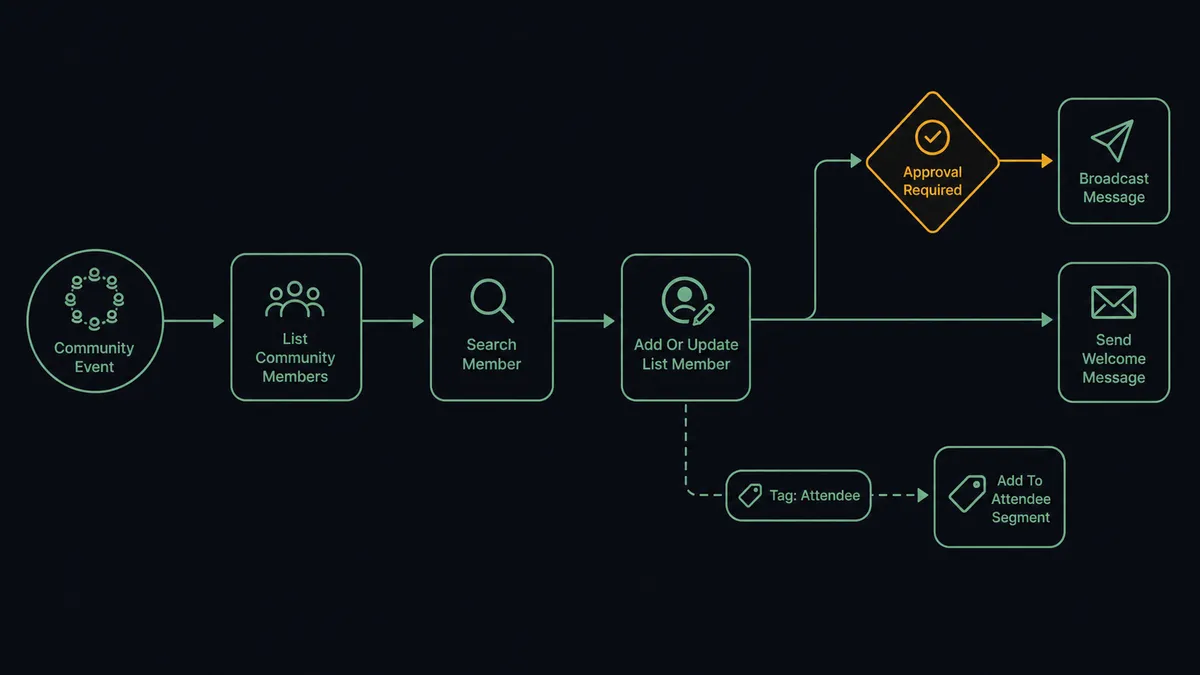
- Trigger: On a schedule, the workflow calls List Community Members in Circle and diffs the result against the last run.
- Read: For each new join, Get Community Member pulls their profile and space memberships.
- Match: Search Member checks Mailchimp for an existing record by email.
- Sync: Add Or Update List Member creates or updates the subscriber, and Add Member Tag marks them as community members, with tags per space where useful.
- Annotate: Add Member Note records the sync context on the Mailchimp record, and Tag Member marks the person as synced back in Circle.
- Departures: Members who left the community get their community tag removed with Remove Member Tag, so they stop receiving community campaigns without being unsubscribed from everything.
That is the “just connect them” answer. The lists stop drifting, the onboarding sequence starts the day someone joins, and nobody exports a CSV again. The reverse direction works too: engaged Mailchimp subscribers who are not yet members get a Create Invitation into Circle, turning your best readers into participants.
Can an AI agent run it? (and why a human stays in the loop)
Yes, and the agent earns its place at the messy parts. A plain sync copies records; an AI agent reads them. When Search Member finds two plausible matches for one Circle member, the agent reconciles instead of duplicating. When a member joins three spaces in a week, it updates their tags so segments track behavior, not just existence. Its toolbox is the real action set: List Community Members, Get Community Member, Search Member, Add Or Update List Member, Add Member Tag, Remove Member Tag, Create Invitation, Send Campaign.
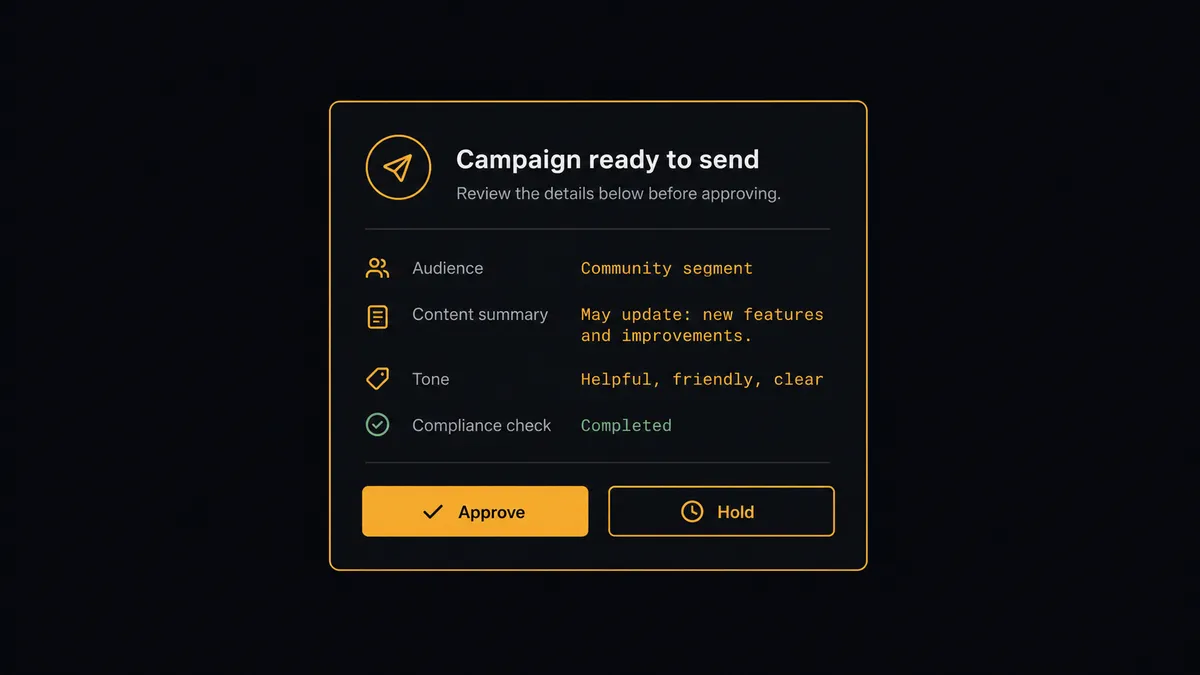
Two steps carry real consequence, and the agent holds a human-in-loop flow as a callable tool for both. The first is Send Campaign. The agent assembles the weekly community digest audience, but before anything broadcasts, the workflow pauses and posts: “Community digest ready. Audience: the community segment. Content: this week’s top posts and the event announcement. Approve to send?” The second is removal. Before Unsubscribe Or Delete List Member runs in Mailchimp, or Delete Community Member runs in Circle, a person sees who is being removed and why, because deleting a member’s history is not a step you want an inference to take alone.
The agent escalates on context, not on a fixed rule. A routine retag flows through silently. A campaign that would reach an unusually large audience, or a removal triggered by ambiguous signals, gets pulled to a person. Prospects call this a digital andon cord: the workflow stops the line the moment it hits uncertainty, and your team pulls it back into motion.
FlowRunner vs n8n
Technical teams evaluating this pair look at n8n, and with reason. n8n has a very large node library, a fair-code license that permits self-hosting, and a template community that has already sketched Mailchimp and Circle flows. If your team is comfortable wiring JSON between nodes and running its own instance, n8n can build this sync.
The difference is who can run it and what happens at the consequential steps. FlowRunner is built for the operations lead who owns the community, not just the engineer who owns the server, and human approval is a native agent decision rather than plumbing you assemble.
| What matters for this pair | FlowRunner | n8n |
|---|---|---|
| Human-in-the-loop on Send Campaign and member removal | Native. The agent invokes an approval flow as a callable tool and pauses | Possible with wait and approval nodes you design and wire yourself |
| Who runs the flow | An AI agent reads, reasons, picks actions as tools | A node graph you build and debug, developer-first by design |
| Users included | Unlimited users on every tier | Seat and plan limits vary by tier |
| Bring your own AI keys | Yes, BYOK | Yes, via its AI nodes |
| Self-hosted option | Yes, cloud-hosted or self-hosted | Yes, self-hosting is a core strength |
| Pricing model | Transparent workflow-based tiers | Execution-based pricing that takes work to predict |
If you have engineers who want full control of a self-hosted node graph, n8n is a genuine option. If you want the community-to-email loop owned by the team that runs the community, with approvals and an audit trail built in, that is where FlowRunner fits.
Before and after
| Category | Before | After |
|---|---|---|
| Member sync | Monthly CSV export from Circle, dedupe in a spreadsheet, import to Mailchimp | New members sync on a schedule through Add Or Update List Member, tagged the day they join |
| Onboarding | New members miss the welcome sequence until the next import | The community tag lands immediately and the sequence starts on time |
| Departures | Churned members keep receiving community campaigns | Remove Member Tag pulls them from community sends without touching their other subscriptions |
| Broadcasts | Whoever has Mailchimp access can send to everyone, no record of who decided | Send Campaign releases only after a named approver signs off, logged with a timestamp |
| Growth loop | Engaged readers never hear about the community | Create Invitation brings top subscribers into Circle automatically |
What you can build
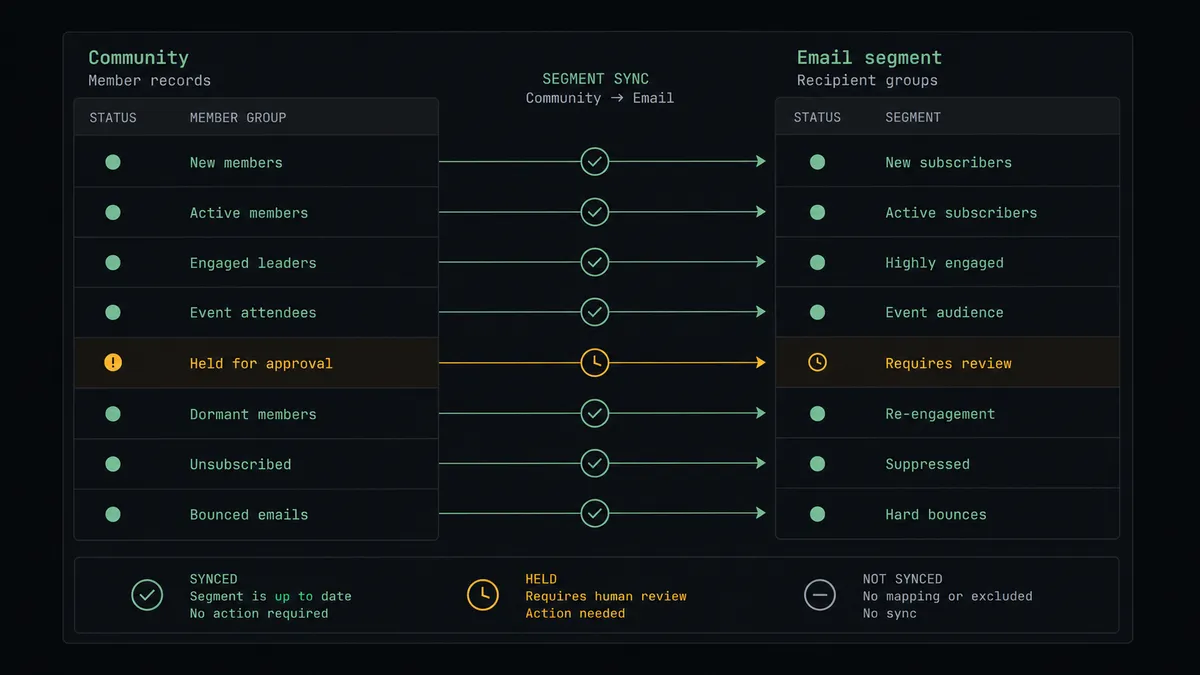
Join-to-segment sync. List Community Members finds new joins, Search Member checks for an existing record, and Add Or Update List Member plus Add Member Tag put them in the right segment the day they arrive. The welcome sequence fires on time, every time.
Community digest with a release gate. The agent drafts the weekly digest audience from the community tag, and Send Campaign runs only after a named person approves the audience and summary. Broadcast mistakes stop being possible in silence.
Reader-to-member invitations. Get Campaign Report and Get Clicks Report surface your most engaged subscribers, and the agent sends each one a Create Invitation into Circle, turning newsletter attention into community participation.
Clean departures. When a member leaves Circle, Remove Member Tag pulls them out of community campaigns while leaving their newsletter subscription intact, and any full removal via Unsubscribe Or Delete List Member waits for human approval.
Event push. When a Create Event goes up in Circle, the agent drafts an announcement with Add Campaign targeted at the community segment, posts it for approval, and sends it once a person signs off, so events fill without a manual email scramble.
Getting started
Start on the free plan: 100 executions a month, every integration included, no credit card required, plus 14 days of Professional for new accounts. Both connectors are available on every tier, and every tier includes unlimited users and unlimited workflows.
Explore the integration details:
- Mailchimp integration (20 actions covering members, tags, segments, and campaigns)
- Circle integration (22 actions covering members, spaces, posts, events, and invitations)
Start building free at flowrunner.ai or book a demo to see a live Mailchimp to Circle workflow, campaign approval and all.
Frequently asked questions
Is it free to connect Mailchimp and Circle on FlowRunner?
You can build and run the connection on FlowRunner's free plan, which includes 100 executions a month and every integration with no credit card required, and new accounts also get 14 days of Professional. Both connectors are available on every FlowRunner tier, and every tier includes unlimited users and unlimited workflows.
Can I self-host the Mailchimp to Circle workflow?
Yes. FlowRunner offers a cloud-hosted option and a self-hosted option, so the connection can run inside your own environment.
Does the AI agent need my own OpenAI or Claude key?
FlowRunner uses a bring-your-own-keys model, so you connect the AI provider key you already have. You are not locked to one model.
What happens when the agent is unsure whether a member should be removed?
It stops. Before Unsubscribe Or Delete List Member runs in Mailchimp or Delete Community Member runs in Circle, the agent packages who the person is, what they did, and why removal came up, then waits for a named human to approve. Nobody's history disappears on an inference.
Which actions drive the sync if neither connector has triggers?
Both connectors are action-based, so the workflow runs on a schedule. It calls List Community Members in Circle to find new joins, then Search Member and Add Or Update List Member in Mailchimp to sync them, with Add Member Tag marking the community segment.
Can the agent send a campaign to community members on its own?
It can prepare one, not release one. The agent assembles the campaign and audience, but Send Campaign is gated behind a human approval that shows the segment size and content summary. A person releases every broadcast, and that release is logged.