How to Connect Mailchimp Marketing with Fulcrum (With or Without an AI Agent)
Connect Fulcrum field data collection to Mailchimp Marketing so contacts gathered on site flow into your audience automatically, with an AI agent that verifies consent per record and pauses for a human before ambiguous sign-ups join the list.
How do you connect Mailchimp Marketing to Fulcrum?
You connect Mailchimp Marketing to Fulcrum by polling List Records for your field sign-up forms on a schedule, reading each submission’s form values with Get Record against the schema from Get Form, and importing cleared contacts with Add Member To List, tagged by event and location with Add Member Tag. FlowRunner is a visual AI-agent orchestration platform where automations run autonomously and pause for human judgment on the steps that carry real consequence. Run as an agent, the same connection reads the consent field on every record, imports the clear opt-ins on its own, holds ambiguous ones for a person, and pauses for a named human before the first Send Campaign reaches a freshly imported segment.
The problem it solves
Today the contacts your field teams collect travel by clipboard-to-laptop relay. A crew runs an open house, a trade booth, a door-to-door canvass, or a site visit, capturing names and emails in a Fulcrum form between every other duty. Days later, someone exports the records, cleans the columns in a spreadsheet, and imports the survivors into Mailchimp. By the time the welcome email arrives, the person who signed up at the booth has forgotten the conversation that made them care.
The edges are compliance and deliverability, and they compound. A hurried technician skips the consent checkbox on half the records, and the batch import adds those people anyway, because a CSV has no conscience. Typos captured on a phone keyboard in the sun become hard bounces that dent your sender reputation. The same prospect signs up at two events and gets two records, two welcomes, and one bad impression. One spam complaint from a person who never meant to subscribe costs more list health than a hundred good sign-ups earn.
How it works: the connection
The connection reads from Fulcrum and writes to Mailchimp Marketing. Here is the plain version, grounded in the real connector actions.
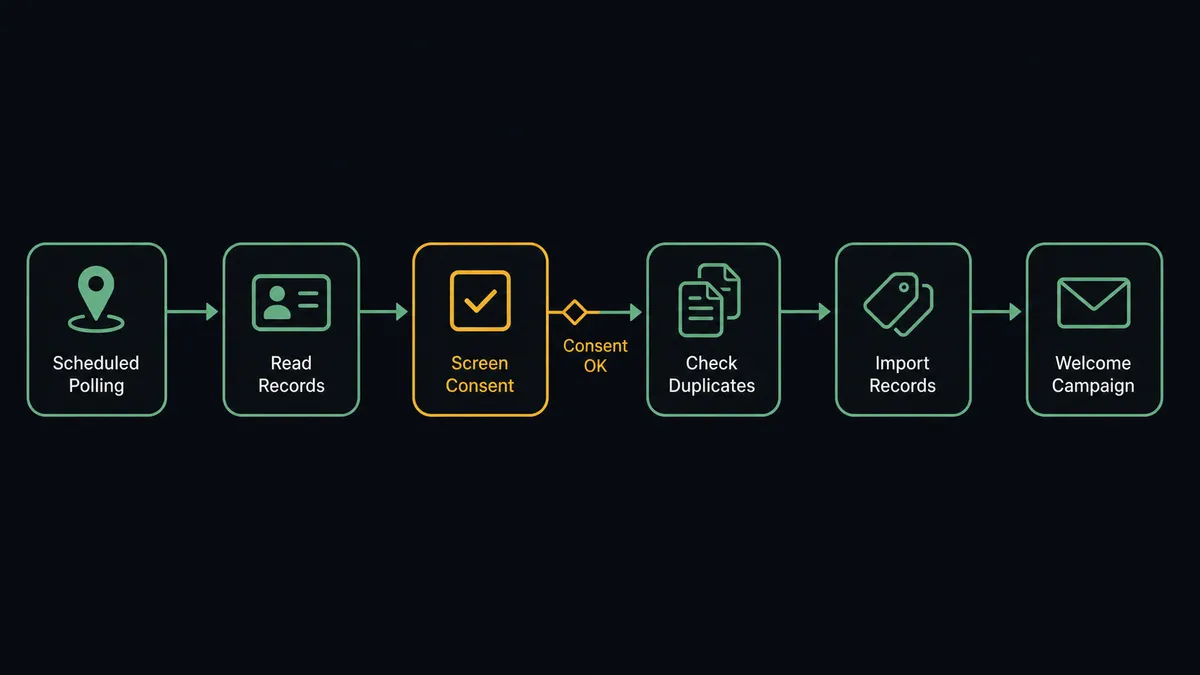
- Trigger: On a schedule, the workflow runs List Records for each form chosen via List Forms, picking up submissions since the last pass.
- Read: Get Record pulls each submission’s form values, coordinates, status, and capturing user, decoded against the field schema from Get Form.
- Screen: The consent field is read per record: a clear opt-in proceeds, an empty or ambiguous value is set aside for review rather than imported.
- Dedupe: Search Member checks the audience for the email, so a returning contact is updated instead of duplicated.
- Import: Add Member To List adds the cleared contact, Add Member Tag applies the event, form, and location, and Add Member Note cites the source record ID.
- Mark the moment: Add Event logs the field sign-up on the member, giving journeys a dated marker to launch from.
- Follow up: The welcome campaign to the new segment goes through Send Campaign, with Get Campaign Report closing the loop on how the cohort engaged.
That is the “just connect them” answer. Field sign-ups reach the audience while the conversation is still warm, tagged by where and how they happened, with consent screened record by record instead of assumed batch by batch.
Can an AI agent run it? (and why a human stays in the loop)
Yes, and consent screening is precisely the judgment a batch import lacks. The agent holds the pair’s actions as tools: List Forms, Get Form, List Records, Get Record, Search Member, Add Member To List, Add Member Tag, Add Member Note, Add Event, Send Campaign, Get Campaign Report. It reads each record the way a careful list manager would. A checked opt-in with a plausible email imports cleanly. An email with a transposed domain gets flagged as a probable typo rather than imported as a future bounce. A record where the notes say “wants product info, not newsletter” is a different consent than the checkbox claims, and the agent trusts the words over the tick.
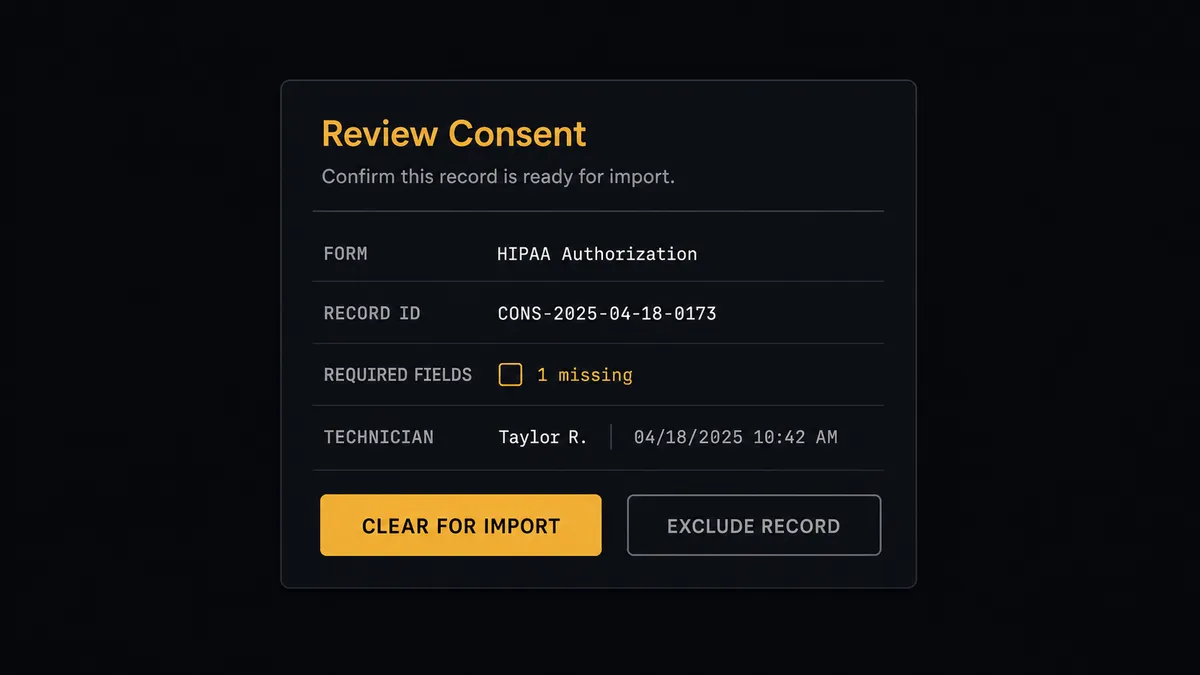
The consequential step is membership itself, and then the first send. Adding someone to a marketing audience is a legal claim that they agreed, and Send Campaign to a fresh field-collected segment is where that claim gets tested against spam complaints. So the gate has two teeth. Records with empty or ambiguous consent never import silently: the agent invokes a human-in-loop flow it holds as a callable tool and posts, “Records from [form name] have unclear consent. Form values and capturing technician attached. Clear for import, or exclude?” And before the welcome goes out, the workflow pauses again: “Welcome campaign drafted for the [event tag] segment, all members consent-cleared. Approve to send?” Only after a named approver signs off does Add Member To List run on the held records or Send Campaign reach the cohort, and both decisions land in the audit trail.
Prospects call this a digital andon cord: the workflow stops the line the moment consent is uncertain, and your team pulls it back into motion. On a mailing list, that pause is the difference between an asset and a liability.
FlowRunner vs Zapier
Zapier is the honest first stop for this connection: it links form platforms to Mailchimp as well as anything, the setup is quick, and a Zap that adds a subscriber for every new Fulcrum record works exactly as advertised. For an internal list where consent is not in question, that is genuinely sufficient.
The difference is that “works as advertised” is the problem when the records themselves are messy. A pipeline that imports everything imports the skipped checkboxes too.
| What matters for this pair | FlowRunner | Zapier |
|---|---|---|
| Human-in-the-loop on ambiguous-consent imports | Native. Unclear records stop at a named approver before Add Member To List | Available via added approval steps, not a native agent decision |
| Who runs the flow | An AI agent reads each record’s consent and quality, reasons, picks actions as tools | Predefined step sequence you configure per Zap |
| Users included | Unlimited users on every tier | Priced by task volume; seats vary by plan |
| Bring your own AI keys | Yes, BYOK | AI features tied to Zapier’s own AI offering |
| Self-hosted option | Yes, cloud-hosted or self-hosted | Cloud only |
| Pricing model | Transparent workflow-based tiers | Per-task pricing; per-record screening steps consume tasks fast |
If your field records are uniformly clean and consent is never in doubt, Zapier moves them fine. If your list’s health and your compliance posture depend on screening what the field actually captured, this pairing is the better fit.
Before and after
| Category | Before | After |
|---|---|---|
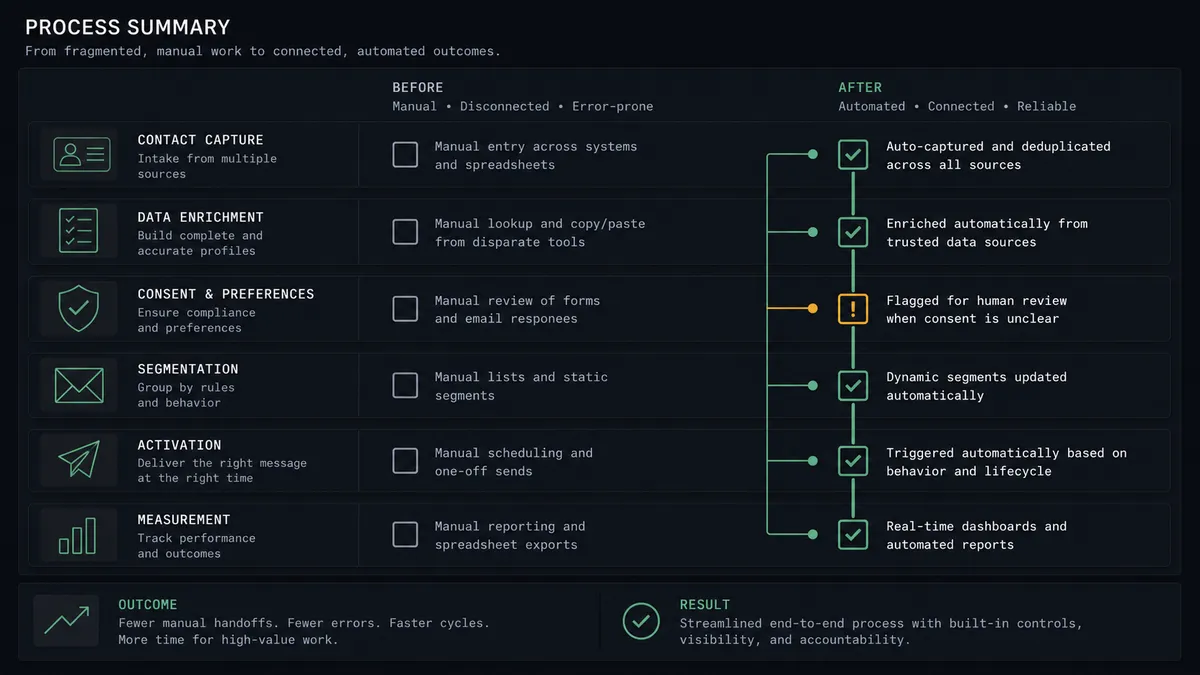
| Import lag | Sign-ups reach the audience days later via spreadsheet relay | Contacts import within the polling interval, while the conversation is warm |
| Consent | Batch imports add everyone, checked box or not | Consent is read per record; ambiguity goes to a named approver |
| Duplicates | The same prospect from two events gets two records and two welcomes | Search Member updates returning contacts instead of duplicating them |
| Segment context | Imported contacts carry no trace of where they came from | Tags carry event, form, and location; notes cite the source record |
| First impression | A generic blast lands whenever the import finishes | The welcome is drafted per cohort and approved before Send Campaign runs |
What you can build
Event sign-up pipeline. List Records pulls each booth form’s submissions, the agent screens consent and quality, and Add Member To List with Add Member Tag lands cleared contacts in a segment named for the event, same day.
Consent review queue. Records with empty or contradictory consent fields collect in a single review card for the marketing owner, who clears or excludes each with one tap, and only cleared ones ever touch the audience.
Canvass-to-cohort welcome. For door-to-door or site-visit campaigns, the agent builds a per-neighborhood segment from record coordinates, drafts a welcome referencing the visit, and holds it for approval before Send Campaign introduces your brand to the street.
Returning-contact enrichment. When Search Member finds the email already subscribed, the agent skips the re-import and instead adds the new event tag and an Add Event marker, so the member’s record shows every field touchpoint without duplication.
Cohort quality report. After each event’s welcome send, the agent pairs Get Campaign Report engagement with the capturing form and technician from the records, and posts which collection contexts produce subscribers who actually engage, so field teams learn what a good sign-up looks like.
Getting started
Start on the free plan: 100 executions a month, every integration included, no credit card required, plus 14 days of Professional for new accounts. Both connectors are available on every tier, and every tier includes unlimited users and unlimited workflows.
Explore the integration details:
- Mailchimp Marketing integration (20 actions covering audiences, tags, campaigns, and reports)
- Fulcrum integration (8 actions covering forms, geolocated records, and field photos)
Start building free at flowrunner.ai or book a demo to see a live Fulcrum to Mailchimp Marketing workflow, consent gate and all.
Frequently asked questions
Is it free to connect Mailchimp Marketing and Fulcrum on FlowRunner?
You can build and run the connection on FlowRunner's free plan, which includes 100 executions a month and every integration with no credit card required, and new accounts also get 14 days of Professional. Both connectors are available on every FlowRunner tier, and every tier includes unlimited users and unlimited workflows.
Can I self-host the Mailchimp Marketing to Fulcrum workflow?
Yes. FlowRunner offers a cloud-hosted option and a self-hosted option, so the connection can run inside your own environment.
Does the AI agent need my own OpenAI or Claude key?
FlowRunner uses a bring-your-own-keys model, so you connect the AI provider key you already have. You are not locked to one model.
What happens when a field record's consent checkbox is empty or ambiguous?
The contact does not enter the audience. The agent holds the record aside, posts the form values and the technician who captured it to a named approver, and calls Add Member To List only for records a person clears. Ambiguity defaults to exclusion, not import.
Neither connector lists a catalog trigger. How does the workflow start?
On a schedule. The workflow polls List Records for each watched Fulcrum form at your chosen interval, reads full form values with Get Record, and processes only records it has not already handled.
Which actions does this connection use on each side?
On the Fulcrum side: List Forms, Get Form to read the field schema, List Records, and Get Record. On the Mailchimp side: Search Member, Add Member To List, Add Member Tag, Add Member Note, Add Event, Send Campaign, and Get Campaign Report.