How to Connect Jira Issues with Tally (With or Without an AI Agent)
Connect Tally form submissions to Jira so every request becomes a triaged, assigned issue, with an AI agent that classifies each submission and pauses for a human before a duplicate ticket is deleted.

How do you connect Jira Issues to Tally?
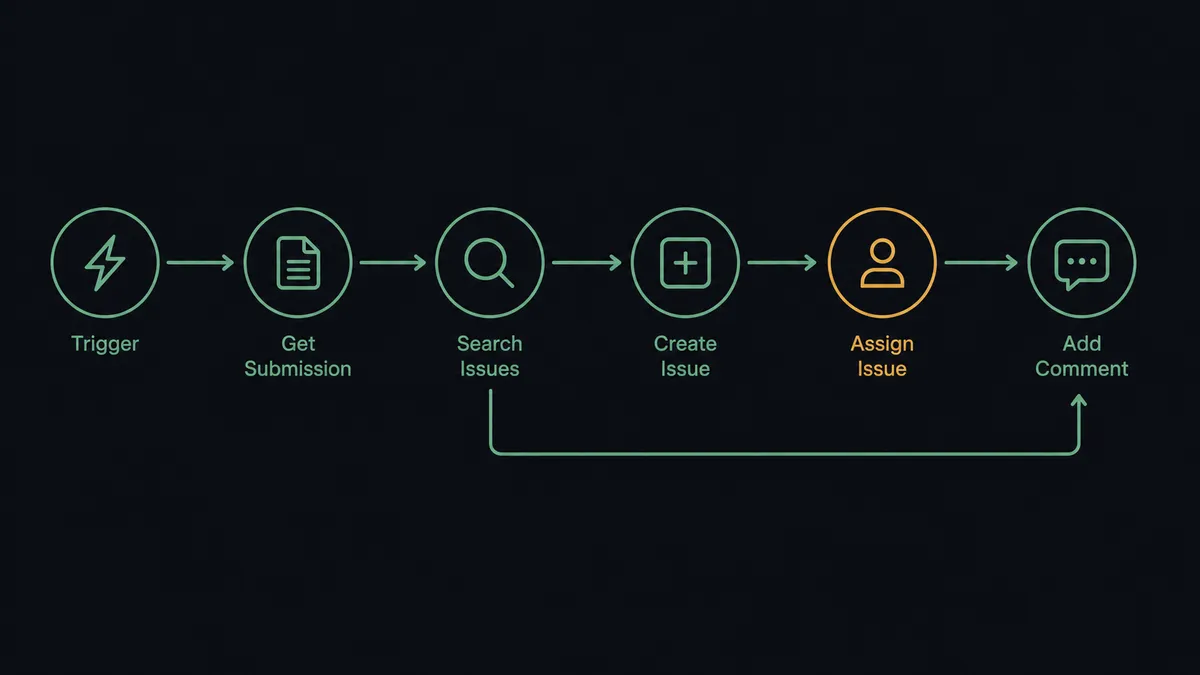
You connect Jira Issues to Tally by having Tally’s On New Submission trigger drive Jira actions: the workflow pulls the respondent’s answers with Get Submission, opens a ticket with Create Issue, routes it with Assign Issue, and attaches the form context with Add Comment, so a submitted form becomes an owned, actionable issue without anyone copying answers across tabs. FlowRunner is a visual AI-agent orchestration platform where automations run autonomously and pause for human judgment on the steps that carry real consequence. The same connection can run as an AI agent that classifies each submission, checks the backlog with Search Issues before creating anything, and pauses for a named human before Delete Issue removes a duplicate.
The problem it solves
Right now the bridge between your intake form and your project tracker is a person with two tabs open. A bug report or internal request lands in Tally. Someone on the ops or engineering team reads it, decides what kind of request it is, opens Jira, creates the issue, guesses at priority, picks an assignee, and pastes the answers into the description. On a busy week the queue backs up, and the person doing the triage is usually the same person the tickets are assigned to.
The edges are worse than the volume. Three people report the same outage through the form and the backlog gets three tickets, each assigned to a different engineer. A vague submission gets filed with the wrong issue type and sits untouched in the wrong project. Someone bulk-cleans duplicates on a Friday and deletes the one ticket that had the reproduction steps in it. Jira’s Delete Issue is permanent, which is exactly why duplicate cleanup keeps getting postponed until the backlog is unreadable.
How it works: the connection
The connection listens to Tally and writes to Jira. Here is the plain version, grounded in the real connector actions.
- Trigger: Tally fires On New Submission the moment a respondent submits the form.
- Read: The workflow calls Get Submission to pull the full set of answers, and List Form Questions when it needs the field labels to interpret them.
- Search first: It calls Search Issues with a JQL query scoped to the project, looking for open tickets that describe the same problem.
- Create: If nothing matches, it calls Create Issue with the summary, description, issue type, and priority derived from the answers.
- Route: It calls Assign Issue to put the ticket in front of the right owner based on the category answer.
- Attach context: It calls Add Comment with the respondent’s email and the raw answers, so the assignee never has to hunt for the source.
- Update instead of duplicate: If a matching ticket exists, it calls Add Comment on that ticket with the new report instead of creating another one.
That is the “just connect them” answer. Submissions become owned issues, context travels with them, and the form stops being a queue someone has to shovel.
Can an AI agent run it? (and why a human stays in the loop)
Yes, and the difference shows in triage quality. A fixed mapping files every submission the same way. An AI agent reads the actual answers, reasons about what the respondent is describing, and picks Jira actions as tools: Create Issue for a new problem, Add Comment and Update Issue when the submission adds detail to a known one, Transition Issue when a report confirms something already fixed, Assign Issue based on what the request is actually about rather than which dropdown the respondent guessed at.
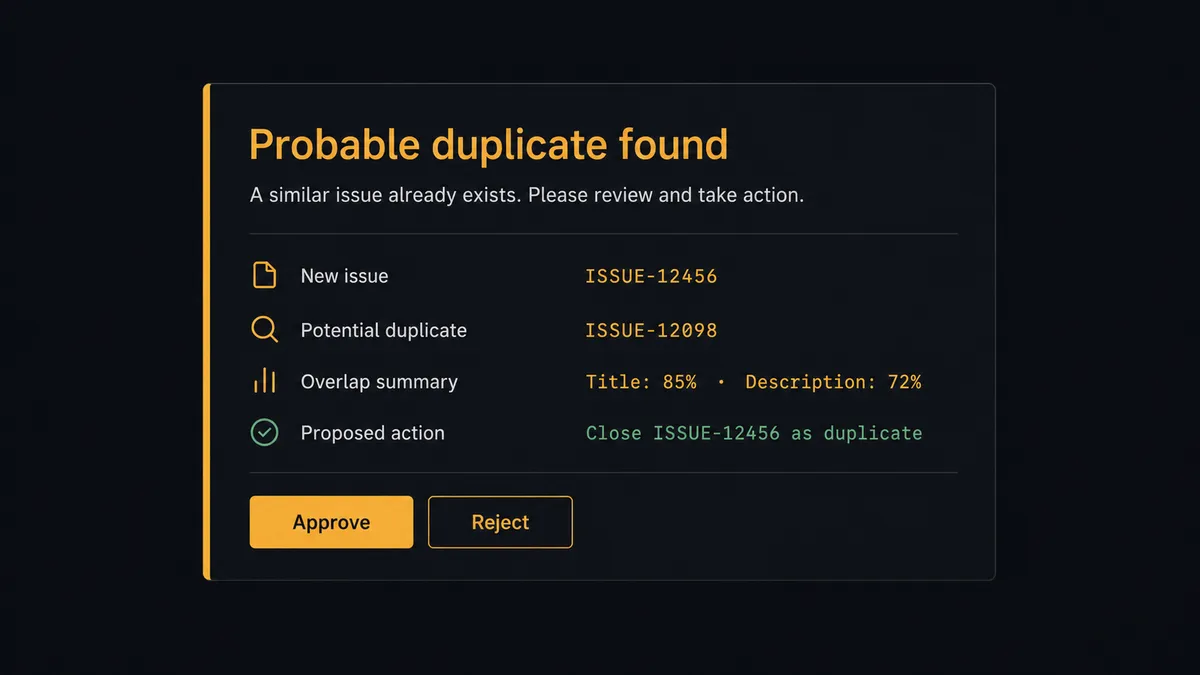
The consequential step is deletion. When the agent finds two tickets describing the same problem, the safe-looking move is to delete one, and that is precisely the move that destroys reproduction steps, watcher lists, and comment history if the judgment is wrong. Jira’s Delete Issue does not have an undo. So the agent never takes it alone. It packages the evidence: both issue keys, the overlapping text, the reporters, and which ticket it proposes to keep. Then it invokes a human-in-loop flow it holds as a callable tool. The workflow pauses and posts to the team channel: “Probable duplicate: [key A] and [key B] both describe [summary]. Proposing to keep [key A] and delete [key B]. Approve?” Only after a named person approves does Delete Issue run, with a comment added to the surviving ticket and the approver recorded in the audit trail.
This is the pattern prospects call a digital andon cord: like Toyota’s quality control pull cord, the workflow stops the line the moment it reaches a step it should not take alone, and a person restarts it with one click. Intake stays fast. The irreversible moves stay human.
FlowRunner vs Zapier
Most teams wiring a form into Jira reach for Zapier first, and the instinct is sound. Zapier’s template gallery has form-to-ticket recipes ready to go, its editor is genuinely easy, and for a straight “new submission creates an issue” Zap it works within the hour. Credit where it is due.
The gap opens at triage and at the irreversible steps. A Zap maps fields; it does not read the submission, search the backlog, or know that deleting a ticket deserves a witness. Here is the honest side-by-side.
| What matters for this pair | FlowRunner | Zapier |
|---|---|---|
| Human-in-the-loop on Delete Issue | Native. The agent invokes an approval flow as a callable tool and pauses until a named approver signs off | Available via added approval steps or paths, not a native agent decision |
| Who runs the flow | An AI agent reads the answers, reasons, and picks actions as tools | Predefined step sequence you configure per Zap |
| Users included | Unlimited users on every tier | Priced by task volume; seats vary by plan |
| Bring your own AI keys | Yes, BYOK. Connect the AI provider key you already have | AI features tied to Zapier’s own AI offering |
| Self-hosted option | Yes, cloud-hosted or self-hosted | Cloud only |
| Pricing model | Transparent workflow-based tiers with clear execution limits | Per-task pricing that can be hard to predict as volume grows |
If all you need is every submission becoming a ticket, unexamined, Zapier will do it well. If you want submissions classified, deduplicated against the live backlog, and a human on the delete decision, that is where FlowRunner is the better fit.
Before and after
| Category | Before | After |
|---|---|---|
| Triage | A person reads each submission, guesses the issue type, and files it by hand | The agent classifies every submission and files it with Create Issue and the right priority |
| Duplicates | The same outage produces multiple tickets assigned to different engineers | Search Issues runs before every create, and new reports land as comments on the existing ticket |
| Routing | Tickets sit unassigned until someone claims them | Assign Issue puts every ticket in front of an owner the moment it is created |
| Context | Assignees chase the reporter for details the form already captured | Add Comment attaches the full answers and the respondent’s email to every ticket |
| Backlog cleanup | Duplicate deletion is postponed for fear of destroying history, or done in bulk and regretted | Delete Issue runs only after a named approver reviews both tickets side by side |
What you can build
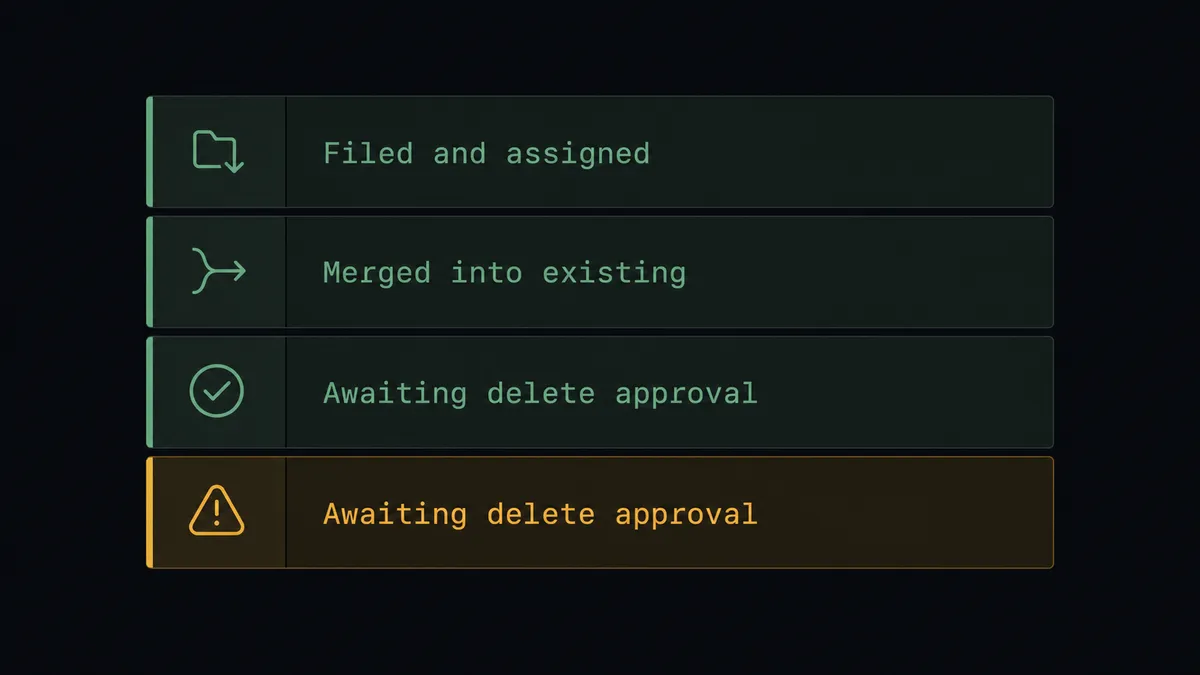
Bug intake with built-in dedupe. On New Submission fires. The agent calls Get Submission, runs Search Issues for the same symptoms, and either opens a fresh ticket with Create Issue or adds the new report to the existing one with Add Comment.
Internal request desk. An operations request form feeds a Jira project. The agent classifies each request, sets priority from the answers, routes it with Assign Issue, and uses Transition Issue to move tickets through the workflow as work completes.
Duplicate cleanup with a witness. On a schedule, the agent sweeps the project with Search Issues, pairs probable duplicates, and queues each Delete Issue behind a human approval that shows both tickets and the proposed survivor.
Escalation triage. When a submission describes something severe, the agent creates the issue, sets the highest priority, assigns the on-call owner, and posts the issue key back to the team channel so the response starts before anyone opens Jira.
Feedback loop to the respondent. After Create Issue runs, the agent uses Get Issue to confirm the key and status, then a connected channel step sends the respondent their reference number, so “did anyone see my request” emails stop arriving.
Getting started
Start on the free plan: 100 executions a month, every integration included, no credit card required, plus 14 days of Professional for new accounts. Both connectors are available on every tier, and every tier includes unlimited users and unlimited workflows, so the people submitting requests and the people triaging them share one workspace from day one.
Explore the integration details:
- Jira Issues integration (13 actions covering issue creation, search, transitions, and comments with full JQL support)
- Tally integration (1 real-time trigger and 15 actions covering forms, submissions, and webhooks)
Start building free at flowrunner.ai or book a demo to see a live Tally to Jira workflow, duplicate-delete approval and all.
Frequently asked questions
Is it free to connect Jira Issues and Tally on FlowRunner?
You can build and run the connection on FlowRunner's free plan, which includes 100 executions a month and every integration with no credit card required, and new accounts also get 14 days of Professional. Both connectors are available on every FlowRunner tier, and every tier includes unlimited users and unlimited workflows.
Can I self-host the Tally to Jira workflow?
Yes. FlowRunner offers a cloud-hosted option and a self-hosted option, so the connection can run inside your own environment.
Does the AI agent need my own OpenAI or Claude key?
FlowRunner uses a bring-your-own-keys model, so you connect the AI provider key you already have. You are not locked to one model, and you control which provider runs the agent.
What happens when the agent thinks a submission duplicates an existing Jira issue?
It does not delete anything on its own. The agent runs Search Issues with a JQL query, and when it finds a probable duplicate it pauses and posts both issue keys, the matching evidence, and the reporter's context to your team's channel. Delete Issue only runs after a named person approves.
Which Tally trigger starts the Jira workflow?
On New Submission, Tally's real-time trigger. It fires the moment a respondent submits the form, and the workflow calls Get Submission to pull the full set of answers before any Jira action runs.
Can the agent update existing Jira issues instead of creating new ones?
Yes. When a submission adds information to a known problem, the agent uses Update Issue, Add Comment, and Transition Issue on the existing ticket instead of opening a new one, so the backlog reflects reality instead of raw intake volume.