How to Connect HubSpot with Tally (With or Without an AI Agent)
Connect Tally form submissions to HubSpot so every response becomes a contact, company, and deal, with an AI agent that pauses for a human before it overwrites an existing contact a sales rep already owns.

How do you connect HubSpot to Tally?
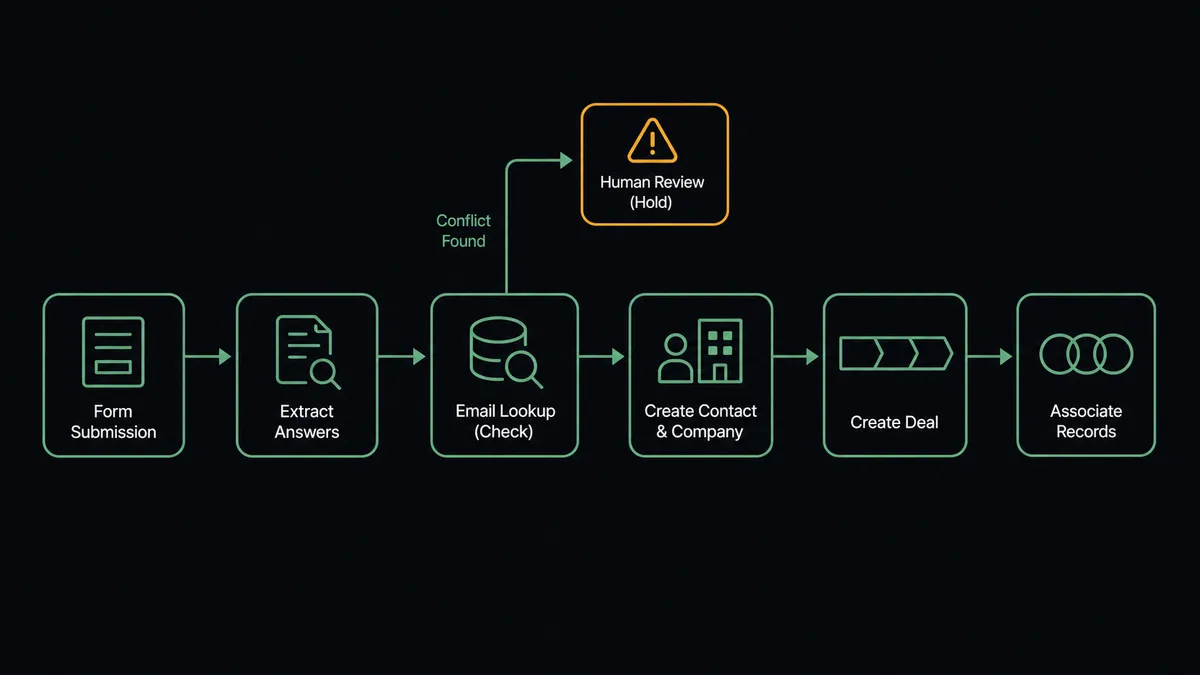
You connect HubSpot to Tally by having Tally’s On New Submission trigger drive HubSpot’s CRM actions: the moment a respondent submits your form, the workflow reads the answers with Get Submission, checks for an existing record with Get Contact By Email, creates the person with Create Contact, builds the pipeline entry with Create Deal, and ties everything together with Associate Objects, so a form response becomes a working CRM record instead of a row in an export nobody downloads. FlowRunner is a visual AI-agent orchestration platform where automations run autonomously and pause for human judgment on the steps that carry real consequence. Run as an AI agent, the same connection scores each submission, builds clean records on its own, and stops for a named person before it overwrites anything on a contact a rep already owns.
The problem it solves
Right now, your Tally responses live in Tally and your pipeline lives in HubSpot, and the bridge is somebody’s Tuesday. A demo request comes in Friday afternoon. It sits in the submissions list through the weekend. Monday, someone exports the CSV, dedupes it against HubSpot by eye, imports the survivors, and manually creates deals for the ones that look qualified. By the time a rep calls, the prospect has heard back from two competitors who answered the same week they asked.
The subtler failure is what the import does to existing records. A form response from someone already in your CRM does not politely coexist with the record; a bulk import overwrites it. The job title a rep confirmed on a discovery call gets replaced by whatever the prospect typed in a hurry. The lifecycle stage resets. Nobody notices until the rep opens the record before a renewal conversation and finds their notes contradicted by their own CRM. Form-to-CRM sync fails quietly, and it fails on exactly the records that matter most: the ones you already have a relationship with.
How it works: the connection
The connection listens to Tally and writes to HubSpot. Here is the plain version, grounded in the real connector actions.
- Trigger: Tally fires On New Submission the moment a respondent completes the form.
- Read: The workflow calls Get Submission to pull the full answer set, and List Form Questions to interpret the fields.
- Check: It calls Get Contact By Email in HubSpot to see whether this person already exists.
- Create: For new people, it calls Create Contact, and Create Company when the answers name an organization worth tracking.
- Build the deal: For qualified submissions, it calls Create Deal with the pipeline and stage your routing rules specify.
- Connect the records: It calls Associate Objects so the contact, company, and deal reference each other the way your reports expect.
That is the “just connect them” answer. Submissions become CRM records in real time, deals appear in the pipeline while the prospect is still thinking about you, and the Monday CSV ritual disappears.
Can an AI agent run it? (and why a human stays in the loop)
Yes, and the difference shows in the two judgment calls a field mapping cannot make. An AI agent holds the real actions as tools: Get Submission, Get Contact By Email, Search Contacts, Create Contact, Create Company, Create Deal, Update Contact, Associate Objects. The first judgment is routing: the agent reads the actual answers, not just the fields. A submission describing a fifty-person operations team evaluating platforms gets a deal in the sales pipeline. A student researching a paper gets a contact and nothing more. You write the routing rules in plain language; the agent applies them per submission.
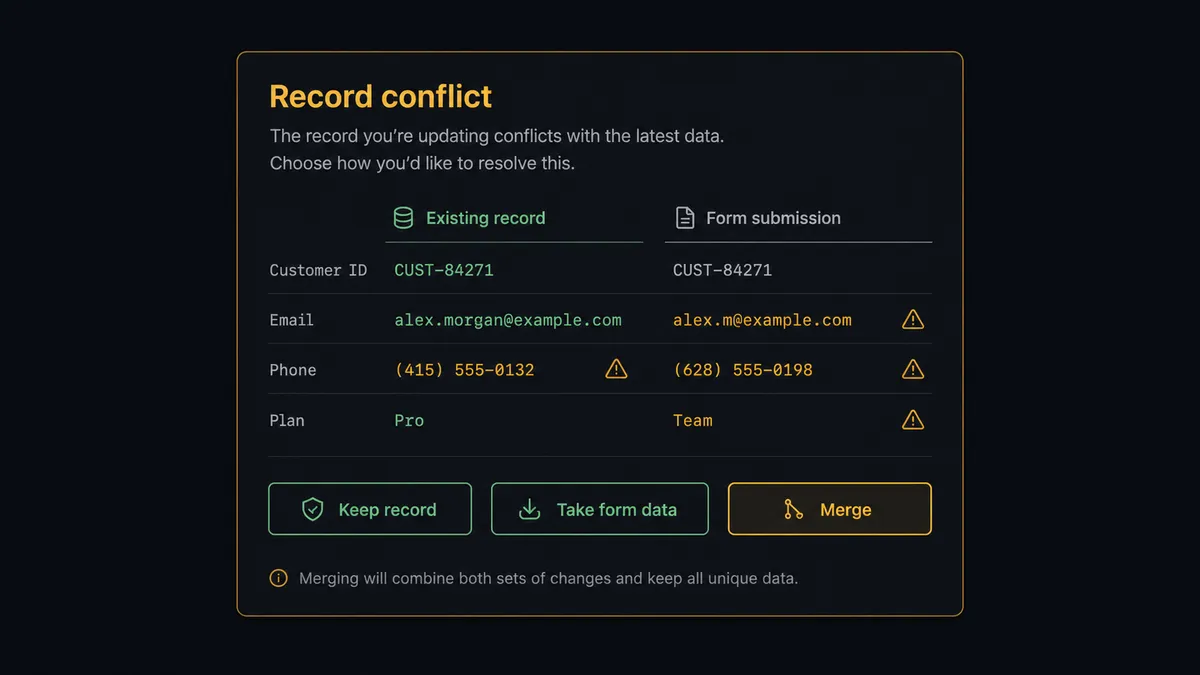
The second judgment is the consequential one: what to do when the submission collides with an existing record. Update Contact is quiet and irreversible in practice, because nobody re-derives what a rep knew once it is overwritten. So when Get Contact By Email returns a record with an owner and conflicting data, the agent invokes a human-in-loop flow it holds as a callable tool. The workflow pauses and posts to your channel: “New submission from [email] matches a contact owned by [rep]. The form says [new title] at [new company]; the record says [existing title] at [existing company]. Keep the record, take the form data, or merge field by field?” A named person decides. Only then does Update Contact run, and the decision, the approver, and the timestamp land in the audit trail.
Prospects call this pattern a digital andon cord: like Toyota’s assembly line, where the cord stops production the moment a worker spots a defect, the workflow stops the line the moment a write would destroy information, and a person decides what the record should say.
FlowRunner vs Zapier
Zapier’s case here is genuine: it connects both tools, the Tally-to-HubSpot Zap is a well-worn template, and a solo marketer can have submissions flowing into contacts within the hour. For a low-volume form feeding a CRM with no existing records at stake, that is honestly all you need.
The gap is judgment. A Zap maps fields; it does not read answers, and it handles a record collision the same way every time, whichever way you configured it once. FlowRunner puts an agent in the seat and a person at the overwrite.
| What matters for this pair | FlowRunner | Zapier |
|---|---|---|
| Human-in-the-loop on overwriting owned records | Native. The agent pauses before Update Contact and shows the conflict side by side | Approval steps exist as add-ons, not a native agent decision |
| Who runs the flow | An AI agent reads each submission and picks actions as tools | Predefined field mapping per Zap |
| Users included | Unlimited users on every tier, so reps can be approvers | Priced by task volume; seats vary by plan |
| Bring your own AI keys | Yes, BYOK | AI features tied to Zapier’s own AI offering |
| Self-hosted option | Yes, cloud-hosted or self-hosted | Cloud only |
| Pricing model | Transparent workflow-based tiers | Per-task pricing that scales with submission volume |
If your form is new, your CRM is empty, and every submission is a stranger, Zapier is a fine start. If submissions regularly collide with records your team has invested in, and lead routing should depend on what people actually wrote, this pairing is built for that.
Before and after
| Category | Before | After |
|---|---|---|
| Response to lead time | Submissions wait for the Monday CSV export | Contacts and deals exist while the prospect is still on your site |
| Deduplication | By eye, against a spreadsheet | Get Contact By Email checks every submission before anything writes |
| Existing records | Bulk imports silently overwrite rep-confirmed data | Conflicts pause for a named person with a side-by-side view |
| Lead routing | One pipeline for everything, sorted by hand later | The agent reads the answers and routes each submission per your rules |
| Accountability | Nobody knows which import changed a record | Every overwrite carries an approver and a timestamp |
What you can build
Demo request to pipeline, instantly. On New Submission fires, the agent reads the answers, creates the records with Create Contact and Create Company, opens the opportunity with Create Deal, and links everything with Associate Objects before the confirmation page finishes loading.
Conflict-safe enrichment. Submissions from known contacts update empty fields freely but pause on conflicts, so form data enriches records without ever silently degrading them.
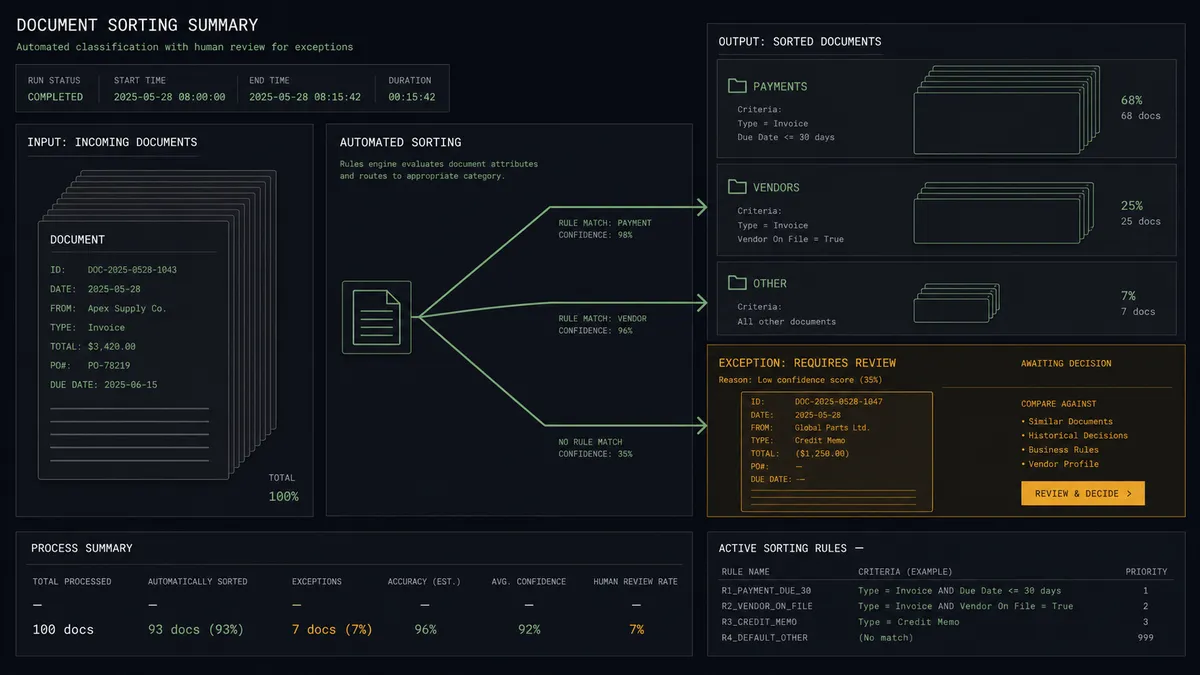
Answer-based routing. The agent applies your routing rules to the actual text of each submission: enterprise signals go to the sales pipeline, newsletter signups become contacts only, and ambiguous ones get flagged for a person to place.
Event registration follow-up. A Tally event form feeds registrants into HubSpot as contacts tagged for the campaign, and the agent opens deals only for the ones whose answers signal buying intent, so the pipeline reflects interest rather than attendance.
Weekly form health check. On a schedule, the agent pulls List Submissions and Search Contacts, reconciles the two, and posts a summary of anything that failed to sync, so no lead dies in the gap between systems.
Getting started
Start on the free plan: 100 executions a month, every integration included, no credit card required, plus 14 days of Professional for new accounts. Both connectors are available on every tier, and every tier includes unlimited users and unlimited workflows.
Explore the integration details:
- HubSpot integration (21 actions covering contacts, companies, deals, and associations)
- Tally integration (1 trigger and 15 actions covering forms, submissions, and webhooks)
Start building free at flowrunner.ai or book a demo to see a live HubSpot to Tally workflow, conflict approval and all.
Frequently asked questions
Is it free to connect HubSpot and Tally on FlowRunner?
You can build and run the connection on FlowRunner's free plan, which includes 100 executions a month and every integration with no credit card required, and new accounts also get 14 days of Professional. Both connectors are available on every FlowRunner tier, and every tier includes unlimited users and unlimited workflows.
Can I self-host the HubSpot to Tally workflow?
Yes. FlowRunner offers a cloud-hosted option and a self-hosted option, so the connection can run inside your own environment.
Does the AI agent need my own OpenAI or Claude key?
FlowRunner uses a bring-your-own-keys model, so you connect the AI provider key you already have. You are not locked to one model.
What happens when a submission matches a contact a sales rep already owns?
The agent stops before writing. It shows the existing record and the new submission side by side, posts the comparison to your channel, and waits. Update Contact only runs after a named person chooses what to keep, so a form never silently overwrites what a rep learned on a call.
Which trigger starts the workflow, since HubSpot is on the receiving end?
Tally's On New Submission trigger starts it. The workflow fires the moment a respondent submits the form, reads the answers with Get Submission, and then runs the HubSpot actions: Get Contact By Email, Create Contact or Update Contact, Create Deal, and Associate Objects.
Can one Tally form feed different HubSpot pipelines?
Yes. The agent reads the answers, not just the field mapping. A submission that describes a large team routes to your sales pipeline with Create Deal, while a newsletter-style signup becomes a contact only. You define the routing rules in plain language and the agent applies them per submission.