How to Connect Jira Issues with Frame.io (With or Without an AI Agent)
Connect Frame.io review comments to Jira Issues so timestamped video feedback becomes tracked production work, with an AI agent that clusters notes into tickets and pauses for a human before client change requests enter the sprint as free work.
How do you connect Jira Issues to Frame.io?
You connect Jira Issues to Frame.io by polling List Comments on assets in active review, clustering the timestamped notes, and filing the work with Create Issue and Assign Issue, deduplicated through Search Issues, with Create Comment posting a reply on the asset so reviewers know their note is tracked. FlowRunner is a visual AI-agent orchestration platform where automations run autonomously and pause for human judgment on the steps that carry real consequence. Run as an agent, the same connection reads every note, files in-scope fixes on its own, and pauses for a named producer when a client comment is really a change request wearing a comment’s clothes.
The problem it solves
Today the bridge between review and production is a producer with a notepad. A cut goes up on Frame.io, the client and internal reviewers pile on timestamped comments, and someone spends the next morning translating: which notes are one fix versus five mentions of the same fix, which are contradictory, which belong to the editor versus the motion designer, and which the client thinks are included but are actually new work. Then each becomes a ticket, typed by hand, with the timestamp copied over or, more often, not.
The edges are where agencies bleed. A note at one timestamp says “make the logo bigger,” a note two minutes later says “logo feels too prominent,” and both become tickets to different people. A “small” request to swap the entire soundtrack gets filed alongside color tweaks and quietly executed, and only at invoicing does anyone realize the project absorbed a week of unbilled scope. Reviewers, hearing nothing back, re-post the same note on the next version, and the review thread becomes an argument about what was already addressed.
How it works: the connection
The connection reads from Frame.io and writes to Jira Issues. Here is the plain version, grounded in the real connector actions.
- Trigger: On a schedule, the workflow uses List Projects and List Assets to find assets in active review, then polls List Comments on each for notes it has not processed.
- Read: Each comment arrives with its text, author, completion state, and, for timed notes, the timestamp in seconds; Get Asset adds the file’s name and project context.
- Cluster: Overlapping notes about the same fix are grouped into one task instead of one ticket per mention.
- Dedupe: Search Issues runs a JQL query to check whether the revision is already tracked from a previous review round.
- File: Create Issue writes one ticket per distinct task, quoting each reviewer note verbatim with its timestamp and linking the asset.
- Route: Assign Issue puts the ticket on the owning editor or designer, and Add Comment on the Jira side records the review round it came from.
- Close the loop: Create Comment posts a short reply on the Frame.io asset noting the feedback is tracked, so reviewers stop re-posting.
That is the “just connect them” answer. Review notes become organized production work with frame-accurate references, and reviewers can see their feedback landed.
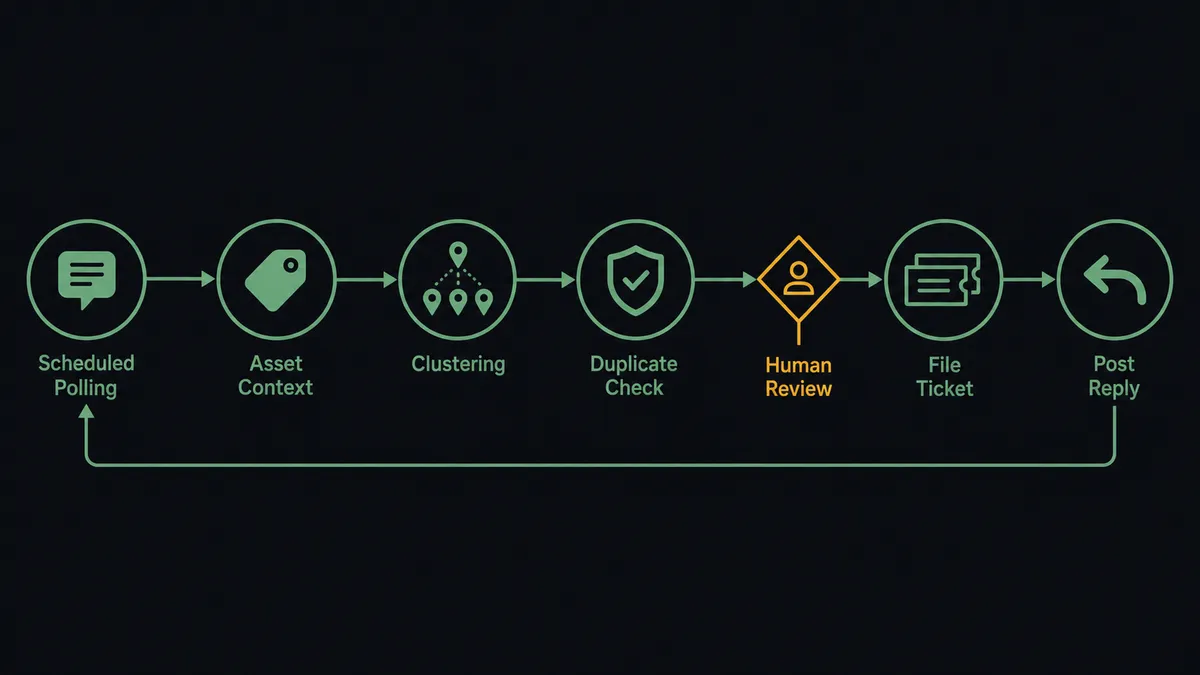
Can an AI agent run it? (and why a human stays in the loop)
Yes, and the clustering alone justifies it. The agent holds the pair’s actions as tools: List Projects, List Assets, Get Asset, List Comments, Create Comment, Search Issues, Create Issue, Assign Issue, Add Comment. A fixed pipeline makes one ticket per comment and floods the sprint with fragments. The agent reads the notes the way a producer would: seven comments across three reviewers describing the same pacing problem become one ticket quoting all seven, and two contradictory notes about the logo become a single question back to the client rather than two opposing tickets.
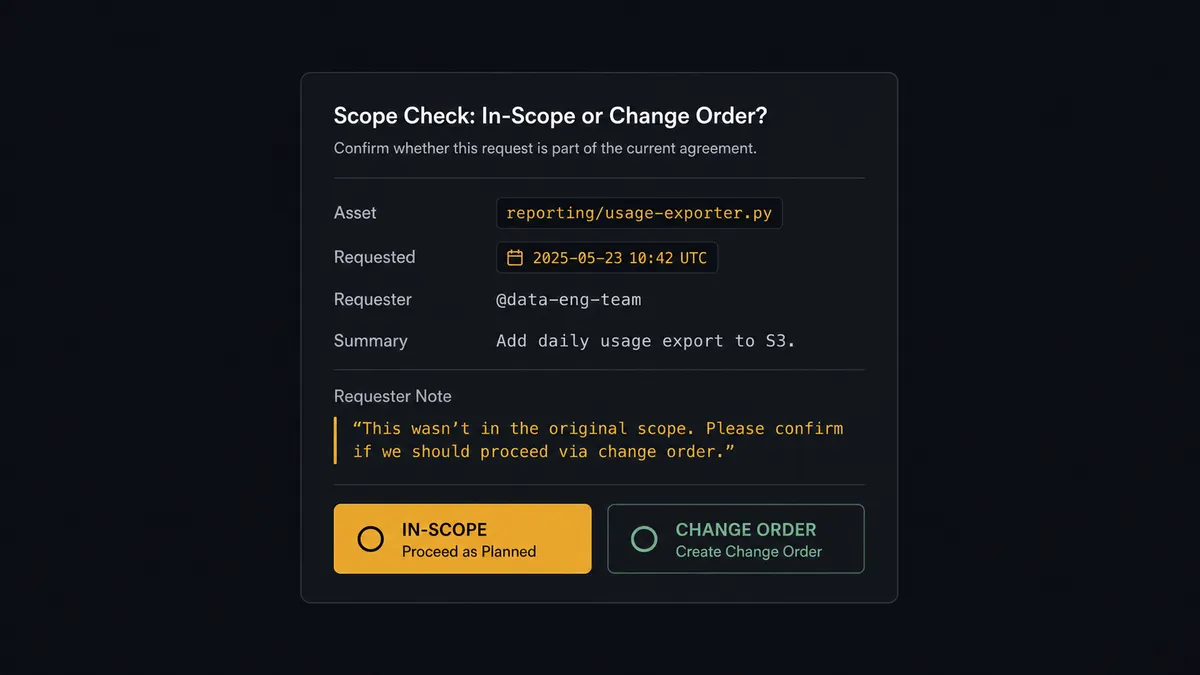
The consequential step is scope. On client-facing work, a Frame.io comment is not just feedback; it is sometimes a purchase order that nobody priced. “Can we also cut a vertical version for social” typed at a timestamp looks exactly like “tighten this transition,” but one is minutes of work and the other is a deliverable. Filing it as routine and assigning it means your team commits unbilled days by default. So when the agent reads a note as scope-suspect, it invokes a human-in-loop flow it holds as a callable tool. The workflow pauses and posts to the producer: “Comment on [asset name] at [timestamp] reads as new scope: [quoted note]. File as in-scope fix, or flag for a change-order conversation?” Only after the producer’s call does Create Issue run, and the decision, with the producer’s name, lands in the audit trail.
Ambiguity escalates the same way: contradictory notes, a comment the agent cannot map to a task, a reviewer asking a question rather than requesting a change. Prospects call this a digital andon cord: the workflow stops the line the moment it hits uncertainty, and your team pulls it back into motion.
FlowRunner vs Zapier
Zapier’s strengths apply here: it connects Frame.io and Jira, its editor is fast to learn, and for a solo editor who wants every new comment mirrored somewhere trackable, a simple Zap is up and running in minutes. The breadth of its app library is genuinely unmatched.
The difference is that agency review rounds are not a mirroring problem. They are a reading problem: clustering, deduplication across rounds, and above all the scope call that decides whether work is billable.
| What matters for this pair | FlowRunner | Zapier |
|---|---|---|
| Human-in-the-loop on scope-suspect client comments | Native. The agent routes the quoted note to the producer before any ticket exists | Available via added approval steps, not a native agent decision |
| Who runs the flow | An AI agent reads and clusters notes, reasons, picks actions as tools | Predefined step sequence you configure per Zap |
| Users included | Unlimited users on every tier | Priced by task volume; seats vary by plan |
| Bring your own AI keys | Yes, BYOK | AI features tied to Zapier’s own AI offering |
| Self-hosted option | Yes, cloud-hosted or self-hosted | Cloud only |
| Pricing model | Transparent workflow-based tiers | Per-task pricing; comment-heavy review rounds consume tasks fast |
If you want raw comment mirroring for a small internal team, Zapier covers it. If review rounds feed a production sprint and client comments carry billing consequences, this pairing is the better fit.
Before and after
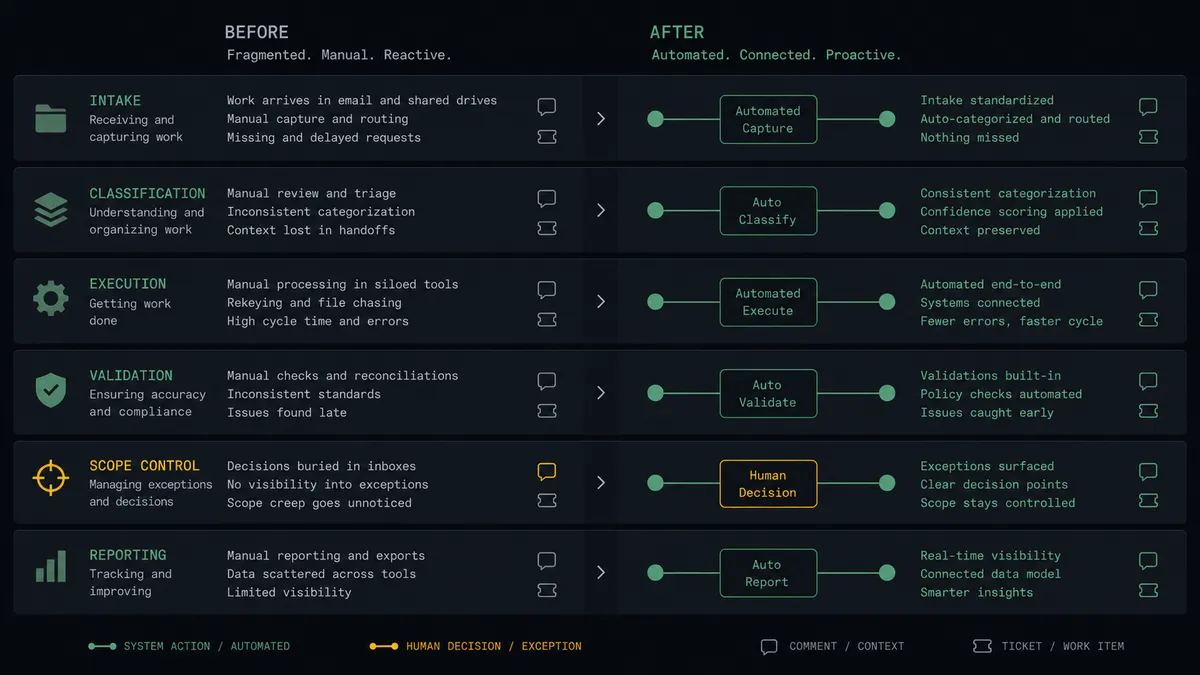
| Category | Before | After |
|---|---|---|
| Note translation | A producer spends the morning after each review turning comments into tickets | Notes are clustered and filed within the polling interval |
| Duplicates across rounds | The same revision request gets re-filed every review cycle | Search Issues catches already-tracked work before filing |
| Scope control | Change requests slip into the sprint disguised as fixes | Scope-suspect notes stop at the producer before a ticket exists |
| Frame accuracy | Editors hunt for the moment a comment meant | Every ticket quotes the note with its timestamp and asset link |
| Reviewer confidence | Clients re-post notes because nothing confirms receipt | Create Comment replies on the asset that the note is tracked |
What you can build
Review-round to sprint pipeline. List Comments feeds the agent each round’s notes, clustering turns them into distinct tasks, and Create Issue with Assign Issue routes each to the owning editor with quoted, timestamped context.
Scope sentry for client projects. Every client comment passes the agent’s scope read, and anything resembling a new deliverable stops at the producer with the quote attached before it can enter the sprint as free work.
Contradiction catcher. When two notes on one asset pull in opposite directions, the agent files neither. It posts both quotes side by side to the producer, who resolves the direction before a ticket exists.
Reviewer receipt loop. For every filed ticket, Create Comment posts a tracked confirmation on the Frame.io asset, and when the Jira issue reaches Done, a follow-up comment tells reviewers the fix is in the next cut.
Version-readiness digest. Before a new version goes up, the agent cross-references the asset’s open tickets via Search Issues and posts a checklist to the team channel showing which review notes are resolved and which remain, so no version ships with known notes unaddressed.
Getting started
Start on the free plan: 100 executions a month, every integration included, no credit card required, plus 14 days of Professional for new accounts. Both connectors are available on every tier, and every tier includes unlimited users and unlimited workflows.
Explore the integration details:
- Jira Issues integration (13 actions covering issue creation, JQL search, transitions, comments, and attachments)
- Frame.io integration (9 actions covering teams, projects, assets, and review comments)
Start building free at flowrunner.ai or book a demo to see a live Frame.io to Jira Issues workflow, scope gate and all.
Frequently asked questions
Is it free to connect Jira Issues and Frame.io on FlowRunner?
You can build and run the connection on FlowRunner's free plan, which includes 100 executions a month and every integration with no credit card required, and new accounts also get 14 days of Professional. Both connectors are available on every FlowRunner tier, and every tier includes unlimited users and unlimited workflows.
Can I self-host the Jira Issues to Frame.io workflow?
Yes. FlowRunner offers a cloud-hosted option and a self-hosted option, so the connection can run inside your own environment.
Does the AI agent need my own OpenAI or Claude key?
FlowRunner uses a bring-your-own-keys model, so you connect the AI provider key you already have. You are not locked to one model.
What happens when a client comment looks like new scope instead of a fix?
The agent does not file it as routine work. It posts the comment text, the asset and timestamp, and its scope reading to the producer, and waits. The producer decides whether it becomes a ticket, a change-order conversation, or both, and that decision is recorded before anything enters the sprint.
Neither connector lists a catalog trigger. How does the workflow start?
On a schedule. The workflow walks the review workspace with List Projects and List Assets, then polls List Comments on active assets at your chosen interval, processing only comments it has not seen before.
Which actions does this connection use on each side?
On the Frame.io side: List Teams, List Projects, List Assets, Get Asset, List Comments, and Create Comment for the confirmation reply. On the Jira side: Search Issues, Create Issue, Assign Issue, and Add Comment.