How to Connect Jira Issues with Elastic Email (With or Without an AI Agent)
Connect Jira Issues to Elastic Email so resolved tickets turn into customer notifications automatically, with an AI agent that drafts every message and pauses for a human before a bulk announcement reaches a full contact list.
How do you connect Jira Issues to Elastic Email?
You connect Jira Issues to Elastic Email by running Search Issues on a schedule with a JQL query for tickets that just changed state, pulling the details with Get Issue and Get Comments, and delivering the news with Send Transactional Email for a single reporter or Send Email for a list. FlowRunner is a visual AI-agent orchestration platform where automations run autonomously and pause for human judgment on the steps that carry real consequence. Run as an agent, the same connection reads each resolved ticket, decides whether the fix concerns one customer or many, sends the single-recipient update on its own, and pauses for a named human before a bulk announcement reaches an entire contact list.
The problem it solves
Today the bridge between your tracker and your customers is a person with two tabs open. An engineer resolves a ticket in Jira. Someone in support or operations notices, eventually, then writes an email from scratch: what was broken, what changed, what the customer should do now. They look up the reporter’s address, guess at the right tone, and hit send. On a busy week, resolved tickets sit unannounced for days, and the customer who reported the problem learns it was fixed by stumbling onto the fix themselves.
The edges are worse than the happy path. A fix that affects a whole segment of customers gets announced to only the one who filed the ticket. Or the opposite: someone blasts the entire list about a niche fix and trains recipients to ignore your emails. Nobody records which customers were told what, so when a ticket reopens, support cannot tell whether the customer was ever notified. The email history lives in a personal outbox, invisible to the team and useless for an audit.
How it works: the connection
The connection reads from Jira Issues and writes through Elastic Email. Here is the plain version, grounded in the real connector actions.
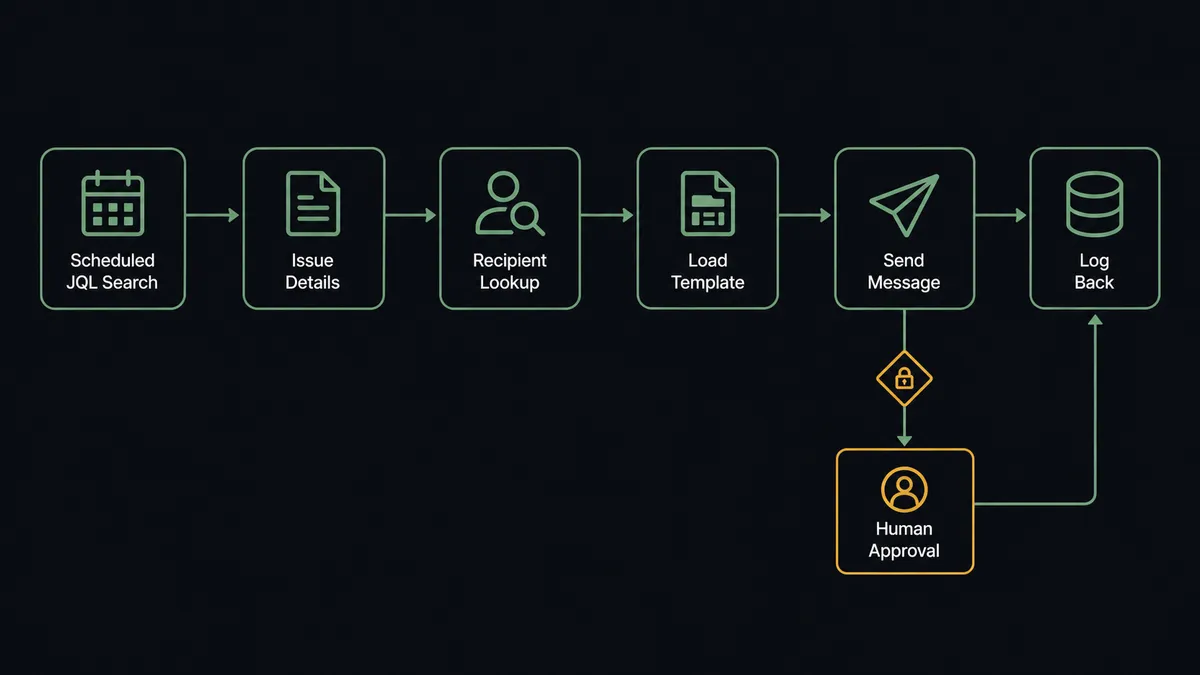
- Trigger: On a schedule, the workflow runs Search Issues with a JQL query, for example issues whose status changed to Resolved since the last run.
- Read: For each match, Get Issue pulls the summary, resolution, and reporter, and Get Comments pulls the resolution notes the engineer left.
- Resolve the recipient: Get Contact looks up the reporter’s email in Elastic Email; List Contacts finds the wider affected audience when the fix touches more than one account.
- Pick the template: List Templates returns the approved layouts so every notification matches your brand instead of an engineer’s improvised prose.
- Send: Send Transactional Email delivers the fix confirmation to the reporter. For a list-wide announcement, Send Email carries the HTML and plain-text body to every recipient.
- Log: Add Comment writes the send back onto the Jira issue, so the ticket itself records who was notified and when.
That is the “just connect them” answer. Resolved tickets become sent notifications, and the ticket carries the receipt.
Can an AI agent run it? (and why a human stays in the loop)
Yes, and this is where the connection stops being a mail merge. An agent holds the Jira and Elastic Email actions as tools: Search Issues, Get Issue, Get Comments, Get Contact, List Contacts, Send Transactional Email, Send Email, Add Comment. Instead of one hardcoded path, it reads each resolved ticket and reasons about scope. A password-reset bug filed by one customer gets a single Send Transactional Email to that reporter. A fix to a defect that generated a dozen duplicate tickets is a different animal: the agent recognizes the pattern across issues and drafts one clear announcement instead of twelve fragmentary ones.
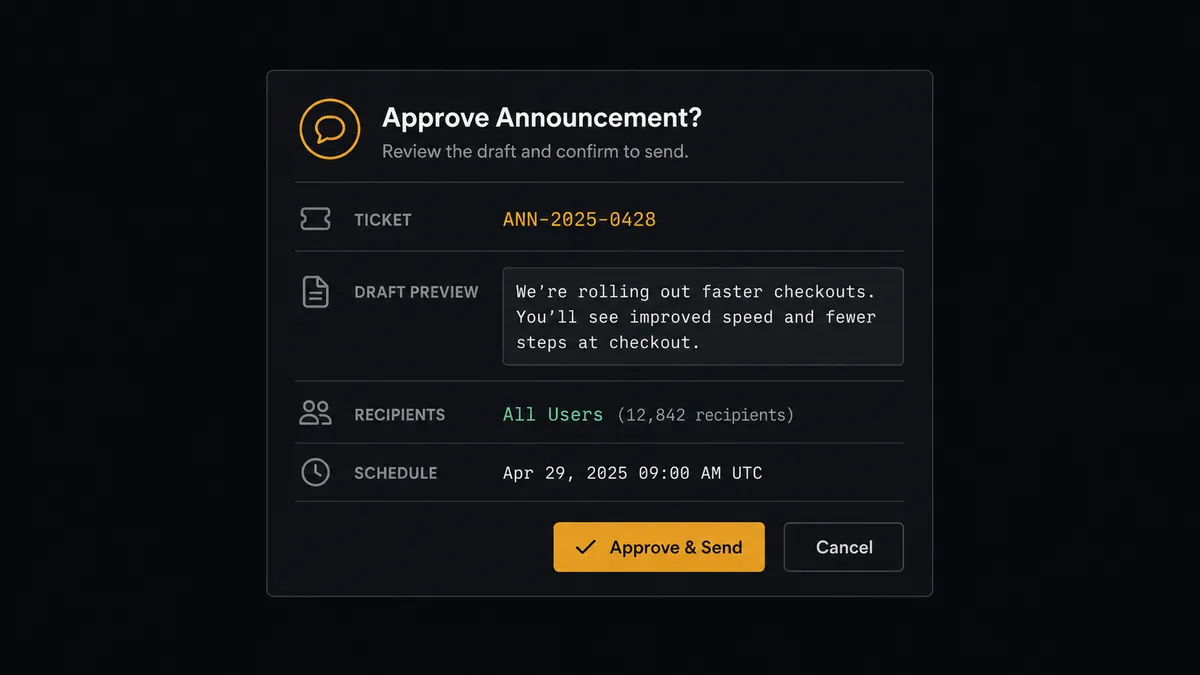
The consequential step is Send Email to a full list. A transactional confirmation to one reporter is low stakes; a bulk announcement to every affected customer is your company speaking in public, and a wrong or premature one cannot be unsent. So before that step, the agent invokes a human-in-loop flow it holds as a callable tool. The workflow pauses and posts to your channel: “Fix for [issue key] is resolved. Draft announcement attached. Proposed recipients: the affected-customers list. Approve to send?” The approver reads the draft, adjusts or approves, and only then does Send Email fire. Add Comment then writes the outcome onto the Jira issue with the approver’s name in the audit trail.
The agent also escalates on ambiguity, not just on scope. If the resolution notes are thin, or the fix description contradicts the original report, it does not guess at customer-facing language. It stops and asks. Prospects call this a digital andon cord: like Toyota’s production line, the workflow stops the line the moment it hits uncertainty, and a person pulls it back into motion.
FlowRunner vs Zapier
Most teams wiring Jira to an email service try Zapier first, and for good reason: its connector library is enormous, setup is genuinely fast, and its template gallery almost certainly has a Jira-to-email starting point you can clone in minutes. For a fixed rule like “when an issue is labeled announce, send this email,” Zapier does the job.
The difference shows up when the email reaches customers and the decision is not fixed. FlowRunner is built around an agent that judges scope per ticket and a native human gate before the send that cannot be taken back.
| What matters for this pair | FlowRunner | Zapier |
|---|---|---|
| Human-in-the-loop on the bulk Send Email step | Native. The agent invokes an approval flow as a callable tool and pauses before the list send | Available via added approval steps, not a native agent decision |
| Who runs the flow | An AI agent reads, reasons, picks actions as tools | Predefined step sequence you configure per Zap |
| Users included | Unlimited users on every tier | Priced by task volume; seats vary by plan |
| Bring your own AI keys | Yes, BYOK | AI features tied to Zapier’s own AI offering |
| Self-hosted option | Yes, cloud-hosted or self-hosted | Cloud only |
| Pricing model | Transparent workflow-based tiers | Per-task pricing that grows with notification volume |
If you need a simple, fixed notification rule, Zapier is a fine choice. If customer-facing announcements need drafting judgment and a named approver before the list send, this pairing is the better fit.
Before and after
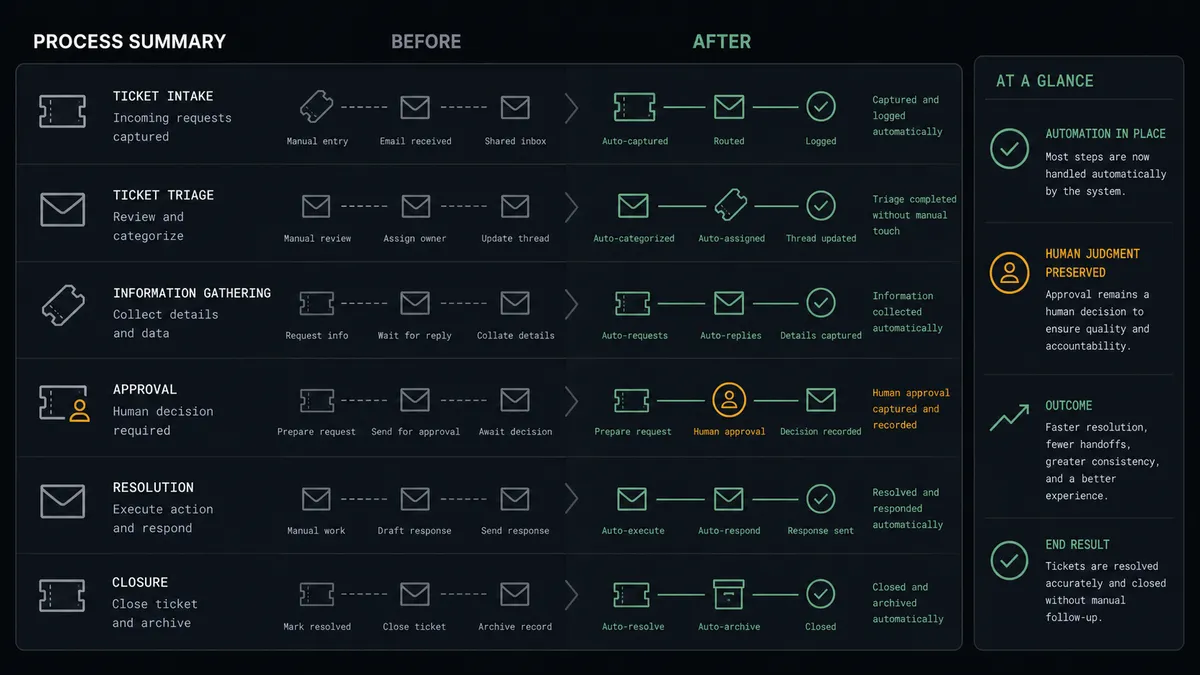
| Category | Before | After |
|---|---|---|
| Fix notifications | A support person notices resolved tickets and writes each email by hand, whenever they get to it | Resolved tickets are found by JQL on a schedule and the notification is drafted and sent the same day |
| Recipient scope | One person guesses whether a fix deserves a list-wide announcement | The agent classifies scope per ticket and a named approver signs off before any list send |
| Message quality | Tone and detail vary by whoever wrote the email that day | Every message is drafted from the actual resolution notes and an approved template |
| Record keeping | Notification history lives in personal outboxes | Add Comment writes every send onto the Jira issue with approver and timestamp |
| Reopened tickets | Support cannot tell whether the customer was ever notified | The ticket itself carries the full notification record |
What you can build
Resolved-ticket confirmations, hands off. Search Issues finds tickets that hit Resolved, Get Issue and Get Comments pull the fix details, and Send Transactional Email confirms the fix to the reporter. The reporter hears the news from you, not from the changelog.
Incident wrap-up announcements with approval. When an incident closes, the agent drafts the all-clear from the resolution notes, invokes the human-in-loop tool with the draft and recipient list, and calls Send Email only after a named approver signs off.
New-customer onboarding into the notification list. When an issue arrives from an unknown reporter, the agent calls Get Contact, finds nothing, and calls Add Contact so future fixes reach them. Contact records stay in step with the people actually filing tickets.
Escalation digest for stale tickets. A daily JQL run finds issues still open past your service target, and Send Email delivers a digest to the operations distribution list, with each ticket linked and Add Comment noting the escalation on the issue.
Deliverability watch on the notification stream. On a weekly schedule the agent calls Get Account Statistics, compares delivery, open, and bounce counts to the prior period, and posts the trend to your channel so a decaying sender reputation gets caught before customers stop seeing fix notices.
Getting started
Start on the free plan: 100 executions a month, every integration included, no credit card required, plus 14 days of Professional for new accounts. Both connectors are available on every tier, and every tier includes unlimited users and unlimited workflows.
Explore the integration details:
- Jira Issues integration (13 actions covering issue creation, JQL search, transitions, comments, and attachments)
- Elastic Email integration (12 actions covering transactional and bulk sending, contacts, lists, and delivery statistics)
Start building free at flowrunner.ai or book a demo to see a live Jira Issues to Elastic Email workflow, bulk-send approval and all.
Frequently asked questions
Is it free to connect Jira Issues and Elastic Email on FlowRunner?
You can build and run the connection on FlowRunner's free plan, which includes 100 executions a month and every integration with no credit card required, and new accounts also get 14 days of Professional. Both connectors are available on every FlowRunner tier, and every tier includes unlimited users and unlimited workflows.
Can I self-host the Jira Issues to Elastic Email workflow?
Yes. FlowRunner offers a cloud-hosted option and a self-hosted option, so the connection can run inside your own environment.
Does the AI agent need my own OpenAI or Claude key?
FlowRunner uses a bring-your-own-keys model, so you connect the AI provider key you already have. You are not locked to one model.
What happens when the agent is unsure whether a fix affects one customer or many?
It stops and asks. The agent posts the issue key, the resolution summary, and its proposed recipient scope to your team's channel, then waits. A single-reporter update goes out on its own; anything that widens into a list send requires a named approver first.
Jira Issues has no trigger in the catalog. How does the workflow start?
On a schedule. The workflow runs Search Issues with a JQL query, for example issues moved to Resolved since the last run, then walks each result with Get Issue and Get Comments. No trigger is needed because JQL gives you precise control over which tickets qualify.
Which Elastic Email actions does this connection use?
Send Transactional Email for single-recipient updates like a fix confirmation to the reporter, Send Email for bulk announcements to a list, plus Get Contact and List Contacts to resolve recipients and List Templates to reuse your approved layouts.