How to Connect Airtable with Elastic Email (With or Without an AI Agent)
Connect Airtable records to Elastic Email so record changes send transactional email and build clean lists, with an AI agent that pauses for a human before any send that reaches a whole segment at once.
How do you connect Airtable to Elastic Email?
You connect Airtable to Elastic Email by having Airtable’s On New or Updated Record trigger drive Elastic Email actions: when a record’s status changes, the workflow pulls the row with Find Record, keeps the contact synced with Add Contact, and delivers the message with Send Transactional Email, so the operational state in your base becomes customer email without exports or copy-paste. FlowRunner is a visual AI-agent orchestration platform where automations run autonomously and pause for human judgment on the steps that carry real consequence. Run as an AI agent, the same connection composes each message from the record’s own fields, sends one-to-one email on its own, and stops for a named human the moment a send would fan out to a whole segment.
The problem it solves
Without this connection, your base and your email tool live separate lives, bridged by CSV. Someone filters an Airtable view, exports it, uploads it to Elastic Email, and sends. The list is stale the moment it downloads: the customer who churned yesterday is still on it, the one who signed up an hour ago is not. One-to-one operational email, the “your order is ready” and “your account is set up” messages, either gets sent by hand or does not get sent at all, because nobody wants to babysit a mailbox all day.
The failure that hurts most is the fan-out mistake. A send meant for a dozen lapsed accounts goes to the whole customer list because the filter was one condition short. A test message reaches production contacts. There is no undo on email; there is only the apology. And in the background, bounces pile up unwatched, deliverability decays, and nobody connects the sender-reputation problem to the base full of dead addresses that keeps feeding it.
How it works: the connection
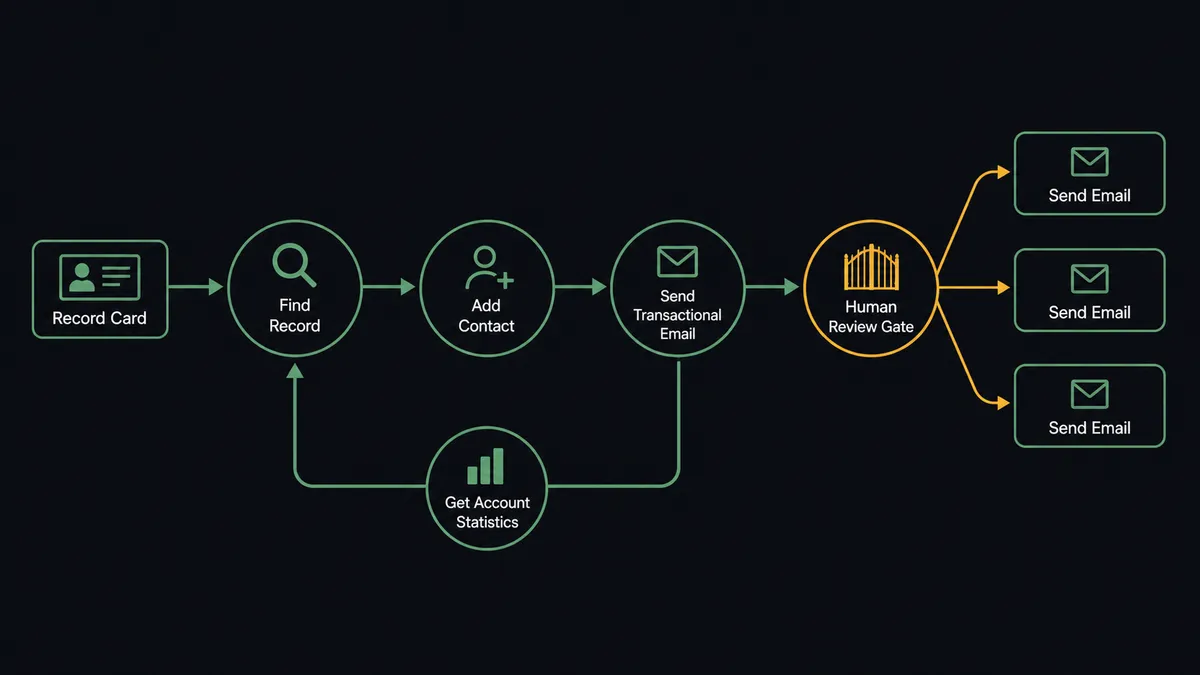
The connection listens to Airtable and sends through Elastic Email, then closes the loop. Here is the plain version, grounded in the real connector actions.
- Trigger: Airtable fires On New or Updated Record when a record’s status field changes on the table you watch.
- Read: The workflow calls Find Record to pull the row: contact email, name, and the fields the message needs.
- Sync the contact: It calls Add Contact so the person exists in Elastic Email, placed into the right list, with Create List standing up new segments when the base defines one.
- Send one-to-one: It calls Send Transactional Email with content assembled from the record’s fields, a message about this record, to this person.
- Build segments, not exports: As records change, Update Contact and Delete Contact keep the Elastic Email lists matching the base, so no CSV ever needs to exist.
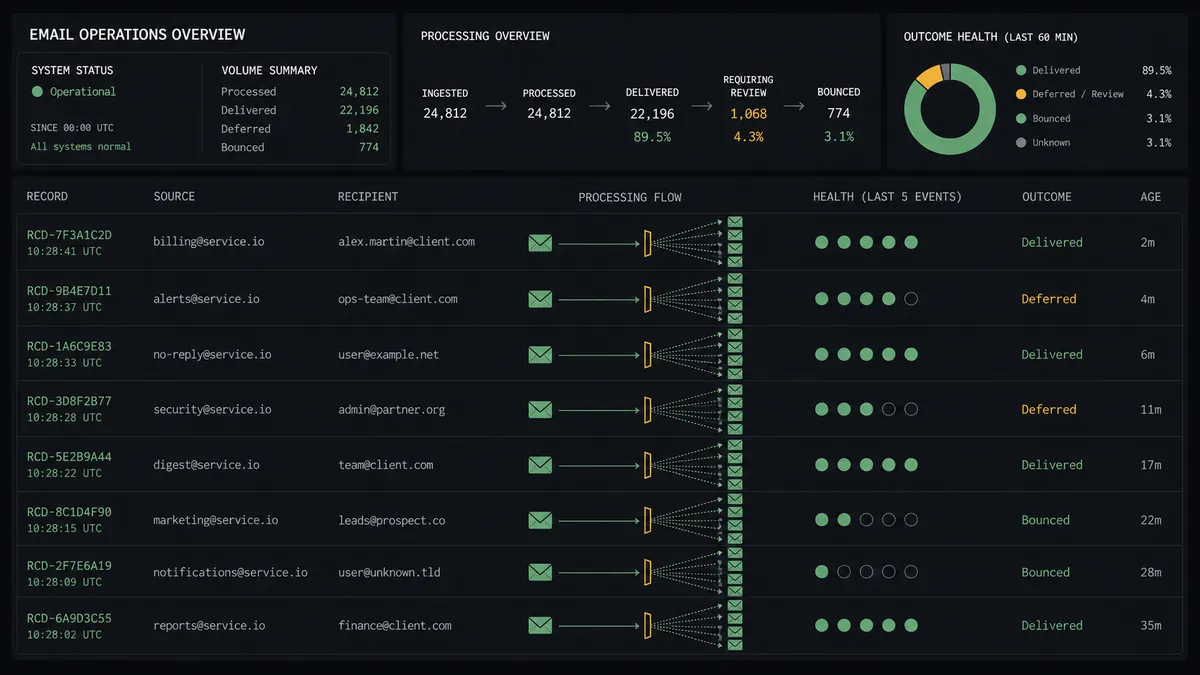
- Watch the health: On a schedule, Get Account Statistics pulls delivery, opens, clicks, and bounces.
- Write back: Update Record flags hard-bounced contacts on their rows and Create Record files the stats summary into a metrics table, so list hygiene is visible where the list lives.
That is the “just connect them” answer. Operational email sends itself the moment the base changes, lists stay current without exports, and the base learns which addresses are dead instead of mailing them forever.
Can an AI agent run it? (and why a human stays in the loop)
Yes, and the agent’s job is to know the difference between a message and a broadcast. A rule-based automation treats every send the same; it will mail one person or one thousand with equal confidence, because it is not counting. An AI agent holds Find Record, Find Many Records, Add Contact, Send Transactional Email, Send Email, and Get Account Statistics as tools and classifies every send before it happens. One record, one recipient, content assembled from the row: send it now. A send whose audience is a view, a list, or a filter: that is a different act with a different blast radius.
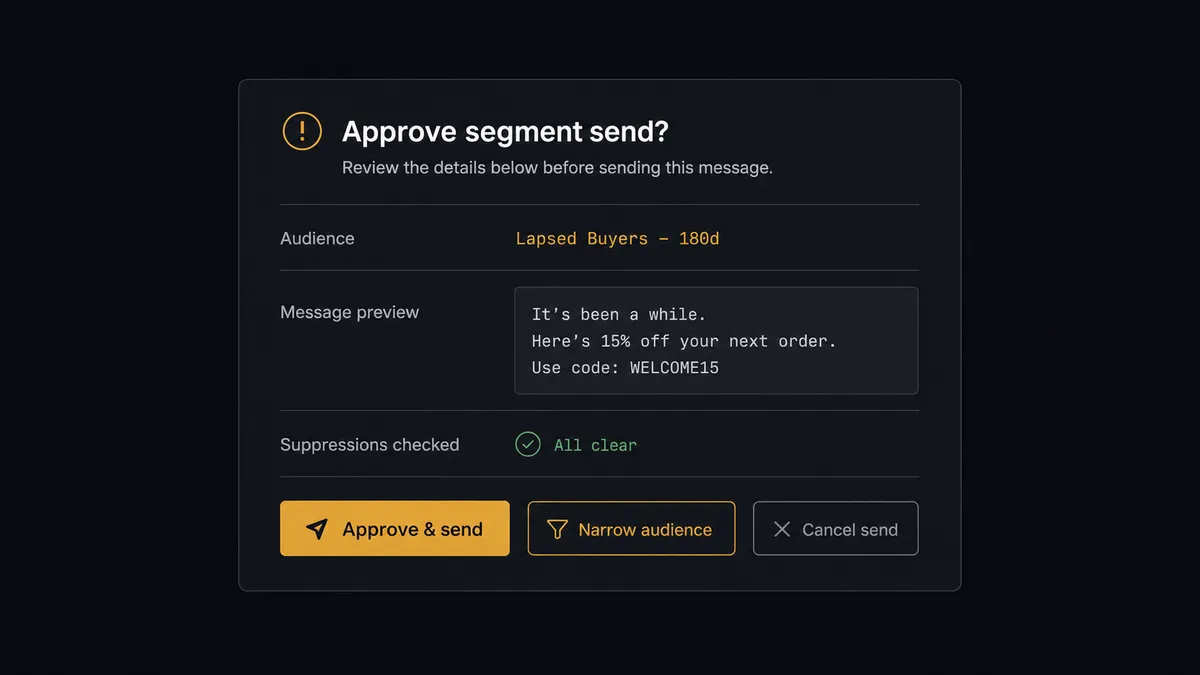
The consequential step is Send Email pointed at a segment, because a fan-out send is irreversible at scale. Before it, the agent invokes a human-in-loop flow it holds as a callable tool. The workflow pauses and posts to your channel: “Reactivation message ready for the lapsed-customers segment. Audience resolves to [the matching records] from the base view. Preview attached. Suppressions checked against unsubscribes and bounce flags. Approve, narrow the audience, or cancel?” A person reads the preview, sees exactly who is in the audience and why, and decides. Only then does the send release. The same gate guards Delete Contact in bulk, because a list you can silently gut is a list you cannot trust.
This is the digital andon cord for email operations: like Toyota’s production line pull cord, the workflow stops the line the moment it hits uncertainty. The one-to-one operational messages flow all day without a human touch. The sends that could become the week’s incident wait for a named approver, with the audience laid out in plain sight.
FlowRunner vs Zapier
Zapier is the first tool most teams try for this pair, deservedly. Both connectors are well supported, the “new record, send an email” pattern is a template away, and for straightforward one-to-one notifications a Zap is quick to build and cheap to think about.
The gap is the blast radius problem. Zapier executes the step you configured; whether that step mails one person or an entire list is your filter’s problem, and the approval patterns you can bolt on are static steps, not a judgment the automation makes about scale and risk. FlowRunner runs the connection as an agent that counts the audience, checks suppressions, and brings a person in exactly when the send graduates from message to broadcast.
| What matters for this pair | FlowRunner | Zapier |
|---|---|---|
| Human-in-the-loop before a segment-wide Send Email | Native. The agent invokes an approval flow as a callable tool and pauses before the fan-out | Available via added approval steps, not a native agent decision |
| Who runs the flow | An AI agent classifies sends, composes content, picks actions as tools | Predefined step sequence with templated email fields |
| Users included | Unlimited users on every tier | Priced by task volume; seats vary by plan |
| Bring your own AI keys | Yes, BYOK. Connect the AI provider key you already have | AI features tied to Zapier’s own AI offering |
| Self-hosted option | Yes, cloud-hosted or self-hosted | Cloud only |
| Pricing model | Transparent workflow-based tiers | Per-task pricing that can be hard to predict as volume grows |
If your email need is a handful of fixed notifications, Zapier covers it. If your base drives both one-to-one messages and segment sends, and one bad fan-out costs you deliverability and trust, the counting-and-gating agent is what this pairing is for.
Before and after
| Category | Before | After |
|---|---|---|
| List management | CSV exports uploaded to Elastic Email, stale on arrival | Add Contact and Update Contact keep lists matching the base continuously |
| Operational email | Sent by hand when someone notices the status change, or not at all | Send Transactional Email fires the moment the record changes |
| Segment sends | One wrong filter away from mailing everyone, with no checkpoint | Every fan-out pauses at a named approval with the audience and preview laid out |
| Bounce handling | Dead addresses stay in the base and get mailed forever | Get Account Statistics flags hard bounces back onto their records |
| Accountability | Nobody can say who approved the campaign that went out wrong | Every segment send carries an approver’s name and a timestamp in the audit trail |
What you can build
Status-driven customer email. On New or Updated Record fires when an order or project record changes. The agent pulls the row with Find Record and sends the matching update with Send Transactional Email, content built from the record’s own fields.
Self-maintaining segments. As records enter and change, the agent runs Add Contact, Update Contact, and Delete Contact against the matching Elastic Email lists, with Create List standing up new segments when the base defines one. No export ever happens again.
Gated reactivation campaigns. The agent gathers lapsed accounts with Find Many Records, drafts the message, resolves the audience, and holds at the approval step. A person reviews the preview and audience, then the send releases through Send Email.
Bounce-driven list hygiene. On a schedule, the agent reads Get Account Statistics, flags hard-bounced contacts on their base records with Update Record, and proposes removals with Delete Contact, each batch confirmed by a person before it runs.
Template-consistent sends. Before composing, the agent checks List Templates and builds on the approved template rather than improvising layout, so every message that leaves the workflow looks like your brand sent it.
Getting started
Start on the free plan: 100 executions a month, every integration included, no credit card required, plus 14 days of Professional for new accounts. Both connectors are available on every tier, and every tier includes unlimited users and unlimited workflows.
Explore the integration details:
- Airtable integration (2 triggers and 17 actions covering full record CRUD)
- Elastic Email integration (12 actions covering sending, contacts, and statistics)
Start building free at flowrunner.ai or book a demo to see a live Airtable to Elastic Email workflow, segment-send approval and all.
Frequently asked questions
Is it free to connect Airtable and Elastic Email on FlowRunner?
You can build and run the connection on FlowRunner's free plan, which includes 100 executions a month and every integration with no credit card required, and new accounts also get 14 days of Professional. Both connectors are available on every FlowRunner tier, and every tier includes unlimited users and unlimited workflows.
Can I self-host the Airtable to Elastic Email workflow?
Yes. FlowRunner offers a cloud-hosted option and a self-hosted option, so the connection can run inside your own environment.
Does the AI agent need my own OpenAI or Claude key?
FlowRunner uses a bring-your-own-keys model, so you connect the AI provider key you already have. You are not locked to one model.
What happens when the agent is unsure whether a send is safe?
It holds the send. The agent posts the recipient count, the audience definition, a rendered preview of the message, and its reason for hesitating to your channel, then waits for a person to approve, narrow the audience, or cancel before Send Email runs.
Which Airtable events can trigger an Elastic Email action?
Airtable offers two triggers: On New Record and On New or Updated Record. One-to-one sends typically run on On New or Updated Record when a status changes, while list building runs on On New Record as contacts enter the base.
How does email performance get back into Airtable?
On a schedule, the workflow calls Get Account Statistics for delivery, opens, clicks, and bounces, and writes the summary into a metrics table with Create Record. Contacts that hard-bounce get flagged on their base record with Update Record so the list cleans itself.