How to Connect Jira Issues with BigMarker (With or Without an AI Agent)
Run webinar operations out of Jira: approved webinar tickets become BigMarker conferences automatically, and an AI agent pauses for a human before Update Conference changes a live event that registrants already signed up for.
How do you connect Jira Issues to BigMarker?
You connect Jira Issues to BigMarker with a scheduled workflow: Search Issues runs a JQL query for webinar tickets that reached your Approved status, Get Issue pulls the title, date, and description, Create Conference builds the live BigMarker event, and Add Comment plus Transition Issue write the registration link back and move the ticket to Scheduled. FlowRunner is a visual AI-agent orchestration platform where automations run autonomously and pause for human judgment on the steps that carry real consequence. Run the same connection as an AI agent and it also watches the other direction: when a scheduled webinar’s ticket changes, the agent checks List Registrants and pauses for a named human before Update Conference reschedules an event that real people have already signed up for.
The problem it solves
If your webinar program runs through Jira, you know the manual bridge well. Marketing files a ticket. It gets scoped, assigned, and approved. Then someone opens BigMarker in another tab, retypes the title, picks the date from the ticket, creates the conference, copies the registration URL, and pastes it back into a Jira comment. Every field retyped is a field that can drift: the ticket says the 14th, the conference says the 15th, and nobody notices until a presenter shows up to an empty room.
The exceptions are worse than the happy path. A ticket gets approved with no duration set, and the conference goes live with a default that is wrong. A stakeholder moves the date in Jira after the event is created, and the BigMarker side never hears about it, so registrants hold the old slot. Or the opposite: someone edits the conference directly and the ticket becomes fiction. Rescheduling is the sharpest edge of all, because a date change on an event with registrants is not a data update, it is a broken promise delivered to every person who signed up.
How it works: the connection
The connection reads from Jira and writes to BigMarker, then reports back. Here is the plain version, grounded in the real connector actions.
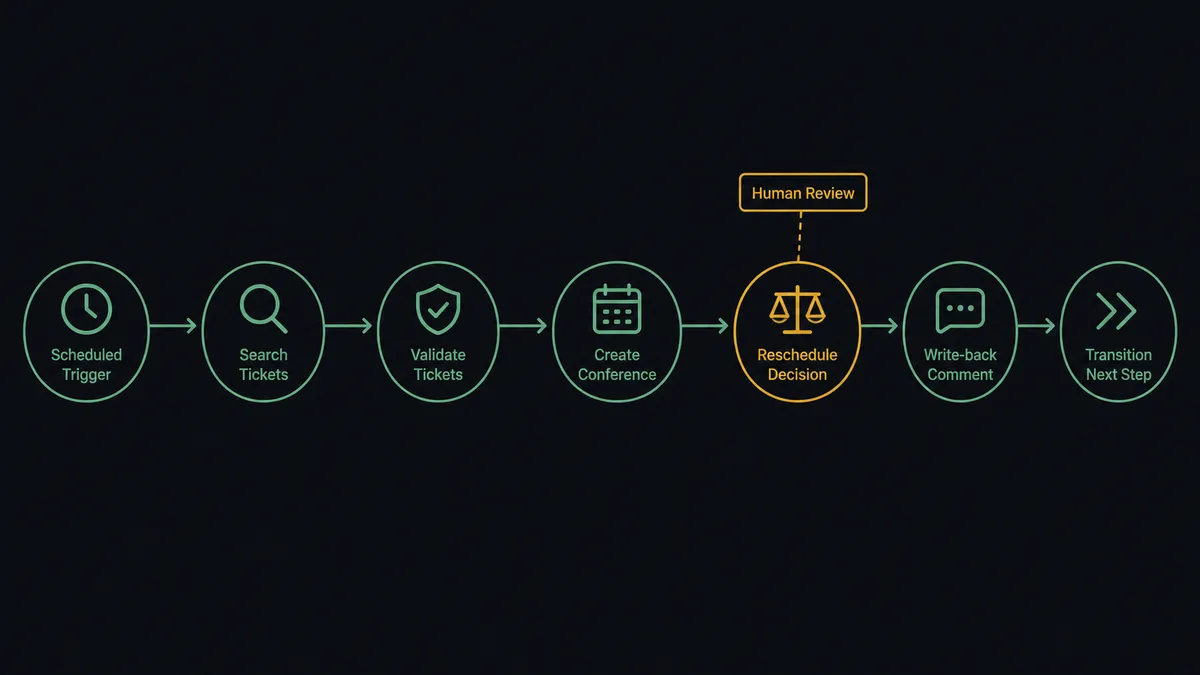
- Trigger: On a schedule, the workflow starts a run and looks for work.
- Read: It calls Search Issues with a JQL query such as project = WEB AND status = Approved, then Get Issue for each match to pull summary, description, date, and duration.
- Route: It calls List Channels in BigMarker to resolve the webinar hub the event belongs to.
- Create: It calls Create Conference with the mapped title, date, duration, and abstract. The registration page is now live.
- Report back: It calls Add Comment on the Jira issue with the conference and registration links, so the ticket is the single source of truth.
- Advance: It calls Transition Issue to move the ticket from Approved to Scheduled, and Assign Issue if a producer owns the next step.
- Watch: On later runs, it compares ticket fields against Get Conference and reads List Registrants to know whether a change now affects real signups.
That is the “just connect them” answer. Approved tickets become live events, links flow back automatically, and the board reflects reality.
Can an AI agent run it? (and why a human stays in the loop)
Yes, and the agent version is what makes this safe to leave running. The agent holds the connector actions as tools: Search Issues, Get Issue, Create Conference, Update Conference, List Registrants, Add Comment, Transition Issue. It reads each ticket the way a webinar producer would. A ticket with a complete title, date, duration, and presenter goes straight to Create Conference. A ticket missing its duration, or scheduled inside a public holiday week, or colliding with another event in the same channel gets held and questioned rather than pushed live.
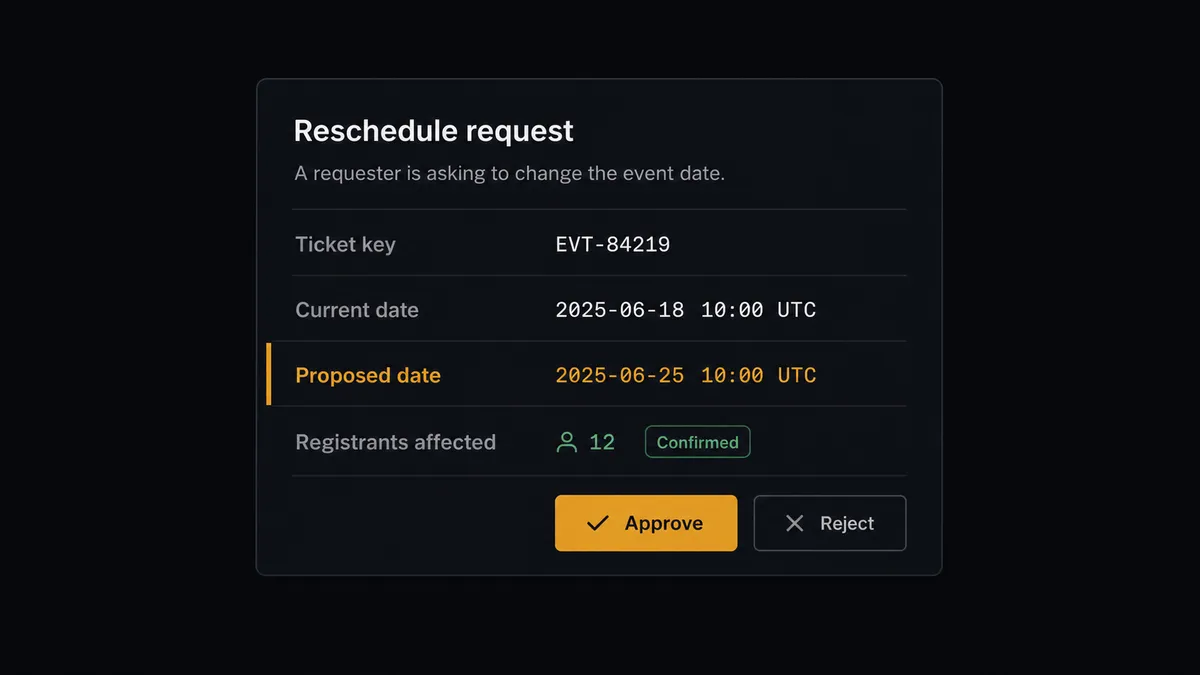
The consequential step is Update Conference on an event that already has registrants. Creating an empty event is cheap to undo. Changing the date on one that people signed up for reaches every registrant, and their trust does not roll back. So before that call, the agent gathers what a human needs: the ticket key, the old date, the proposed date, and the current registration state from List Registrants. Then it invokes a human-in-loop flow it holds as a callable tool. The workflow pauses and posts to your events channel: “Ticket WEB-214 moved its date. The conference has active registrants. Old: [date]. Proposed: [date]. Approve the reschedule?” A named approver decides. Only then does the agent call Update Conference and document the change with Add Comment, with the approver and timestamp in the audit trail.
This is the pattern our prospects call a digital andon cord: like Toyota’s production line pull cord, the workflow stops the line the moment it hits uncertainty, and it is a person who sets it moving again.
FlowRunner vs Zapier
Most teams wiring Jira to a webinar platform look at Zapier first, and Zapier has earned that. Its connector library is enormous, its editor is genuinely easy for a first-time builder, and its template gallery gets a simple “new ticket creates an event” Zap running in minutes. For a one-way push with no judgment involved, it works.
The difference shows up when the flow has to reason and when a change carries consequence. FlowRunner runs this pair as an AI agent with native human-in-the-loop, so the registrant-aware pause before Update Conference is a platform primitive, not a workaround.
| What matters for this pair | FlowRunner | Zapier |
|---|---|---|
| Human-in-the-loop before Update Conference on a live event | Native. The agent checks List Registrants and pauses for a named approver as a built-in tool call | Approval steps exist but are add-on paths you assemble, not an agent’s own decision |
| Who runs the flow | An AI agent reads tickets, validates completeness, picks actions as tools | A predefined step sequence you configure per Zap |
| Users included | Unlimited users on every tier | Priced by task volume; seats vary by plan |
| Bring your own AI keys | Yes, BYOK | AI features tied to Zapier’s own AI offering |
| Self-hosted option | Yes, cloud-hosted or self-hosted | Cloud only |
| Pricing model | Transparent workflow-based tiers with clear execution limits | Per-task pricing that gets hard to predict as webinar volume grows |
If you need a simple one-way push from a ticket to an event and nothing more, Zapier will do it well. If your webinar program needs validation before events go live, a watchful sync in both directions, and a named human in front of every reschedule, this pairing is the better fit.
Before and after
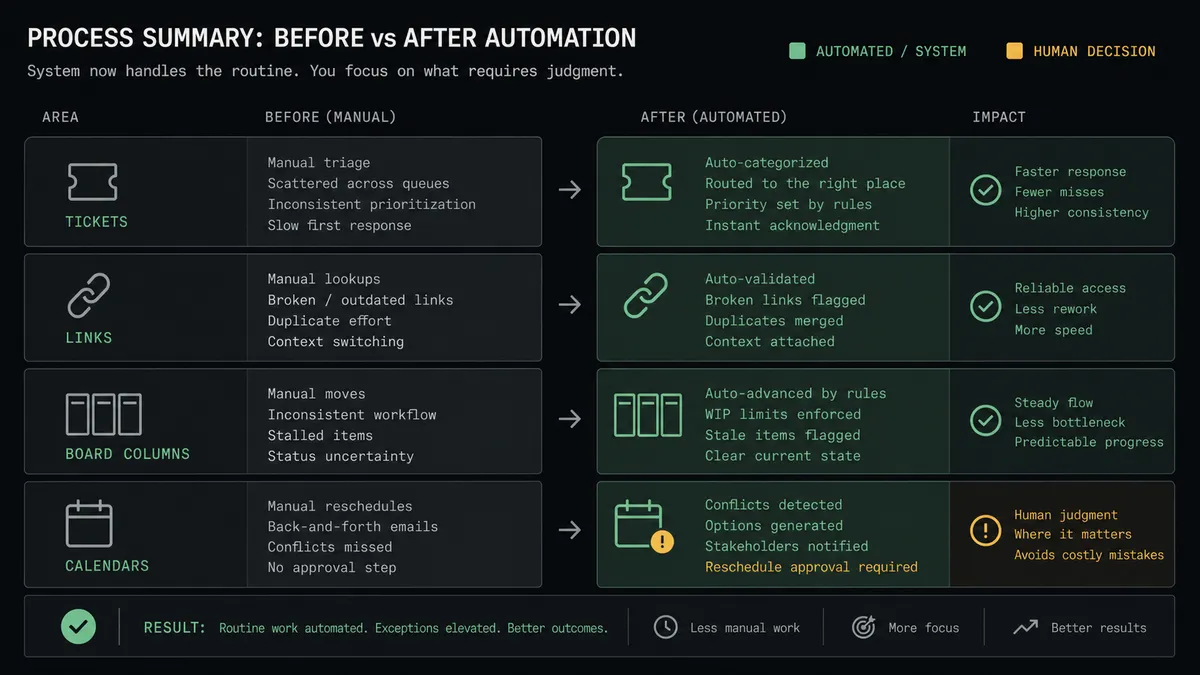
| Category | Before | After |
|---|---|---|
| Event creation | A producer retypes ticket fields into BigMarker and hopes nothing drifts | Create Conference builds the event from the issue fields, byte for byte |
| Link handoff | Registration URLs travel by DM and get lost | Add Comment writes the link onto the ticket the moment the event exists |
| Board accuracy | Tickets sit in Approved long after the event is live | Transition Issue moves every scheduled ticket forward automatically |
| Reschedules | Date changes happen in one system and surprise the other | The agent detects the change, checks List Registrants, and routes it to a named approver |
| Accountability | Nobody can say who moved the webinar or why | Every Update Conference carries an approver, a timestamp, and a comment trail |
What you can build
Approved ticket to live event. Search Issues finds tickets that reached Approved, Get Issue pulls the details, Create Conference builds the event, and Add Comment plus Transition Issue close the loop on the board. No retyping, no drift.
Registrant-aware reschedule gate. When a scheduled ticket’s date changes, the agent reads List Registrants. Empty event: it updates quietly. Registered event: it pauses, packages the impact, and waits for a named approver before Update Conference runs.
Speaker registration from the ticket. The agent reads presenter names from the issue and calls Register Person so speakers and internal staff hold seats in the conference from day one, with Update Registration handling corrections.
Pre-event readiness check. Ahead of each event, the agent calls Get Conference and List Registrants, compares against the ticket’s acceptance criteria, and posts a readiness summary to the producer, filing follow-up work with Create Issue when something is missing.
Post-event wrap-up. After the event date passes, the agent pulls final registration data with List Registrants, attaches the summary to the ticket with Add Comment and Add Attachment, and calls Transition Issue to move it to Done, so the program’s history lives where the work was planned.
Getting started
Start on the free plan: 100 executions a month, every integration included, no credit card required, plus 14 days of Professional for new accounts. Both connectors are available on every tier, and every tier includes unlimited users and unlimited workflows, so producers, marketers, and the Jira admin all work in the same workspace.
Explore the integration details:
- Jira Issues integration (13 actions covering issues, transitions, comments, and JQL search)
- BigMarker integration (8 actions covering conferences, registrants, and channels)
Start building free at flowrunner.ai or book a demo to see a live Jira Issues to BigMarker workflow, reschedule approval and all.
Frequently asked questions
Is it free to connect Jira Issues and BigMarker on FlowRunner?
You can build and run the connection on FlowRunner's free plan, which includes 100 executions a month and every integration with no credit card required, and new accounts also get 14 days of Professional. Both connectors are available on every FlowRunner tier, and every tier includes unlimited users and unlimited workflows.
Can I self-host the Jira Issues to BigMarker workflow?
Yes. FlowRunner offers a cloud-hosted option and a self-hosted option, so the connection can run inside your own environment.
Does the AI agent need my own OpenAI or Claude key?
FlowRunner uses a bring-your-own-keys model, so you connect the AI provider key you already have. You are not locked to one model.
What happens when the agent is unsure whether a webinar ticket is ready to become a live event?
The agent stops and invokes a human-in-loop step. It posts the ticket key, the proposed title, date, and duration to your team channel and waits for an approve or reject decision before it calls Create Conference. Nothing goes live on a guess.
Which actions does this connection use, since neither service has a trigger?
The workflow runs on a schedule. It finds approved webinar tickets with Search Issues using JQL, reads details with Get Issue, creates the event with Create Conference in BigMarker, writes the registration link back with Add Comment, and moves the ticket forward with Transition Issue.
Can the workflow reschedule a webinar that already has registrants?
Only with sign-off. The agent reads registration state with List Registrants, and if anyone has signed up it pauses before Update Conference, packaging the old date, the new date, and the registrant impact for a named approver. Rescheduling an empty event runs without the gate.