How to Connect NetSuite with Base64.ai (With or Without an AI Agent)
Turn scanned customer purchase orders into NetSuite sales orders with Base64.ai extraction, run by an AI agent that matches customers and items automatically and pauses for a named approver before Create Sales Order books the order.
How do you connect NetSuite to Base64.ai?
You connect NetSuite to Base64.ai with a scheduled workflow that runs each inbound customer purchase order through Scan Document, which extracts the buyer, PO number, line items, quantities, and totals with a confidence score on every field, then matches those values against real NetSuite records with List Customers, List Items, and Run SuiteQL Query before Create Sales Order books the result. Neither service has a trigger in FlowRunner, so a schedule sweeps for new documents at the cadence you set. FlowRunner is a visual AI-agent orchestration platform where automations run autonomously and pause for human judgment on the steps that carry real consequence. Run as an AI agent, the same connection does the matching and reconciliation on its own, and stops for a named approver before any order actually books in the ERP.
The problem it solves
Plenty of B2B revenue still arrives as a PDF. A customer emails a purchase order, and someone on the order desk opens it, finds the customer in NetSuite, translates the customer’s part numbers into your item codes, checks the pricing, and keys the sales order line by line. On a good day that is minutes per order. On a busy day the queue backs up, orders book late, and the warehouse finds out about a rush order after the cutoff.
The exceptions do the real damage. The customer’s PO uses last year’s pricing and nobody catches it until the invoice dispute. A part number maps to the wrong SKU and the wrong product ships, which costs freight twice and goodwill once. A duplicate PO books twice because two people worked the same email. Order entry errors are not clerical trivia in an ERP; every one of them propagates into fulfillment, invoicing, and revenue reporting, and unwinding a bad sales order costs far more than keying it did.
How it works: the connection
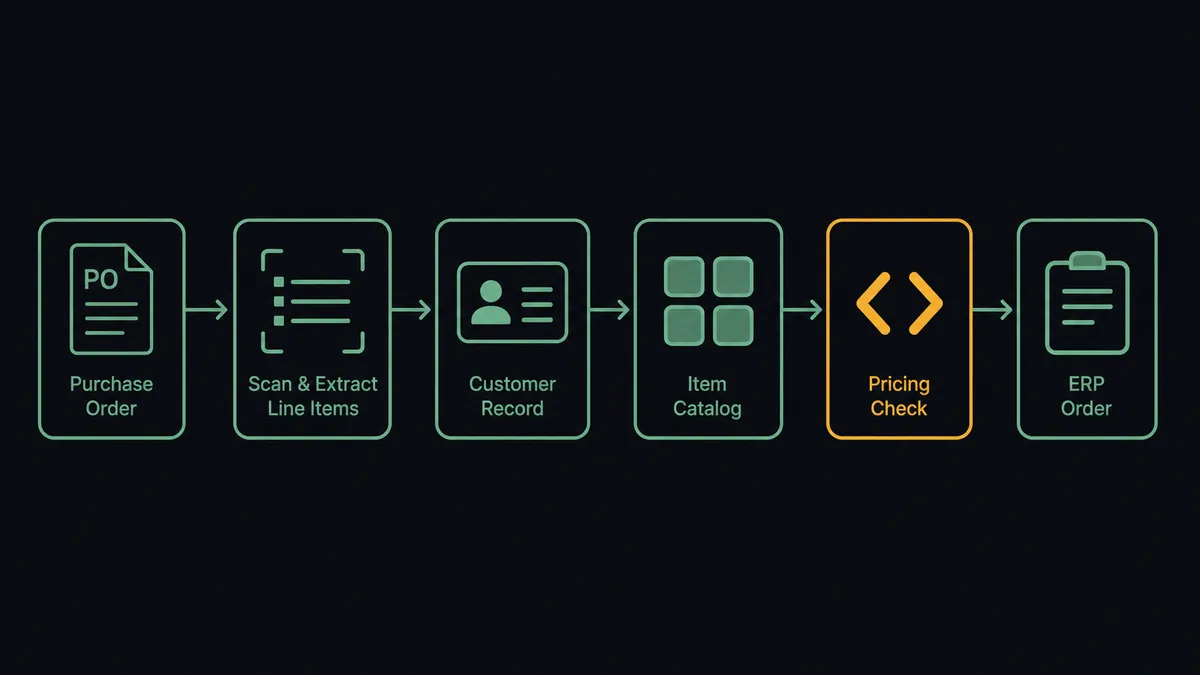
The connection reads inbound PO documents on a schedule and writes matched orders to NetSuite. Here is the plain version, grounded in the real connector actions.
- Trigger: On a schedule, the workflow picks up newly arrived purchase order documents, or pulls fresh stored extractions with Get Flow Results.
- Scan: It calls Scan Document, which recognizes the document automatically and returns the buyer, PO number, line items, quantities, and totals with per-field confidence scores. Large multi-page files go through Start Async Scan and Get Async Scan Result.
- Match the customer: It calls List Customers to find the buyer, then Get Customer for the full record and terms.
- Resolve the lines: It calls List Items and Get Item to map each extracted part to a real NetSuite item.
- Check the commercials: It calls Run SuiteQL Query to compare extracted prices against the customer’s pricing and to check for an open order with the same PO number.
- Book: It calls Create Sales Order with the matched customer, items, quantities, and prices, carrying the PO number in the order.
- Verify: It calls Get Sales Order to confirm the booked order matches what was approved.
That is the “just connect them” answer. A PDF purchase order becomes a matched, priced NetSuite sales order without anyone retyping a line.
Can an AI agent run it? (and why a human stays in the loop)
Yes, and the agent is the difference between transcription and reconciliation. A plain OCR pipeline books whatever it reads. The agent holds the toolbox, Scan Document, List Customers, Get Customer, List Items, Get Item, Run SuiteQL Query, Create Sales Order, Detect Signatures, and it interrogates each extraction the way a sharp order-desk veteran would: does this buyer resolve to exactly one customer, does every part map to a live item, do the prices agree with this customer’s pricing, has this PO number been seen before, and is the document signed by someone authorized?
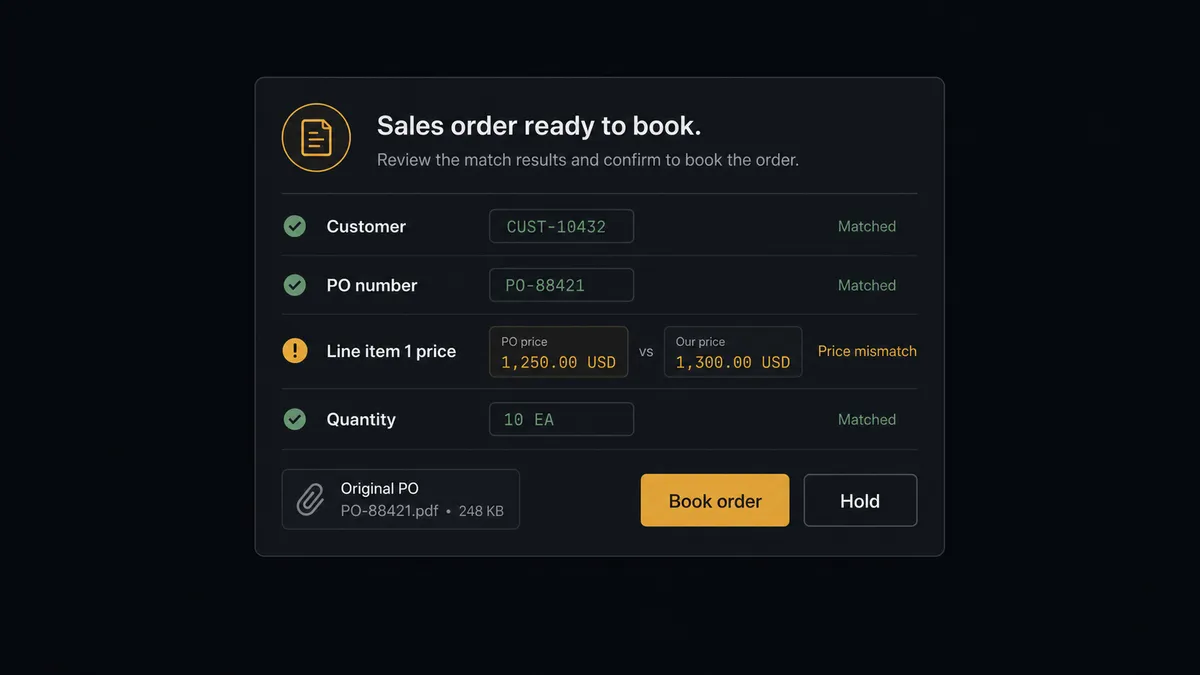
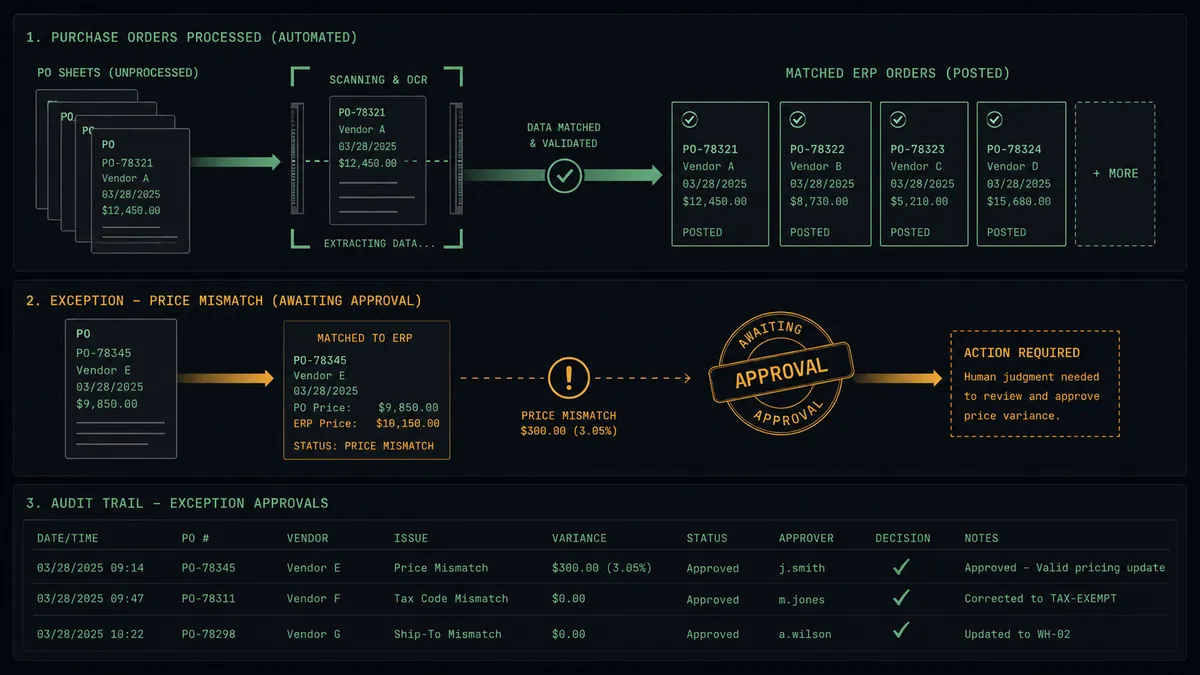
The consequential step is Create Sales Order, because a booked order sets fulfillment, invoicing, and revenue in motion. Clean, fully matched POs are staged automatically. Anything less stops. The agent invokes a human-in-loop flow it holds as a callable tool, and the workflow pauses and posts to the order desk channel: “PO [number] from [customer]: all lines matched, but the extracted unit price on line two disagrees with this customer’s pricing in NetSuite. Original document attached. Book at PO price, book at list, or hold?” A named approver decides with both numbers in front of them. Only then does Create Sales Order run, and the extraction, the decision, and the timestamp land in the audit trail. Even the clean orders can be gated the same way while you build trust in the flow.
That is the digital andon cord on the order desk: like Toyota’s andon cord, the workflow stops the line the moment it hits uncertainty. Orders move at machine speed; commitments still get a human signature.
FlowRunner vs Celigo
Celigo grew up in the NetSuite ecosystem, and it shows: its integrator.io platform and prebuilt NetSuite integration apps are mature, and teams standardizing NetSuite-to-SaaS sync flows get real value from those templates. If your problem is keeping NetSuite in step with a stack of standard SaaS endpoints, Celigo is a serious option and NetSuite shops know it.
This pair is a different problem. It is not record sync; it is judgment applied to messy paper before a record exists. The work happens in the reconciliation, and the safety happens at the approval gate.
| What matters for this pair | FlowRunner | Celigo |
|---|---|---|
| Human-in-the-loop before Create Sales Order | Native. The agent invokes the approval flow as a callable tool with the discrepancies attached | Error and exception management for flows, not agent-invoked order approval |
| Who runs the flow | An AI agent reconciles the extraction against live ERP records and picks actions as tools | Prebuilt and configured integration flows between endpoints |
| Users included | Unlimited users on every tier | Priced by edition and endpoints, oriented to enterprise contracts |
| Bring your own AI keys | Yes, BYOK. Connect the AI provider key you already have | AI capabilities are Celigo’s own platform features |
| Self-hosted option | Yes, cloud-hosted or self-hosted | Cloud iPaaS |
| Pricing model | Transparent workflow-based tiers | Edition-based enterprise pricing, scoped in a sales conversation |
If you are standardizing a dozen NetSuite sync flows and have the budget for an enterprise iPaaS, Celigo fits that job. If the job is turning inbound purchase order documents into correctly booked sales orders with a human approving every commitment, that is where FlowRunner is the better fit.
Before and after
| Category | Before | After |
|---|---|---|
| Order entry | The order desk retypes each PO into NetSuite line by line | Scan Document extracts the lines and the agent matches them to real records |
| Pricing errors | Stale PO pricing surfaces later as invoice disputes | Run SuiteQL Query compares prices before anything books, and mismatches stop |
| Wrong-item shipments | A misread part number becomes the wrong product on a truck | Every line resolves against List Items, and unknown SKUs go to a person |
| Duplicate orders | Two people work the same emailed PO and it books twice | The agent checks for the PO number in open orders before staging |
| Approval record | Booking decisions live in nobody’s memory | Every order carries the source extraction, the approver, and a timestamp |
What you can build
PO-to-sales-order desk. The core flow: Scan Document reads the PO, the agent matches buyer and lines with List Customers and List Items, verifies pricing through Run SuiteQL Query, and stages Create Sales Order for a named approval. The desk approves orders instead of typing them.
New-customer intake gate. When the buyer on a PO matches nothing in List Customers, the agent drafts the record for Create Customer, routes it through the human gate with the source document, and only then books the order against the newly approved customer.
Signed-order enforcement. Detect Signatures runs on every PO, and Verify Signature (Match) compares against a specimen for accounts that require authorized signers. Unsigned paper never becomes a booked order without an explicit human override.
Duplicate PO catcher. Before staging, the agent runs Run SuiteQL Query for open sales orders carrying the same customer and PO number, and flags matches for a person to merge or reject instead of letting the order book twice.
Invoice-side reconciliation. The same extraction machinery reads customer remittance documents, matches them against List Invoices, and stages Create Payment for approval, so the cash application queue shrinks the same way the order queue did.
Getting started
Start on the free plan: 100 executions a month, every integration included, no credit card required, plus 14 days of Professional for new accounts. Both connectors are available on every tier, and every tier includes unlimited users and unlimited workflows.
Explore the integration details:
- NetSuite integration (27 actions covering customers, orders, invoices, and SuiteQL)
- Base64.ai integration (11 actions covering document scanning, faces, and signatures)
Start building free at flowrunner.ai or book a demo to see a live NetSuite to Base64.ai workflow, order approval gate and all.
Frequently asked questions
Is it free to connect NetSuite and Base64.ai on FlowRunner?
You can build and run the connection on FlowRunner's free plan, which includes 100 executions a month and every integration with no credit card required, and new accounts also get 14 days of Professional. Both connectors are available on every FlowRunner tier, and every tier includes unlimited users and unlimited workflows.
Can I self-host the NetSuite to Base64.ai workflow?
Yes. FlowRunner offers a cloud-hosted option and a self-hosted option, so the connection can run inside your own environment.
Does the AI agent need my own OpenAI or Claude key?
FlowRunner uses a bring-your-own-keys model, so you connect the AI provider key you already have. You are not locked to one model.
What happens when the PO price does not match NetSuite pricing?
The order does not book. The agent runs the comparison through Run SuiteQL Query, and when the extracted price disagrees with the customer's pricing in NetSuite, it posts both numbers side by side with the original document to your channel and waits. Create Sales Order runs only after a named approver decides which price stands.
Neither NetSuite nor Base64.ai has a trigger in FlowRunner, so what starts the workflow?
A schedule. Each run picks up newly arrived purchase order documents, runs them through Scan Document, and processes the extractions. Teams route inbound PO files from their document drop or mailbox into the workflow, and Get Flow Results can also pull newly stored extractions from a configured Base64.ai flow.
Which actions does the pair use to match the PO against NetSuite?
Scan Document extracts the buyer, PO number, line items, and totals with confidence scores. The agent then matches the buyer with List Customers and Get Customer, resolves each line with List Items and Get Item, checks pricing and open orders with Run SuiteQL Query, and books the result with Create Sales Order after approval.