How to Connect HubSpot with Aircall (With or Without an AI Agent)
Sync Aircall calls and contacts with HubSpot so every call lands on a CRM record, optionally as an AI agent that logs and tags calls automatically and pauses for a human before Delete Contact permanently removes a record during dedupe.
How do you connect HubSpot to Aircall?
You connect HubSpot to Aircall by having a scheduled workflow poll Aircall with List Calls, pull each completed call’s detail with Get Call, and land it in the CRM: Search Contacts finds the caller in HubSpot by phone or email, Update Contact logs the outcome on a known contact, Create Contact builds a record for an unknown caller, and back on the Aircall side, Comment on Call, Add Tags to Call, and Add Link to Call annotate the call with CRM context so the next rep who opens it knows exactly who they are dealing with. FlowRunner is a visual AI-agent orchestration platform where automations run autonomously and pause for human judgment on the steps that carry real consequence. The same connection can run as an AI agent that also reconciles the two contact databases continuously, and pauses for a human before Delete Contact, the one action in this pair that cannot be undone.
The problem it solves
Phone teams live in two systems that drift apart daily. A call comes into Aircall from a number the CRM has never seen, the rep handles it, jots the context in their own notes, and moves on. The call never reaches HubSpot. The next touchpoint, maybe an email sequence, maybe another rep, happens in total ignorance of that conversation. Meanwhile the reverse rot runs too: contacts created in HubSpot never make it into Aircall’s shared contacts, so inbound calls from real prospects show up as bare numbers and get treated like cold calls.
The edges are where it gets expensive. The same person exists three times across the two systems under a mobile number, a work line, and a misspelled name, and their history is scattered across all three. Someone eventually runs a cleanup, deletes the wrong record, and a year of call context evaporates, because Delete Contact in Aircall is permanent. Or nobody runs the cleanup, reporting is built on inflated contact counts, and every “calls per account” metric your ops team publishes is quietly wrong.
How it works: the connection
The connection polls Aircall and writes to both systems. Here is the plain version, grounded in the real connector actions.
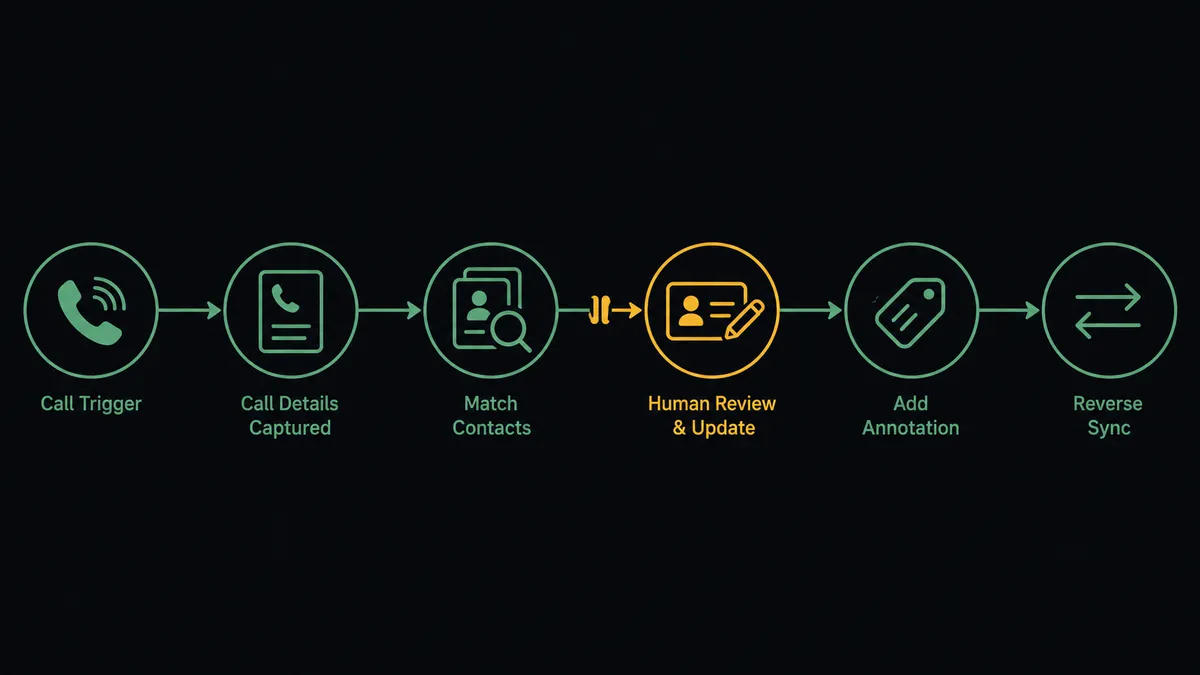
- Trigger: On a schedule, the workflow calls List Calls with a date-range filter and picks up calls completed since the last run.
- Read: It calls Get Call for each one: direction, duration, timestamps, recording link, tags, and the matched contact if Aircall recognized the number.
- Match the caller: It calls Search Contacts in HubSpot to find the person by phone number, falling back to Get Contact By Email when the Aircall contact carries an email.
- Write to the CRM: Known callers get the call outcome via Update Contact; unknown callers become new records via Create Contact, associated to their company with Associate Objects when one matches.
- Annotate the call: It calls Comment on Call with the CRM summary, Add Tags to Call for call category, and Add Link to Call pointing at the HubSpot record.
- Sync the other direction: New HubSpot contacts flow into Aircall via Create Contact, so future inbound calls from them arrive with a name instead of a bare number.
That is the “just connect them” answer. Every call lands on a CRM record, every caller gets recognized, and neither database rots.
Can an AI agent run it? (and why a human stays in the loop)
Yes, and the agent earns its place in the ambiguity that plain field mapping cannot survive. Phone data is messy: the same person calls from two numbers, a shared office line maps to four contacts, a voicemail drop is not a conversation. The agent holds List Calls, Get Call, Search Contacts, Get Contact By Email, Create Contact, Update Contact, Create Deal, Associate Objects, Comment on Call, Add Tags to Call, Add Link to Call, and Delete Contact as tools, and it reasons per call: is this caller the existing contact with a new number, a colleague at the same company, or genuinely new? It writes the interpretation it is confident in and flags the one it is not.
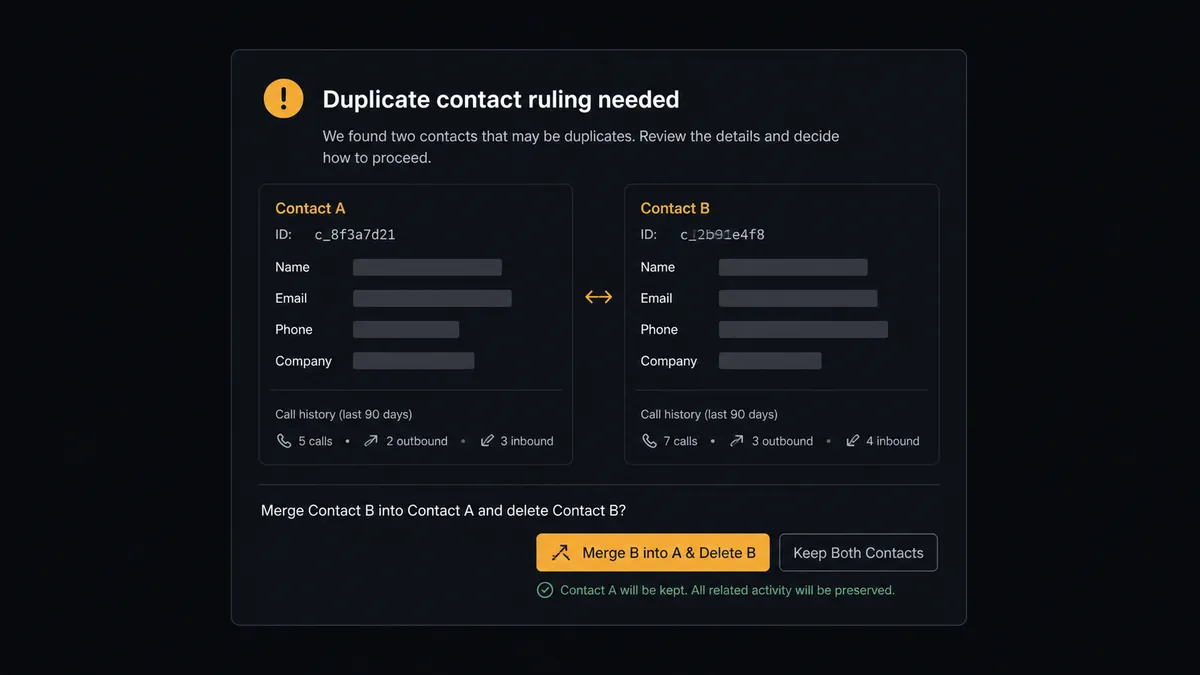
The consequential step is Delete Contact in Aircall. The catalog is explicit about this action: it permanently deletes the contact, and it cannot be undone. Dedupe is exactly where automation loves to do irreversible damage confidently, so the agent never takes that step alone. When it finds two records that look like the same person, it assembles the evidence: both records, their field differences, and each one’s call history. Then it invokes a human-in-loop flow it holds as a callable tool and the workflow pauses. The ops owner sees: “These two Aircall contacts appear to be the same person at [company]. Record A carries [call history], record B carries [call history]. Approve merging into A and deleting B?” Only after a named person approves does the agent update the survivor with Update Contact, carrying every phone and email over, and then call Delete Contact on the duplicate. The ruling, the approver, and the timestamp go to the audit trail.
That is the digital andon cord for your contact data: like Toyota’s line, the workflow stops the line the moment the next action is irreversible, and a person makes the call.
FlowRunner vs Zapier
Zapier is the first tool most teams try for this pair, with cause. Its connector catalog is the largest in the industry, its template gallery almost certainly has an Aircall-to-HubSpot starting point ready to go, and for a linear “call ended, log it on the contact” push, a Zap gets you moving the same afternoon. That speed to first result is real.
The gap opens where this pair actually hurts: the judgment calls and the irreversible step. FlowRunner runs the connection as a reasoning agent with a native human gate, rather than a fixed sequence.
| What matters for this pair | FlowRunner | Zapier |
|---|---|---|
| Human-in-the-loop on Delete Contact | Native. The agent invokes an approval flow as a callable tool before any permanent deletion | Available via added approval steps you insert into a Zap, not an agent’s own decision |
| Who runs the flow | An AI agent interprets each call and caller, picks actions as tools | Predefined step sequence you configure per Zap |
| Users included | Unlimited users on every tier | Priced by task volume; seats vary by plan |
| Bring your own AI keys | Yes, BYOK | AI features tied to Zapier’s own AI offering |
| Self-hosted option | Yes, cloud-hosted or self-hosted | Cloud only |
| Pricing model | Transparent workflow-based tiers; a busy phone team’s call volume will not surprise you | Per-task pricing, and every logged call consumes tasks as volume grows |
If you need a simple one-way call log pushed to the CRM and your contact data is already clean, Zapier will do that well. If you want both databases reconciled continuously, callers interpreted rather than string-matched, and a human ruling on every permanent deletion, this pairing is the better fit.
Before and after
| Category | Before | After |
|---|---|---|
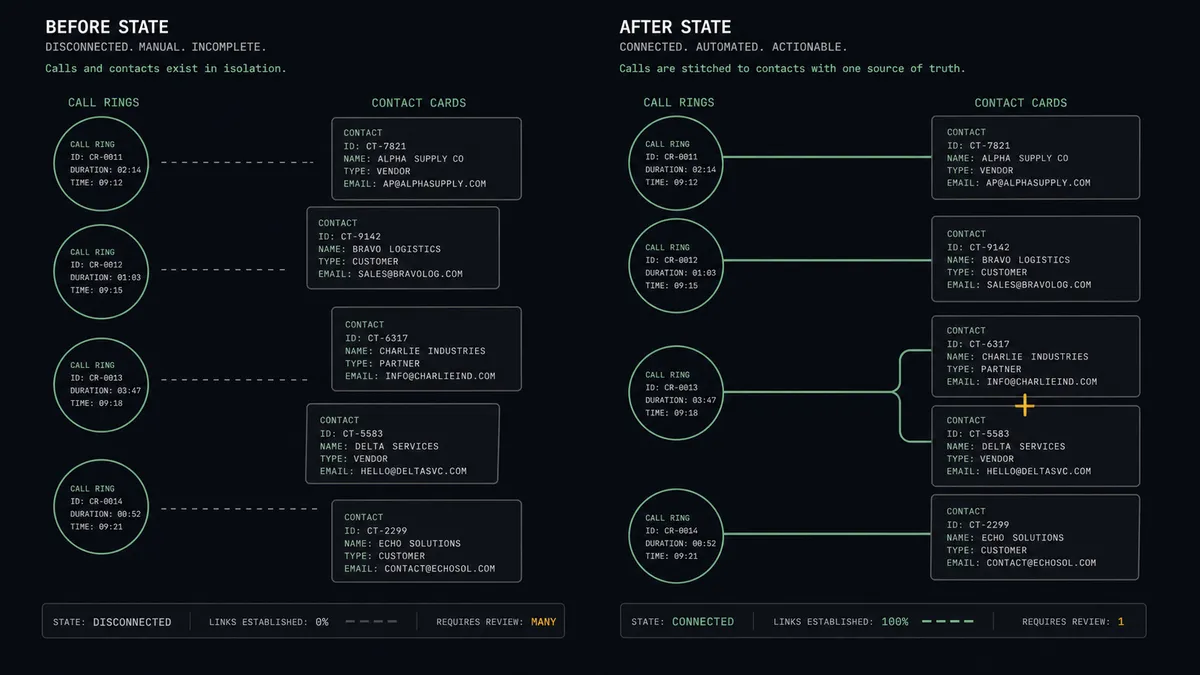
| Call logging | Calls live in Aircall; the CRM hears about the ones reps remember to log | Every completed call lands on a HubSpot contact with direction, duration, and outcome |
| Unknown callers | Bare numbers get treated as cold calls and forgotten | Unknown callers become CRM records automatically, associated to companies where they match |
| Caller recognition | HubSpot contacts are invisible to the phone system | Reverse sync via Create Contact puts names on inbound calls |
| Duplicate contacts | Cleanup is a risky annual project someone dreads | The agent reconciles continuously, and deletions happen only behind a named approval |
| Rep context | The next rep opens a call with zero history | Comment on Call and Add Link to Call put the CRM story inside the call record |
What you can build
Call to CRM record, hands off. List Calls picks up the completed call, the agent reads it with Get Call, matches the caller through Search Contacts, and writes the outcome with Update Contact or Create Contact, annotating the call via Comment on Call and Add Link to Call.
Gated dedupe. The agent continuously compares contacts across both systems, packages suspected duplicates with their call histories, and only runs Update Contact plus Delete Contact after a person approves the merge.
Sales-call to pipeline. When a logged conversation reads as qualified interest, the agent stages Create Deal in HubSpot, wires it to the contact and company with Associate Objects, and tags the source call with Add Tags to Call so pipeline traces back to the conversation that started it.
Caller-ID enrichment. New HubSpot contacts sync into Aircall through Create Contact with labeled numbers and emails, so the phone team greets prospects by name instead of answering blind.
Missed-call rescue. The agent watches List Calls for missed inbound calls from contacts with open deals, flags them to the deal owner with the full CRM context, and archives handled ones with Archive Call so the active feed stays meaningful.
Common questions
Is it free to connect HubSpot and Aircall on FlowRunner? You can build and run the connection on FlowRunner’s free plan, which includes 100 executions a month and every integration with no credit card required, and new accounts also get 14 days of Professional. Both connectors are available on every FlowRunner tier, and every tier includes unlimited users and unlimited workflows.
Can I self-host the HubSpot to Aircall workflow? Yes. FlowRunner offers a cloud-hosted option and a self-hosted option, so the connection can run inside your own environment.
Does the AI agent need my own OpenAI or Claude key? FlowRunner uses a bring-your-own-keys model, so you connect the AI provider key you already have. You are not locked to one model.
What happens when the agent is unsure whether two contacts are the same person? It never deletes on a guess. The agent posts both records side by side, with the call history and field differences, and waits for a person to rule merge or keep separate. Delete Contact in Aircall is permanent, so it only ever runs behind a named approval.
Which events start the HubSpot to Aircall workflow? Neither connector publishes a catalog trigger, so the workflow runs on a schedule. It polls Aircall with List Calls using date-range filters to pick up calls completed since the last run, and pulls each one’s full detail with Get Call.
Can the workflow create deals from sales calls? Yes. When a logged call reads as a qualified sales conversation, the agent stages a deal with Create Deal in HubSpot, associates it to the contact with Associate Objects, and links the call record to it with Add Link to Call in Aircall.
Getting started
Start on the free plan: 100 executions a month, every integration included, no credit card required, plus 14 days of Professional for new accounts. Both connectors are available on every tier, and every tier includes unlimited users and unlimited workflows.
Explore the integration details:
- HubSpot integration (21 actions covering contacts, companies, deals, and associations)
- Aircall integration (33 actions covering calls, contacts, tags, teams, and webhooks)
Start building free at flowrunner.ai or book a demo to see a live HubSpot to Aircall workflow, dedupe approval and all.
Frequently asked questions
Is it free to connect HubSpot and Aircall on FlowRunner?
You can build and run the connection on FlowRunner's free plan, which includes 100 executions a month and every integration with no credit card required, and new accounts also get 14 days of Professional. Both connectors are available on every FlowRunner tier, and every tier includes unlimited users and unlimited workflows.
Can I self-host the HubSpot to Aircall workflow?
Yes. FlowRunner offers a cloud-hosted option and a self-hosted option, so the connection can run inside your own environment.
Does the AI agent need my own OpenAI or Claude key?
FlowRunner uses a bring-your-own-keys model, so you connect the AI provider key you already have. You are not locked to one model.
What happens when the agent is unsure whether two contacts are the same person?
It never deletes on a guess. The agent posts both records side by side, with the call history and field differences, and waits for a person to rule merge or keep separate. Delete Contact in Aircall is permanent, so it only ever runs behind a named approval.
Which events start the HubSpot to Aircall workflow?
Neither connector publishes a catalog trigger, so the workflow runs on a schedule. It polls Aircall with List Calls using date-range filters to pick up calls completed since the last run, and pulls each one's full detail with Get Call.
Can the workflow create deals from sales calls?
Yes. When a logged call reads as a qualified sales conversation, the agent stages a deal with Create Deal in HubSpot, associates it to the contact with Associate Objects, and links the call record to it with Add Link to Call in Aircall.