How to Connect Google Forms with Aircall (With or Without an AI Agent)
Turn Google Forms callback requests into a staged, routed Aircall queue, optionally as an AI agent that triages every submission and pauses for a human before Update Contact overwrites an existing contact's phone and email set.
How do you connect Google Forms to Aircall?
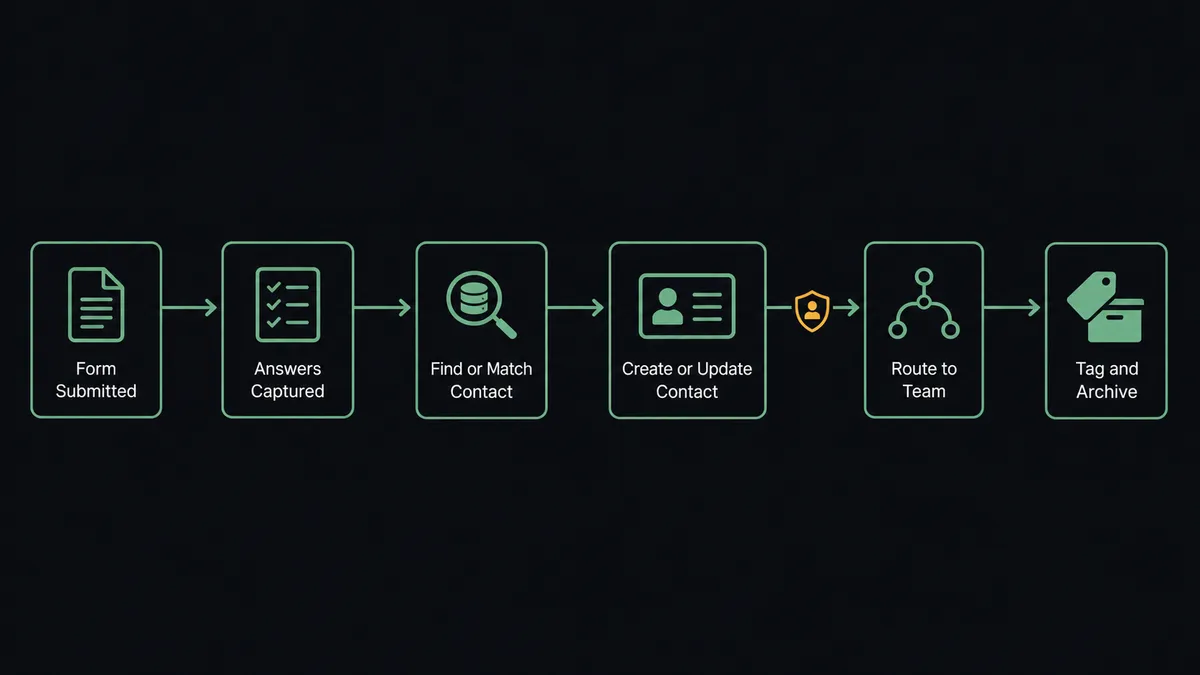
You connect Google Forms to Aircall by having a scheduled workflow poll your callback-request form with Get Form Responses List, pull each submission’s answers with Get Form Response by ID, and stage the caller in your phone system: List Contacts checks whether the requester already exists, Create Contact stages new requesters with labeled phone numbers so the callback dials a named person, and List Teams and List Users resolve which group owns the conversation. After the call, Add Tags to Call, Comment on Call, and Archive Call close the loop. FlowRunner is a visual AI-agent orchestration platform where automations run autonomously and pause for human judgment on the steps that carry real consequence. The same connection can run as an AI agent that triages every request by what it actually says, and pauses for a human before Update Contact overwrites an existing contact, because that action replaces the entire phone and email set on the record.
The problem it solves
The “request a callback” form is where good intentions go to wait. Submissions land in a spreadsheet, and someone on the support or sales team is supposed to check it between calls. In practice the sheet gets checked in bursts: a morning sweep, then silence, then a guilty afternoon scroll. Requesters who asked for a call at a specific time get dialed hours later or the next day. Nobody transcribes the form context into the phone system, so the person calling back opens with “you requested a call?” and makes the customer repeat everything they already typed.
The edge cases do the lasting damage. A furious customer fills out the form to demand a manager and gets the same cheerful queue treatment as a demo request. A requester who already exists in Aircall submits a new mobile number, someone pastes it over the record, and the office line that three months of call history hangs on disappears, because contact updates in Aircall replace the whole number set. And when two people work the sheet at once, the same requester gets two callbacks in an hour, which reads as chaos, not attentiveness.
How it works: the connection
The connection polls Google Forms and stages work in Aircall. Here is the plain version, grounded in the real connector actions.
- Trigger: On a schedule, the workflow calls Get Form Responses List and picks up submissions received since the last run.
- Read: It calls Get Form Response by ID for each submission’s answers, using Get Form Details to interpret the question structure when needed.
- Match the requester: It calls List Contacts, filtered by creation window, and Get Contact to check whether this person already exists in Aircall by number.
- Stage the contact: New requesters get a record via Create Contact, with the phone answer stored as a labeled number so the callback shows a name, not digits.
- Route the callback: It calls List Teams and List Users to resolve the owning group from the form’s topic answer, and stages the request in that team’s queue.
- Close the loop: After the callback, the workflow finds it via List Calls, applies the topic tag with Add Tags to Call, writes the form context with Comment on Call, and files it with Archive Call.
That is the “just connect them” answer. Every submission becomes a named, routed callback with its context attached, minutes after the requester hits submit.
Can an AI agent run it? (and why a human stays in the loop)
Yes, and the agent’s value is that it reads the form the way a good dispatcher would, not the way a field mapper does. It holds Get Form Responses List, Get Form Response by ID, List Contacts, Get Contact, Create Contact, Update Contact, List Teams, List Users, List Calls, Comment on Call, Add Tags to Call, and Archive Call as tools. A routine demo request flows straight to the sales team’s queue. A message whose free-text answer reads as a complaint or cancellation risk gets pulled aside, summarized, and routed to a manager to choose the owner before anyone dials, because the wrong voice on that callback makes it worse. A submission at an odd hour gets staged for the right team’s working window instead of dropping into a dead queue.
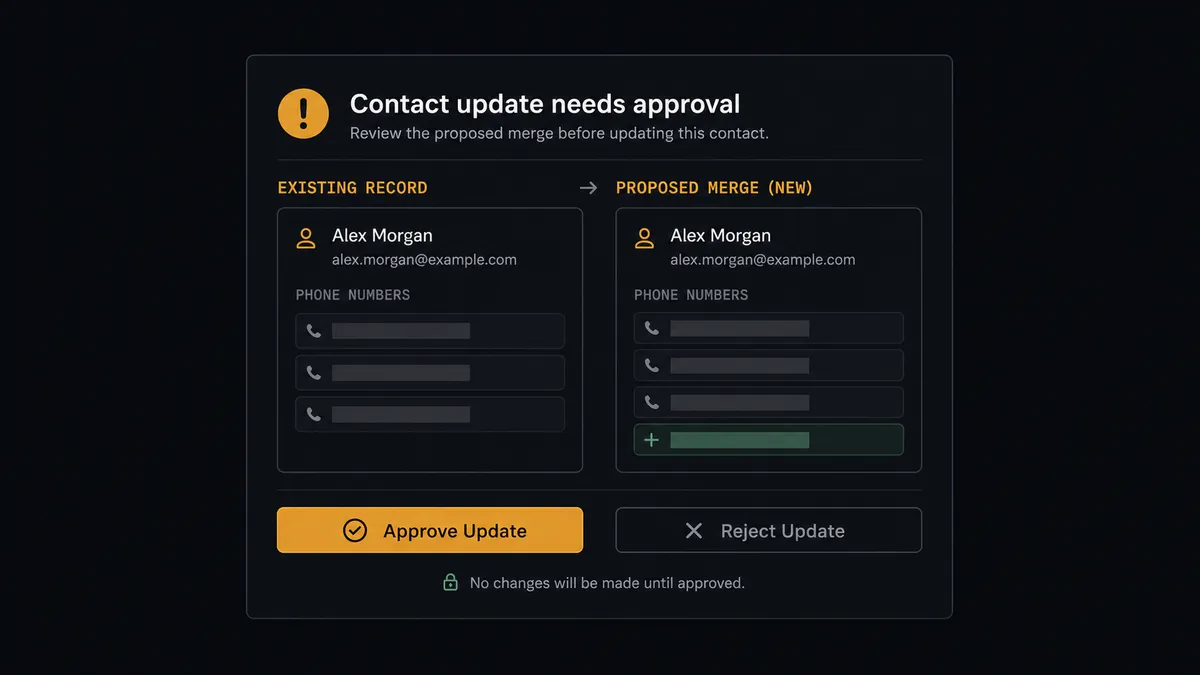
The consequential step in this pair is quieter than a payment or a deletion, and that is exactly why it needs a gate: Update Contact. The Aircall catalog is explicit that supplying phone numbers or emails on an update replaces the entire existing set for that contact. A returning requester with a new mobile number is one careless write away from erasing the office line that months of call history and future routing depend on. So the agent never overwrites on its own. It builds the merged version it believes is right, then invokes a human-in-loop flow it holds as a callable tool and pauses. The queue owner sees: “Form submission from [name] matches existing contact [name] at [company]. Submitted number is new. Proposed merged record keeps [existing numbers] and adds the new one. Approve the update?” Only after a named person approves does Update Contact run, with the full set intact, and the ruling is written to the audit trail.
That is the digital andon cord at dispatcher scale: like Toyota’s line, the workflow stops the line wherever a write would destroy information or a callback would carry real relationship risk, and a person makes the call.
FlowRunner vs Zapier
Zapier’s strengths apply squarely to this pair. It has the largest connector catalog in the market, Google Forms is one of its most-used integrations, and its template gallery will get a “form submitted, create a contact” Zap running in minutes. For a low-volume form feeding a small team, that simplicity is genuinely attractive.
The separation shows when the form’s content should change what happens, and when a write can destroy data.
| What matters for this pair | FlowRunner | Zapier |
|---|---|---|
| Human-in-the-loop on Update Contact | Native. The agent invokes an approval flow as a callable tool before any overwrite replaces a contact’s numbers | Available via added approval steps you insert into a Zap, not an agent’s own decision |
| Who runs the flow | An AI agent reads each submission’s text and routes on meaning | Predefined step sequence you configure per Zap |
| Users included | Unlimited users on every tier | Priced by task volume; seats vary by plan |
| Bring your own AI keys | Yes, BYOK | AI features tied to Zapier’s own AI offering |
| Self-hosted option | Yes, cloud-hosted or self-hosted | Cloud only |
| Pricing model | Transparent workflow-based tiers with clear execution limits | Per-task pricing, and every submission, lookup, and update step consumes tasks |
If your form feeds one team and every submission gets identical treatment, Zapier handles that cleanly. If submissions deserve triage, complaints deserve a human owner decision, and no contact’s reach information should ever be silently overwritten, this pairing is the better fit.
Before and after
| Category | Before | After |
|---|---|---|
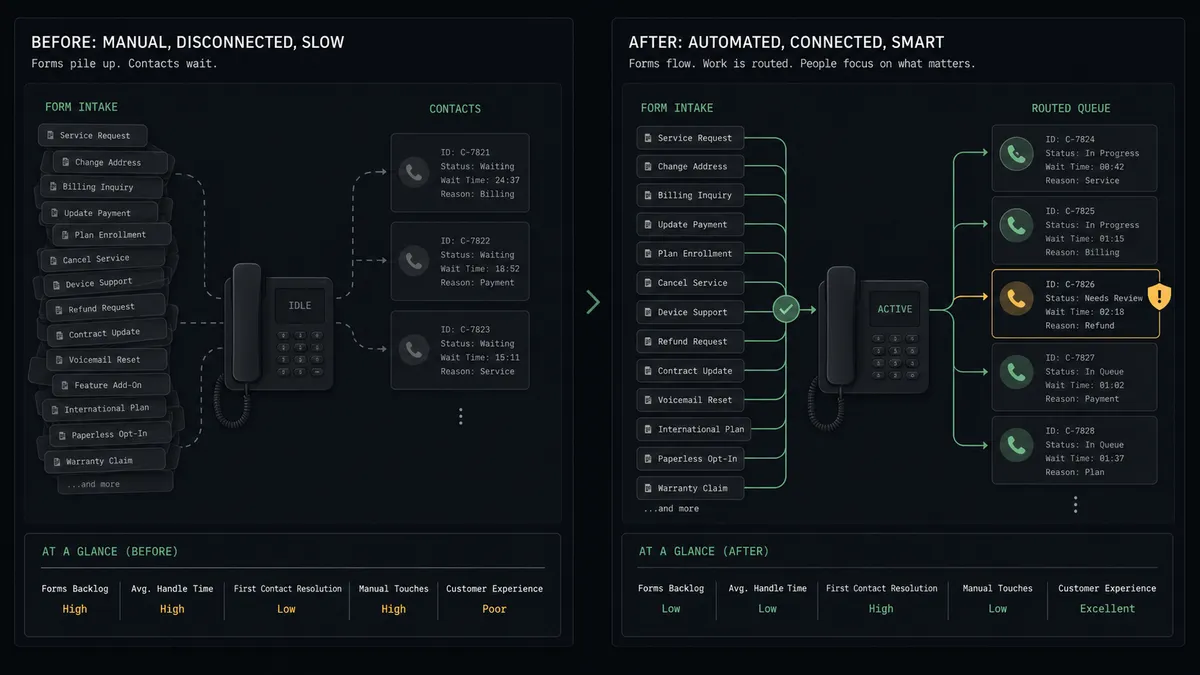
| Response time | Requests wait in a spreadsheet until someone’s guilty afternoon scroll | Requests are staged as named, routed callbacks within minutes of submission |
| Caller context | The rep opens with “you requested a call?” and makes the customer repeat everything | The form’s answers ride into the call via Comment on Call before anyone dials |
| Routing | Every request gets the same queue regardless of what it says | The agent routes on meaning, and complaints reach a manager before anyone dials |
| Contact integrity | New numbers get pasted over records, erasing lines that call history depends on | Update Contact runs only after a person approves the full merged record |
| Double handling | Two people work the sheet and the same requester gets two callbacks | Each submission is processed exactly once and archived with Archive Call when done |
What you can build
Callback request to routed queue, hands off. Get Form Responses List picks up the submission, the agent reads it with Get Form Response by ID, checks List Contacts, stages the requester via Create Contact, and routes through List Teams to the owning group.
Complaint triage with a human owner. Submissions whose text reads as anger or churn risk are summarized and routed to a manager who chooses the callback owner before anyone dials, with the full response attached.
Overwrite-proof contact upkeep. Returning requesters with changed details produce a proposed merged record; Update Contact runs only after approval, so no phone or email is ever silently dropped from the set.
Context-rich callbacks. The agent writes the form’s answers onto the completed call with Comment on Call and applies topic tags via Add Tags to Call, so reporting on callback reasons comes free.
Queue hygiene sweep. On a daily schedule the agent reviews List Calls for callback attempts that never connected, re-stages them with their context, and archives completed ones with Archive Call so the active feed only shows real work.
Getting started
Start on the free plan: 100 executions a month, every integration included, no credit card required, plus 14 days of Professional for new accounts. Both connectors are available on every tier, and every tier includes unlimited users and unlimited workflows.
Explore the integration details:
- Google Forms integration (9 actions covering forms, responses, and field management)
- Aircall integration (33 actions covering calls, contacts, tags, teams, and webhooks)
Start building free at flowrunner.ai or book a demo to see a live Google Forms to Aircall workflow, contact-overwrite gate and all.
Frequently asked questions
Is it free to connect Google Forms and Aircall on FlowRunner?
You can build and run the connection on FlowRunner's free plan, which includes 100 executions a month and every integration with no credit card required, and new accounts also get 14 days of Professional. Both connectors are available on every FlowRunner tier, and every tier includes unlimited users and unlimited workflows.
Can I self-host the Google Forms to Aircall workflow?
Yes. FlowRunner offers a cloud-hosted option and a self-hosted option, so the connection can run inside your own environment.
Does the AI agent need my own OpenAI or Claude key?
FlowRunner uses a bring-your-own-keys model, so you connect the AI provider key you already have. You are not locked to one model.
What happens when a form submission matches an existing Aircall contact with different details?
The agent stops before writing. Update Contact in Aircall replaces the entire phone and email set on a contact, so the agent posts both versions side by side and waits for a person to approve the merged record. No number gets silently erased.
Which events start the Google Forms to Aircall workflow?
Neither connector publishes a catalog trigger, so the workflow runs on a schedule. It polls the form with Get Form Responses List every few minutes, picks up new submissions, and pulls each one's full answers with Get Form Response by ID.
How do urgent or complaint submissions get handled differently?
The agent reads the free-text answers, not just the checkbox. Submissions that read as complaints or cancellation risk are routed to a human owner decision before any callback is staged, with the full response text attached, while routine requests flow straight into the queue.