How to Connect Google Forms with Bitrix24 (With or Without an AI Agent)
Connect Google Forms responses to Bitrix24 leads, optionally as an AI agent that routes every submission to the right owner and pauses for a human before Delete Lead removes any record, including opt-out requests.
How do you connect Google Forms to Bitrix24?
You connect Google Forms to Bitrix24 with a scheduled workflow, because Google Forms publishes no webhook triggers: at the interval you choose, FlowRunner calls Get Form Responses List to pull new submissions, reads each one with Get Form Response by ID, checks the portal for a match with List Leads, then builds the record with Create Lead, logs the source with Create Activity, and alerts the assigned owner with Send Notification. FlowRunner is a visual AI-agent orchestration platform where automations run autonomously and pause for human judgment on the steps that carry real consequence. When the connection runs as an AI agent, the agent also classifies what came through the door, and it stops for a named human before Delete Lead or Delete Contact removes anything from the portal.
The problem it solves
The form is the easiest intake channel you have, which is exactly why everything arrives through it. Real prospects, yes, but also the same prospect three times under three email addresses, competitors doing research, students, gibberish, and the occasional “please remove my information” request that legally matters. Today a person triages all of it: open the responses sheet, squint at each row, retype the good ones into Bitrix24, guess who should own each lead, and hope the removal requests get forwarded to whoever handles those. Response time is measured in days, and assignment is whoever the triager thought of first.
The failure modes hide in the triage. A hot lead sits in the sheet over a weekend while a competitor answers the same inquiry in an hour. Junk rows get keyed into the CRM anyway because retyping is mindless work, and the pipeline report inflates. Duplicates pile up until someone runs a cleanup and, in the bulk delete, takes out a live lead with an open activity. And the removal request, the one row with a compliance clock on it, gets missed entirely because it looks like every other row in the sheet.
How it works: the connection
The connection reads Google Forms on a schedule and writes to Bitrix24. Here is the plain version, grounded in the real connector actions.
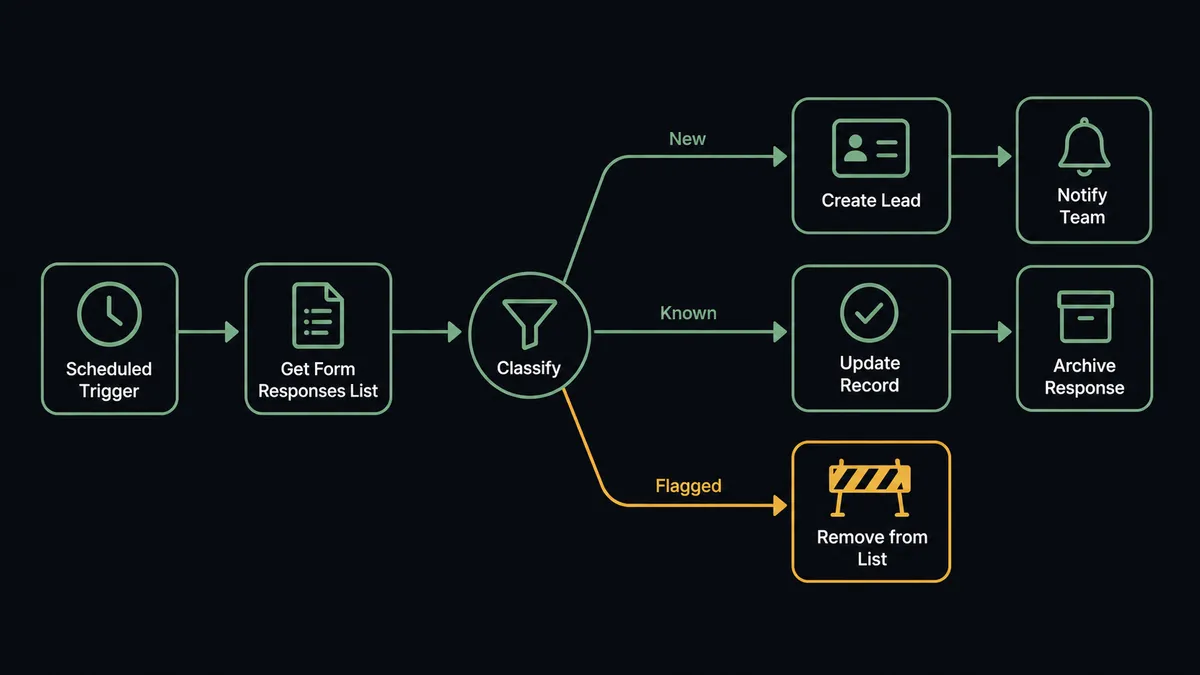
- Trigger: On a schedule, the workflow calls Get Form Responses List and collects every response that arrived since the last run.
- Read: Get Form Response by ID pulls the full answer set for each submission.
- Check for a match: List Leads searches the portal by email and phone so a returning respondent updates their record instead of spawning a twin.
- Create the lead: Create Lead builds the record from the mapped form fields, with Get Lead Fields keeping the mapping aligned to your portal’s actual field list.
- Log the source: Create Activity attaches the submission to the record, so the owner reads the actual answers, not a summary.
- Notify the owner: Send Notification pings the assigned owner inside Bitrix24 the moment the lead exists.
- Update the known: For matches, Update Lead refreshes the record and Add Timeline Comment notes the repeat inquiry, which is itself a buying signal worth seeing.
That is the “just connect them” answer. Every submission becomes an owned, logged lead within minutes of hitting the form, and repeat interest is visible instead of duplicated.
Can an AI agent run it? (and why a human stays in the loop)
Yes, and classification is where the agent earns its keep. The agent holds the Bitrix24 actions as tools: List Leads, Create Lead, Update Lead, Delete Lead, Delete Contact, Create Activity, Add Timeline Comment, Send Notification. It reads each response the way an experienced SDR reads an inbox. A complete submission with a corporate domain becomes a routed lead. A vague submission gets created but parked with a note rather than assigned. A submission that is clearly the same person as an existing lead becomes an update and a timeline comment. And a submission asking to be removed gets recognized for what it is: a compliance request, not a lead.
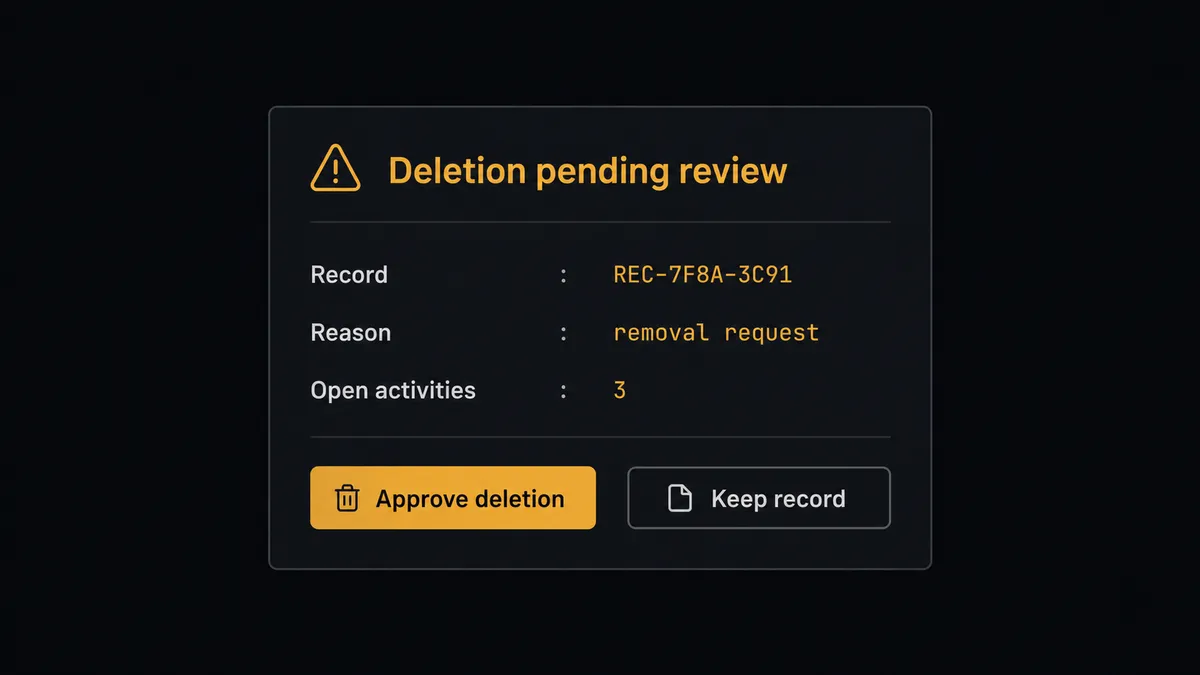
The consequential step is deletion. Delete Lead and Delete Contact are the two actions in this pair that cannot be undone, and they get invoked for two very different reasons: cleaning up a confirmed duplicate, and honoring a removal request. In both cases the agent refuses to act alone. It gathers the record, the open activities attached to it, and its reason, then invokes a human-in-loop flow it holds as a callable tool. The workflow pauses and posts: “Deletion proposed for [record]. Reason: [duplicate of existing record / removal request from form]. Open activities: [listed]. Approve?” A person confirms, the deletion runs, and Add Timeline Comment preserves the decision on any surviving record. Approver and timestamp land in the audit trail, which is exactly the evidence you want on file when the deletion was a compliance request.
Prospects describe the pattern as a digital andon cord. Like Toyota’s production line pull cord, the workflow stops the line at the irreversible step, and one person restores motion with one decision instead of owning the whole triage queue.
FlowRunner vs Zapier
Zapier is the obvious first candidate, and it is genuinely good at the simple version of this. Huge connector library, an editor a non-developer can learn in an hour, and form-to-CRM templates that work out of the box. If every submission should become a lead, full stop, Zapier does that.
The difference is that every submission should not become a lead, and some submissions are requests to un-become one. FlowRunner runs this connection as an AI agent that classifies first and holds a native human gate in front of the irreversible step.
| What matters for this pair | FlowRunner | Zapier |
|---|---|---|
| Human-in-the-loop on Delete Lead and Delete Contact | Native. The agent posts every proposed deletion for approval with the record and its reason | Available by inserting approval-style steps, not a native agent decision |
| Who runs the flow | An AI agent classifies each response, reasons, picks actions as tools | Predefined step sequence you configure per Zap |
| Users included | Unlimited users on every tier | Priced by task volume; seats vary by plan |
| Bring your own AI keys | Yes, BYOK. Connect the AI provider key you already have | AI features tied to Zapier’s own AI offering |
| Self-hosted option | Yes, cloud-hosted or self-hosted | Cloud only |
| Pricing model | Transparent workflow-based tiers | Per-task pricing that scales with every form submission |
If your form volume is low and every response is a keeper, Zapier is a fine choice. If the form brings in a mix, and deletions in your CRM deserve a named approver and a paper trail, this pairing is where FlowRunner is the better fit.
Before and after
| Category | Before | After |
|---|---|---|
| Response triage | A person scans the sheet and retypes rows into Bitrix24 when time allows | Every response is classified and in the portal on the next scheduled run |
| Lead assignment | Whoever the triager thought of, whenever they got to it | Create Lead plus Send Notification puts the lead in the owner’s queue within minutes |
| Junk and duplicates | Keyed in anyway, cleaned up in risky bulk purges later | The agent parks junk with a note and routes duplicate merges through review |
| Removal requests | Buried in the sheet with every other row, sometimes missed | Recognized on arrival, held at the human gate, and executed with an audit record |
| Pipeline trust | Reports inflated by junk and twins | The portal holds one record per human, each with its source logged via Create Activity |
What you can build
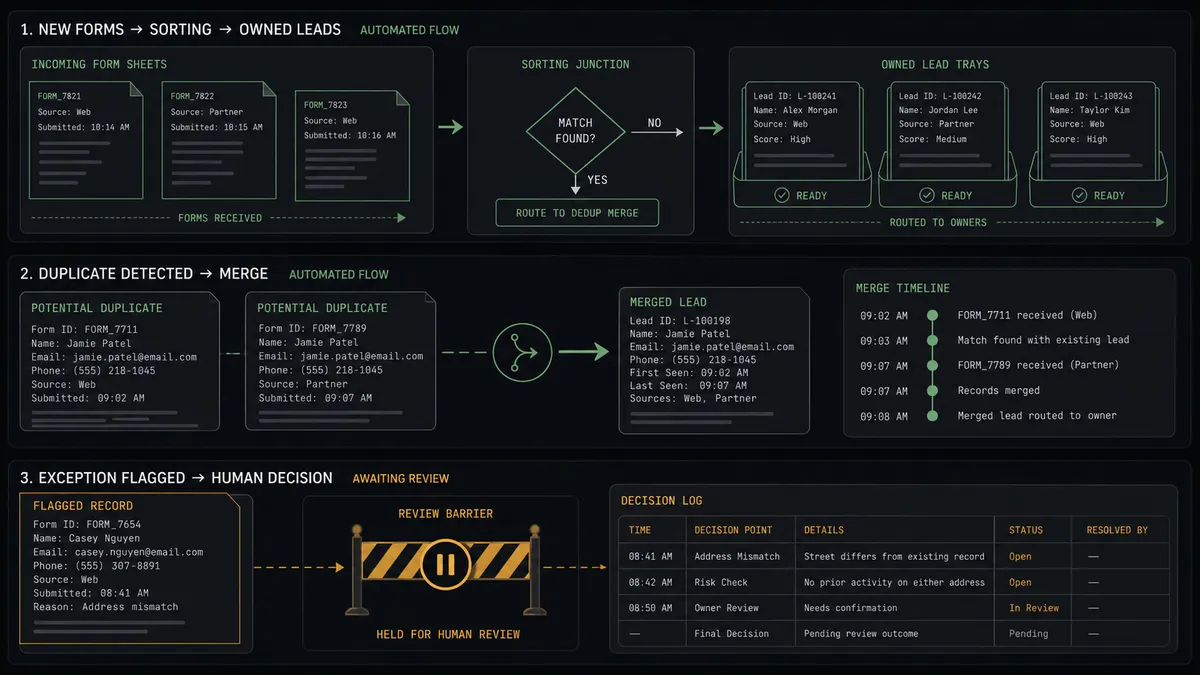
Form to owned lead in minutes. The scheduled run pulls responses with Get Form Responses List, checks List Leads for matches, builds the record with Create Lead, logs the answers with Create Activity, and pings the owner with Send Notification before the prospect’s interest cools.
Repeat-interest detector. When a known email submits again, the agent calls Update Lead and Add Timeline Comment instead of duplicating, and tells the owner this is the prospect’s second touch, which changes how the call opens.
Compliance-grade removal handling. Removal requests are classified on arrival, matched to every record via List Leads and List Contacts, and executed with Delete Lead or Delete Contact only after a named person approves, leaving a timestamped trail.
Qualification-based routing. The agent reads the form’s budget and need questions, routes qualified leads to senior reps and early-stage ones to nurture ownership, and creates a follow-up with Create Task so nothing lands unowned.
Weekly intake hygiene report. On a schedule, the agent summarizes what arrived, what was parked as junk, and what deletions were approved, posting the digest with Send Notification so the pipeline numbers in Monday’s meeting are numbers you trust.
Common questions
Is it free to connect Google Forms and Bitrix24 on FlowRunner? You can build and run the connection on a $100 credit with no credit card, which is roughly 67 days free on the Growth tier at $45/mo. Both connectors are available on every FlowRunner tier, and every tier includes unlimited users and unlimited workflows.
Can I self-host the Google Forms to Bitrix24 workflow? Yes. FlowRunner offers a cloud-hosted option and a self-hosted option, so the connection can run inside your own environment.
Does the AI agent need my own OpenAI or Claude key? FlowRunner uses a bring-your-own-keys model, so you connect the AI provider key you already have. You are not locked to one model.
What happens when a form submission asks to be removed from our records? The agent recognizes the removal request but never deletes on its own. It locates the matching records with List Leads and List Contacts, posts what it found to your team’s channel, and waits for a person to approve before Delete Lead or Delete Contact runs. The request, the decision, and the approver are all captured in the audit trail.
Google Forms has no webhook trigger, so how does the workflow start? It runs on a schedule. FlowRunner calls Get Form Responses List at the interval you choose and processes every response that arrived since the last run, with Get Form Response by ID pulling the full answer set for each one. Nothing depends on Google pushing events.
How does a form response become an assigned lead in Bitrix24? The workflow calls List Leads to check for an existing match, Create Lead to build the record from the form answers, Create Activity to log the source, and Send Notification to tell the assigned owner a new lead is waiting.
Getting started
Start with a $100 credit on the Growth tier at $45/mo. That is roughly 67 days free, and no credit card is required. Both connectors are available on every tier, and every tier includes unlimited users and unlimited workflows.
Explore the integration details:
- Google Forms integration (9 actions covering forms, responses, and field management)
- Bitrix24 integration (40 actions across leads, contacts, companies, deals, tasks, and notifications)
Start building free at flowrunner.ai or book a demo to see a live Google Forms to Bitrix24 workflow, deletion approval and all.