How to Connect Google Forms with Basecamp (With or Without an AI Agent)
Turn Google Forms intake responses into Basecamp to-dos and briefs automatically, with an AI agent that pauses for a human before Create Project spins up a whole new project and pulls a team in.
How do you connect Google Forms to Basecamp?
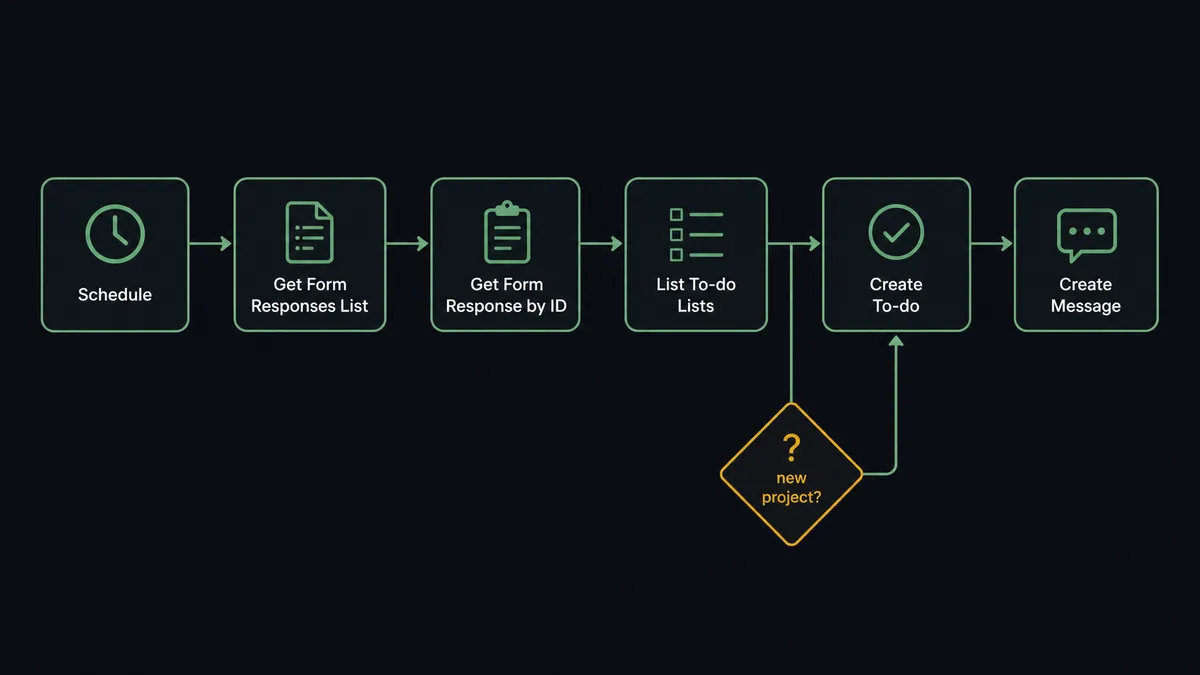
You connect Google Forms to Basecamp with a scheduled workflow, because Google Forms has no push trigger to fire: on an interval, the workflow calls Get Form Responses List, pulls each new submission with Get Form Response by ID, finds the right home with List Projects and List To-do Lists, and files the request with Create To-do, posting a brief with Create Message where discussion is needed. FlowRunner is a visual AI-agent orchestration platform where automations run autonomously and pause for human judgment on the steps that carry real consequence. The same connection can run as an AI agent that reads each response, decides whether it is a task or a whole engagement, and pauses for an operations lead before Create Project commits a team to something new.
The problem it solves
The intake form was supposed to bring order, and it half did. Requests from the field, other departments, or clients now arrive in one structured place instead of scattered email. But the last mile is still a person: someone owns the spreadsheet of responses, reads each row, decides what it is, opens Basecamp, finds the right project, creates the to-do, retypes the details, and pings the assignee. When that person is out for two days, intake stops. Requests sit in a spreadsheet nobody else checks, and requesters start following up by email, which is exactly what the form was built to end.
The sizing problem is the sharp edge. Most submissions are tasks: update the banner, pull the report, fix the page. But some are engagements wearing a task’s clothes: “we need a microsite for the spring launch” is six weeks of work for four people. Handled wrong in either direction it hurts. Treat an engagement as a to-do and it dies buried on a list. Let every big request auto-become a project and Basecamp fills with abandoned shells, each one having pinged a team when it appeared.
How it works: the connection
The connection polls Google Forms and writes to Basecamp. Here is the plain version, grounded in the real connector actions.
- Trigger: On a schedule, every few minutes, the workflow calls Get Form Responses List and keeps only submissions it has not seen.
- Read: It calls Get Form Response by ID for the full answers, and Get Form Details to map answer values to the actual questions.
- Locate: It calls List Projects to find the destination project, then Get Todoset and List To-do Lists to find the intake list.
- File: It calls Create To-do with the request summary as the title, details in the description, and the due date from the requested-by answer.
- Brief: For requests that need discussion, it calls Create Message on the project board so the context is where the conversation will happen.
- Schedule: When the response carries a real deadline, it calls Create Schedule Entry so the date exists on the calendar, not just in a field.
That is the “just connect them” answer. The form stops feeding a spreadsheet and starts feeding the place work actually happens, minutes after submission, whether or not the intake owner is at their desk.
Can an AI agent run it? (and why a human stays in the loop)
Yes, and sizing is where the agent earns its place. A fixed mapping can turn every row into a to-do; it cannot tell a banner swap from a spring-launch microsite. The agent reads the full response, weighs scope, dates, and who is asking, and holds the Basecamp actions as tools: Create To-do, Create To-do List, Create Message, Create Schedule Entry, Create Document, and Create Project. Routine requests flow straight to the right list. A request touching an existing engagement lands on that project with a Create Comment linking related work. And a request that reads like a new engagement triggers a different behavior entirely: the agent drafts instead of files.
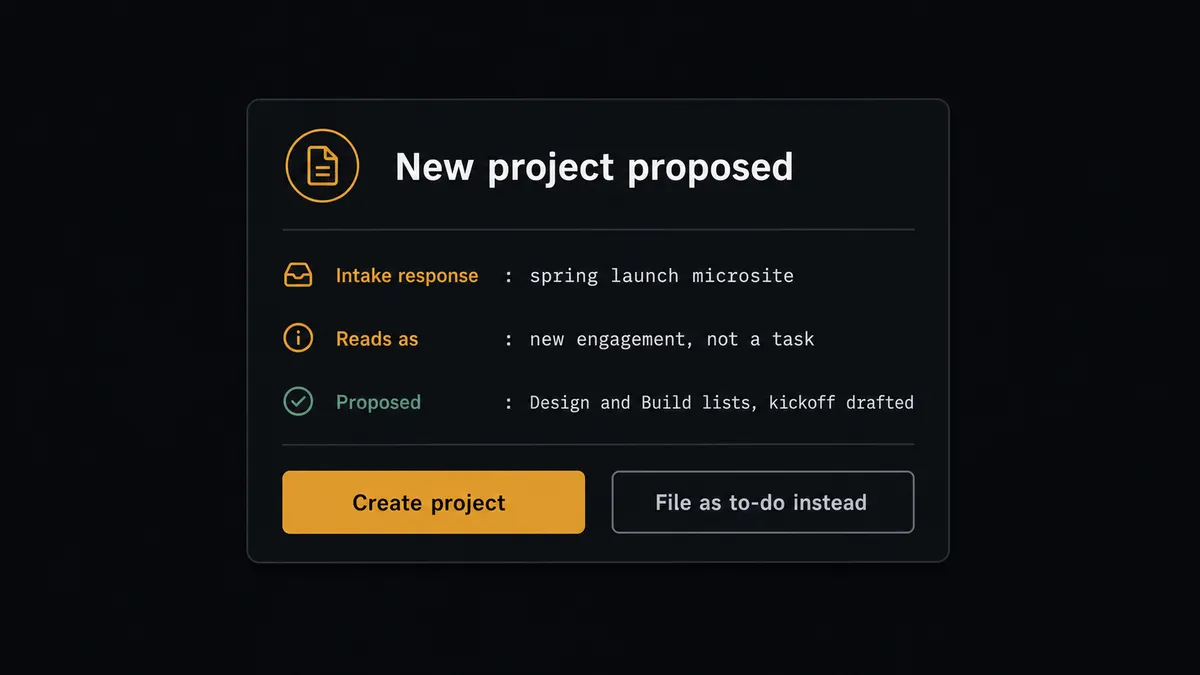
The consequential step is Create Project. A new Basecamp project is not a record, it is a commitment: people get added, notifications fire, and a structure exists that someone must now run or visibly abandon. So the agent prepares the case and stops. It invokes a human-in-loop flow it holds as a callable tool, and the operations lead gets the decision: “Intake response from [requester]: spring launch microsite, requested live date [date]. This reads as a new engagement, not a task. Proposed: project with Design and Build lists, kickoff message drafted. Approve to create?” One click. Only then does Create Project run, followed by Create To-do List for the structure, Create Message for the kickoff brief, and Create Schedule Entry for the milestone dates. The response, the sizing call, and the approver all sit on the record.
The agent asks rather than guesses at the margins too: a response that fits two projects equally gets a one-line question to the lead, not a coin flip. Prospects call this pattern a digital andon cord. Like Toyota’s production line pull cord, the workflow stops the line the moment scope is uncertain, a person decides in seconds, and the routine ninety percent never waits on anyone.
FlowRunner vs n8n
If you have a developer handy, n8n can wire this pair. Its node library is broad, its community has published thousands of workflow templates to start from, and the fair-code Community Edition self-hosts for free. Polling a Google Form and creating Basecamp to-dos is well within its reach for someone comfortable building and maintaining node graphs.
The difference is the judgment in the middle and who owns the workflow after it ships. Here is the honest side-by-side.
| What matters for this pair | FlowRunner | n8n |
|---|---|---|
| Human-in-the-loop on Create Project | Native. The agent drafts the project and waits for the operations lead to approve | Wait and approval steps exist as nodes; the gate is logic you assemble and maintain |
| Who runs the flow | An AI agent reads each response, sizes it, picks actions as tools | A node graph with branching you predefine; AI available as nodes within it |
| Users included | Unlimited users on every tier | Varies by plan; self-hosting shifts cost to your own infrastructure and upkeep |
| Bring your own AI keys | Yes, BYOK | Yes, model credentials are yours |
| Self-hosted option | Yes, cloud-hosted or self-hosted | Yes, fair-code Community Edition or paid plans |
| Pricing model | Transparent workflow-based tiers with clear execution limits | Execution-based pricing where a polling workflow’s count takes thought to predict |
If your team has engineers who enjoy owning the graph, n8n is a capable and economical choice. If intake is run by operations people who need the sizing judgment and the project gate without maintaining infrastructure, this pairing on FlowRunner is the better fit.
Before and after
| Category | Before | After |
|---|---|---|
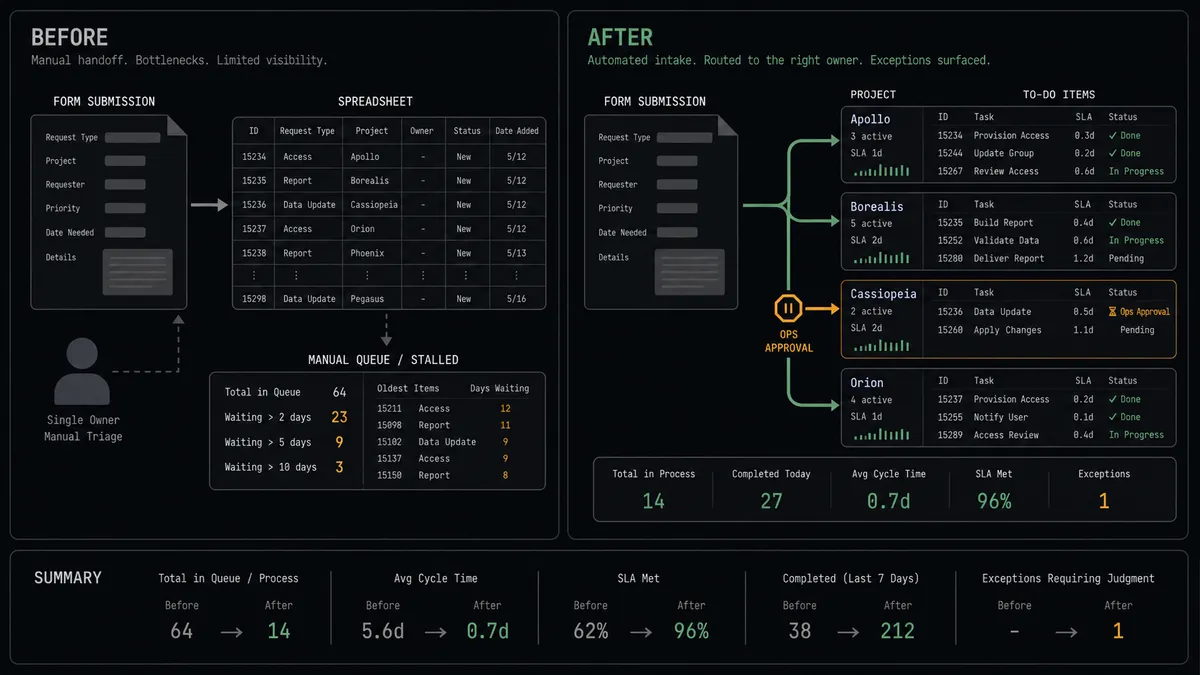
| Intake handling | One person reads the response spreadsheet and retypes requests into Basecamp | New responses become to-dos through Create To-do within minutes, on a schedule that never takes a day off |
| Coverage | Intake stops when the owner is out; requesters revert to email | The poll runs regardless, and only the project-sized calls wait for a person |
| Request sizing | Everything becomes a to-do, or every big ask becomes a premature project | Routine work files automatically; Create Project waits for an approved decision |
| Context | To-dos arrive as one-liners, the real ask still in the spreadsheet | The full response travels into the description, with Create Message briefs where discussion belongs |
| Deadlines | Requested dates live in a form field nobody rechecks | Create Schedule Entry puts real dates on the project calendar |
What you can build
Intake form to team queue. The scheduled poll picks up each new response with Get Form Responses List, and the agent files it with Create To-do on the right list with the full answers in the description. The intake spreadsheet retires.
Engagement gatekeeper. Requests the agent sizes as more than a task get drafted as a project outline and held for the operations lead. Approved ones become a Create Project with Create To-do List structure and a Create Message kickoff, all traceable to the response.
Client request portal. A shared form becomes the front door for client asks. The agent routes each response to that client’s Basecamp project, posts the brief with Create Message, and files the work, so client emails stop being the intake system.
Deadline autopilot. Responses with dates get Create Schedule Entry on the project calendar, and the agent posts a Create Campfire Line heads-up to the project chat when a new dated request lands inside the current week.
Intake digest. Each morning the agent summarizes yesterday’s responses, what was filed where via List To-dos, and anything still waiting at the approval gate, posting the digest with Create Message so the operations lead starts the day with the whole picture.
Getting started
Start on the free plan: 100 executions a month, every integration included, no credit card required, plus 14 days of Professional for new accounts. Both connectors are available on every tier, and every tier includes unlimited users and unlimited workflows.
Explore the integration details:
- Google Forms integration (9 actions covering forms, responses, and form structure)
- Basecamp integration (37 actions covering projects, to-dos, messages, schedules, and documents)
Start building free at flowrunner.ai or book a demo to see a live Google Forms to Basecamp workflow, project approval gate and all.
Frequently asked questions
Is it free to connect Google Forms and Basecamp on FlowRunner?
You can build and run the connection on FlowRunner's free plan, which includes 100 executions a month and every integration with no credit card required, and new accounts also get 14 days of Professional. Both connectors are available on every FlowRunner tier, and every tier includes unlimited users and unlimited workflows.
Can I self-host the Google Forms to Basecamp workflow?
Yes. FlowRunner offers a cloud-hosted option and a self-hosted option, so the connection can run inside your own environment.
Does the AI agent need my own OpenAI or Claude key?
FlowRunner uses a bring-your-own-keys model, so you connect the AI provider key you already have. You are not locked to one model.
What happens when a form response looks like more than a single task?
The agent does not quietly spin up a project. It drafts the project outline, posts the response summary and the proposed structure to the operations lead, and waits. Create Project runs only after approval, so new projects are a decision someone made, not a side effect of a form.
How does the workflow start if Google Forms has no trigger?
On a schedule. The workflow polls Get Form Responses List every few minutes, compares against the responses it has already processed, and handles only the new ones. In practice a submission becomes a Basecamp to-do within minutes of arriving.
Which Basecamp actions does the connection use?
Create To-do files the request on the right list, found via Get Todoset and List To-do Lists. Create Message posts the brief to the project board, Create Schedule Entry books deadlines, and Create Project, behind the approval gate, stands up new engagements.