How to Connect Google Forms with Amazon Redshift (With or Without an AI Agent)
Stream Google Forms responses into Amazon Redshift for analysis, with an agent that detects form edits before they corrupt the table and pauses for an engineer before any schema migration runs.
How do you connect Google Forms to Amazon Redshift?
You connect Google Forms to Amazon Redshift with a scheduled FlowRunner workflow: Get Form Responses List pulls the responses submitted since the last run, Get Form Response by ID reads each answer set, and Batch Execute Statement inserts the rows into your warehouse table through the Redshift Data API, keyed on the response ID, with Describe Statement and Get Statement Result confirming every batch. Neither connector exposes a trigger, so an hourly schedule is the honest starting point. FlowRunner is a visual AI-agent orchestration platform where automations run autonomously and pause for human judgment on the steps that carry real consequence. Run as an agent, the connection also guards the thing that actually breaks this pipeline: it diffs the live form structure against the table before every load, and pauses for an engineer before any migration SQL runs.
The problem it solves
Teams collect real data through Google Forms: field inspections, research surveys, intake questionnaires, event feedback. The responses pile up in the form’s own summary view, which is fine for a glance and useless for analysis. To join responses against operational data, trend them over quarters, or feed a model, the answers need to live in the warehouse. So a builder exports CSVs, or writes a quick Apps Script, and either way the loading becomes a manual chore that runs whenever someone remembers.
The structural problem is sneakier: a form’s questions are its schema, and the people who edit forms are not the people who own the warehouse. A program manager reordering questions, rewording one, or adding a new required field has just executed an unreviewed schema migration. The CSV columns shift, the script maps answers into the wrong fields, and the corruption is silent: the load succeeds, the numbers are wrong, and nobody notices until an analyst finds satisfaction scores in the department column. Pipelines from user-editable sources fail quietly, and quiet failures are the expensive kind.
How it works: the connection
Here is the deterministic version, grounded in the real connector actions.
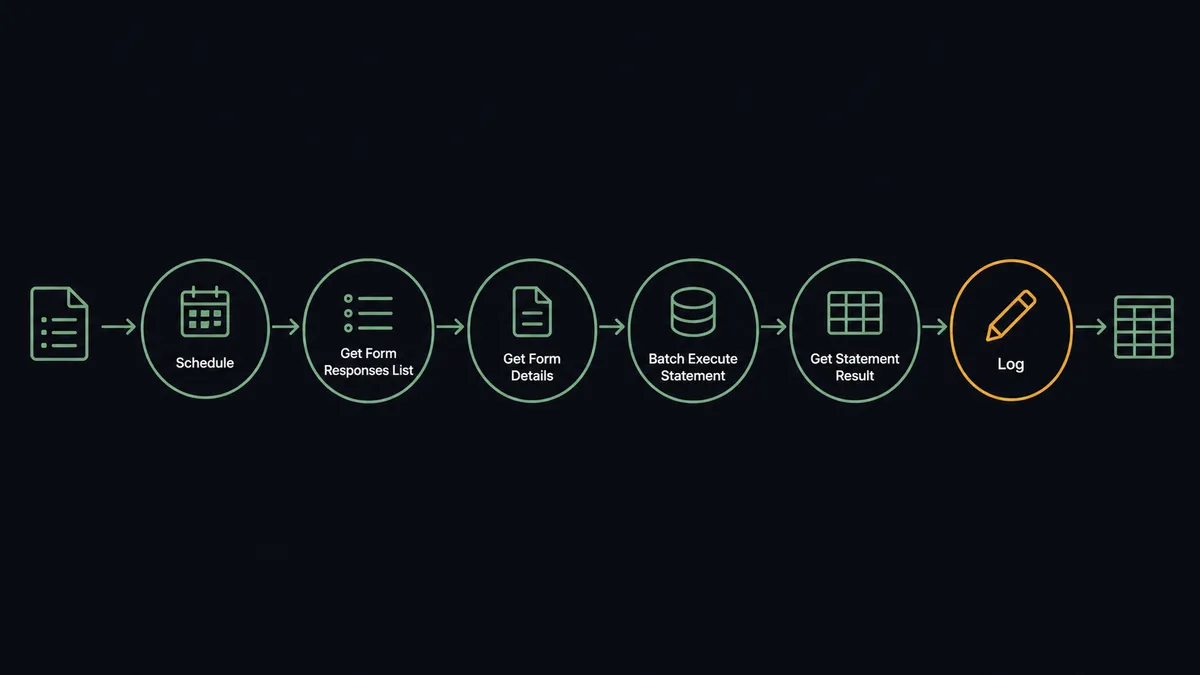
- Trigger: On an hourly schedule, the workflow starts a load run.
- Extract: It calls Get Form Responses List to pull responses submitted since the last run, and Get Form Response by ID for each full answer set.
- Verify structure: It calls Get Form Details and Describe Table, confirming the question set still matches the warehouse columns.
- Load: It calls Batch Execute Statement to insert rows keyed on the response ID, so reruns never duplicate.
- Confirm: It polls Describe Statement and reads Get Statement Result to verify each batch, retrying failures.
- Record: The run’s counts and any held responses are logged, so the pipeline’s state is always inspectable.
That is the plain answer. Every submission is a warehouse row within the hour, and the CSV export chore disappears.
Can an AI agent run it? (and why a human stays in the loop)
Yes, and the agent’s job is to stand between two groups who never talk: the people who edit the form and the people who query the table. It holds the actions as tools: Get Form Responses List, Get Form Response by ID, and Get Form Details on the Google Forms side; Execute Statement, Batch Execute Statement, Describe Statement, Get Statement Result, Cancel Statement, List Tables, and Describe Table on the Redshift side. Before each load it compares the live question set against the columns. Questions match, load proceeds. A new question appeared, a question was reworded, an option list changed: the agent holds the affected responses instead of forcing them into columns that no longer mean the same thing.
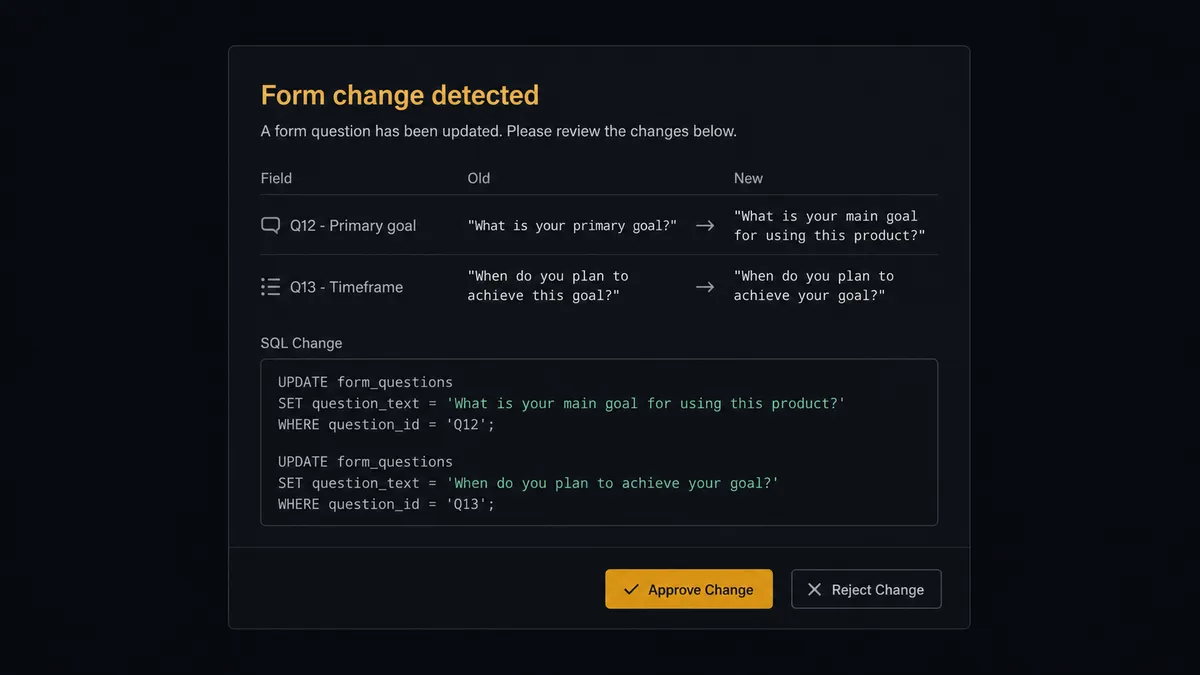
The consequential step is the migration itself. Fixing drift honestly means Execute Statement running an ALTER to add columns, or a TRUNCATE and reload when meaning changed rather than shape, and both can destroy or distort data if the diagnosis is wrong. So the agent proposes and waits. It invokes a human-review flow it holds as a callable tool, and the workflow pauses: “Form [name] changed: question [old wording] is now [new wording], and one new question was added. Proposed: ALTER to add a column for the new question; keep the reworded question in its existing column, flagged from this date. SQL attached. Held responses will load after approval. Approve?” The engineer decides whether a rewording is cosmetic or semantic, which is exactly the judgment no script can make. Only after approval does Execute Statement run, with the approver, timestamp, and statement in the audit trail.
This is the digital andon cord for a pipeline whose source anyone can edit: the line stops the moment the form and the table disagree, and it restarts only when a person has ruled on what the disagreement means.
FlowRunner vs Fivetran
Fivetran belongs in this conversation, and its strengths are not in dispute. It is the benchmark for managed ELT: hundreds of source connectors, automated schema evolution, incremental syncs that survive vendor API changes, and essentially zero pipeline maintenance. If your goal is replicating a whole stack of SaaS sources into Redshift, Fivetran is the strongest tool for that job.
Google Forms is a different kind of source. Its schema is a living document edited by non-engineers, and the hard problem is not replication mechanics but deciding what a change means.
| What matters for this pair | FlowRunner | Fivetran |
|---|---|---|
| Human-in-the-loop on schema migrations | Native. The agent posts the form diff and SQL, and an engineer approves before Execute Statement runs | Not part of the model; schema changes are applied by connector policy without a review step |
| Who runs the flow | An AI agent diffs form structure, holds mismatched responses, and escalates as a reasoned choice | Managed connector jobs on a sync schedule |
| Users included | Unlimited users on every tier | Consumption pricing by monthly active rows, not seats |
| Bring your own AI keys | Yes, BYOK for the agent layer | No agent layer; not applicable |
| Self-hosted option | Yes, cloud-hosted or self-hosted | Cloud-managed service, with hybrid options at enterprise tiers |
| Pricing model | Transparent workflow-based tiers | Monthly-active-rows consumption that is hard to forecast for spiky survey volume |
If you are standardizing dozens of stable sources into the warehouse, choose Fivetran. If your source is a form that a program manager will edit next Tuesday, and you want a human ruling on every migration before it runs, that is what this pairing is built for.
Before and after
| Category | Before | After |
|---|---|---|
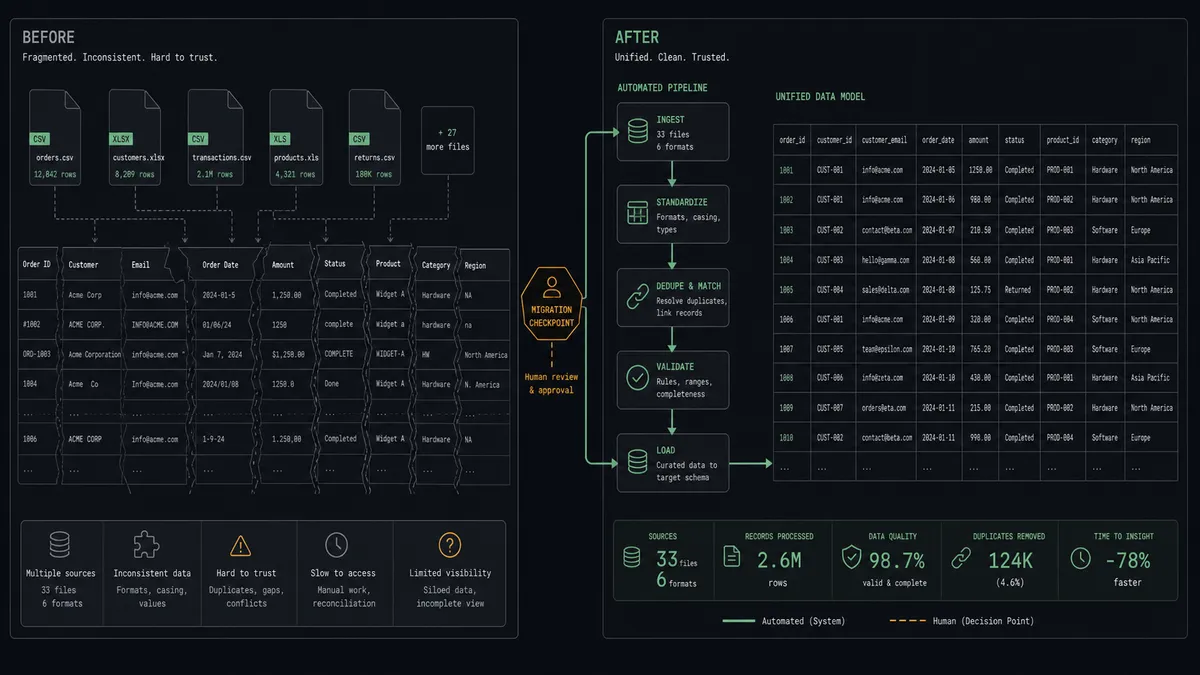
| Loading | CSV exports and ad hoc scripts run whenever someone remembers | Responses become warehouse rows within the hour, keyed and idempotent |
| Form edits | A reworded question silently corrupts columns until an analyst notices | The agent diffs Get Form Details per run and holds mismatched responses |
| Migrations | Schema fixes run unattended, sometimes destroying history | Every ALTER or TRUNCATE waits for a named engineer with the SQL attached |
| Data trust | Analysts spot-check answers against the form before believing the table | The pipeline’s held-response log shows exactly what loaded and what waited |
| Multi-form analysis | Each form’s exports live in separate files nobody joins | Shared questions map to shared columns across forms, with conflicts escalated |
What you can build
Survey warehouse. Hourly runs pull responses with Get Form Responses List and insert them via Batch Execute Statement, so a quarter of survey data is queryable alongside operational tables instead of trapped in summary charts.
Gated schema evolution. When the form gains a question, the agent drafts the ALTER, posts the diff, and migrates only after approval, with held responses loading immediately afterward. Form edits stop being silent breaking changes.
Field-operations intake. Inspection forms from distributed teams land in Redshift within the hour, and a scheduled Execute Statement rolls them into a site-level quality view that operations reviews each morning.
Cross-form research base. Several cohort surveys feed one table: the agent maps shared questions to shared columns using Get Form Details per form, and asks a person when two forms phrase the same concept differently.
Response anomaly watch. After each load, the agent queries the fresh rows with Execute Statement and Get Statement Result, flags patterns like duplicate submitters or empty required answers, and posts a short data-quality note with the run summary.
Getting started
Start on the free plan: 100 executions a month, every integration included, no credit card required, plus 14 days of Professional for new accounts. Both connectors are available on every tier, and every tier includes unlimited users and unlimited workflows.
Explore the integration details:
- Google Forms integration (9 actions covering responses, form details, and form management)
- Amazon Redshift integration (10 actions covering SQL execution, results, and schema exploration)
Start building free at flowrunner.ai or book a demo to see a live Google Forms to Amazon Redshift workflow, migration gate and all.
Frequently asked questions
Is it free to connect Google Forms and Amazon Redshift on FlowRunner?
You can build and run the connection on FlowRunner's free plan, which includes 100 executions a month and every integration with no credit card required, and new accounts also get 14 days of Professional. Both connectors are available on every FlowRunner tier, and every tier includes unlimited users and unlimited workflows.
Can I self-host the Google Forms to Amazon Redshift workflow?
Yes. FlowRunner offers a cloud-hosted option and a self-hosted option, so the connection can run inside your own environment.
Does the AI agent need my own OpenAI or Claude key?
FlowRunner uses a bring-your-own-keys model, so you connect the AI provider key you already have. You are not locked to one model.
What happens when someone edits the form while the pipeline is live?
The agent catches it before the next load. It diffs Get Form Details against the warehouse columns, holds the affected responses, and posts the change with its proposed migration SQL to your team's channel. An engineer approves before Execute Statement alters anything, and no response is loaded into a mismatched column in the meantime.
Which triggers and actions does this pair use?
Neither connector exposes a trigger, so the workflow runs on a schedule. It calls Get Form Responses List, Get Form Response by ID, and Get Form Details in Google Forms, and Describe Table, Batch Execute Statement, Execute Statement, Describe Statement, and Get Statement Result in Amazon Redshift.
Can several forms feed one warehouse table?
Yes. The agent runs the same diff per form with Get Form Details, maps shared questions to shared columns, and keeps form-specific answers in their own columns, escalating to a person when two forms disagree about what a question means.