How to Connect Calendly with Attio (With or Without an AI Agent)
Connect Calendly bookings to Attio records so every meeting builds CRM history automatically, with an AI agent that pauses for a human before it cancels a scheduled event on a customer's calendar.
How do you connect Calendly to Attio?
You connect Calendly to Attio by having Calendly’s On Invitee Created trigger drive Attio actions: the workflow calls Query Records to check for an existing person, Assert Record (Upsert) to create or update them, Create Note to log the booking, and Create Task so the meeting owner walks in prepared. FlowRunner is a visual AI-agent orchestration platform where automations run autonomously and pause for human judgment on the steps that carry real consequence. When the same connection runs as an AI agent, the agent also triages cancellations and no-shows in context, and it stops for a named human before Cancel Scheduled Event touches anything on a customer’s calendar.
The problem it solves
Bookings are where pipeline actually starts, and in most teams they leave no trace. A prospect books through Calendly, the meeting happens, and the CRM never hears about any of it unless the rep remembers to log it. Multiply that by demos, intro calls, and renewal check-ins across a team, and the CRM’s activity history describes maybe half of what happened. Forecast reviews run on vibes because the meeting data lives in individual calendars.
The recovery paths are worse. A prospect cancels and nobody follows up, because the cancellation email went to one person’s inbox. A no-show quietly ends a deal that one reschedule link would have saved. A routing form gathers qualification answers that never reach the record, so the rep asks the same questions live and the prospect wonders why they filled in the form at all.
How it works: the connection
The connection listens to Calendly and writes to Attio. Here is the plain version, grounded in the real connector actions.
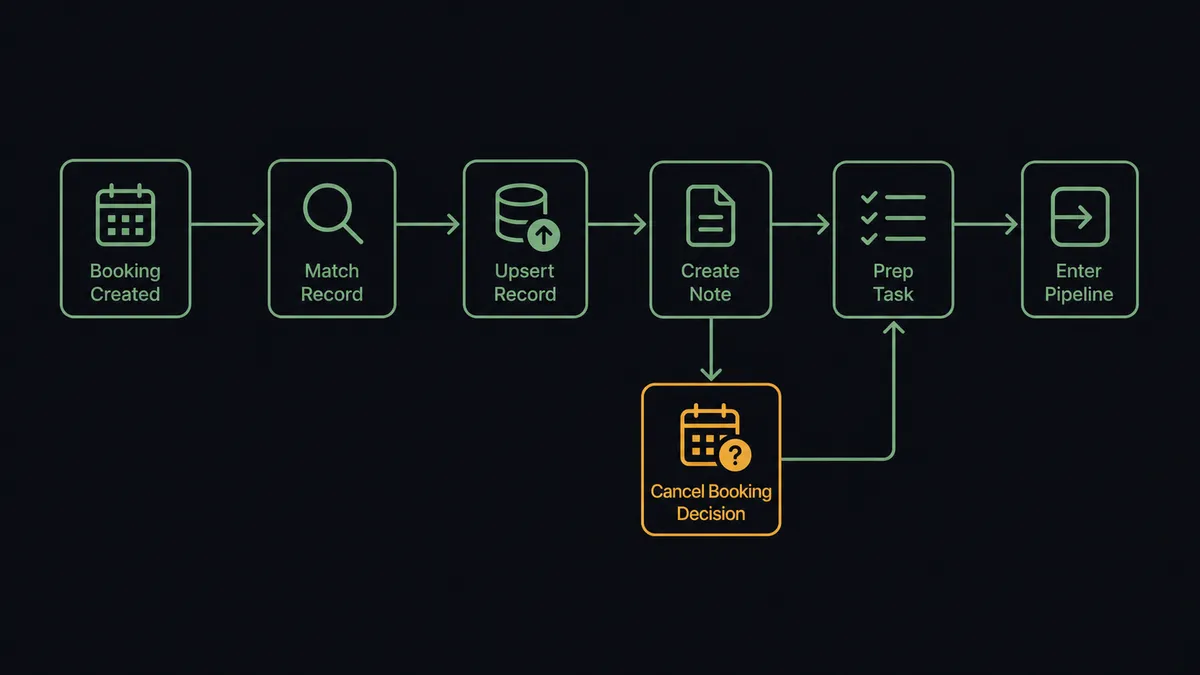
- Trigger: Calendly fires On Invitee Created when a meeting is booked.
- Match: The workflow calls Query Records in Attio to check whether the invitee already exists.
- Write: It calls Assert Record (Upsert) so a new prospect becomes a person record and a returning one converges on their existing record.
- Log: It calls Create Note with the event type, time, and any routing form answers, so the booking lives on the record.
- Prep: It calls Create Task assigned to the meeting owner, due before the call.
- Route: It calls Add List Entry to place the record in the right pipeline collection, so a booked demo is visible pipeline, not calendar trivia.
That is the “just connect them” answer. Bookings become records, notes, tasks, and pipeline entries with nobody logging anything. On Invitee Canceled and On Mark Invitee as No-Show drive the recovery flows the same way, and On New Routing Form Submitted captures qualification answers even when the visitor never books. Because every step writes to the same Attio record, the account history reads as one continuous story instead of fragments scattered across calendars, inboxes, and memory.
Can an AI agent run it? (and why a human stays in the loop)
Yes, and the cancellation and no-show paths are where reasoning beats rules. A rule can log a no-show; it cannot decide what the no-show means. An AI agent holds Query Records, Assert Record (Upsert), Create Note, Create Task, Add List Entry, Delete List Entry, Create Single-Use Scheduling Link, and Cancel Scheduled Event as tools, and it reads the account before choosing. A first no-show from a prospect with an active thread gets grace: a reschedule task and a fresh single-use link. A third no-show on a stalled deal gets flagged to the owner with a recommendation to release the pipeline entry.
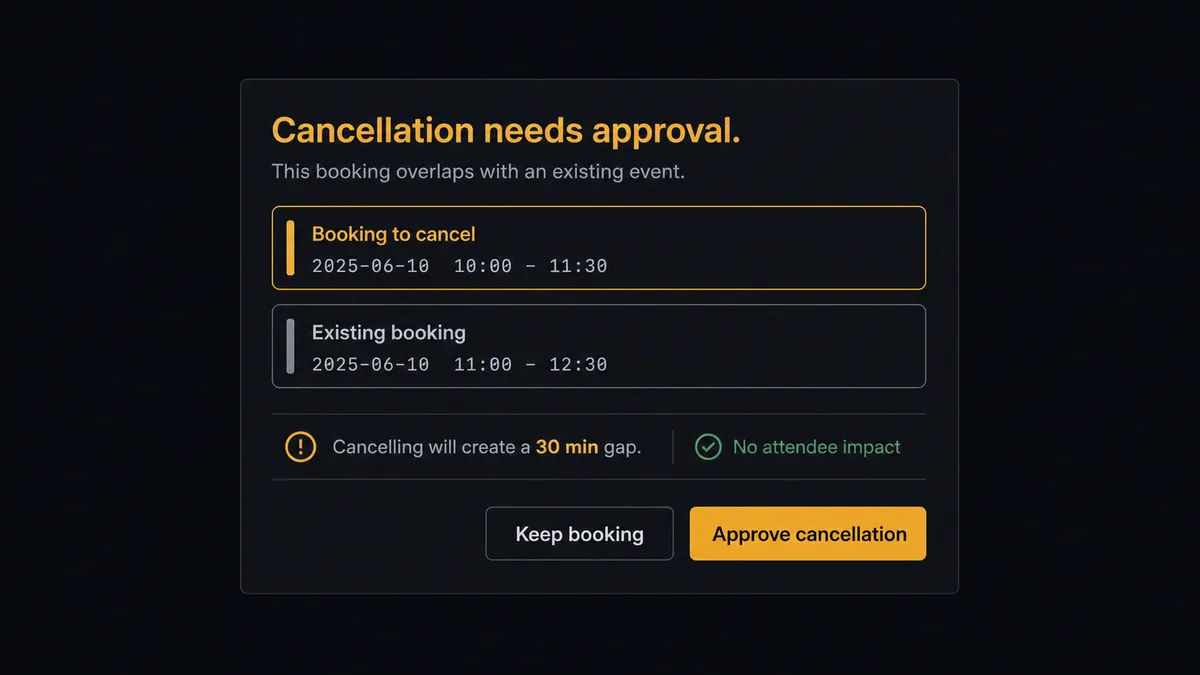
The consequential steps are the ones that reach outside your walls or erase pipeline: Cancel Scheduled Event edits a customer’s calendar, and Delete List Entry removes a deal from the list your forecast reads. Before either, the agent invokes a human-in-loop flow it holds as a callable tool. The workflow pauses and posts to the revenue channel: “Double booking detected for [prospect]: two overlapping events this week. Recommend canceling the duplicate and keeping the original slot. Approve the cancellation?” A named approver clicks, Cancel Scheduled Event runs, and the decision, the approver, and the timestamp land in the audit trail.
Everything routine flows without friction: bookings logged, prep tasks created, routing form answers written to the record. The agent asks only when the action carries weight. Prospects call this the digital andon cord: like Toyota’s cord on the line, the workflow stops itself the moment a step would be hard to take back, and a person restarts it with the whole account story in view.
FlowRunner vs Zapier
Zapier earns its place here: the connector library is huge, Calendly is one of its most-used triggers, and the template gallery will get “invitee created, create a CRM record” running in minutes. For a straight booking log, it is a fast, proven path.
The difference is everything after the booking. FlowRunner is built around native human-in-the-loop and AI-agent orchestration, where the agent works the recovery paths and brings a person in before customer-facing steps.
| What matters for this pair | FlowRunner | Zapier |
|---|---|---|
| Human-in-the-loop before Cancel Scheduled Event | Native. The agent invokes an approval flow as a callable tool and pauses before touching a customer’s calendar | Available via added approval steps or paths, not a native agent decision |
| Who runs the flow | An AI agent reads account history, reasons, picks actions as tools | Predefined step sequence you configure per Zap |
| Users included | Unlimited users on every tier | Priced by task volume; seats vary by plan |
| Bring your own AI keys | Yes, BYOK | AI features tied to Zapier’s own AI offering |
| Self-hosted option | Yes, cloud-hosted or self-hosted | Cloud only |
| Pricing model | Transparent workflow-based tiers | Per-task pricing; every booking event burns tasks |
If you only need bookings to appear in a CRM, Zapier does that well. If cancellations, no-shows, and double bookings should be worked rather than merely recorded, with a human on every customer-facing step, this pairing is built for it.
Before and after
Here is what changes operationally when the connection is live.
| Category | Before | After |
|---|---|---|
| Meeting history | Bookings live in personal calendars and the CRM stays blank | Every booking lands on the record via Create Note the moment it is made |
| Meeting prep | Reps skim the invite five minutes before the call | Create Task delivers routing form answers and account history before the meeting |
| Cancellations | Cancellation emails die in one inbox | On Invitee Canceled opens a recovery task with a reschedule link attached |
| No-shows | Deals fade after a missed call with no follow-up pattern | The agent triages each no-show and a person rules on the pipeline entry |
| Pipeline truth | Booked demos are invisible until the rep updates the CRM | Add List Entry makes each booking visible pipeline immediately |
What you can build
Booking to pipeline, hands off. On Invitee Created fires. The agent upserts the person with Assert Record (Upsert), logs the booking with Create Note, preps the owner with Create Task, and places the record in the demo pipeline with Add List Entry.
Cancellation save play. On Invitee Canceled fires. The agent logs the cancellation, generates a Create Single-Use Scheduling Link, and queues a personal follow-up task for the owner instead of letting the thread die.
No-show triage with judgment. On Mark Invitee as No-Show fires. The agent counts prior no-shows from the record’s history, offers grace or escalation accordingly, and routes pipeline removal decisions to a named approver.
Routing form to qualified record. On New Routing Form Submitted fires. The agent writes the answers onto the person via Assert Record (Upsert) and flags high-fit submissions with Create Task, so strong prospects get a human touch even before they pick a time.
Double-booking cleanup. When overlapping events appear for the same invitee, the agent proposes which to keep, and Cancel Scheduled Event runs only after the approver confirms, with the customer notified through the normal Calendly flow.
Getting started
Start on the free plan: 100 executions a month, every integration included, no credit card required, plus 14 days of Professional for new accounts. Both connectors are available on every tier, and every tier includes unlimited users and unlimited workflows, so everyone whose calendar feeds the pipeline works inside the same workflow from day one.
Explore the integration details:
- Calendly integration (5 triggers and 3 actions across the scheduling lifecycle)
- Attio integration (26 actions across records, lists, notes, and tasks)
Start building free at flowrunner.ai or book a demo to see a live Calendly to Attio workflow, cancellation gate and all.
Frequently asked questions
Is it free to connect Calendly and Attio on FlowRunner?
You can build and run the connection on FlowRunner's free plan, which includes 100 executions a month and every integration with no credit card required, and new accounts also get 14 days of Professional. Both connectors are available on every FlowRunner tier, and every tier includes unlimited users and unlimited workflows.
Can I self-host the Calendly to Attio workflow?
Yes. FlowRunner offers a cloud-hosted option and a self-hosted option, so the connection can run inside your own environment.
Does the AI agent need my own OpenAI or Claude key?
FlowRunner uses a bring-your-own-keys model, so you connect the AI provider key you already have. You are not locked to one model.
What happens when someone no-shows a booked call?
On Mark Invitee as No-Show fires and the agent reads the account context in Attio before acting. A first no-show from an engaged account gets a reschedule task and a fresh Create Single-Use Scheduling Link; a repeat no-show is posted to the deal owner with a recommendation, and a person decides what happens to the pipeline entry.
Which Calendly events can trigger an Attio update?
Calendly offers five triggers: On Invitee Created, On Invitee Canceled, On Mark Invitee as No-Show, On Unmark Invitee as No-Show, and On New Routing Form Submitted. On Invitee Created is the core booking flow; the cancellation and no-show triggers drive the recovery paths.
Can the workflow cancel a meeting on its own?
No. Cancel Scheduled Event touches a customer's calendar, so it sits behind the human-in-loop step. The agent proposes the cancellation with the reason and account context, and it only runs after a named approver signs off.