How to Connect Google Forms with Bigin (With or Without an AI Agent)
Connect Google Forms responses to Bigin contacts and deals, optionally as an AI agent that creates clean pipeline entries and pauses for a human before Update Contact overwrites data you already trust.
How do you connect Google Forms to Bigin?
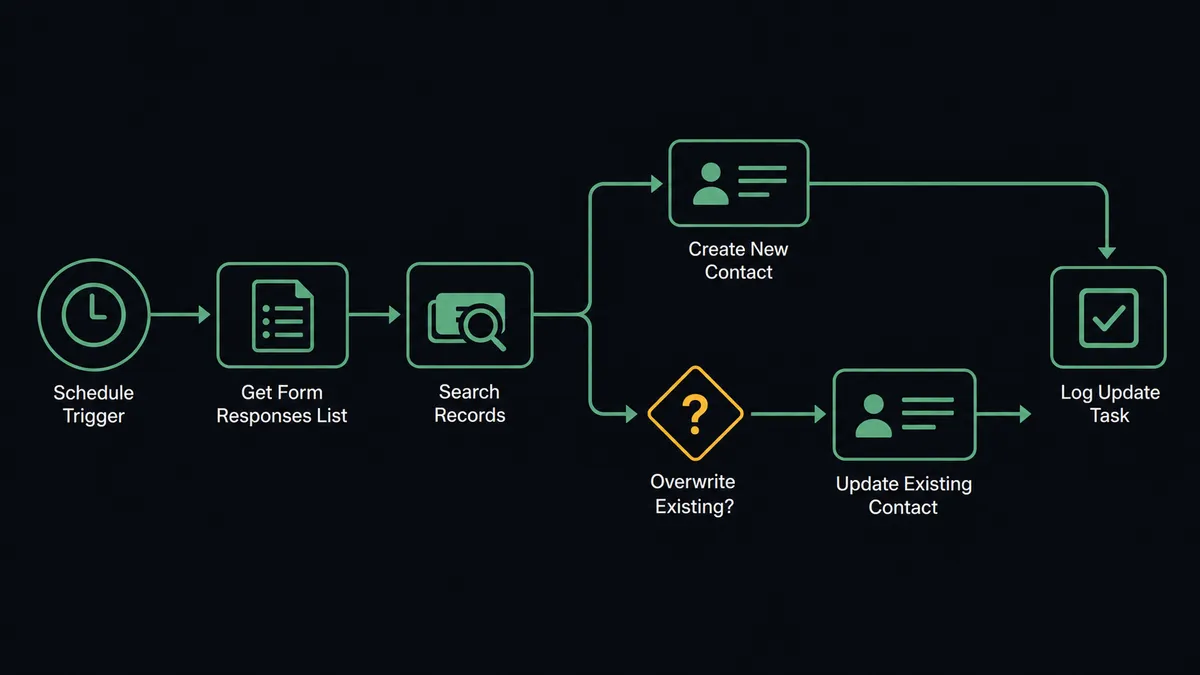
You connect Google Forms to Bigin with a scheduled workflow, because Google Forms publishes no webhook triggers: at the interval you choose, FlowRunner calls Get Form Responses List to pull new submissions, reads each one with Get Form Response by ID, checks Bigin for an existing match with Search Records, and opens the pipeline entry with Create Contact, Create Company, and Create Deal, attaching the full answers with Add Note. FlowRunner is a visual AI-agent orchestration platform where automations run autonomously and pause for human judgment on the steps that carry real consequence. When the connection runs as an AI agent, the agent also referees conflicts, and it stops for a named human before Update Contact overwrites a field your team already verified.
The problem it solves
Google Forms is where inquiries land because it takes five minutes to build one: the contact form on the site, the event signup, the quote request. Bigin is where those inquiries are supposed to become deals. Between the two sits a spreadsheet and a person. Someone opens the responses sheet, scans for new rows, retypes name and email into Bigin, guesses which pipeline the inquiry belongs to, and pastes the rest of the answers into a note if they remember. On a busy week the sheet gets checked twice, which means a Tuesday inquiry gets its first reply on Friday, long after the respondent filled out a competitor’s form too.
The edges are where trust erodes. The same person fills the form twice, so the CRM grows twins and two reps call the same prospect. A respondent typos their own phone number, and a careless sync overwrites the correct number the rep already confirmed on a call. Junk submissions with fake emails become deals that clutter the pipeline until someone cleans them out by hand. The form is honest about being dumb; the danger is a sync that is just as dumb but writes to your system of record.
How it works: the connection
The connection reads Google Forms on a schedule and writes to Bigin. Here is the plain version, grounded in the real connector actions.
- Trigger: On a schedule, the workflow calls Get Form Responses List and collects every response that arrived since the last run.
- Read: Get Form Response by ID pulls the full answer set for each submission, question by question.
- Check for a match: Search Records looks for an existing Bigin contact by email and an existing company by name.
- Create the records: For a new respondent, Create Contact and Create Company build the account, and Create Deal opens the pipeline entry in the right stage.
- Attach the context: Add Note writes the complete form answers onto the contact, so the rep reads the actual submission instead of a summary.
- Assign the follow-up: Create Task puts a follow-up on the deal owner’s list with the response details in the description.
- Handle the known respondent: When Search Records finds a match, the workflow updates the existing records with Update Contact and Update Deal instead of minting duplicates.
That is the “just connect them” answer. Every submission becomes a worked record in minutes, not a row waiting in a sheet.
Can an AI agent run it? (and why a human stays in the loop)
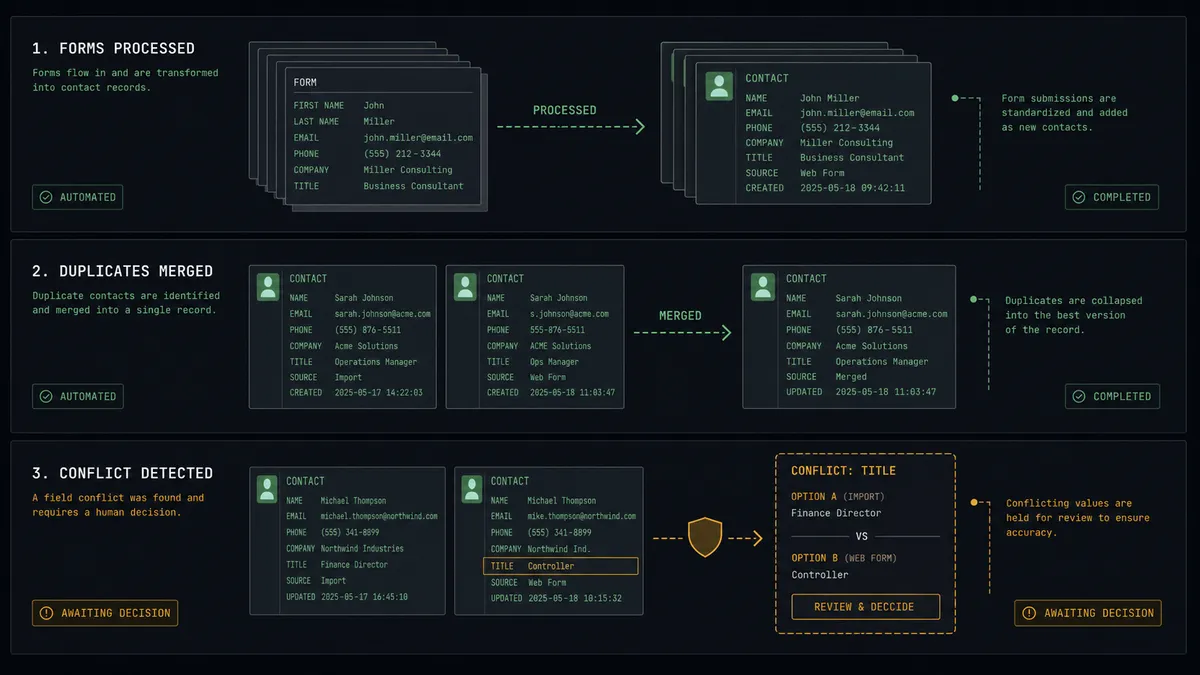
Yes, and the difference is judgment at intake. An AI agent holds the Bigin actions as tools: Search Records, Create Contact, Create Company, Create Deal, Update Contact, Update Deal, Add Note, Create Task. It reads each response the way a good SDR would. A complete submission with a corporate email and a clear request flows straight into the pipeline. A submission with a free-mail address and a one-word answer gets created as a contact but held out of the deal pipeline with a note explaining why. A submission that looks like the third variant of an existing account gets matched instead of minted.
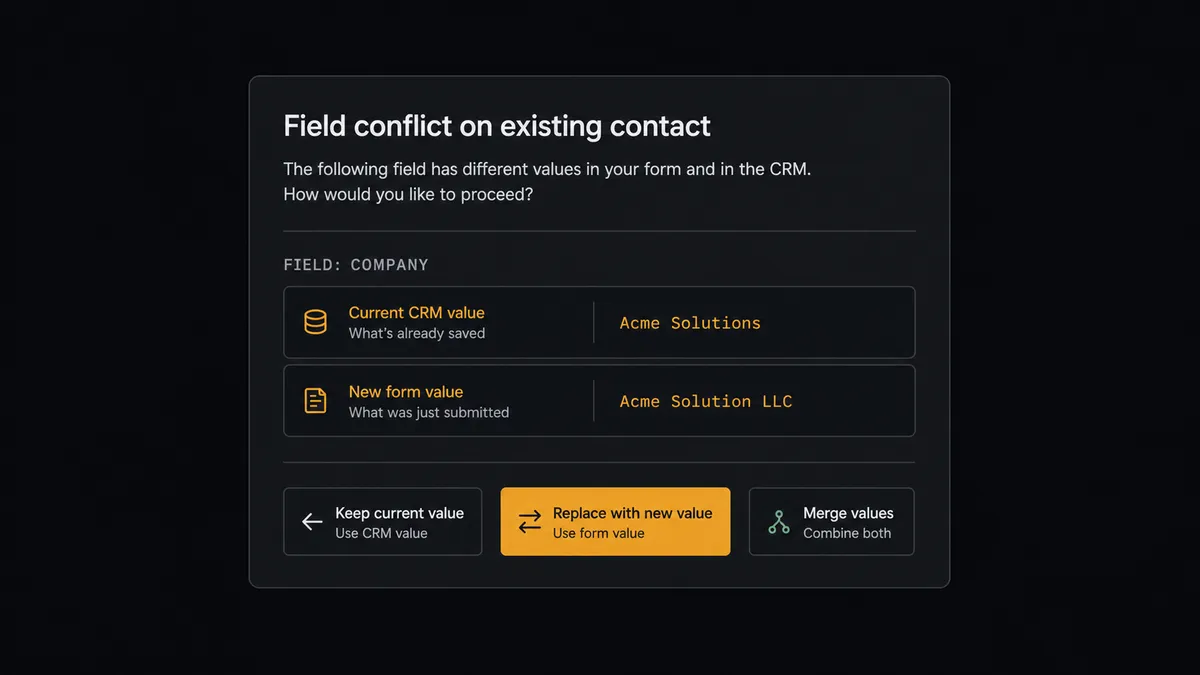
The consequential step is Update Contact on a record your team has already worked. A form response is unverified, typed by a stranger, sometimes by the same person on a different day with different answers. When the response says the contact’s phone number or company differs from what Bigin holds, the agent does not pick a winner. It invokes a human-in-loop flow it holds as a callable tool, pauses the workflow, and posts: “Form response from [contact] conflicts with the existing record. Bigin has one value, the form says another. Keep, replace, or merge?” A person decides in one click, and only then does Update Contact run. The choice, the approver, and the timestamp land in the audit trail.
That single pause is the difference between a CRM that compounds in value and one that decays. Prospects describe it as a digital andon cord: like Toyota’s production line pull cord, the workflow stops the line the moment it hits uncertainty, and a person restores motion with a decision instead of re-keying the whole intake queue by hand.
FlowRunner vs Zapier
Zapier is the default answer for form-to-CRM, and honestly it earned that. The connector library is vast, the editor is friendly to a first-time builder, and its template gallery is full of form-to-CRM recipes that stand up in an afternoon. For a simple “new response, create contact” push, it does the job.
The difference is what happens to the responses that are not simple. FlowRunner runs this connection as an AI agent with a native human-in-the-loop step, so ambiguity gets judgment instead of a default branch.
| What matters for this pair | FlowRunner | Zapier |
|---|---|---|
| Human-in-the-loop on overwriting verified CRM data | Native. The agent invokes an approval flow as a callable tool and pauses before Update Contact | Available by inserting approval-style steps, not a native agent decision |
| Who runs the flow | An AI agent reads each response, reasons, picks actions as tools | Predefined step sequence you configure per Zap |
| Users included | Unlimited users on every tier | Priced by task volume; seats vary by plan |
| Bring your own AI keys | Yes, BYOK. Connect the AI provider key you already have | AI features tied to Zapier’s own AI offering |
| Self-hosted option | Yes, cloud-hosted or self-hosted | Cloud only |
| Pricing model | Transparent workflow-based tiers | Per-task pricing that scales with every form submission |
If your form feeds a low-stakes list and every response should become a record no matter what, Zapier is a fine choice. If your Bigin data is worth protecting and you want a person on the record for every overwrite, this pairing is where FlowRunner is the better fit.
Before and after
| Category | Before | After |
|---|---|---|
| Response handling | Someone checks the responses sheet when they remember and retypes rows into Bigin | Every response becomes a Bigin record on the next scheduled run |
| Speed to first touch | Inquiries wait days for a human to notice them | Create Task puts the follow-up on the owner’s list within minutes of submission |
| Duplicates | The same respondent becomes two or three contacts over time | Search Records matches first, records are created only when no match exists |
| Data integrity | Syncs overwrite verified fields with whatever the respondent typed | Conflicts pause for a keep, replace, or merge decision by a named person |
| Context for reps | The rep sees a name and email, the actual answers live in a sheet | Add Note attaches the full submission to the contact, in the CRM where the rep works |
What you can build
Inquiry form to pipeline. The scheduled run pulls new responses with Get Form Responses List, validates each one, and opens the entry with Create Contact, Create Company, and Create Deal, with the full answers attached via Add Note and a follow-up on the owner’s list via Create Task.
Duplicate-safe intake. Search Records runs before anything is created. Known respondents get Update Deal and a fresh note on the existing record instead of a twin, so one relationship stays one record no matter how many forms the person fills.
Event registration to segmented follow-up. A signup form feeds the workflow, and the agent tags each registrant’s deal by the interest they selected, so post-event follow-up in Bigin starts from segments instead of a flat export.
Quote request triage. The agent reads the budget and timeline questions, opens deals for qualified requests, and files thin or junk submissions as contacts with an explanatory note, keeping the pipeline itself clean enough to forecast from.
Verified-field guardrail. Any response touching an account your team actively works routes its changes through the human gate, so a stranger typing into a public form never silently edits the record behind your biggest open deal.
Getting started
Start on the free plan: 100 executions a month, every integration included, no credit card required, plus 14 days of Professional for new accounts. Both connectors are available on every tier, and every tier includes unlimited users and unlimited workflows.
Explore the integration details:
- Google Forms integration (9 actions covering forms, responses, and field management)
- Bigin integration (17 actions across contacts, companies, deals, tasks, and notes)
Start building free at flowrunner.ai or book a demo to see a live Google Forms to Bigin workflow, overwrite approval and all.
Frequently asked questions
Is it free to connect Google Forms and Bigin on FlowRunner?
You can build and run the connection on FlowRunner's free plan, which includes 100 executions a month and every integration with no credit card required, and new accounts also get 14 days of Professional. Both connectors are available on every FlowRunner tier, and every tier includes unlimited users and unlimited workflows.
Can I self-host the Google Forms to Bigin workflow?
Yes. FlowRunner offers a cloud-hosted option and a self-hosted option, so the connection can run inside your own environment.
Does the AI agent need my own OpenAI or Claude key?
FlowRunner uses a bring-your-own-keys model, so you connect the AI provider key you already have. You are not locked to one model.
What happens when a form response conflicts with a contact Bigin already has?
The agent does not overwrite. It posts both versions to your team's channel, the value Bigin holds and the value the respondent typed, and waits for a person to keep the old data, accept the new, or merge the two. Only after that decision does Update Contact run.
Google Forms has no webhook trigger, so how does the workflow start?
It runs on a schedule. FlowRunner calls Get Form Responses List at the interval you choose and processes every response that arrived since the last run. Get Form Response by ID pulls the full answer set for each one, so nothing depends on Google pushing events.
Which Bigin records does the workflow create from a form response?
Search Records checks for an existing match first. For a new respondent, the workflow calls Create Contact, Create Company when a company name is present, and Create Deal to open the pipeline entry, then Add Note attaches the full form answers to the record.