How to Connect Outreach with Salesforce Pro (With or Without an AI Agent)
Connect Outreach to Salesforce Pro in FlowRunner so prospect events trigger CRM actions automatically, with an AI agent that pauses for human approval before converting a lead or enrolling a strategic account.
How do you connect Outreach to Salesforce Pro?
Set the On Prospect Created trigger in Outreach as the flow’s starting point and map it to Create Lead or Convert Lead to Contact in Salesforce Pro. FlowRunner is a visual AI-agent orchestration platform where automations run autonomously and pause for human judgment on the steps that carry real consequence. The same connection can run as an AI agent that scores each prospect, routes based on ICP fit, and holds for a sales manager’s approval before making irreversible changes in Salesforce.
The problem teams are solving
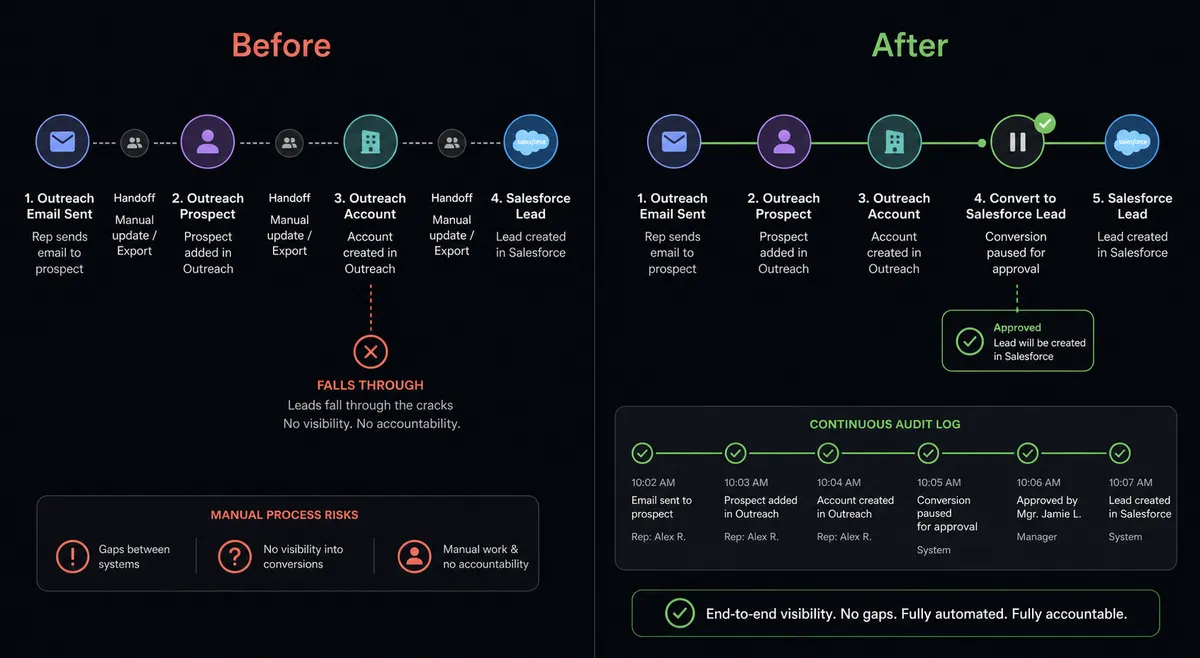
Outreach and Salesforce are both systems of record for revenue, but they are not the same system. A prospect created in Outreach does not automatically become a lead in Salesforce. A lead converted in Salesforce does not automatically enroll in a sequence. Reps fill the gap by hand: copying names and emails across tabs, checking for duplicates, deciding which sequence to use, and flagging the sales manager when something looks ready to convert. That process works until it does not scale.
The pressure compounds around the exceptions. A prospect from a named target account lands in Outreach and someone has to decide: does this go into the standard sequence, or does it get escalated? A lead scores high enough to convert, but the territory assignment is contested. Someone has to catch it before Salesforce locks the record. Without a coordinated layer between the two systems, those decisions fall through the cracks or land in someone’s inbox at the wrong time.
How it works: the connection
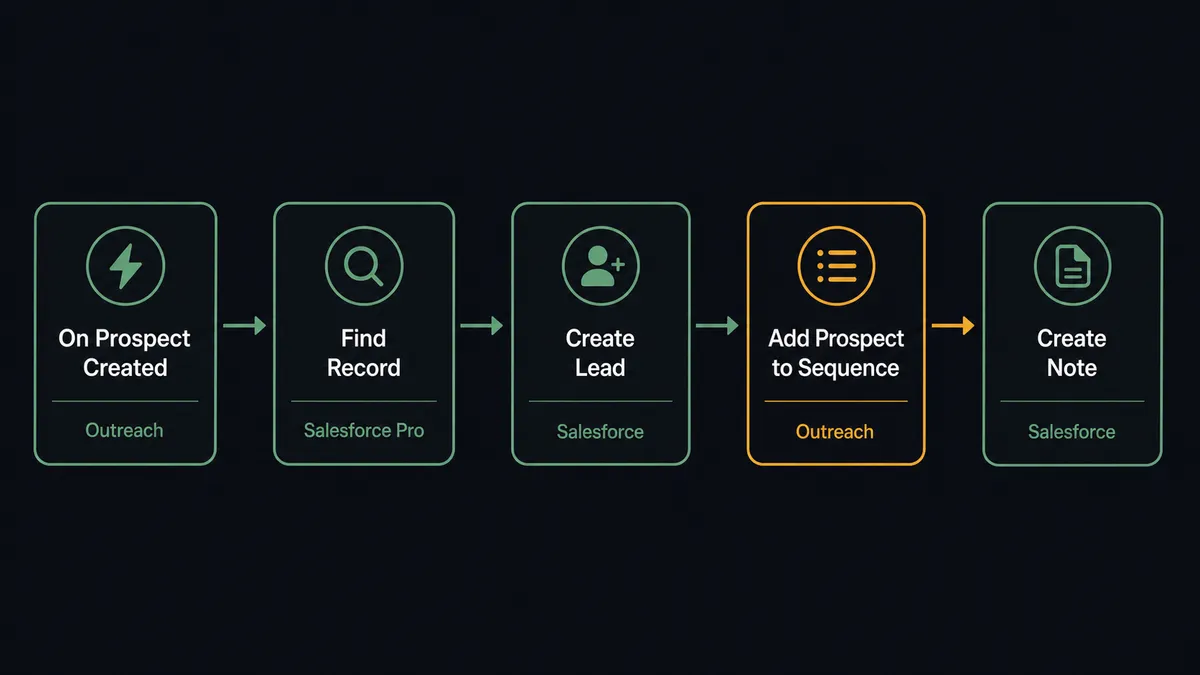
The On Prospect Created trigger in Outreach fires the moment a new prospect is created. That event carries the prospect’s name, email, title, account context, and any tags assigned at creation. FlowRunner receives it and starts the flow.
The first action in Salesforce Pro is Find Record, using the prospect’s email address as the lookup key. If a matching lead or contact already exists, the agent updates the existing record instead of creating a duplicate. If no match exists, Create Lead writes the prospect into Salesforce with their name, email, title, and company.
From there, Add Prospect to Sequence in Outreach enrolls them in the right cadence. List Sequences gives the agent a current view of available sequences so it picks the correct one based on account type or tag. List Mailboxes confirms the sending mailbox before enrollment completes.
At each step, the action names are the agent’s tools: Find Record, Create Lead, Add Prospect to Sequence, Create Note. The agent does not guess. It works from the data in front of it.
Can an AI agent run it? (And why a human stays in the loop)
The plain connection handles volume. The AI agent handles judgment.
When the On Prospect Created trigger fires, the agent does more than copy fields from one system to the other. It reads the prospect and its account context, runs Find Records by Query in Salesforce Pro to pull firmographic history, checks whether the account is on the named-target list, and scores the prospect against ICP criteria. Then it decides what to do based on the result.
For a prospect who scores above threshold, the agent does not just convert. Convert Lead to Contact in Salesforce is irreversible. It creates the contact, merges the account, and assigns the opportunity. A phantom conversion or a wrong territory assignment is a real problem with real consequences. So the agent stops and asks.
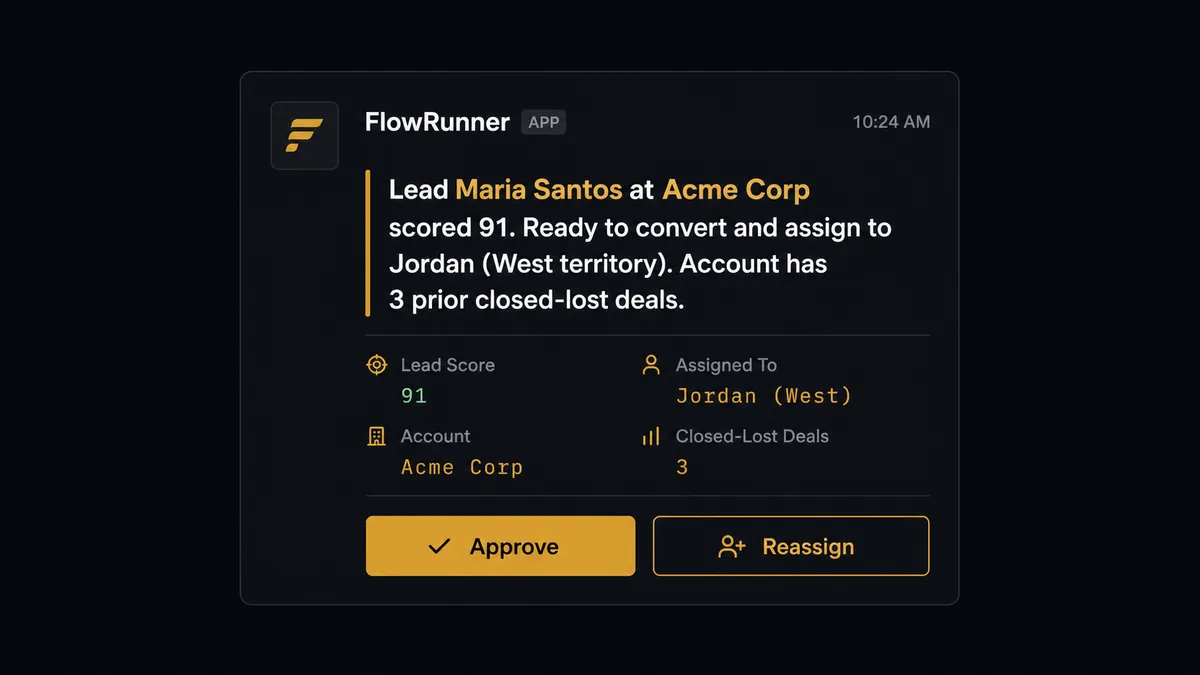
The agent packages what it knows: the prospect’s name, the account, the ICP score, the territory it would assign, and any history it found on the account. It sends that context to the sales manager via Slack with an Approve or Reassign button. The manager decides in one click. The agent converts the lead, creates the opportunity with Create Record, assigns the rep, and logs the decision with Create Note. The approver’s identity and the timestamp are both recorded.
This is not a threshold rule. The agent might approve a $2,000 deal automatically if the account has clean history and strong ICP fit, and stop for approval on a $500 deal if the account has contested territory or a prior closed-lost that changes the picture. The decision to involve a human is itself a judgment call, not a formula.
On the Outreach side, the same reasoning applies to sequence enrollment. On named target accounts, where a mistimed touch does real damage, the agent pauses Add Prospect to Sequence and routes the decision to the assigned rep. The rep sees the prospect, the account, and the sequence the agent planned to use. They approve or pick a different sequence. Ordinary prospects flow through automatically. Strategic ones get a human before the first send. Prospects call this kind of stop point a digital andon cord: the line pauses when the agent hits a decision that deserves a person.
FlowRunner vs the tool you’re probably comparing
Most teams reaching this point are running Zapier for the simpler connections or evaluating n8n as a more flexible option.
Zapier is the right choice for a basic Outreach-to-Salesforce sync with no conditional logic. It is fast to set up, reliable for simple trigger-action chains, and widely understood. Where it runs out of runway is anything that requires reasoning across fields, routing based on multiple criteria, or pausing for a human at a specific decision point.
n8n gives technical teams more flexibility, including the ability to build conditional logic and call external APIs. It requires a developer to configure and maintain, and it does not have a native human-in-loop concept. You can bolt on an approval step by sending a webhook and waiting, but the agent reasoning, context packaging, and audit capture are things you build yourself.
| Capability | Zapier | n8n | FlowRunner |
|---|---|---|---|
| Basic Outreach to Salesforce trigger-action | Yes | Yes | Yes |
| AI agent that reasons before acting | No | Partial (requires dev build) | Yes, native |
| Human-in-loop as a callable tool | No | Manual webhook pattern | Yes, native |
| Unlimited users on every tier | No (seat-based) | No (seat-based) | Yes |
| BYOK for AI models | No | No | Yes |
| Audit trail for agent decisions | No | No | Yes, at Professional tier |
| Self-hosted option | No | Yes | Yes |
Before and after
| Category | Before | After |
|---|---|---|
| Lead routing | Reps review each prospect individually and decide on routing | ICP scoring runs on every prospect; high-scoring leads route to rep automatically |
| Lead conversion | Any rep could convert a lead at any stage, inconsistently | Every conversion requires manager approval with the decision logged in Salesforce |
| Sequence enrollment | Reps add prospects to sequences manually, one at a time | Prospects enroll in the right sequence on arrival; named accounts pause for rep review |
| Duplicate records | Duplicates created when the same prospect lands from multiple sources | Find Record runs before every Create Lead, blocking duplicates at the source |
| Pipeline visibility | Outreach activity and Salesforce records updated separately, often out of sync | On Opportunity Updated trigger fires on stage changes and keeps both systems current |
| Audit trail | No record of who approved what or when in either system | Agent decisions, approver identity, and timestamps captured in Salesforce notes |
What you can build
Prospect enrichment and sequence enrollment on arrival. On Prospect Created fires in Outreach. The agent enriches the record, uses Find Record in Salesforce Pro to pull account history, and selects the right sequence using List Sequences. Add Prospect to Sequence runs automatically for qualified prospects. Named accounts pause for rep approval before the first email sends.
Lead conversion with manager gate. When ICP scoring crosses the threshold, the agent stops before Convert Lead to Contact and sends the sales manager a Slack approval card with the prospect’s score, the account’s history, and the rep it plans to assign. The manager approves in one click. The agent converts, creates the opportunity via Create Record, and logs the decision with Create Note.
Stage change pipeline sync. On Opportunity Updated in Outreach fires when a deal changes stage. The agent updates the matching record in Salesforce using Update Record, then queues a follow-up task for the assigned rep using Create Task in Outreach to keep next steps current without a manual check.
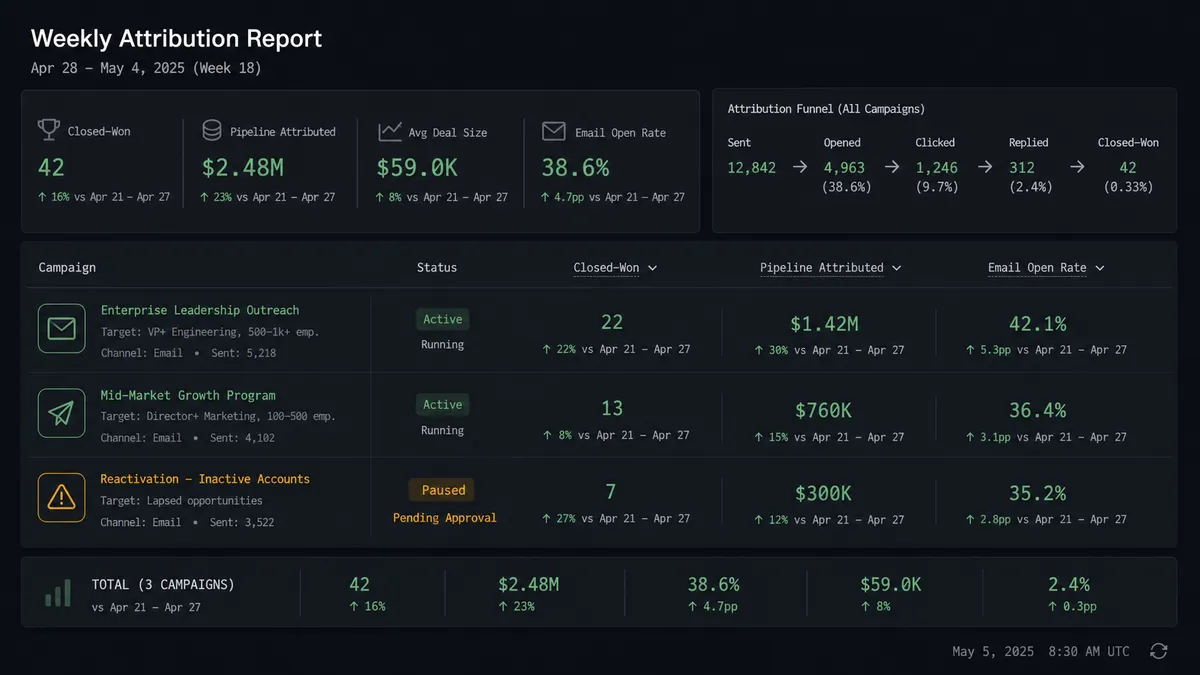
Weekly engagement and attribution report. A scheduled flow runs Find Records by Query in Salesforce Pro using a Custom SOQL Query to pull closed opportunities and their campaign associations. List Calls and List Mailings pull engagement data from Outreach. The agent generates an attribution summary and posts it to the revenue ops Slack channel.
Named account sequence governance. The agent tags prospects using Add Prospect Tags in Outreach, then checks the tag set before enrolling. Prospects tagged “named-account” or “strategic” route to List Sequences, and the agent presents the sequence options to the assigned rep before Add Prospect to Sequence runs. Ordinary prospects enroll without review.
Common questions
Is it free to connect Outreach and Salesforce Pro on FlowRunner? FlowRunner has a free plan with 100 executions a month, every integration included, and no credit card required, and new accounts get 14 days of Professional on top. Beyond the free plan, Growth starts at $45 per month. All tiers include unlimited users and workflows.
Can I self-host the Outreach and Salesforce Pro integration? Yes. FlowRunner offers a self-hosted Community Edition at no cost for teams that need to keep the orchestration layer on their own infrastructure. Enterprise self-hosting adds multi-instance clustering and the full compliance suite.
Does the AI agent need my own OpenAI or AI model key? FlowRunner uses a bring-your-own-keys model. You connect your preferred AI provider directly. The platform works with any provider; you are not locked into a specific model.
What happens when the agent is not sure what to do? The agent invokes a human-in-loop flow as a callable tool. It pauses the workflow, packages the relevant context (prospect name, account, score, the action it planned to take), and routes the decision to the right person via Slack or email. The workflow resumes once the human responds.
Can I run this without the AI agent and just use a basic trigger-action automation? Yes. The plain connection works without an AI agent. The On Prospect Created trigger in Outreach fires when a new prospect arrives, and FlowRunner maps the fields into Salesforce Pro actions like Create Lead or Update Record. You add the AI agent layer only when you want reasoning and human oversight on top.
Does FlowRunner verify actions against the real Outreach and Salesforce APIs? Yes. Every action in the Outreach and Salesforce Pro integrations is built and verified against the official APIs. The Outreach integration covers 47 actions across prospects, accounts, sequences, tasks, calls, and opportunities. Salesforce Pro covers 26 actions including SOQL queries, lead conversion, and file handling.
Getting started
FlowRunner has a free plan with 100 executions a month, every integration included, and no credit card required, and new accounts get 14 days of Professional on top. Any real email address works; disposable domains are not accepted.
Connect both integrations from the FlowRunner integrations panel:
- Outreach integration: prospects, accounts, sequences, tasks, calls, opportunities, and nine real-time triggers
- Salesforce Pro integration: record management, SOQL queries, lead conversion, campaign management, and file handling
Start building at flowrunner.ai or book a 30-minute walkthrough at calendly.com/flowrunner/intro. Bring your current Outreach-to-Salesforce workflow and the team will show you exactly where the AI agent and human oversight layer would fit.
Frequently asked questions
Is it free to connect Outreach and Salesforce Pro on FlowRunner?
FlowRunner has a free plan with 100 executions a month, every integration included, and no credit card required, and new accounts get 14 days of Professional on top. Beyond the free plan, Growth starts at $45 per month. All tiers include unlimited users and workflows.
Can I self-host the Outreach and Salesforce Pro integration?
Yes. FlowRunner offers a self-hosted Community Edition at no cost for teams that need to keep the orchestration layer on their own infrastructure. Enterprise self-hosting adds multi-instance clustering and the full compliance suite.
Does the AI agent need my own OpenAI or AI model key?
FlowRunner uses a bring-your-own-keys model. You connect your preferred AI provider directly. The platform works with any provider; you are not locked into a specific model.
What happens when the agent is not sure what to do?
The agent invokes a human-in-loop flow as a callable tool. It pauses the workflow, packages the relevant context (prospect name, account, score, the action it planned to take), and routes the decision to the right person via Slack or email. The workflow resumes once the human responds.
Can I run this without the AI agent and just use a basic trigger-action automation?
Yes. The plain connection works without an AI agent. The On Prospect Created trigger in Outreach fires when a new prospect arrives, and FlowRunner maps the fields into Salesforce Pro actions like Create Lead or Update Record. You add the AI agent layer only when you want reasoning and human oversight on top.
Does FlowRunner verify actions against the real Outreach and Salesforce APIs?
Yes. Every action in the Outreach and Salesforce Pro integrations is built and verified against the official APIs. The Outreach integration covers 47 actions across prospects, accounts, sequences, tasks, calls, and opportunities. Salesforce Pro covers 26 actions including SOQL queries, lead conversion, and file handling.