How to Connect DocuSign with Deskera (With or Without an AI Agent)
Connect signed DocuSign envelopes to Deskera Books so an executed contract becomes a contact, a sales order, and an invoice, with an AI agent that pauses for a human before the first invoice reaches the customer.
How do you connect DocuSign to Deskera?
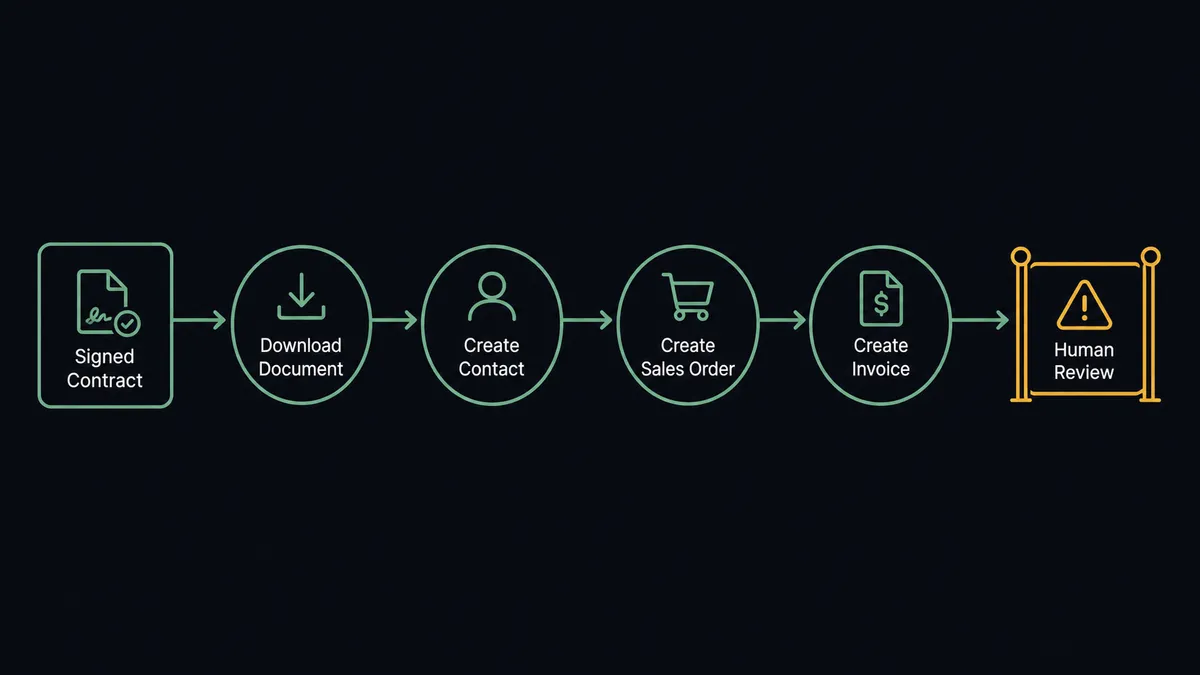
You connect DocuSign to Deskera by having DocuSign’s On Envelope Completed trigger drive Deskera actions: the workflow pulls the executed agreement with Download Document, finds or creates the customer with List Contacts and Create Contact, stages the deal with Create Sales Order, and bills it with Create Invoice, so a signed contract becomes a live receivable without anyone retyping terms from a PDF. FlowRunner is a visual AI-agent orchestration platform where automations run autonomously and pause for human judgment on the steps that carry real consequence. Run as an AI agent, the same connection reads the contract itself, extracts the billing terms, and stops for a named human before Create Invoice sends a bill built from an AI’s interpretation of a legal document.
The problem it solves
In most businesses the distance between “the contract is signed” and “the invoice went out” is measured in days and owned by nobody in particular. Sales celebrates the signature and moves on. The signed PDF lands in a shared folder. Eventually someone in finance opens it, reads the commercial terms, creates the customer in Deskera, sets up the sales order, and raises the invoice, translating contract language into accounting fields by hand. Every day of that gap is unbilled revenue, and every manual translation is a chance for the invoice to disagree with the contract.
The edges are expensive. A contract with quarterly billing gets invoiced annually because the person keying it in assumed the default. A negotiated discount lives in the signed document but not in the invoice, and the customer’s first interaction with your finance team is a dispute. A deal gets voided after the envelope went out, but the sales order already exists in Deskera and quietly inflates the pipeline until someone notices at close. These are handoff failures, and the handoff is the part nobody owns.
How it works: the connection
The connection listens to DocuSign and writes to Deskera Books. Here is the plain version, grounded in the real connector actions.
- Trigger: DocuSign fires On Envelope Completed the moment every signer has signed.
- Read: The workflow calls Download Document to retrieve the executed contract and Get Envelope Recipients to pull the signer’s name, company, and email.
- Match the customer: It calls List Contacts in Deskera, searching by company name. If no record exists, it calls Create Contact with the signer’s details.
- Stage the deal: It calls Create Sales Order with the contract’s products, quantities, and prices, carrying the envelope ID as the reference.
- Raise the bill: It calls Create Invoice against the contact with the agreed terms and payment schedule.
- Close the loop: When the money arrives, Record Payment Received marks the invoice paid, and the receivable closes with a straight line back to the signed document.
- Handle the unwind: A second branch on On Envelope Voided finds the related records with List Invoices and stages the cleanup, a Create Credit Note or a Delete Invoice, for review.
That is the “just connect them” answer. Signed becomes billed the same day, the invoice terms come from the document instead of someone’s memory of the negotiation, and every receivable traces to its envelope.
Can an AI agent run it? (and why a human stays in the loop)
Yes, and the agent is what makes the contract-to-cash path trustworthy rather than just fast. A field-mapping sync assumes every contract fits the template. An AI agent actually reads the executed document, holds List Contacts, Create Contact, Create Sales Order, Create Invoice, Create Credit Note, and Record Payment Received as tools, and works out what this specific deal requires: one-time or recurring, net 30 or net 60, standard list pricing or a negotiated schedule buried in an appendix.
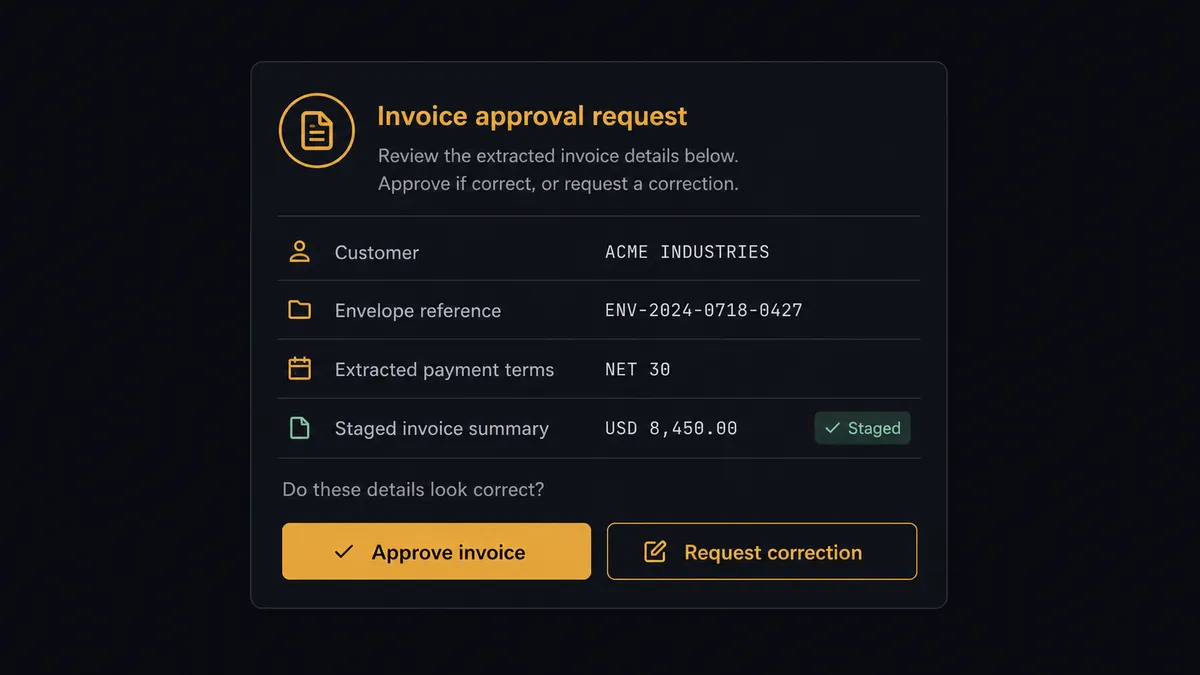
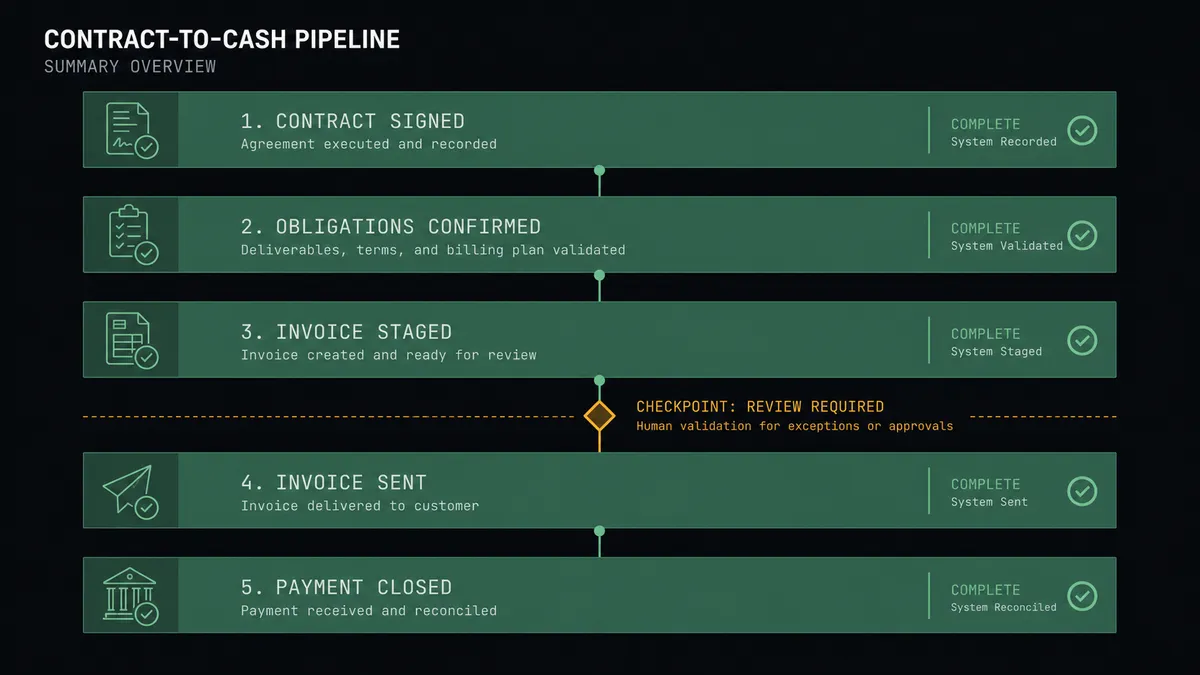
The consequential step is Create Invoice, because an invoice is not internal record-keeping. It reaches the customer, states an amount, and starts a payment clock, and a wrong one damages trust at the exact moment the relationship is newest. So the agent stages everything up to that line on its own, then invokes a human-in-loop flow it holds as a callable tool. The workflow pauses and posts to your finance channel: “Contract signed with [customer], envelope [reference]. Extracted terms: [amount] on [schedule], payment terms [terms]. Staged invoice attached. Approve to send, or correct the terms first?” A person compares the staged bill against the contract in one glance, because the agent put them side by side. Only after approval does Create Invoice run. Voids work the same way in reverse: the agent drafts the Create Credit Note or Delete Invoice, and a person approves the reversal before the books change.
This is the digital andon cord applied to billing: like Toyota’s production line pull cord, the workflow stops the line the moment it hits uncertainty. Clean, standard contracts flow from signature to invoice without a human touch. The ones with negotiated exceptions, the ones where an extraction error would become a customer dispute, wait for a named approver, and the audit trail keeps the receipt.
FlowRunner vs Zapier
Zapier is the obvious starting point here and it has real strengths: both connectors, a huge template gallery, and an editor a finance ops person can learn in an afternoon. For a simple “envelope completed, create a contact” push, Zapier is quick to stand up and dependable.
The difference is that this pair’s hard part is not moving data, it is interpreting a contract and deciding whether the resulting invoice is safe to send. Zapier executes the steps you configured with the fields you mapped; it does not read the document, and an approval is something you bolt on rather than something an agent decides to invoke. FlowRunner runs the flow as an agent whose judgment call, and whose escalation to a human, is the core of the workflow.
| What matters for this pair | FlowRunner | Zapier |
|---|---|---|
| Human-in-the-loop before Create Invoice reaches the customer | Native. The agent invokes an approval flow as a callable tool and waits for a named approver | Available via added approval steps, not a native agent decision |
| Who runs the flow | An AI agent reads the contract, reasons, picks actions as tools | Predefined step sequence you configure per Zap |
| Users included | Unlimited users on every tier | Priced by task volume; seats vary by plan |
| Bring your own AI keys | Yes, BYOK. Connect the AI provider key you already have | AI features tied to Zapier’s own AI offering |
| Self-hosted option | Yes, cloud-hosted or self-hosted | Cloud only |
| Pricing model | Transparent workflow-based tiers | Per-task pricing that can be hard to predict as volume grows |
If your contracts are uniform and your billing is simple, Zapier handles the push. If your contracts carry negotiated terms and a wrong invoice costs you a customer conversation, the agent-plus-approval model is what this pairing is for.
Before and after
| Category | Before | After |
|---|---|---|
| Signature to invoice | The signed PDF waits in a folder until finance gets to it | The invoice is staged within minutes of On Envelope Completed firing |
| Term accuracy | Billing terms are retyped from the contract, and mistakes surface as customer disputes | Terms are extracted from the document and confirmed by a named approver before sending |
| New customers | Contacts get created ad hoc, sometimes twice, with terms left at defaults | List Contacts matches first, Create Contact fills from the agreement itself |
| Voided deals | Dead deals leave live sales orders and invoices in the books | On Envelope Voided stages the credit note or deletion for one-click review |
| Traceability | Linking an invoice to its contract means searching two systems | Every invoice carries the envelope reference, and every approval carries a name and timestamp |
What you can build
Contract to first invoice. On Envelope Completed fires. The agent reads the document, matches the customer with List Contacts or creates them with Create Contact, stages Create Sales Order, and holds Create Invoice at the approval gate with the extracted terms attached.
Quotation to signature to order. Working the other direction, the agent takes an accepted Create Quotation in Deskera, sends the matching agreement with Send Envelope from Template, and converts to Create Sales Order automatically when On Envelope Completed fires, so the paper trail and the books never diverge.
Void cleanup with approval. On Envelope Voided fires. The agent finds the related billing with List Invoices, drafts Create Credit Note if payment was recorded or proposes Delete Invoice if the bill never went out, and a person approves the reversal before the ledger changes.
Payment reconciliation on signed deals. When cash lands, the agent matches it to the invoice, records it with Record Payment Received, and posts a mismatch alert when the amount differs from the signed terms, so partial payments get chased while they are fresh.
Declined envelope follow-up. On Envelope Declined fires. The agent identifies which recipient declined with Get Envelope Recipients and posts the deal context to your sales channel, so the conversation restarts the same day instead of surfacing in next month’s pipeline review.
Getting started
Start on the free plan: 100 executions a month, every integration included, no credit card required, plus 14 days of Professional for new accounts. Both connectors are available on every tier, and every tier includes unlimited users and unlimited workflows.
Explore the integration details:
- DocuSign integration (4 triggers and 9 actions covering the full envelope lifecycle)
- Deskera integration (35 actions covering end-to-end Books accounting)
Start building free at flowrunner.ai or book a demo to see a live DocuSign to Deskera workflow, invoice approval and all.
Frequently asked questions
Is it free to connect DocuSign and Deskera on FlowRunner?
You can build and run the connection on FlowRunner's free plan, which includes 100 executions a month and every integration with no credit card required, and new accounts also get 14 days of Professional. Both connectors are available on every FlowRunner tier, and every tier includes unlimited users and unlimited workflows.
Can I self-host the DocuSign to Deskera workflow?
Yes. FlowRunner offers a cloud-hosted option and a self-hosted option, so the connection can run inside your own environment.
Does the AI agent need my own OpenAI or Claude key?
FlowRunner uses a bring-your-own-keys model, so you connect the AI provider key you already have. You are not locked to one model.
What happens when the agent is unsure about the billing terms in a signed contract?
It never guesses on an invoice. The agent posts the customer, the envelope reference, the terms it extracted, and the specific clause it is unsure about to your finance channel, then waits for a person to confirm or correct the amounts before Create Invoice runs.
Which DocuSign events can start a Deskera workflow?
DocuSign offers four triggers: On Envelope Completed, On Envelope Sent, On Envelope Declined, and On Envelope Voided. On Envelope Completed drives the billing flow, and On Envelope Voided drives the cleanup path for deals that fall through after paperwork started.
What happens in Deskera when a contract is voided after billing started?
On Envelope Voided fires and the agent assembles the cleanup: the related invoice from List Invoices, a drafted Create Credit Note if payment was recorded, or a proposed Delete Invoice if it was never sent. A person approves the reversal before anything in the books changes.