How to Connect DocuSign with Bitrix24 (With or Without an AI Agent)
Connect DocuSign envelope events to Bitrix24 deals, optionally as an AI agent that moves deals on signature, works declines, and pauses for a human before an envelope is voided.
How do you connect DocuSign to Bitrix24?
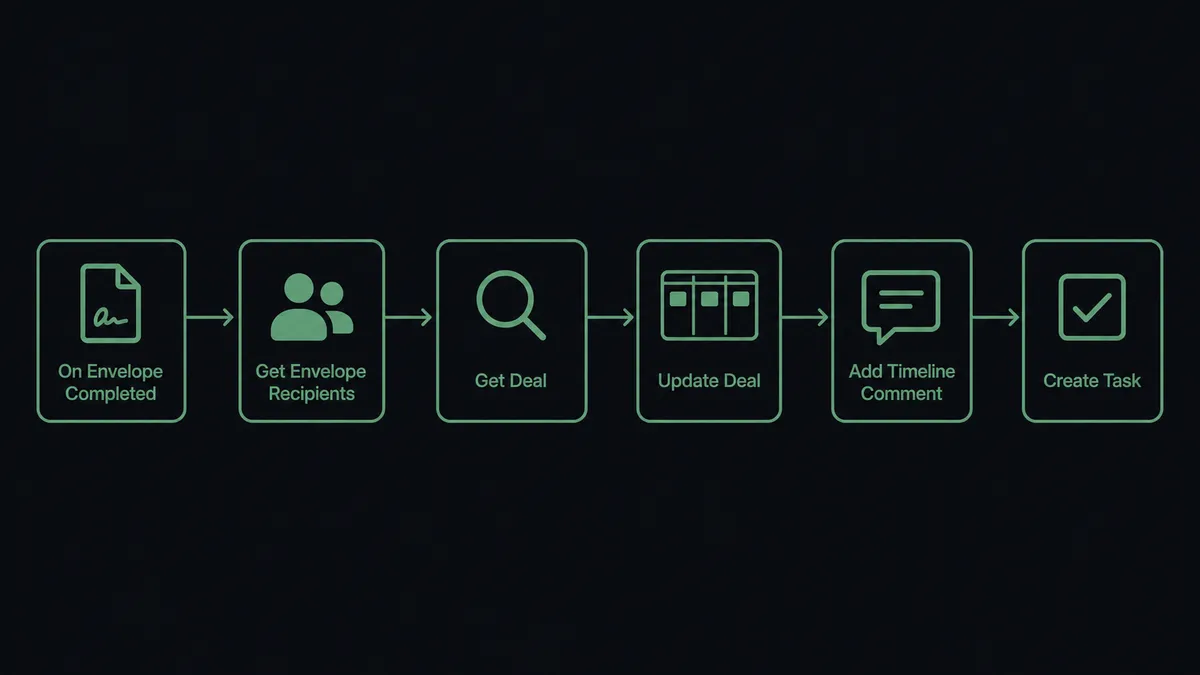
You connect DocuSign to Bitrix24 by having DocuSign’s On Envelope Completed trigger drive Bitrix24 actions: the workflow pulls the signers with Get Envelope Recipients, finds the deal with List Deals and Get Deal, moves it with Update Deal, and records the event with Add Timeline Comment, so a completed signature becomes a stage change your team sees inside the CRM. Bitrix24 has no triggers of its own, so the workflow always starts from the DocuSign side, where the contract events actually happen. FlowRunner is a visual AI-agent orchestration platform where automations run autonomously and pause for human judgment on the steps that carry real consequence. The same connection can run as an AI agent that also works the envelopes that go wrong, resending the stalled ones and pausing for a named human before Void Envelope cancels a live contract.
The problem it solves
Right now the signature status of your contracts lives in one system and your deals live in another, and a person shuttles between them. A contract goes out through DocuSign. The deal owner refreshes the envelope status, or forgets to, and the Bitrix24 deal sits in “contract sent” long after the customer signed. Fulfillment starts late because nobody told operations the ink was dry. When a manager asks which contracts are still out, the answer requires opening DocuSign, scanning List Envelopes by eye, and cross-referencing deals from memory.
The declines are where deals quietly die. A signer declines because legal wants one clause changed, and the decline sits unnoticed in DocuSign while the Bitrix24 deal looks healthy. By the time someone checks, momentum is gone. And the voids cut the other way: an envelope gets voided in a hurry, sometimes the wrong one, and there is no record in the CRM of who decided the contract should be cancelled or why. A signature workflow with no connection to the pipeline leaks exactly the deals that needed attention most.
How it works: the connection
The connection listens to DocuSign and writes to Bitrix24. Here is the plain version, grounded in the real connector actions.
- Trigger: DocuSign fires On Envelope Completed when the last signer signs.
- Read: The workflow calls Get Envelope Recipients to pull who signed, and Download Document to fetch the executed contract.
- Match the deal: It calls List Deals and Get Deal in Bitrix24 to find the deal the envelope belongs to.
- Move the deal: It calls Update Deal to advance the deal to your signed stage, so the pipeline reflects reality within seconds.
- Record the event: It calls Add Timeline Comment with the envelope subject, signers, and completion time, so the deal history shows the contract milestone.
- Start fulfillment: It calls Create Task for the operations owner and Send Notification to the deal owner, so the handoff happens the moment the signature lands.
That is the “just connect them” answer. Signatures become stage moves, executed contracts become timeline entries, and fulfillment starts on the event instead of on a memory. On Envelope Sent and On Envelope Declined each drive their own paths the same way, so the deal timeline tracks the full life of the envelope.
Can an AI agent run it? (and why a human stays in the loop)
Yes, and the envelopes that go wrong are exactly why. Instead of a fixed script that only handles the happy path, an AI agent reads each envelope event and picks the DocuSign and Bitrix24 actions it needs as tools. Get Envelope Status, Resend Envelope, Void Envelope, Update Deal, Add Timeline Comment, Create Task, Send Notification: that is the toolbox, and the agent chooses based on what the event and the deal actually say.
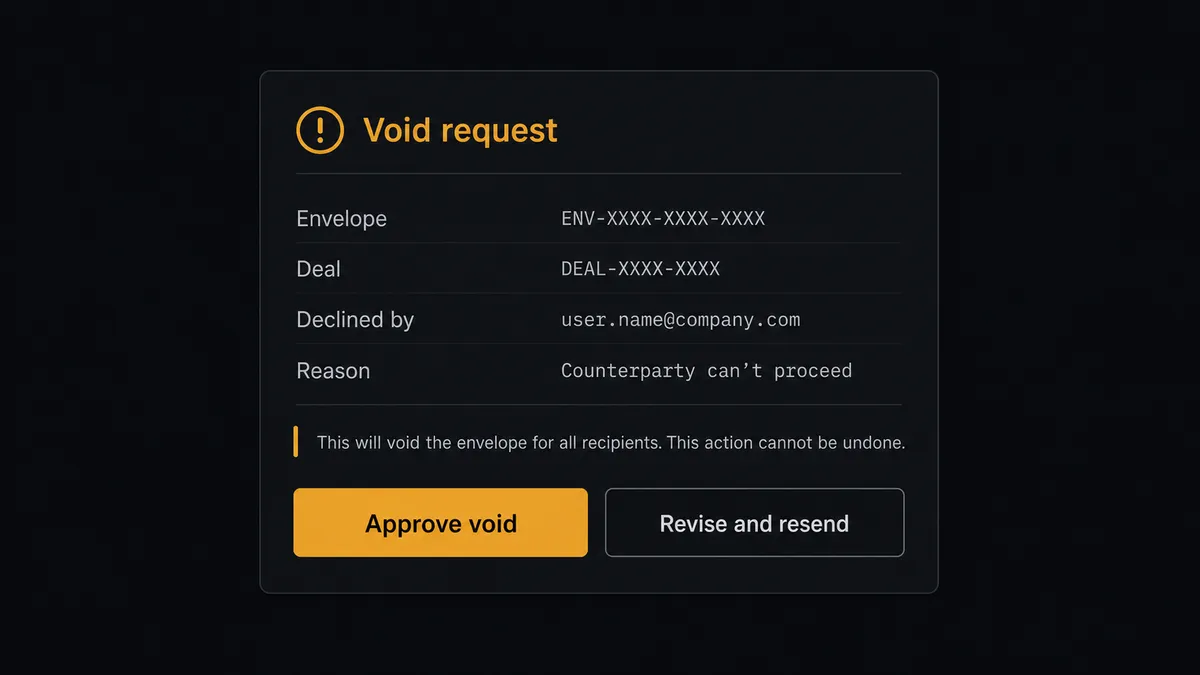
When On Envelope Declined fires, the agent gathers the context: which signer declined, the reason if one was given, the deal’s value and stage from Get Deal, how long the envelope has been out. A decline that reads like a redline request gets routed to the deal owner with Create Task and a timeline comment. A stalled envelope with no response gets a Resend Envelope nudge. But the consequential step is Void Envelope. Voiding cancels a live contract for every signer, and there is no undo. The agent never takes it alone. It invokes a human-in-loop flow it holds as a callable tool, and the workflow pauses and posts to your channel: “Envelope [subject] for deal [name], value [amount], declined by [signer]. Reason: [reason]. Void the envelope, or revise and resend?” A person decides in one click. Only then does Void Envelope run, and both the FlowRunner audit trail and the Bitrix24 timeline comment record who approved it and when.
That pause is the difference between an automation you tolerate and one you trust with contracts. Prospects call it the digital andon cord: like Toyota’s quality control pull cord, the workflow stops the line the moment it hits uncertainty, and your team pulls it back into motion.
FlowRunner vs Zapier
Most teams wiring DocuSign into a CRM reach for Zapier first, and for good reason. Zapier connects to both DocuSign and Bitrix24, its editor is quick to learn, and its template gallery covers signature-to-CRM patterns you can stand up in an afternoon. For a straight “envelope completed moves the deal” push, it is a fast, proven path.
The difference shows up on the envelopes that do not complete. FlowRunner is built around native human-in-the-loop and AI-agent orchestration, where the agent works declines and stalls, and a person stays on the one action that cancels a contract.
| What matters for this pair | FlowRunner | Zapier |
|---|---|---|
| Human-in-the-loop on voiding envelopes | Native. The agent invokes an approval flow as a callable tool and pauses before Void Envelope | Available by adding approval steps, not a native agent decision |
| Who runs the flow | An AI agent reads each envelope event, reasons, and picks actions as tools | Predefined step sequence you configure per Zap |
| Users included | Unlimited users on every tier | Priced by task volume; seats vary by plan |
| Bring your own AI keys | Yes, BYOK | AI features tied to Zapier’s own AI offering |
| Self-hosted option | Yes, cloud-hosted or self-hosted | Cloud only |
| Pricing model | Transparent workflow-based tiers | Per-task pricing that gets harder to predict as contract volume grows |
If all you need is a stage move on completion, Zapier will do it well. If you want declines worked, stalls nudged, and a named human on every void, this pairing is the better fit.
Before and after
| Category | Before | After |
|---|---|---|
| Signature visibility | Deal owners refresh DocuSign by hand to learn what signed | Update Deal and Add Timeline Comment run the moment On Envelope Completed fires |
| Fulfillment handoff | Operations learns about signed contracts at the next standup | Create Task and Send Notification start fulfillment on the signature event |
| Declined envelopes | Declines sit unnoticed while the deal looks healthy in the CRM | Each decline lands on the deal timeline with a routed task the same hour |
| Void decisions | Envelopes get voided ad hoc with no CRM record of who or why | Void Envelope waits for a named approver, and the timeline comment records the decision |
| Contract audit trail | The story of each contract is scattered across two systems | The deal timeline carries sent, declined, resent, voided, and completed events in one place |
What you can build
Signature to fulfillment, hands off. On Envelope Completed fires. The agent pulls signers with Get Envelope Recipients, matches the deal with Get Deal, moves it with Update Deal, records it with Add Timeline Comment, and starts fulfillment with Create Task. No one refreshes DocuSign again.
Decline triage. On Envelope Declined fires. The agent reads the reason, posts it to the deal timeline, and routes a revision task to the deal owner with Create Task, so redline requests get worked while the deal is still warm.
Void with named approval. A contract needs cancelling. The agent packages the envelope, deal value, and reason, and invokes the human-in-loop tool. Void Envelope only runs after a person approves, and the decision lands on the deal timeline.
Stalled envelope nudge. On a schedule, the agent scans List Envelopes and Get Envelope Status for contracts sent but unsigned, calls Resend Envelope on the stale ones, and logs each nudge with Add Timeline Comment so the deal owner sees the chase history.
Executed contract filing. When an envelope completes, the agent calls Download Document and List Envelope Documents, records the completion on the deal, and notifies the account team with Send Notification, so the signed paper is findable from the deal instead of buried in an inbox.
Common questions
Is it free to connect DocuSign and Bitrix24 on FlowRunner? You can build and run the connection on a $100 credit with no credit card, which is roughly 67 days free on the Growth tier at $45/mo. Both connectors are available on every FlowRunner tier, and every tier includes unlimited users and unlimited workflows.
Can I self-host the DocuSign to Bitrix24 workflow? Yes. FlowRunner offers a cloud-hosted option and a self-hosted option, so the connection can run inside your own environment.
Does the AI agent need my own OpenAI or Claude key? FlowRunner uses a bring-your-own-keys model, so you connect the AI provider key you already have. You are not locked to one model.
What happens when a signer declines and the agent is unsure what to do next? The agent stops and invokes a human-in-loop step. It posts the envelope, the signer who declined, the decline reason if one was given, and the Bitrix24 deal context, then waits for a person to choose resend, revise, or void. Void Envelope never runs without a named approver.
Which DocuSign events can drive a Bitrix24 action? DocuSign offers four triggers: On Envelope Completed, On Envelope Sent, On Envelope Declined, and On Envelope Voided. Bitrix24 has no triggers, so the workflow always starts from the DocuSign side, with each event driving its own path in the flow.
Can the signed document end up attached to the Bitrix24 deal? The workflow calls Download Document when On Envelope Completed fires, then records the completion on the deal with Add Timeline Comment and stores the file wherever your document flow requires, so the deal timeline points at the executed contract.
Getting started
Start with a $100 credit on the Growth tier at $45/mo. That is roughly 67 days free, and no credit card is required. Both connectors are available on every tier, and every tier includes unlimited users and unlimited workflows.
Explore the integration details:
- DocuSign integration (4 triggers and 9 actions covering envelopes, recipients, and documents)
- Bitrix24 integration (40 actions covering leads, deals, tasks, and notifications)
Start building free at flowrunner.ai or book a demo to see a live DocuSign to Bitrix24 workflow, void approval and all.