How to Connect Cohere with Pinecone (With or Without an AI Agent)
Connect Cohere's embeddings and reranking to a Pinecone vector index through a FlowRunner workflow that runs autonomously and pauses for human judgment before any write that cannot be undone.
How do you connect Cohere to Pinecone?
You connect Cohere to Pinecone in FlowRunner by setting a trigger that fires when new content arrives or a question comes in, then chaining Cohere’s Create Embeddings action into Pinecone’s Upsert Records action for ingestion, and Pinecone’s Query Vectors into Cohere’s Rerank Documents and Chat with Documents for retrieval. FlowRunner is a visual AI-agent orchestration platform where automations run autonomously and pause for human judgment on the steps that carry real consequence. That same connection runs as an AI agent: the agent chooses which tools to use based on the data it sees, and it calls a human-in-loop flow before returning any answer that touches policy or before deleting anything from the index that cannot be recovered.
The problem it solves
Most teams that reach for Cohere and Pinecone together are trying to fix the same thing: a knowledge base that nobody can actually use. Reference material lives in shared drives, inboxes, and wikis that search can reach only if the words match exactly. Employees ask the same questions over and over because the answer is buried under near-misses. Whoever manages the knowledge base answers the same queries by hand until they stop trying to keep it current.
When someone tries to build a retrieval system to fix this, they hit a second wall. Standing up embeddings infrastructure, wiring it to a vector store, adding reranking on top, and then deciding what to do with the results is a project, not an afternoon. The pieces work, but the pipeline connecting them does not exist until someone builds it. And once it exists, keeping it in sync with changing source material becomes its own job. The team that needed to stop answering questions manually now has a system to maintain.
How it works: the connection
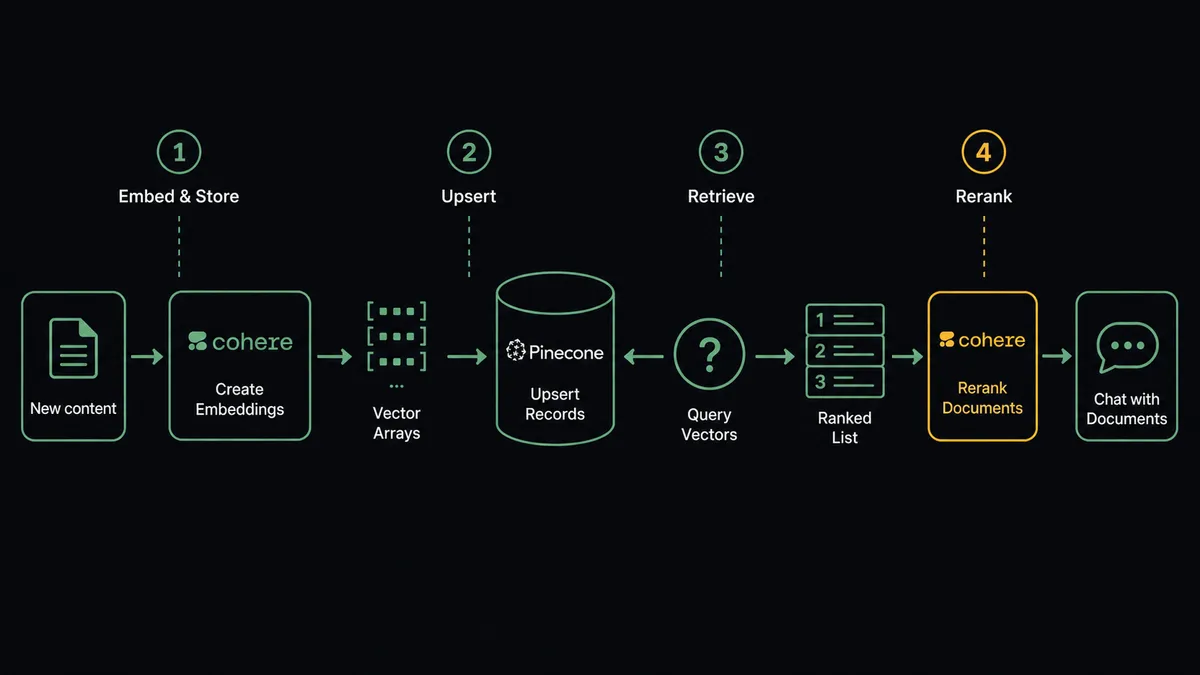
For ingestion, the flow starts when a new document arrives. FlowRunner calls Cohere’s Create Embeddings action, which converts the document chunks into vectors using the Cohere Embed v4 model. Those vectors go into Pinecone via Upsert Vectors, written into the correct namespace with metadata attached. The flow then calls Describe Index Stats to confirm the write landed and the record count is correct before closing out.
If your Pinecone index is set up with integrated embedding (created via Create Index for Model), you can simplify the ingestion path to a single Upsert Records call. Pinecone handles the embedding automatically using the hosted model the index was configured with, so you skip the separate Cohere embedding step entirely on that path.
For retrieval, the flow starts with a question. Pinecone’s Query Vectors finds the nearest neighbors. Cohere’s Rerank Documents reorders those results by true semantic relevance to the exact question asked, not just vector distance. The top passages go into Cohere’s Chat with Documents, which generates a grounded answer that cites the retrieved sources. The person asking gets an answer with links to what it is based on.
Can an AI agent run it? (and why a human stays in the loop)
A trigger-action chain handles the mechanics. An AI agent handles the judgment. The difference is visible the moment a retrieval result is ambiguous.
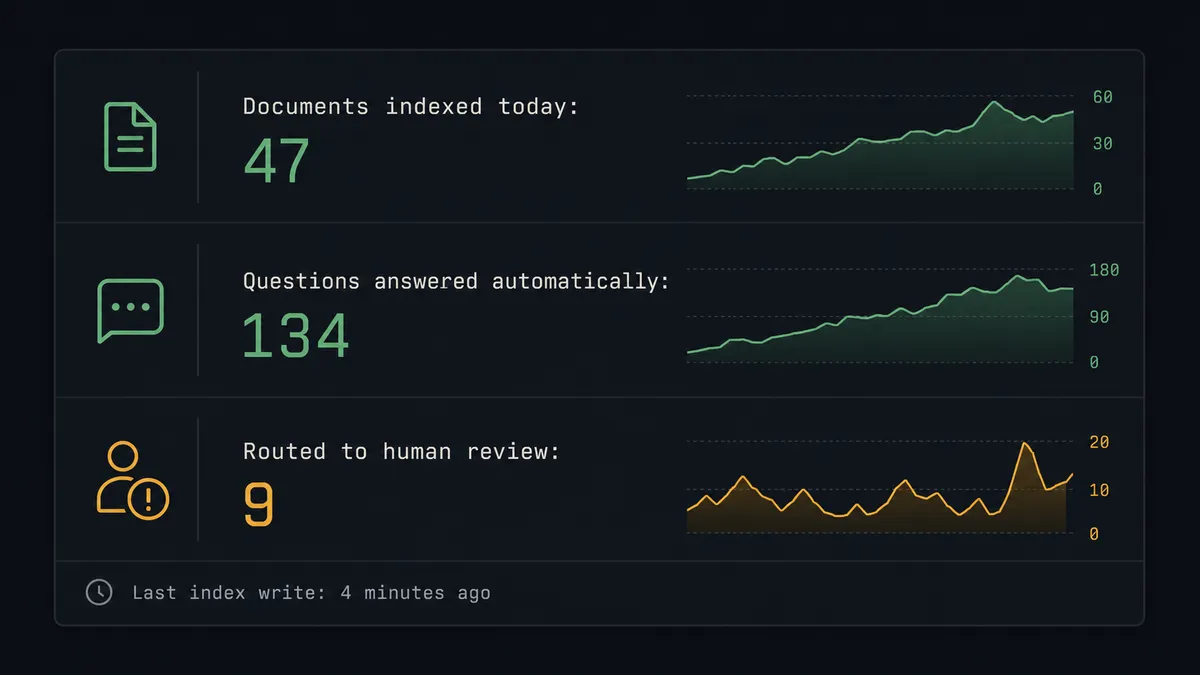
An AI agent in FlowRunner has the Cohere and Pinecone actions as tools in its toolbox. When a question comes in, the agent embeds it, queries the index, reranks the candidates, reviews the top results, and decides what to do based on what it sees. If the top reranked passage scores confidently relevant and the question is routine, the agent calls Chat with Documents and returns the grounded answer. If the reranking surfaces a weak top result, or if the question touches compensation, legal liability, or clinical protocol, the agent does not guess. It stops.
When the agent stops, it calls a human-in-loop flow as a tool. That flow sends a Slack message to the team that owns the relevant content area. The message includes the original question, the top three retrieved passages with their relevance scores, and the draft answer Cohere would return. The team member sees everything the agent saw. They confirm the answer, correct it, or redirect the question. The agent resumes with their decision as input and records the reviewer’s identity and the timestamp in the audit trail.
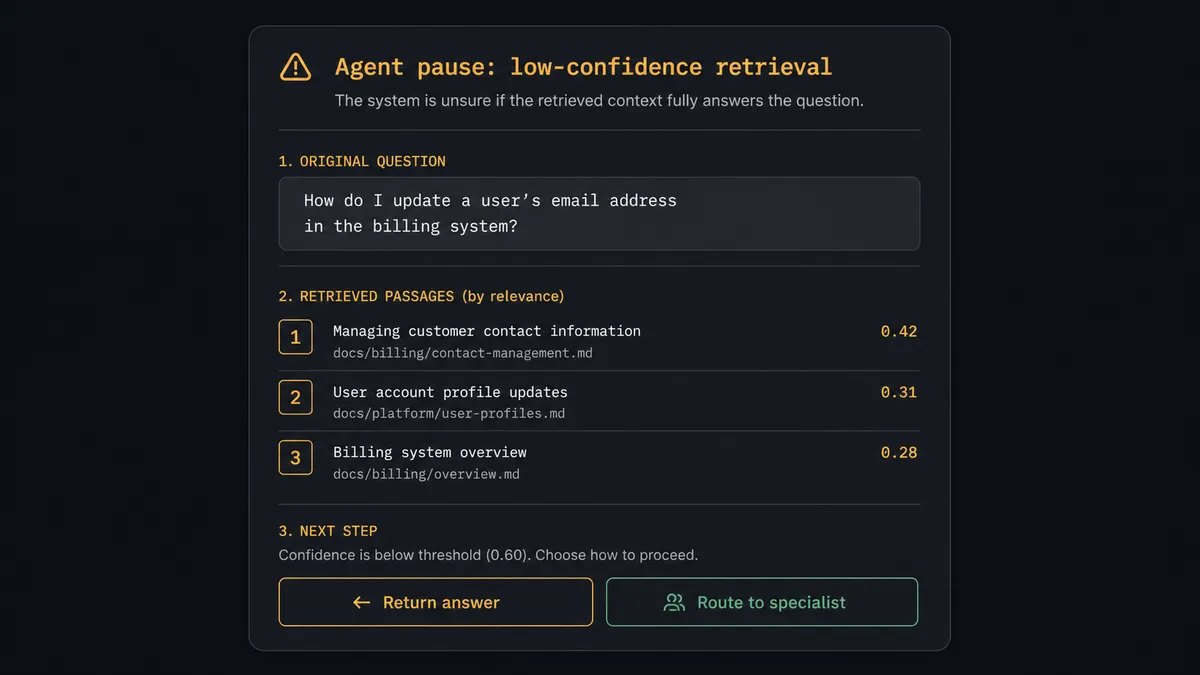
This is not a threshold (“if score below 0.7, ask human”). The agent reads the content of what it retrieved. A high-relevance passage about a policy that changed last week gets a different treatment than a high-relevance passage about a stable technical procedure. The same score, different context, different decision. Prospects call this a digital andon cord: the system stops the line when it hits uncertainty rather than shipping a bad answer.
The same logic applies to Pinecone writes. The agent provisions indexes and upserts vectors on its own. It does not delete them on its own. When a flow reaches a Delete Namespace or Delete Index step, the agent calls Describe Index Stats, gathers the vector count and the last query timestamp, and routes an approval request to the data owner. “The retired-project namespace holds 84,000 vectors and was last queried nine days ago. Deleting it is permanent. Delete it?” The data owner approves or declines. The action runs only on approval.
FlowRunner vs Zapier
Zapier is the right comparison for non-technical teams who need a quick connection between two services. It handles straightforward trigger-action pairs reliably, has a large library of pre-built integrations, and the setup takes minutes without any coding.
Where Zapier stops is exactly where this use case starts.
| Capability | Zapier | FlowRunner |
|---|---|---|
| Cohere and Pinecone connectors | No native connectors for either | Both connectors with full action libraries |
| AI agent decision-making | Workflow follows fixed steps | Agent reads context and picks its tools dynamically |
| Human-in-loop | Conditional branch if you build it | Native tool the agent invokes based on reasoning |
| Audit trail for every decision | Not included | Included on Professional tier ($299/mo) |
| BYOK for Cohere and Pinecone | No | Yes, both keys stay with your account |
| Unlimited users and workflows | Per-seat pricing | Unlimited on every tier |
The gap is not the connection. The gap is what happens after the connection. A Zapier zap that embeds content and upserts it to Pinecone works for ingestion. It cannot reason about what it retrieved, decide when a result needs a human, or gate destructive index operations behind an approval. Those are orchestration problems, not connection problems.
Before and after
| Category | Before | After |
|---|---|---|
| Knowledge access | Employees search shared drives and find near-misses or nothing | Agent queries the vector index and returns the passage that matches |
| Answer quality | Generated replies with no link to what they are based on | Every answer cites the retrieved source behind it |
| Repeated questions | Same policy questions answered by hand, again | Common questions answered from the knowledge base without staff involvement |
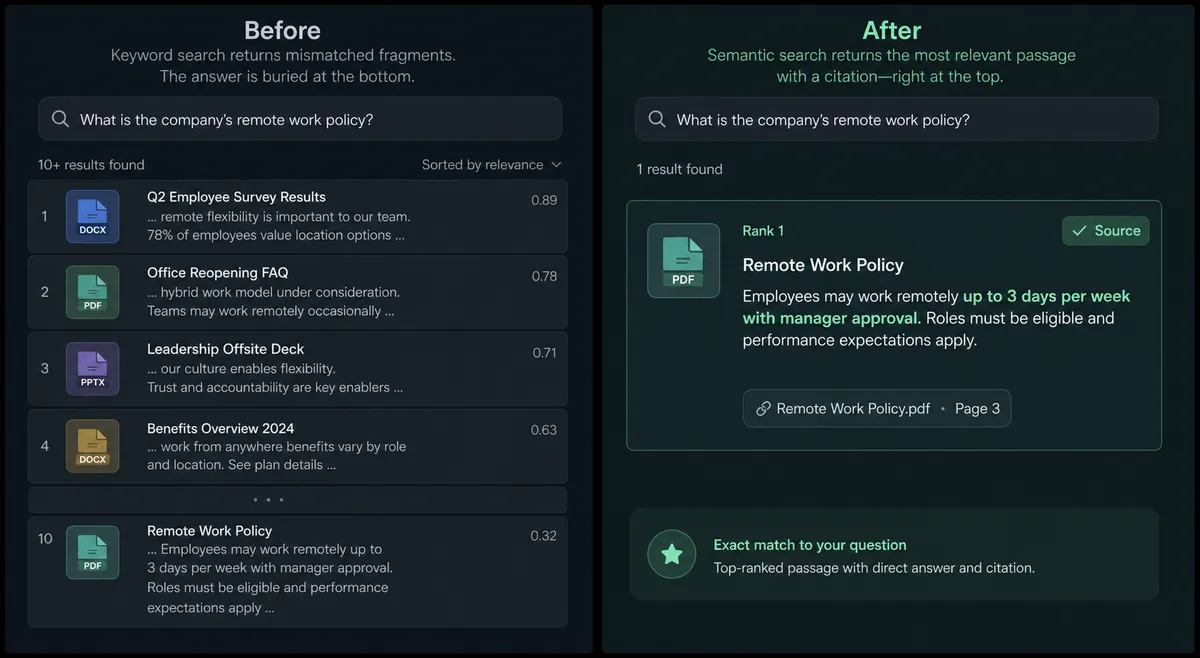
| Retrieval accuracy | Keyword search buries the right answer under word-overlap results | Reranking promotes the semantically relevant passage regardless of phrasing |
| Index maintenance | Stale knowledge base nobody keeps current | New content embedded and indexed as it arrives |
| Destructive actions | No gate on index or namespace deletion | Every deletion requires explicit owner approval before it runs |
What you can build
Grounded internal Q&A agent. An employee asks a policy question in Slack. The agent embeds the question with Cohere Create Embeddings, queries the Pinecone index with Query Vectors, reranks the results with Cohere Rerank Documents, and generates a sourced answer with Chat with Documents. Questions that touch legal or compensation policy route to the HR team via the human-in-loop flow before the answer goes back.
Document ingestion pipeline. When a new policy document is published, the flow chunks the text, embeds each chunk with Cohere Create Embeddings, and writes the vectors to the correct namespace with Pinecone Upsert Vectors. Describe Index Stats confirms the record count increased. The knowledge base stays current without a rebuild.
Support ticket triage with semantic search. Incoming support tickets are classified with Cohere’s Classify Text action to assign a category. The agent then runs Query Vectors against the known-issue namespace to find similar past tickets. If the ticket matches a known pattern, it routes automatically. Novel tickets with no close match in the index route to a senior agent for review.
Namespace lifecycle management. At the end of each quarter, a scheduled flow lists all namespaces with List Namespaces, gathers vector counts and last-query timestamps with Describe Index Stats, and assembles a retirement report. Namespaces inactive for 90 days get a Delete Namespace approval request routed to the data owner. Nothing is deleted without a human sign-off.
Batch embedding for large corpora. When a large document set needs to enter the index, the agent creates a Cohere dataset with Create Dataset, starts a batch embed job with Create Embed Job, polls with Get Embed Job until the status is complete, and retrieves the output with Get Dataset. It then writes the resulting vectors to Pinecone in batches. Large embedding runs that would hit the 96-text limit of a real-time call are handled as background jobs.
Common questions
Is it free to connect Cohere and Pinecone on FlowRunner? FlowRunner has a free plan with 100 executions a month, every integration included, and no credit card required, and new accounts get 14 days of Professional on top. You bring your own Cohere API key and your own Pinecone API key, so those costs are billed directly by each provider. The FlowRunner platform fee covers the orchestration.
Do I need my own Cohere and Pinecone API keys? Yes. FlowRunner uses a Bring Your Own Key model for both integrations. Your Cohere API key authenticates the Chat with Documents, Create Embeddings, and Rerank Documents actions. Your Pinecone API key covers Upsert Records, Query Vectors, and the rest of the Pinecone connector.
Can an AI agent run the Cohere and Pinecone connection automatically? Yes. You can build a FlowRunner AI agent that uses Cohere and Pinecone actions as tools. The agent embeds incoming content with Cohere Create Embeddings, writes it to Pinecone with Upsert Records, and retrieves and reranks results when a question arrives. It decides when to route to a human based on context, not a fixed threshold.
What happens when the agent is not sure about a retrieval result? When the agent’s Cohere reranking returns a low-confidence top result, or when a retrieved passage touches sensitive policy, the agent pauses and routes to a human through Slack or email. It packages the original question, the top retrieved passages, and the draft answer so the reviewer has everything they need to confirm or correct before the answer goes out.
Can I self-host this setup? Yes. FlowRunner is available as a self-hosted Enterprise deployment. Your Cohere and Pinecone API keys stay inside your own network. The Professional tier and above include audit trails for every workflow execution, so every index write and every human decision is recorded.
What happens when a Pinecone namespace needs to be deleted? FlowRunner treats Delete Namespace and Delete Index as human-gated actions. The agent gathers the namespace record count from Describe Index Stats and the recent query activity, then routes an approval request to the data owner. The deletion does not run until the owner confirms. This applies whether the trigger is scheduled cleanup or a manual request.
Getting started
FlowRunner has a free plan with 100 executions a month, every integration included, and no credit card required, and new accounts get 14 days of Professional on top. Every tier includes unlimited users and unlimited workflows, so your whole team can build on the same platform from day one.
Connect both integrations in your account: Cohere and Pinecone. Each takes a single API key. The full action libraries are available immediately.
Start your trial at flowrunner.ai or book a 30-minute demo at calendly.com/flowrunner/intro to see the Cohere and Pinecone agent flow running against a real knowledge base.
Frequently asked questions
Is it free to connect Cohere and Pinecone on FlowRunner?
FlowRunner has a free plan with 100 executions a month, every integration included, and no credit card required, and new accounts get 14 days of Professional on top. You bring your own Cohere API key and your own Pinecone API key, so those costs are billed directly by each provider. The FlowRunner platform fee covers the orchestration.
Do I need my own Cohere and Pinecone API keys?
Yes. FlowRunner uses a Bring Your Own Key model for both integrations. Your Cohere API key authenticates the Chat with Documents, Create Embeddings, and Rerank Documents actions. Your Pinecone API key covers Upsert Records, Query Vectors, and the rest of the Pinecone connector.
Can an AI agent run the Cohere and Pinecone connection automatically?
Yes. You can build a FlowRunner AI agent that uses Cohere and Pinecone actions as tools. The agent embeds incoming content with Cohere Create Embeddings, writes it to Pinecone with Upsert Records, and retrieves and reranks results when a question arrives. It decides when to route to a human based on context, not a fixed threshold.
What happens when the agent is not sure about a retrieval result?
When the agent's Cohere reranking returns a low-confidence top result, or when a retrieved passage touches sensitive policy, the agent pauses and routes to a human through Slack or email. It packages the original question, the top retrieved passages, and the draft answer so the reviewer has everything they need to confirm or correct before the answer goes out.
Can I self-host this setup?
Yes. FlowRunner is available as a self-hosted Enterprise deployment. Your Cohere and Pinecone API keys stay inside your own network. The Professional tier and above include audit trails for every workflow execution, so every index write and every human decision is recorded.
What happens when a Pinecone namespace needs to be deleted?
FlowRunner treats Delete Namespace and Delete Index as human-gated actions. The agent gathers the namespace record count from Describe Index Stats and the recent query activity, then routes an approval request to the data owner. The deletion does not run until the owner confirms. This applies whether the trigger is scheduled cleanup or a manual request.